


Have you ever lost your data from your iPhone? Or did you accidentally delete your data, which may be your pictures, videos, or even files? If you have, there is nothing to worry about because you have yet to lose the data completely. We all know the iPhone as the most secure device in the world. In fact, one of Apple’s top priorities indeed is to keep iPhone users’ data secure. However, there are some times when people lose their data after updating iOS. The reason for that could be a glitch or malware in the new update.
This article is part of our Mobile Phones & Smartphones resource section.
Fortunately, there are iPhone data recovery applications and software that, with a couple of clicks, can bring back all of your data. So, if you’ve lost or accidentally deleted your photos, videos, or other files, you can recover them with AceThinker, the best iPhone data recovery software. As of now, there are tons of software for iPhone data recovery nowadays. Most are too costly; some need to be fixed and will provide broken files instead. Using this tool provides every aspect of the files that you have lost. Here are some of the following aspects you should be familiar with before using AceThinker iPhone Data Recovery.
Because the iPhone is a widely used smartphone for storing photos, messages, documents, and other personal information, understanding backup and recovery options can be valuable across different generations. Users considering newer devices can compare the iPhone 14, iPhone 15, and iPhone 16 or read our Apple iPhone 15 review. Owners of earlier models can explore some useful facts about the iPhone 12 or compare the iPhone 11, iPhone 11 Pro, and iPhone 11 Pro Max.
Table of Contents
3 Methods to Recover Lost or Deleted iPhone Data
If you have lost any of your data, including messages, contacts, or songs, from your iPhone or iPad, you can recover it via AceThinker. Occasionally, you can pursue iPhone data recovery in three modes using this software. You can choose either one that looks easy and benign to you.
Recovery is easier to prepare for when important information is backed up and properly managed before something goes wrong. You can compare some of the best iPhone backup software, explore iPhone data recovery software, or consider the best iTunes alternatives for iPhone data management. Maintaining the device itself also matters, including regularly freeing up space on your iPhone and keeping important applications current; our guide to updating an app on Android and iOS provides an example of the app-update process.
If you don’t want to Back up your Data
iPhone data recovery via AceThinker without a backup is super easy. You can go for the method where you don’t need to back up any of your files, but you can still get back your lost data. Moreover, you can even back up if you need data for future recovery.
Recover your iPhone Data from iTunes
Sometimes you lose your phone, break it, or it jailbreaks. In that case, you can recover your data using iTunes, and the AceThinker can use the iTunes backup feature without having your device connected to the internet. In fact, it is more of a professional way to do iPhone data recovery.
Protecting iPhone data also involves reducing the risk of unauthorized access or device loss. Learn to recognize signs that your iPhone might be at risk and consider how to protect iOS devices through a VPN when using less-trusted networks. For locating authorized devices, you can explore apps to track an iPhone online or options to track an iPhone location by number. Parents managing a child’s device can also review ways to track a child’s iPhone using appropriate family and location features.
A receiver using iCloud Backup
There are thousands of cases in which users lose or damage their phones. The important thing for many people isn’t the phone but the pictures, videos, contacts, messages, and other files saved on it. But you can recover all of those things from the iCloud backup using AceThinker.
Recover 30+ Types of Data from iOS
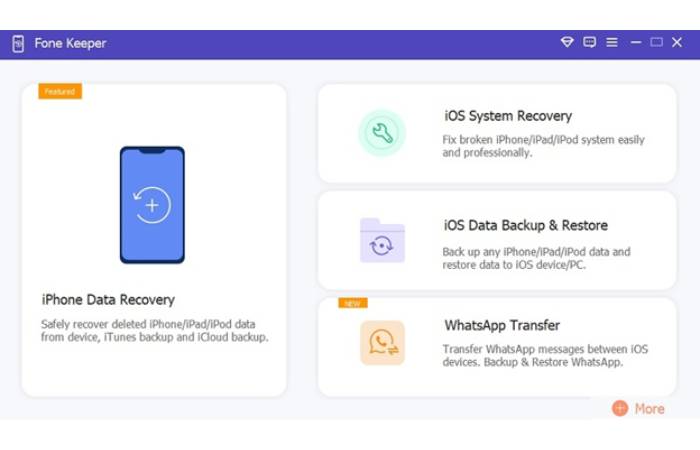
Data recovery may require a lot of time, and the process is frustrating. Many people try diverse software for iPhone data recovery; however, this iPhone Data Recovery always works. You can recover all 30+ file types using AceThinker, providing efficiency and overall flexibility that eases data recovery for any iPhone user.
Capability to Recover Every Type of File
AceThinker iPhone Data Recovery will help you recover almost every type of file. The company claims you can recover 30 files using their iPhone data recovery software. Recover reminders iPhone, camera rolls, photo streams, photo library bookmarks, call history, chats, voice memos, text messages, and many other types of files can be recovered.
Begin Recovering Data from Any iOS Device
AceThinker iPhone Data Recovery software supports every IOS device. Beginning with all iPhone, iPad, and iPod models. Moreover In, specifically, iPhone 14 pro max, iPhone 14 pro, iPhone 13 Pro max, iPhone 13, iPhone 12 Pro max, iPhone 12 Pro, iPhone XS max, iPhone XR, iPad pro, iPad Air, iPad Mini, iPad Touch 6, iPad Touch 5, and more.
Different iPhone models may be used for much more than storing files. Users can learn about mirroring an iPhone to a PC or explore ways to learn new skills using an iPhone. For families, it can also be useful to know how to block apps on a child’s iOS device. Physical protection should not be overlooked either, so owners can learn how to choose an iPhone 15 Pro Max cover or understand why an iPhone 16 Pro case can be useful.
Restore Your iPhone and iPad Data in All Scenarios
Numerous reasons can cause you to lose your iPhone data. Explaining the reason will matter now. If lost, you can recover your iOS data using AceThinker iPhone Data Recovery software. It can scan all of your deleted or lost iOS device data. After scanning, it will preview all your data. Then you can choose which one to recover or recover all of them.
There are some situations when people panic. But don’t worry, age thinker iPhone data recovery software can recover data on any iOS device.
- When you accidentally delete your files, It can happen to anyone. In this scenario, your data recovery is possible with AceThinker Fone Keeper – iPhone Data Recovery.
- When your mobile gets stolen, Some may believe that all of the data has been lost with the phone, but you can still recover your data from iTunes.
- If your phone has dropped into the water, in that case, you can recover deleted files on iPhone as well.
- Sometimes, the iOS system crashes. Most of us would surely panic afterward about our data, but when there is AceThinker iPhone Data Recovery, there is nothing to worry about.
- In the case of a viral attack that has gotten all of your data, you can still recover your data.
Some data-loss situations begin with an iPhone that cannot start or be accessed normally. If the device continually restarts, follow our guide to fix an iPhone stuck in a boot loop, while a device displaying the recovery screen may require the steps for fixing an iPhone stuck in recovery mode. Access problems are different: users can learn how to access an iPhone when they forgot the password, review additional tips to unlock an iPhone, or explore how to unlock an iPhone passcode without a computer.
Fascinating, isn’t it? If you have faced any of those situations, you might wonder if it will take much work to recover the data. However, with AceThinker iPhone Data Recovery software, it will only take you a few minutes. There are easy steps that will take a few minutes of yours.
Data management can also become important when moving from one phone to another rather than recovering deleted files. If you are switching platforms, explore these methods to transfer WhatsApp from Android to iPhone, learn how to transfer WhatsApp from Android to iPhone without resetting, or follow the steps to transfer WhatsApp messages to a new iPhone 13. For transfers in the opposite direction, see our guide to Backuptrans iPhone WhatsApp to Android Transfer. Standard conversations can also be moved by following our guide to transfer messages from Android to iPhone.
Final Viewpoints
AceThinker iPhone Data Recovery is a godsend for iPhone users. So, if you find yourself in the circumstances like the one described above, you can use it for iPhone data recovery, which will only take a few minutes. Moreover, it doesn’t require any internet connection, so that you can do it anywhere.
Once important data has been recovered or transferred, users may also want to organize how they interact with that information. For example, you can learn how to forward a text message on iPhone. If you are considering a compact Apple device, our iPhone SE 3rd Generation review and earlier iPhone SE review provide additional information about these models.
