

iPhone Data Recovery Software
Data has become the most crucial aspect of everyone’s lives, and we suppose you are no different. Whether it is personal photos or some business-related information, every piece of data is as important as the other. However, you may face different situations in life where you will lose all your saved files. Gone are the days when you just had to deal with the loss and move on. Now, you can recover the lost data. Your first option here is that you can contact customer service executives to help you out. But the process involved is lengthy and complicated.
This article is part of our Software Fundamentals resource section.
iPhone data recovery software is a specialized application designed to retrieve lost or inaccessible information from an iPhone, a local device backup or an available cloud backup. Readers seeking a broader technical foundation can first explore what software is, how it works and its major types.
On the other hand, you can simply get free iPhone data recovery software. It won’t only make the work convenient, but you can also personally check whether the task has been done efficiently or not.
Table of Contents
Recovering Operational Data from Business iPhones
Employees may use iPhones to capture equipment photographs, maintenance notes, inspection results, customer communications and other operational information. As these records grow, businesses can also explore software-defined storage as a way to manage storage resources more flexibly across modern data environments.
Understanding how maintenance software supports product managers demonstrates why this mobile data should be synchronized with a central system rather than stored only on an individual device.
Recovering lost mobile records can help restore access after an incident, but prevention remains the stronger strategy. Businesses can reduce disruption by automatically synchronizing field data, maintaining verified backups and following the same proactive principles described in our guide to using modern maintenance software to prevent downtime.
Why Does Data Loss Happen?
There is no specific reason for data loss. It depends on individual situations why this may happen. However, a few common causes of data loss can be:
- Hardware Crash: The very first reason for any data loss is the crash of hardware on which it was stored. While talking about small storages, your storage drive, memory card, or phone may stop abruptly. In such circumstances, the chances of losing the data are high. Plus, there isn’t much you can do here except for creating a backup.
- Software Crash: Just like hardware, your device software also holds the risk of crashing. When the major software like the device’s operating system stops abruptly, it takes along the stored data. Again, there is nothing much you can do here.
- Human Error: If you restore your device to its factory settings without backing up the data, you will lose everything stored on it. You can’t go back to the previous stage from this. It means what is lost once is lost.
Apart from these, other reasons like theft and viruses might also account for data loss. As stated above, the only solution to these problems is to create a data backup somewhere else. But in today’s time, the data is growing continually every minute. This continual growth in digital information is one reason for the increasing popularity of software storage solutions among individuals and businesses managing larger data volumes. Storing the new files and creating a backup of them at the same time may not be possible in every situation. That is where iPhone recovery software comes into account.
iPhone Data Recovery With Dr.Fone
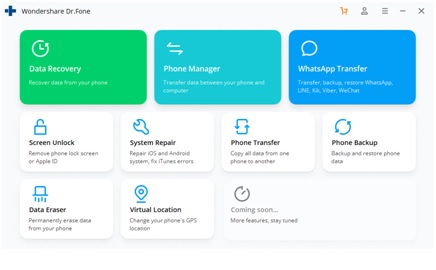
Dr.Fone is a handy tool that you can use to recover lost data and manages documents stored on your mobile. More generally, data recovery software can be used to scan storage devices and attempt to restore deleted, corrupted or inaccessible files. Or simply, you can decode its name “Doctor of Phone.” You can also use the tool to create a backup of your data before restoring the device. A few features of Dr.Fone for iPhone are:
> Data Recovery
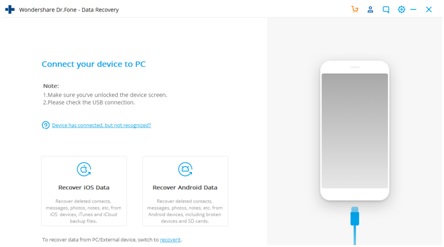
The first feature of Dr.Fone is data recovery. As stated above, data is one of the most crucial parts of everyone’s lives. And nowadays, we store some of our essential files on our phones. When it gets deleted due to one reason or another, this free iPhone recovery software is what you will need. For recovery needs beyond iPhones, you can also compare different free data recovery software options for computers and other supported storage devices. You only need to connect your phone with the laptop and run the scan. The tool will provide you three options to choose from:
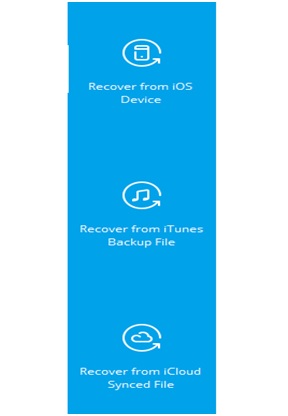
You can pick one of these based on where you want to restore files from. Once you get done with the scan, the software will show you all the deleted data from your device. You can then easily save it again.
> Phone Manager
If you don’t want to go through the hassle of ‘how to recover data after factory reset iPhone,’ you can create a backup in advance. This means saving all the information on your iPhone to a secondary device. After factory resetting your iPhone, you can use this device to move back all the data to the iPhone. Dr.Fone makes it easy to transfer all the files from your phone to the computer to create a backup.
> WhatsApp Transfer
It is almost impossible to avoid WhatsApp nowadays. From work-related conversations to personal chats, everything is done on WhatsApp. But transferring the WhatsApp data from one device to another can be a hectic process. There you can use Dr.Fone. You only have to connect both your phones with the computer, which has the software on it and run it.
> Other Features
A few other things you can do with the software are:
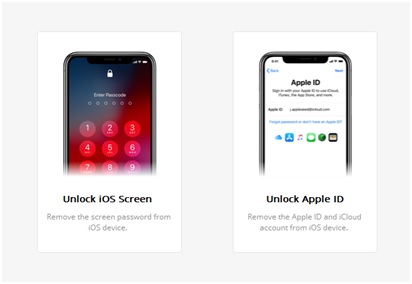
- Screen Unlock: When you are stuck out of your phone, you can use this feature to unlock the iOS Screen or the Apple ID.
- Phone Transfer: If you are switching phones, you can use this feature to transfer all the data from your old iPhone to the new one.
- Data Eraser: When you hand over your old phone to someone else, you need to delete all the files permanently. You can use this feature to do that.
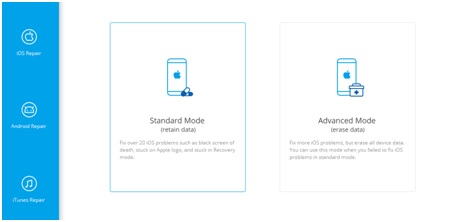
- System Repair: If your phone is stuck somewhere like on a black screen or on the Apple logo, you can use this to retain the data while fixing or permanently erasing the data, in case it doesn’t get fixed.
> Android Devices
Don’t worry if you have an android device in hand. Along with iOS fixation and recovery, Dr.Fone also provides the same features for Android. So you can use it for both. You will only have to select your target phone on the very first page of the software, and it will proceed accordingly. If you also work across Apple computers, you can compare free Mac data recovery software for recovering files from compatible Mac storage devices.
One of the reliable names you will hear for data recovery is Dr.Fone. Before we move on to the details of ‘how you can recover iPhone data after restore‘ with Dr.Fone, let’s first see the reasons behind data loss.
Understand the Difference Between Recovery and Secure Erasure
Recovery software attempts to restore information that has been deleted or made inaccessible. Secure-erasure tools have the opposite objective: they remove data so that it cannot be recovered easily.
Before selling, recycling or transferring a computer that contains iPhone backups, users may need appropriate software for securely erasing hard drives and SSDs. However, secure erasure should be performed only after all required iPhone data and backups have been recovered, transferred and verified.
Conclusion
Dr.Fone is a one-stop solution for all your iPhone data-related problems. You can use it to recover iPhone data lost after restoring to factory settings or transferring iPhone data to other devices. It is filled with features that can be used to fix other issues with your iPhone or erase the files when the problems can’t be fixed. With everything at one place for free, why would you want to try any other iPhone data recovery software?
