

Table of Contents
Definition Software-Defined Storage
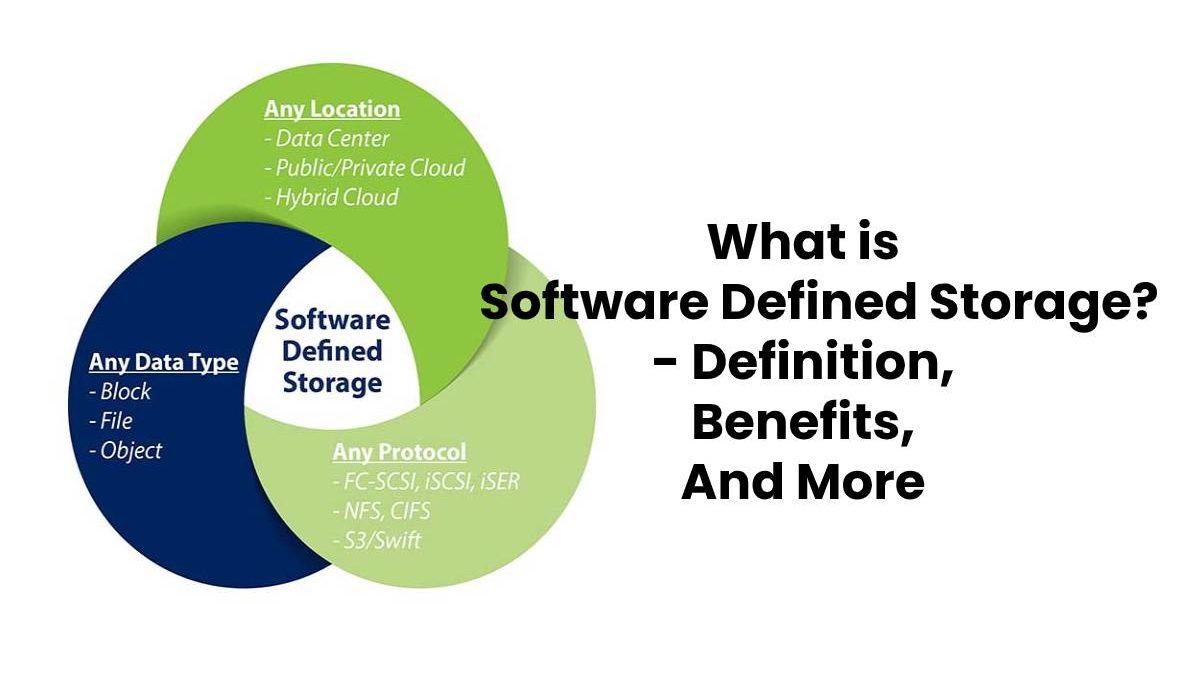
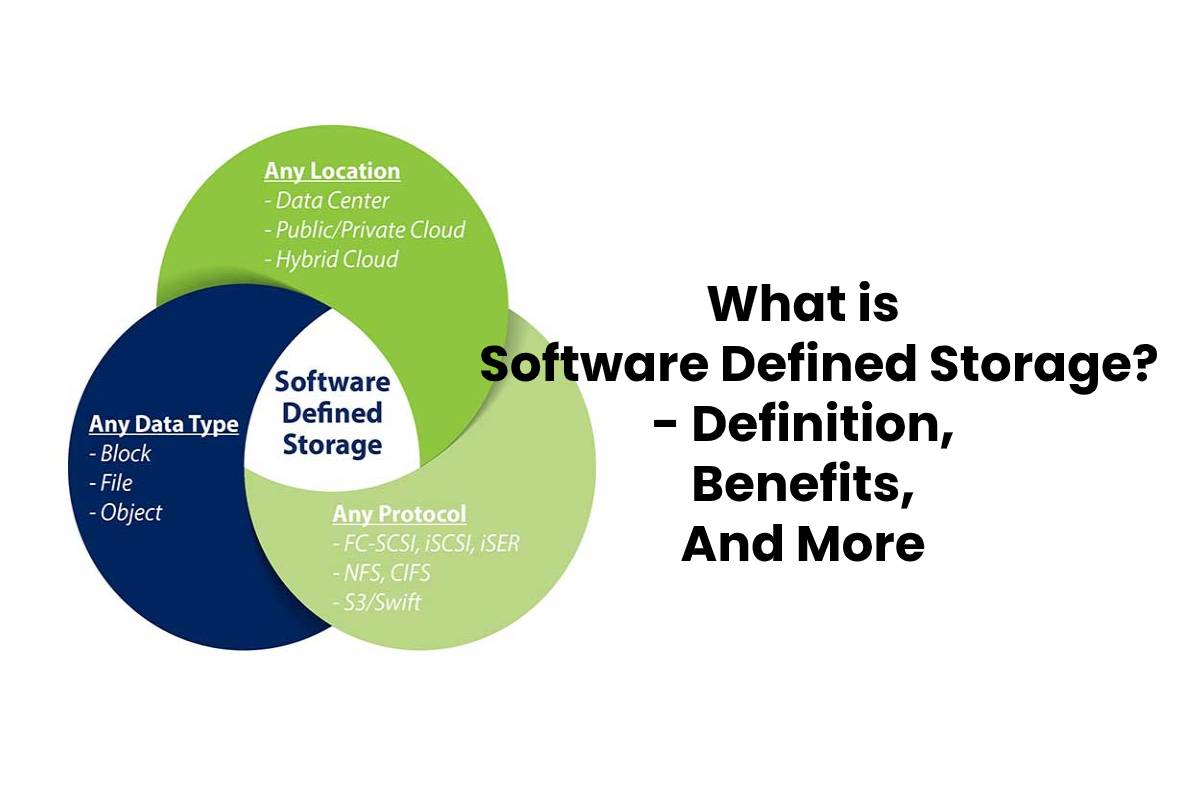
Software-Defined Storage (SDS) is a storage design that separates storage software from your hardware. Unlike traditional network-attached storage (NAS) or storage area network (SAN) systems, SDS runs on any x86 or industry-standard system, and thus software does not depend on the proprietary hardware.
This article is part of our Software Fundamentals resource section.
Separating your storage software from your hardware allows you to expand your storage capacity as you like and when you see fit, so you don’t have to strain to add another piece of proprietary hardware. It also lets you downgrade or upgrade your hardware to previous versions whenever you want. The SDS places tremendous flexibility in your hands.
Software-defined storage is part of the broader software ecosystem, but it performs a specialized infrastructure role by controlling how storage resources are organized and managed. Readers unfamiliar with the underlying concept can first explore what software is, how it works and its major types.
Example
It is the main idea. Suppose you have a different set of X86 servers. Each one has a different storage capacity, and each needs a different kind of storage software to function. The SDS allows you to remove the storage capacity of these inflexible pieces of hardware and bring them all together in one place that is infinitely flexible and scalable. With SDS, you can expand your storage capacity almost instantly, making it cost-effective, flexible, and scalable. But SDS doesn’t create a cloud (we’ll discuss this later).
Consider a company using a computerized maintenance management system to store equipment histories, inspection reports, work orders, manuals and sensor data. As these records increase, software-defined storage can provide a more flexible foundation for expanding capacity. Organizations managing large volumes of operational records can also benefit from modern maintenance software that helps centralize maintenance data, schedules and asset information.
Our related guide explains how maintenance software helps product managers use operational information to monitor performance and support planning.
SDS is part of a larger ecosystem, broadly defined as “all software-defined,” where all software is separate from all hardware. This separation guarantees the freedom to choose what hardware to buy and how much storage you need.
In most cases, the SDS must have:
- Automation: Simplified administration that keeps costs low.
- Standard interfaces: that is an application programming interface (API) for managing and maintaining storage devices and services.
- A virtualized data path: Object, file, and block interfaces that are supported by applications written for those interfaces.
- Scalability: The ability to scale the storage infrastructure horizontally without compromising performance.
- Transparency: The capacity to monitor and manage storage usage while knowing what resources are available and what costs they have.
How does software-defined storage work?
Traditional, old-school storage is monolithic. Sold as a set of hardware (which is usually the industry standard) and proprietary software. But the worth of SDS lies in its independence from any specific hardware.
SDS does not separate storage itself from the hardware. Rather, SDS is merely one level of your technology stack that provides many services using industry-standard servers, rather than proprietary hardware.
The SDS extracts the elements that control the storage requests, and not what is stored. It is a level of software between physical storage and data request that allows you to manipulate the way and place where data is stored. The SDS driver software provides access services to storage, network connections, and connectivity. The most important feature of the SDS driver software is that it does not make assumptions about the capacity or usefulness of the underlying hardware. When storage hardware reaches the end of its useful life, organizations should also use software to erase hard drives and SSDs securely before devices are repurposed, recycled or discarded.
Benefits
This ability to expand capacity without depending entirely on proprietary storage hardware is one reason for the growing popularity of software-based storage solutions. Organizations can manage resources more flexibly, but they must still evaluate performance, compatibility, security and total ownership costs before choosing an architecture.
- OR You can choose the hardware that will run the storage services. The SDS you choose does not have to be from the same company that sold you the hardware. You can use any basic or x86 server to create an SDS-based storage infrastructure. It means that you can maximize the capacity of your existing hardware as your storage needs to expand.
- It is profitable. SDS is distributed and scaled horizontally rather than vertically, and that allows you to adjust capacity and performance independently.
- You can unite multiple data sources to build your storage infrastructure. You can network either object platforms, external disk systems, disk or flash resources, virtual servers, and cloud-based resources (including data dedicated to workloads) to create a unified storage volume. Organizations using Apple hardware within this environment may also need free Mac data recovery software when recovering files from Mac-based storage devices.
- SDS can be automatically adapted based on your capacity needs. Because SDS is not hardware dependent, automation in SDS is automatic because it can extract data from any storage volume to which it is connected. The storage system can be custom-made to data and performance needs without administrator intervention, new connections, or new hardware.
- The options are limitless. In contrast, traditional storage area networks are limited to the number of nodes (devices with assigned IP addresses) that they can use. The SDS, as its definition indicates, is not limited in the same way. In theory, it means that it is infinitely scalable.
Software-Defined Storage and Data Recovery
Flexible storage management does not eliminate the possibility of accidental deletion, corruption, hardware failure or configuration errors. An SDS deployment should therefore include tested backups, access controls, monitoring and a documented recovery plan. A reliable recovery strategy should also account for unexpected file loss, and data recovery software can provide an additional option when important data becomes inaccessible.
If files are deleted unexpectedly, appropriate free data recovery software may help in limited situations. However, recovery utilities should be treated as an emergency option rather than a replacement for reliable backups and disaster-recovery procedures. The same principle applies to mobile business data, where iPhone data recovery software may help recover important files when information is accidentally deleted from an iPhone.
