

This Article is a part of
Generative AI Guide
Table of Contents
Introduction
Stable Diffusion has evolved significantly since its initial launch.
I think that overall the main thing people will remember (by 2022) was how it was this AI system that suddenly allowed nearly anyone with a decent graphics card to make images from text. That alone was a huge achievement. Before then, powerful AI image generation mostly existed behind closed platforms.
But in 2026, Stable Diffusion is a whole lot larger than a single model.
It has grown into a complete open-weights image generation ecosystem built around local AI models, custom workflows, community fine-tunes, LoRAs, ControlNet, and professional creative pipelines.
And what‘s of extra interest is that you may find that the best Stable Diffusion experience of this day does not reside at all in the original Stable Diffusion model.
Today newly emerging creators compare SDXL, Stable Diffusion 3.5 or Flux.1 if needed:
- better realism
- stronger prompt accuracy
- more control
- faster workflows
- commercial flexibility
- local image generation
Other users want an easy-to-use tool for instantly generating beautiful images. While others want having total control over every element of the generation.
Otherwise known as the second group. This type of diffusion is put to use in the concept of:
If you‘re interested in how Stable Diffusion works, which version to use, what computer hardware is required, and how it measures up against Midjourney and DALL-E, read on.
Stable Diffusion is part of the larger artificial intelligence movement explained in our complete guide to generative AI technologies, where models learn patterns from data to create new content such as images, text, audio, and video.
What Is Stable Diffusion?
Stable Diffusion is a collection of AI image generation models that generate images from text images, existing images, sketches, and many other visual input.
This is technically part of a type of AI called latent diffusion models.
All this sounds very complicated, though in fact the concept is fairly straightforward.
Stable Diffusion is one of the most popular examples of modern text-to-image AI systems that convert written prompts into detailed visual content using advanced machine learning models.
Stable Diffusion does not generate the image pixel by pixel from scratch. It operates within a compressed mathematical space (latent space):
Imagine you are rough sketching it before rebuilding up the final image with the details.
Because of this, AI image generation was actually much faster, as the model no longer was required to process that enormous amount of raw pixel data at each iteration.
And that is exactly why would work so well for Stable Diffusion.
Users could:
- download the model
- run it on personal computers
- customize outputs
- train custom styles
- build creative workflows
The original version of the Stable Diffusion models was made available to the public in 2022 by Stability AI. That release created one of the world‘s biggest communities around AI art, because developers and artists were no longer entirely dependent on closed image generators.
People started creating:
- custom checkpoints
- LoRA models
- extensions
- interfaces
- professional workflows
That community ecosystem is still Stable Diffusion’s biggest advantage today.
How Stable Diffusion Works
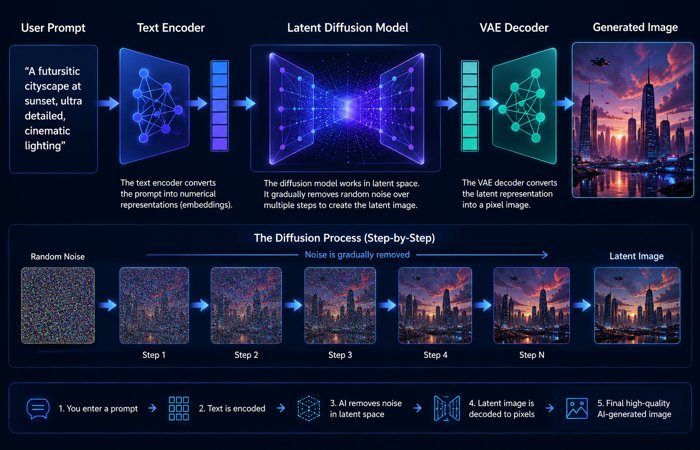
Every Stable Diffusion generation follows a few important steps.
You write a prompt.
For example:
“A cinematic portrait of an astronaut standing on Mars during sunset.”
The text encoder converts your words into information the AI model understands.
Then the diffusion model starts with random noise and slowly removes that noise step by step until an image appears.
The final image is decoded from latent space into normal pixels that you can view and edit.
The basic pipeline contains three important parts:
1. Text Encoder
The text encoder understands you’re prompt.
Older Stable Diffusion models used CLIP-based text understanding. Newer models improved this area because prompt accuracy became one of the biggest challenges.
The better the model understands language, the better it follows complicated instructions.
For example:
Simple prompt:
“A dog wearing sunglasses”
Most models handle this easily.
Complex prompt:
“A golden retriever wearing red sunglasses sitting beside a blue suitcase in a rainy Tokyo street”
Older models often ignored some details.
Modern models like SD 3.5 and Flux.1 perform better because they have stronger text understanding.
2. Diffusion Model
This is the main engine.
Older Stable Diffusion versions used a U-Net-based architecture.
U-Net worked extremely well, but it had limitations with:
- complex scenes
- accurate text inside images
- multiple objects
- detailed relationships
Later systems adopted more transformer based models.
This is similar to the larger AI revolution, where transformer models became imperative for language, vision, and multimodal AI.
The newer method introduced by Stable Diffusion 3.5 and Flux.1 which aims to improve the quality of the image, and the accuracy of prompts.
3. VAE (Variational Autoencoder)
VAE is pretty much the most overlooked part of the Stable Diffusion.
But it matters.
The VAE handles conversion between compressed latent information and the final image.
A weak VAE can affect:
- small details
- color quality
- textures
- image clarity
This is one reason older AI images sometimes produced strange hands, broken objects, or distorted details.
It was not only a VAE problem, but improving this part helped newer models create more realistic images.
Stable Diffusion Evolution: From SD 1.5 to Modern AI Models
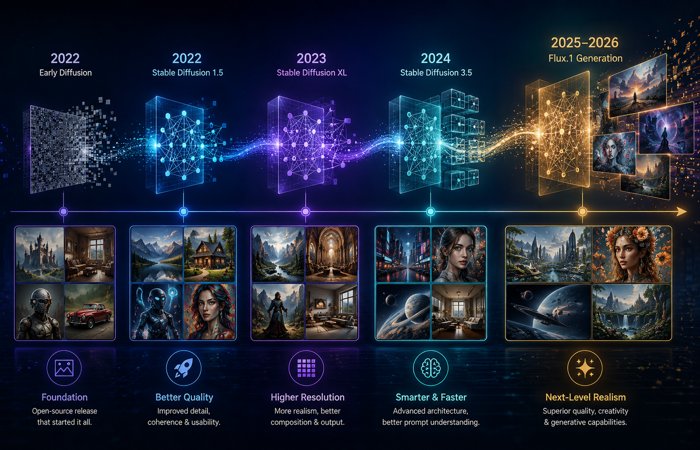
Stable Diffusion did not improve through one simple upgrade.
Every generation changed something important.
Some versions improved quality.
Some improved speed.
Others changed the entire architecture.
When you understand these differences you might be able to actually pick a model that is appropriate rather than defaulting to the latest model which might not be the best.
Stable Diffusion 1.5: The Model That Built the Community
The Stable Diffusion 1.5 became one of the most significant AI image models ever published.
The generated images could be of 512*512 native resolution. Also the system could be run on consumer graphics cards.
Today that resolution sounds limited.
But at the time, accessibility changed everything.
Developers and artists started creating thousands of custom versions.
Examples include models optimized for:
- anime artwork
- realistic photography
- fantasy characters
- product designs
- illustrations
Even years later, SD 1.5 still survives because of community support.
The base technology is older, but the ecosystem around it is massive.
For some specialized styles, a highly trained SD 1.5 model can still produce impressive results.
That’s the power of community development.
SDXL: The Upgrade That Made Stable Diffusion Production Ready
The XL version of Stable Diffusion (SDXL) was one of the most notable additions.
The biggest visible change was image quality.
Older versions of SD (Stable Diffusion) could only render images at 512 x 512. But SDXL, by default, renders at a far more useful resolution of 1024 x 1024. This means that images will have way more detail and much better resolution textures than previous models, along with much stronger composition.
But SDXL was not only about bigger images.
It improved:
- prompt understanding
- human anatomy
- lighting
- object placement
- artistic flexibility
SDXL also introduced a two-stage workflow:
- Base model
- Optional refiner model
The base model creates the main image, while the refiner improves details during the final stages.
In real workflows, many users eventually stopped using the refiner every time because community fine-tunes became extremely powerful. Still, the idea showed how image generation pipelines were becoming more advanced.
Why does SDXL still matter in 2026?
Simple.
The ecosystem.
A newer model is not automatically more useful if there are fewer resources around it.
SDXL has:
- thousands of LoRAs
- custom checkpoints
- ControlNet support
- tutorials
- extensions
- optimized workflows
For creators who want flexibility, SDXL remains one of the safest choices.
Stable Diffusion 3 and SD 3.5: The Architecture Change
One of the biggest technical leaps in the family of model variations that the Stable Diffusion 3 brought in.
Stability AI shifted away from the classic U-Net focused set-up and employed now a state-of-the-art transformer-based architecture.
This change was designed to improve areas where older diffusion models struggled.
Especially:
- understanding longer prompts
- following exact instructions
- generating readable text
- handling complex scenes
Think about a prompt like:
“Create a poster showing a red sports car parked outside a futuristic building with the words Future Mobility 2026 written clearly on a sign.”
Older models might create a beautiful car.
But the text?
Usually messy.
The sign might become random letters.
Modern architectures improved this significantly.
Stable Diffusion 3.5 continued this direction with several variants, including:
- SD 3.5 Large
- SD 3.5 Large Turbo
- SD 3.5 Medium
The Medium version was especially important because it targeted consumer hardware instead of only high-end AI systems.
This matters because local generation has always been one of Stable Diffusion’s biggest advantages.
People want powerful AI tools they can actually run.
Not everyone owns a workstation GPU.
Flux.1: The Model That Changed the Conversation
For years, open image generation discussions mostly revolved around Stable Diffusion.
Then Flux.1 arrived.
Created by Black Forest Labs, Flux.1 quickly became one of the strongest competitors in the open image generation space.
It gained attention because of improvements in:
- realistic faces
- human anatomy
- lighting
- photography-style images
- prompt accuracy
Many creators started testing Flux.1 because it produced results closer to premium closed image generators.
Especially for realistic portraits.
Flux.1 also proved something important:
Open image generation was no longer controlled by one model family.
The ecosystem had matured.
Nowadays, even creators have the same turf battles as photographers. They bench mark different models the same way one does with different cameras.
And so no overall winner.
That really hinges on the job.
SDXL vs SD 3.5 vs Flux.1 Comparison
Choosing between these models depends on your goal.
| Model | Strengths | Limitations | Best For |
| SDXL | Huge ecosystem, many LoRAs, stable workflows | Older architecture, weaker text generation | General creators, styles, custom workflows |
| SD 3.5 | Better prompt following, modern architecture, improved text | Higher hardware requirements | Complex prompts and modern AI workflows |
| Flux.1 | Excellent realism, anatomy, strong visual quality | Hardware and license depend on version | Portraits, realistic images, professional visuals |
For most beginners:
SDXL is still the easiest starting point.
For creators wanting better instruction following:
SD 3.5 makes sense.
For users chasing realism:
Flux.1 is extremely competitive.
Stable Diffusion vs Midjourney vs DALL-E
There are also other AI image generators apart from Stable Diffusion.
What makes artificial intelligences such as Midjourney and DALL-E so popular is that they do both the creation, and so the intricacies, for us.
But they solve different problems.
| Feature | Stable Diffusion | Midjourney | DALL-E |
| Local installation | Yes | No | No |
| Custom models | Excellent | Limited | Limited |
| Beginner friendly | Medium | Very easy | Very easy |
| Workflow control | Very high | Medium | Low-medium |
| Hardware needed | Yes for local use | No | No |
| Community modifications | Huge | Limited | Limited |
Midjourney is like buying a finished professional camera.
Stable Diffusion is like building your own photography studio.
One gives convenience.
The other gives control.
There is nothing wrong with either of the above mentioned methods.
That all depends on your requirement.
Creators often compare Stable Diffusion with Midjourney AI image generator capabilities because both platforms approach AI-powered creativity differently, with one focusing on control and the other on simplified visual generation.
Choose Stable Diffusion if you want:
- custom styles
- local generation
- privacy
- advanced control
- experimental workflows
Choose Midjourney or DALL-E if you want:
- quick results
- simple interface
- no setup
- cloud generation
While Stable Diffusion focuses on customization and local AI workflows, DALL-E modern AI image generation provides a cloud-based approach designed for simple prompting, accessibility, and integration with AI tools.
However, for the developer, AI artist, and technical creator, Stable Diffusion tends to offer wider flexibility.
Stable Diffusion Hardware Requirements in 2026
One of the biggest advantages of Stable Diffusion is local generation.
You are not forced to depend completely on cloud servers. You can generate images directly on your own computer.
But there is one catch.
Hardware matters.
A model may technically run on your system, but that does not always mean the experience will be smooth.
The most important factor is GPU VRAM.
4GB VRAM: Basic Experiments
4GB graphics card is usually restricted to old workflows.
You can run the Stable Diffusion 1.5 family with some optimizations, but you shouldn‘t expect the tool to hit the performances you get with others.
Common limitations include:
- slower generation
- lower resolutions
- fewer advanced workflows
- limited batch sizes
This setup is fine for learning.
For serious AI image creation, it quickly feels restrictive.
6GB to 8GB VRAM: Entry-Level Local Generation
This is where Stable Diffusion becomes more practical.
Many users can run:
- SDXL workflows
- optimized checkpoints
- smaller modern models
However, settings matter.
Large models with heavy text encoders or advanced workflows may require memory optimizations.
An 8GB GPU can work, but it should be considered the lower comfortable range rather than a perfect setup.
10GB to 12GB VRAM: Better Creative Experience
This range is much more comfortable.
Creators can work with:
- SDXL
- higher resolutions
- ControlNet
- multiple extensions
- advanced workflows
There is less time spent fighting memory errors and more time actually creating.
For many hobbyists and creators, this is the practical sweet spot.
16GB to 24GB VRAM: Professional Workflows
This is where local AI generation feels much smoother.
More VRAM allows:
- larger models
- complex ComfyUI workflows
- higher resolutions
- faster experimentation
- multiple AI tools together
If image generation is part of workflow, more VRAM usually gives a better experience.
How to Install and Run Stable Diffusion Locally
Stable Diffusion setup will vary according to the interface you opt for.
The general process looks like this:
Step 1: Choose an Interface
Popular choices include:
- AUTOMATIC1111
- Forge
- ComfyUI
Beginners usually prefer Forge or AUTOMATIC1111.
Advanced users often move toward ComfyUI.
Step 2: Download a Model
The model file controls the image generation style and capability.
Examples:
- SDXL checkpoint
- SD 3.5 model
- 1 model
- custom community checkpoint
Model files are usually stored inside your interface model folder.
Step 3: Load the Model
After installation:
Open your interface.
Select the model.
Enter a prompt.
Adjust settings like:
- image size
- steps
- guidance
- sampler
- seed
Then generate your image.
Step 4: Improve Your Workflow
The fundamental prompting is just the beginning.
Advanced Stable Diffusion users usually add:
- LoRAs
- ControlNet
- custom VAEs
- upscalers
- workflow templates
This is where Stable Diffusion becomes much more powerful than simple online generators.
Best Stable Diffusion Interfaces
The model creates the image.
The interface controls your experience.
Choosing the right interface can completely change how you work.
AUTOMATIC1111
AUTOMATIC1111 WebUI became the classic Stable Diffusion interface.
For many people, it was their first introduction to local AI image generation.
It provides:
- browser-based controls
- extensions
- model switching
- image-to-image tools
- inpainting
- community plugins
The biggest advantage is information.
Because millions of users started here, tutorials and troubleshooting guides are everywhere.
The downside?
It can feel older compared with newer workflows.
Still, it remains useful.
Especially for beginners following existing tutorials.
Forge
Forge keeps the familiar AUTOMATIC1111 experience but focuses on better performance.
Many users moved to Forge because it improves:
- speed
- memory management
- compatibility with newer workflows
The interface has a familiar feel although the experience was smoother.
One of the very simplest ways to get started for a novice in 2026 is to use Forge.
ComfyUI
ComfyUI is different.
Instead of normal menus, it uses nodes.
At first, that looks confusing.
But once you understand the system, it gives incredible control.
A workflow can include:
- model loading
- prompt processing
- ControlNet
- image refinement
- upscaling
- saving
Everything becomes visible.
Professional users like ComfyUI because workflows are:
- repeatable
- customizable
- shareable
If AUTOMATIC1111 is a simple camera app, ComfyUI is a full editing studio.
More complicated.
Much more powerful.
Which Interface Should You Choose?
For beginners:
Choose Forge.
It offers a good balance between simplicity and performance.
For users following older tutorials:
AUTOMATIC1111 is still useful.
For advanced creators:
ComfyUI is the strongest long-term option.
Mostly it‘s a personal thing, what‘s most popular isn‘t necessarily what‘s right; the thing you need is the control you require.
Stable Diffusion Prompt Engineering: How to Get Better Results
However, a stable diffusion model is only part of an image generation system.
The prompt matters too.
A good prompt tells the model what you want clearly. A weak prompt forces the model to guess.
For example:
Basic prompt:
“a car”
The model has too much freedom.
A better prompt:
“a cinematic photo of a black electric sports car parked on a mountain road during sunset, realistic lighting, detailed reflections, professional automotive photography”
Now the model understands:
- subject
- environment
- style
- lighting
- quality expectations
Specific details usually create better results.
Stable Diffusion Prompt Example
Here is an example structure many creators use:
Subject + Details + Environment + Style + Lighting + Quality
Example:
A realistic portrait of an astronaut standing on Mars, detailed spacesuit, orange sunset background, cinematic lighting, realistic photography, high detail, sharp focus
Each part controls a different element.
Subject:
astronaut
Environment:
Mars during sunset
Style:
cinematic photography
Quality:
sharp focus, detailed image
Small changes can completely transform the result.
Testing Methodology: How We Compared These AI Models
Example:
“We compared SDXL, SD 3.5, and Flux.1 using portrait generation, product images, prompt following, anatomy accuracy, and workflow flexibility.”
Test Prompts
Portrait realism test:
“A professional studio portrait of a woman wearing a blue jacket…”
Text accuracy test:
“A coffee shop sign saying OPEN 2026”
Negative Prompts Explained
A normal prompt tells Stable Diffusion what you want.
A negative prompt tells it what you want to avoid.
Example:
Negative prompt:
low quality, blurry, distorted face, extra fingers, bad anatomy, incorrect hands, unwanted objects
Negative prompts became especially popular with older models because they helped reduce common generation problems.
Modern models have improved, so negative prompts are sometimes less important than before.
Still, they remain useful in many workflows.
What Are LoRAs in Stable Diffusion?
LoRA stands for Low-Rank Adaptation.
It sounds technical.
But the idea is simple.
A LoRA teaches an existing model a new style, subject, or behavior without rebuilding the entire model.
Instead of downloading a completely new image model, you can apply a smaller LoRA file.
Creators use LoRAs for:
- art styles
- characters
- product concepts
- photography styles
- clothing designs
- visual effects
For example:
A base SDXL model may create normal portraits.
Add a cinematic photography LoRA.
Now the same model produces images closer to professional movie photography.
That flexibility is one reason Stable Diffusion remains popular.
What Is ControlNet?
Prompting explains what should appear.
ControlNet helps control where and how things appear.
That difference is important.
Without ControlNet:
You ask for a person standing in a certain pose.
The model guesses.
With ControlNet:
You provide structure.
The model follows it.
ControlNet can use:
- human poses
- depth maps
- sketches
- outlines
- object placement
This changed Stable Diffusion from a fun image generator into a serious creative tool.
Professional creators often use ControlNet when consistency matters.
Examples:
- product photography
- character design
- architecture concepts
- animation workflows
Stable Diffusion Professional Workflows
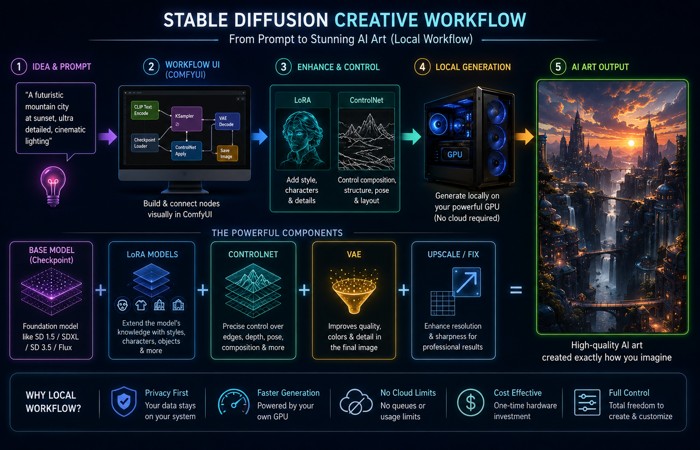
Beginners usually generate images with a single prompt.
Experts usually do not settle for that.
A more advanced workflow might look like this:
Step 1:
Generate a base image with SDXL or Flux.1.
Step 2:
Use ControlNet to improve composition.
Step 3:
Apply LoRA for a specific style.
Step 4:
Fix details using inpainting.
Step 5:
Increase resolution. Use an AI upscaler.
The final result is not created from one button click.
It‘s a creative process. This is what distinguishes Stable Diffusion from more primitive AI tools.
Common Stable Diffusion Problems and Fixes
Problem: Images Have Bad Hands
Possible solutions:
- use newer models
- improve prompts
- use ControlNet
- repair with inpainting
Modern models handle anatomy better, but difficult poses can still create problems.
Problem: Images Look Blurry
Try:
- higher resolution
- better checkpoints
- upscaling workflows
- improved VAE settings
Image quality depends on more than just the prompt.
Problem: Stable Diffusion Runs Slowly
Possible fixes:
- use optimized interfaces
- reduce image size
- enable memory improvements
- avoid oversized models
Your hardware and settings make a huge difference.
Can You Use Stable Diffusion Images Commercially?
Certainly one of the most important questions.
The answer depends on the model license.
Stable Diffusion is open-weight technology, but open-weight does not always mean unlimited commercial use.
You need to check:
- base model license
- fine-tune license
- LoRA permissions
- platform rules
For example, Stability AI’s Community License allows many creators and smaller businesses to use supported models commercially, but larger companies may need separate licensing depending on revenue and usage.
Also remember:
Model permission and copyright law are different topics.
A model license explains how you can use the model.
Copyright guidelines regarding AI photos could be different in various nations and contexts.
Always check the most recent legal requirements if you are running a business using AI images for clients, advertising or products.
Is Stable Diffusion Still Worth Using in 2026?
Yes.
However, not for all.
Stable Diffusion is best for people who value control.
Choose Stable Diffusion if you want:
- local image generation
- custom workflows
- privacy
- model customization
- advanced editing
Choose simpler online AI generators if you want instant results without setup.
The biggest strength of Stable Diffusion is freedom.
You decide the model.
You decide the workflow.
You take charge of the creative process.
Frequently Asked Questions About Stable Diffusion
Q1: What are the applications of Stable Diffusion?
Via artificial intelligence, people also use Stable Diffusion to generate images and edit images.
Common uses include:
- digital artwork
- concept design
- product images
- character creation
- marketing visuals
- photography experiments
- creative workflows
Since it can be run locally and is customizable, many artists turn to it when they need more depth than what most AI image generators online can offer.
Q2: Is Stable Diffusion free of charge?
Stable Diffusion models are available through different licenses depending on the version.
Many models can be downloaded and used locally without paying for a monthly image generation service.
In fact, free to download may not be free to use at all.
Before using a model commercially, check the exact license terms for:
- the base model
- custom checkpoints
- LoRAs
- additional assets
And
for organizations.
Q3: Is Stable Diffusion superior to Midjourney?
It depends!
This is where Midjourney strives.
You enter a prompt and receive polished images without managing models, settings, or hardware.
Stable Diffusion focuses on control.
You can change models, install extensions, modify workflows, train styles, and run everything locally.
For beginners wanting quick results, Midjourney is generally more user-friendly.
And for those creators wanting personalization, Stable Diffusion gives lesser rule.
Q4: Is Stable Diffusion more effective than DALL-E?
And of course Stable Diffusion and Dalle-2 are solving different problems.
DALL-E offers a seamless, cloud-oriented experience, with great integration into existing OpenAI tools.
Stable Diffusion provides deeper customization.
Stable Diffusion is usually preferred by users who want:
- local generation
- custom models
- advanced workflows
- more technical control
Users using the DALL-E would normally to go for convenience.
Q5: Which is the best version Stable Diffusion in 2026?
There are no “best models”.
Different models work better for different applications.
But SDXL still remains one of the most powerful options given its vast ecosystem.
SD 3.5 provides newer architecture and stronger prompt understanding.
Flux.1 remains widely used by artists striving for realism and trying to achieve good visual result.
Whichever model is best will depend on your particular hardware, and the style of images you enjoy producing.
Q6: Is it possible for Stable Diffusion to be run without internet?
Yes.
Once the required models and software are installed, Stable Diffusion can generate images locally without a constant internet connection.
This is one of its biggest advantages.
Your computer handles the generation instead of sending every request to an external server.
Q7: What are the RAM and GPU requirements for Stable Diffusion?
Requirements are model dependent.
Older models like SD 1.5 can run on lower hardware.
Modern models such as SDXL, SD 3.5, and Flux.1 generally benefit from stronger GPUs with more VRAM.
For a smoother experience, creators usually prefer GPUs with higher VRAM because advanced workflows require more memory.
Q8: Can Stable Diffusion generate videos?
Stable Diffusion itself is mainly known for image generation.
However, related diffusion-based tools and extensions can create animation and video workflows.
Many creators combine image models with video AI tools to create:
- animations
- motion effects
- AI-generated scenes
This area continues developing quickly.
Final Take: More Than One AI Model for Stable Diffusion
Diffusion has an origin as an AI image model.
Today, it’s almost everything.
It has become an entire ecosystem built around open image generation, community development, and creative control.
SDXL proved how powerful community-supported models could become.
SD 3.5 pushed Stable Diffusion toward newer architectures with better prompt understanding.
Flux.1 showed that open-weight AI image generation had expanded beyond one company or one model family.
And that competition is good for creators.
The future of AI image generation is not only about producing prettier pictures.
It is about control.
Who controls the model?
Who controls the workflow?
Who decides how creative tools are used?
Cloud-based services like Midjourney and DALL- E, would certainly be attractive and appropriate for those who want instant results.
But for creators, developers, researchers, and companies who want the most flexibility, Stable Diffusion continues to be one of the most essential AI image generation ecosystems for 2026.
