

Midjourney: Guide to the AI Image Generator
This Article is a part of
Generative AI Guide
AI has revolutionized visual creativity. A couple hours of designing work can be reduced to only a single sentence.
Midjourney, one of the most popular AIG generation tools of today. It interprets text input to build complex, creative, sometimes hyper realistic, images. Designers, to generate ideas, marketers, to build marketing campaigns, content creators, for faster image generation, etc.
Midjourney is a powerful example of how generative AI technology is changing the way people create digital content, from images and videos to text-based applications.
If you come across the question, What is Midjourney? How does it work? What can it do? Is it worth it? This guide will answer them all clearly and practically.
Table of Contents
What Is Midjourney?
Midjourney is an AI- powered image generator service that generates images from a text description of what you have in mind, also known as ‘prompt’.
Powered by Midjourney, Inc., an independent research lab and startup, founded by David Holz. Its image generation is characterized by a solid composition, an overall sculpted look, and a visual style that looks like it has been cleaned-up.
Midjourney belongs to the growing category of text-to-image AI tools, which transform written descriptions into realistic images, illustrations, concepts, and creative artwork.
For example, a prompt like this:
“A city of the future that is dark at night filled with flying cars, luminous neon signs and makes films lighting.”
Is able to give a visual outcome which can reflect that idea in a wink of an eye.
People commonly use Midjourney for:
- Digital artwork.
- Concept design.
- Marketing visuals.
- Product mockups.
- Game environments.
- Character creation.
- Storytelling images.
- Social media content.
Arguably one of the best things about it is that you can do it without having any conventional drawing ability to begin with. The real skill in this area is being able to translate ideas.
How Midjourney Works
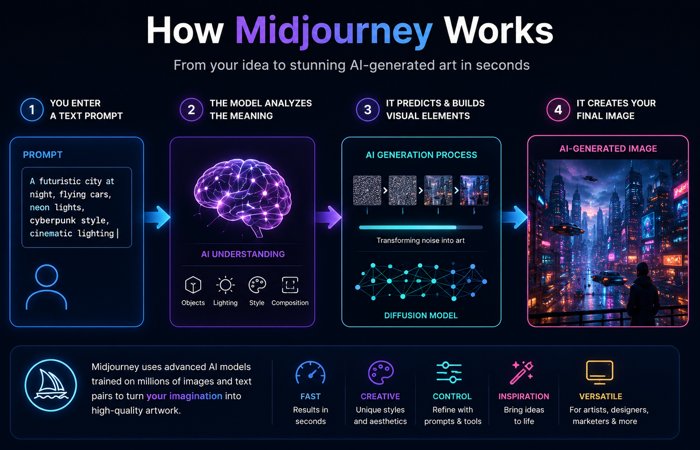
Midjourney is just of a few generative art form, known as text-to-image models. These systems are taught on extensive number of image and text pairings and learn how language correspond to visual elements.
In brief, at the most basic level, glucose enters the cell and when enough has accumulated it triggers the release of insulin:
- You enter a text prompt.
- The model analyzes the meaning of the prompt.
- It predicts relevant visual elements.
- It used the information it had for creating an image on itself.
This is not a system like you used to design with; where you place all objects you need; it classifies objects on trained data and assembles a new image according to this classification.
Currently, most image-generations that exist use either diffusion based or other similar generative modes. In simple terms, the model learns how to convert the noise into form. It begins with the noise and refines it into something meaningful.
Which explains how the output can often sound very well by the time the input is a relatively short sentence.
Why People Use Midjourney
A reason Midjourney became a staple was that it hits the quality vs. simplicity sweet spot. It is perfect for those who don‘t want to wrestle with Photoshop or 3D software but still need good imagery.
It is often used by:
- Brand teams creating campaign ideas.
- Bloggers and editors designing featured images.
- Game developers building early concepts.
- Freelancers exploring visual directions for clients.
- Social media creators who create striking assets.
Where this tool becomes even more useful is in the early stages of a project. Forget about sketching all day with your notebook, you can move around to see what works and make your adjustments without wasting time.
Key Features
Midjourney has evolved from a simple image producer into an all-inclusive creatively centered software. It has services that amateurs and professional designers alike can all use.
Text-to-Image Generation
The bottom line is turning text into images.
You can describe almost anything:
- A realistic portrait.
- A fantasy landscape.
- A futuristic product concept.
- A minimal website hero image.
- A cinematic movie scene.
Generally a more detailed prompt grants a higher degree of control over the output. Midjourney has an attention to subject matter, mood, environment, artist/style influences and composition.
High-Quality Visuals
Generally Midjourney is known for good aesthetics. It provides pretty polished and dramatic looking output.
It performs especially well for:
- Realistic portraits.
- Fantasy art.
- Cinematic scenes.
- Architecture concepts.
- Product concepts.
- Stylized illustrations.
The attraction for many is not just the speed; it is also that the results are often ready for presentation.
Variations and Refinement
Once a photo has been generated, you can generate variations of the image.
For example, if you generate a futuristic car, you might want:
- A different color.
- A better background.
- A wider camera angle.
- A more premium look.
Rather than try to create something entirely new, variation tools are used to help you zero in on the piece you really want.
Upscaling
Sometimes, the AIG image lacks details when used in a professional setting or they may require a higher resolution.
Upscaling helps improve image quality, making the result more suitable for:
- Websites.
- Presentations.
- Marketing graphics.
- Portfolios.
- Editorial visuals.
Style Consistency
A problem encountered with AI image generation is maintaining a consistent style between different images.
Style reference tools help users maintain:
- Similar colors.
- Similar mood.
- Similar artistic direction.
- Similar visual identity.
This matters a lot in branding, where a set of images must feel connected.
Character Consistency
Another novel use case is the consistency of characters.
If you are drawing a comic, story, or brand mascot you want the same character to look (almost) the same whatever frame. Character reference features help maintain that identity across generations.
This is useful for:
- Storytelling.
- Comics.
- Brand mascots.
- Game concepts.
- AI characters.
- Animation planning.
Web App and Discord Access
Midjourney‘s initial popularity can be traced back to Discord, where user input prompts and received images generated from the bot.
The web interface added visual context and made it more intuitive and less user-friendly. To many it makes Midjourney feel less like a chat-bot and more like a modern creative application.
Discord remains useful for community-oriented workflows, but the web app is easier for orderly creation and navigation.
How to Use Midjourney
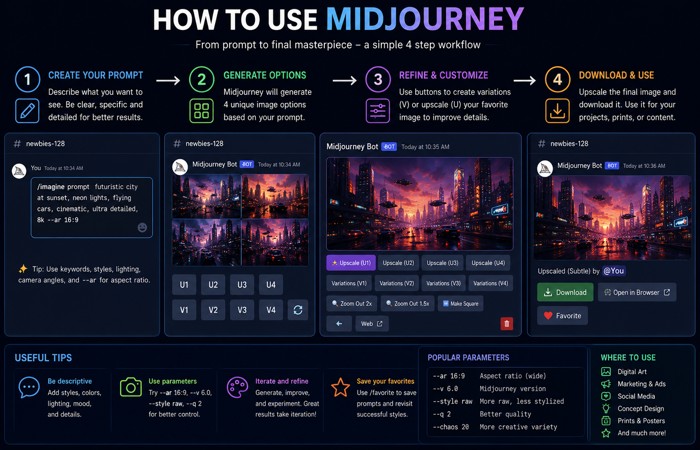
Midjourney functions differently than imaging editing programs. You are not drawing every detail manually. You are guiding the system with language.
Step 1: Create an Account
Register on the official Midjourney site. Once logged in you will have access to the image-generation feature plus all your previous artworks.
Step 2: Write a Prompt
A prompt is the command you give to the AI.
A simple prompt could be:
“Robot walking through a futuristic city.”
That‘s reasonable, but very vague.
A stronger version would be:
“A humanoid robot in morphsuits, very detailed, walking through a cyberpunk city at night, illuminated by all the myriad of lights, a realistic style of a photograph.”
That version gives the model much more to work with:
- Subject: humanoid robot.
- Location: cyberpunk city.
- Time: night.
- Lighting: neon.
- Style: realistic photography.
- Mood: cinematic.
Step 3: Generate and Review
When prompted, Midjourney will bring up several options pick the single one that best fits your idea and edit from there.
Common next steps include:
- Generating variations.
- Adjusting the prompt.
- Changing style language.
- Tweaking composition.
- Testing different references.
Step 4: Refine the Final Image
And the good results do get there iteratively.
For example:
- “Luxury sports car.”
- “Realistic- luxury sports car, no one is around, shot on streets of MONACO, as the sun is going down, using DSLR and exaggerated reflections and filmic light.
Both are reasonable prompts, but the 2nd prompt tends to provide more guidance to Midjourney and achieve results in a more consistent manner.
Writing Better Prompts
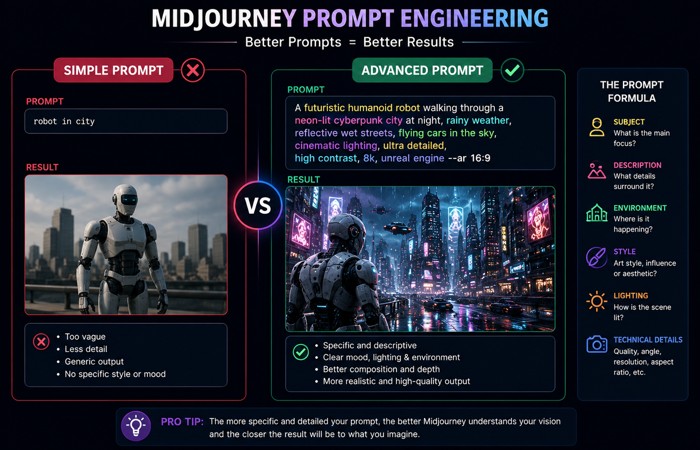
Writing a good Prompt, is arguably one of the most essential skills you can learn in Midjourney. If your prompt is rough, the model will not understand your instructions as efficiently, so be as concise as possible.
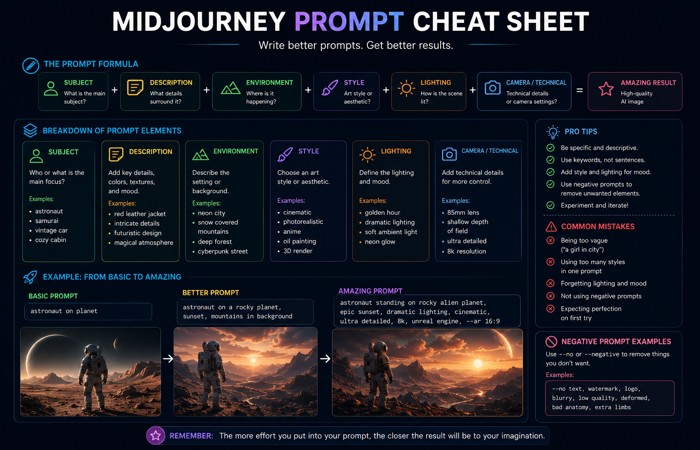
A useful structure is:
Subject + Description + Environment + Style + Lighting + Technical details
Example:
“Oddly enough, a golden retriever puppy sitting in a garden, natural sunlight, realistic photography, shallow depth of field, professional camera style.”
Breakdown:
- Subject: golden retriever puppy.
- Environment: garden.
- Lighting: natural sunlight.
- Style: realistic photography.
- Camera effect: shallow depth of field.
That is a much clearer creative brief than a short phrase like “dog in garden.”
Prompt Examples
Below are some practical prompts you might like to use as an example.
Realistic Photography
“An elderly man sitting in a traditional wooden library, natural window light, realistic portrait photography, detailed skin texture, emotional expression.”
Best for:
- Portrait concepts.
- Editorial visuals.
- Storytelling.
- Character creation.
Product Concept
“Modern wireless headphones placed on a glass table, premium product photography, studio lighting, minimal background.”
Best for:
- Advertising ideas.
- E-commerce concepts.
- Product mockups.
- Marketing visuals.
Website Concept
“Modern technology website homepage design, clean interface, blue color theme, futuristic AI elements, professional UI design.”
Best for:
- Web design inspiration.
- Layout exploration.
- Visual planning.
Game Environment
“Ancient fantasy castle on top of a mountain, dramatic clouds, magical atmosphere, cinematic game environment style.”
Best for:
- Game development.
- Fantasy art.
- World-building.
Advanced Controls
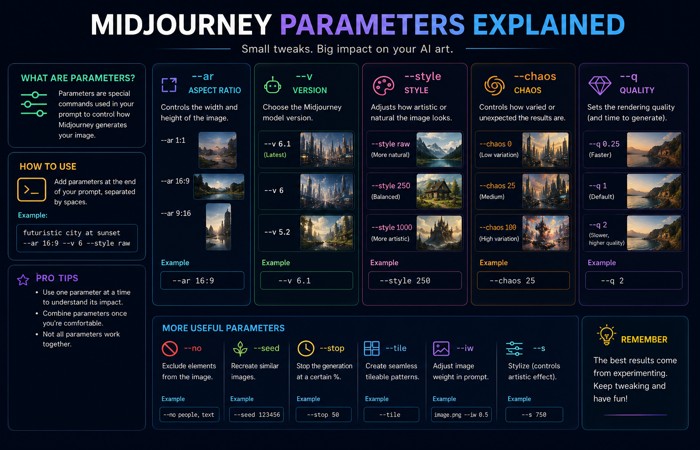
It‘s fairly straightforward to begin experimenting with some of the higher end settings once you have the fundamentals sorted.
Aspect Ratio
The size of the image is constrained by the aspect ratio.
Common uses include:
- Square formats for profile images and social posts.
- Wide formats for banners and thumbnails.
- Vertical formats for posters and mobile-friendly content.
Choosing the right ratio matters because the same subject can feel completely different in a wide or vertical composition.
Style Direction
The same idea can be rendered in very different styles.
For example, “mountain village” could become:
- Realistic photography.
- Watercolor illustration.
- Anime art.
- 3D rendering.
- Vintage poster style.
Style direction helps you match the output to the project.
Image Weight
If you use a reference image, image weight controls how strongly the model follows it.
Higher image influence is useful when you want:
- Brand consistency.
- Product ideas.
- Character matching.
- Similar composition.
Seed Values
Seed values help keep results more reproducible.
If you want to test small variations without starting from randomness every time, seeds are helpful for controlled experimentation.
Consistency in Creative Work
The first thing is keeping everything consistent between images, which is very difficult in AI-generated art.
When doing a brand series, storyboard or character set, you need consistency more than you need innovation.
Style consistency helps you keep:
- Color palette alignment.
- Mood consistency.
- Similar composition choices.
- Recognizable branding.
Character consistency helps maintain:
- Same facial structure.
- Same clothing.
- Same identity across scenes.
- Same visual personality.
Therefore, the Midjourney is useful not only for an isolated picture, but also for series of images which have to be coherent.
Practical Uses
Midjourney just isn‘t used in as many places as you think.
Image generators like Midjourney are only one part of the AI ecosystem. Other technologies, including LLMs and voice cloning powering AI companions, show how generative models are expanding into communication and interactive experiences.
Marketing
Teams use it for:
- Ad concepts.
- Campaign visuals.
- Social content.
- Mood boards.
Game Development
Game creators use it for:
- Characters.
- Environments.
- Props.
- World-building references.
Web Design
Designers use it for:
- Hero section ideas.
- Banner concepts.
- Mood inspiration.
- Brand imagery.
Content Creation
Creators use it for:
- Blog visuals.
- Thumbnails.
- Story images.
- Presentation graphics.
Architecture and Interiors
Professionals use it for:
- Room concepts.
- Building ideas.
- Style exploration.
- Visual planning.
Midjourney isn‘t 100% replacing design work, but is a faster way to brainstorm and work quickly.
Pricing and Access
Midjourney is a subscription service. Access, Plan names and what image limits, privacy options and commercial rights are available may change over time, so always check on the official site before subscribing.
For most purposes, Midjourney has been tiered on plans to suit differing levels of usage, for example a trial-tier with limited images, a standard tier for more regular creation, and one for more intense professional use.
Since the platform is built on highly compute-driven generation, th pricing is linked to processing power, not a single purchase.
Fast, Relax, and Turbo Modes
Midjourney has offered different processing modes for speed and resource usage.
Fast Mode
Fast mode prioritizes quick generation. It is useful when you are working on:
- Client deadlines.
- Campaign assets.
- Quick creative iterations.
Relax Mode
Relax mode is slower, but it allows users on supported plans to keep creating without using fast processing time as quickly. It works well for experimentation and personal projects.
Turbo Mode
Turbo mode is designed for maximum speed. It‘s handy for quickly obtaining results, though it could take extra processings.
As these icons can change, it is always worth checking the latest documentation for the relevant platform before making use of a particular mode.
Is Midjourney Free?
Free access has changed over time. Midjourney has adjusted trial availability and access policies in response to demand and compute costs.
If you are planning content around pricing or access, avoid hard-coding a claim that may become outdated quickly. It is better to say that availability changes and should be checked on the official site.
Commercial Use and Copyright
This is one of the most important questions for businesses.
In general, paid subscribers have been allowed to use generated images commercially under Midjourney’s terms, but the exact rights and conditions can change. Any commercial use should be reviewed against the current terms before publishing or selling the output.
Don‘t forget that AI images’ ownership and copyright law is still being made. If you‘re planning on incorporating your AI images into major branding projects, client outputs, or products check up on the latest regulations.
A practical approach is:
- Check the current terms.
- Do not include copyright images or characters without prior permission.
- Take precautions against Celebrity look-a-like and real-(person) images.
- Use human review before publishing.
Strengths
What makes Midjourney a clear choice are a few reasons.
- Excellent image quality.
- Easy for beginners to start.
- Fast creative exploration.
- Strong artistic style.
- Useful for multiple creative fields.
If you prefer visually polished suggestions over complete manual control, then Midjourney is a good option.
Limitations
Tools are not perfect. There are limitations to Midjourney.
Prompt Sensitivity
Results depend heavily on how well you write prompts. Weak prompts usually produce weak output.
Less Manual Control
Compared with traditional design software, you have less pixel-level control. You guide the model, but you do not place every element by hand.
Accuracy Issues
Like most AI tools, Midjourney can struggle with:
- Text in images.
- Complex layouts.
- Precise technical diagrams.
- Exact object details.
Copyright and Policy Concerns
Content created by AI also poses persistent legal and ethical dilemmas. That means human judgment still matters.
Midjourney vs Other Tools
Choosing the perfect image generator AI is individualist and there is no such perfect AI generator. It depends on your needs.
| Tool | Main Strength | Best For | Trade-Off |
| Midjourney | Artistic, polished visuals | Creators, marketers, concept art | Less manual control |
| DALL·E | Easy prompting and broad accessibility | General users, quick mockups | Less stylistic control for some workflows |
| Stable Diffusion | High customization | Developers, advanced users, local workflows | More setup and technical effort |
Midjourney is often the better choice when visual quality and creative style matter most. Stable Diffusion is better when control and flexibility matter more. DALL·E is often preferred by users who want a simple, accessible experience.
Is Midjourney the Best Choice?
That would be determined by your workflow.
A good choice is Midjourney if you want:
- Strong aesthetics.
- Fast concept generation.
- Easy experimentation.
- Professional-looking visuals with minimal setup.
Choose another tool if you need:
- Deep technical control.
- Local installation.
- Open customization.
- A workflow tied tightly to other platforms.
Many creators actually use more than one tool. For example, they may use Midjourney for hero visuals, another model for quick mockups, and traditional software for final edits.
Future of AI Image Generation
AI image generation is improving quickly. The next phase is likely to bring:
- Better detail accuracy.
- More consistent characters.
- More control over composition.
- Faster generation.
- Expanded video and motion features.
- Smoother creative workflows.
The bigger change is not just technical. It is also how people work. More and more, creators are starting with ideas and shaping them further with prompts instead of beginning with blank canvases.
As AI tools continue improving, the biggest challenge is moving from experimental models to practical adoption. This transition is often called the last mile of GenAI, where businesses focus on making generative AI useful in everyday workflows.
That indeed presents a more important skill than at any other time.
Final Thoughts
This has been well known as one of the most prevalents tool for AI images; Midjourney. Users can have full transformation with specific text into creatively working images; This benefits for designers, marketers, creative and even industries.
It‘s greatest advantage is the mixing of quality and simplicity. The ability to generate beautiful pictures without a traditional design skill set; although the top quality images still depend on running a clear instruction and reiteration, assessed by the human.
For creators and marketers, Midjourney is not about beat creativity but about accelerate it.
FAQs
Q1: What is Midjourney
A: Midjourney is an AI image generator that retrieves images of any subject or concept from the TEXT.
Q2: Who designed Midjourney?
A: Its developer: Midjourney is a company developed by Midjourney, Inc and founded by David Holz.
Q3: Is Midjourney free for all?
A: Free has changed over time so that should be checked at the main site today.
Q4: How does Midjourney Image Generate?
A: It employs AI models trained on the correlation of visuals and text to create a new image based on an input.
Q5: Is Midjourney user friendly for beginners?
A: Sure, the beginners can try some simple prompts, and then the results could be optimized when they learn more about the knowledge of writing prompts.
Q6: Are images from Midjourney for commercial use?
A: Ownership for commercial use is based on the existing subscription situation and policy of platform. These should review before publish.
Q7: What are Midjourney prompts?
A: Prompts are text instructions that tell the AI what image you want to generate.
Q8: Is Midjourney better than DALLE?
A: Midjourney is preferred for art visuals and DALLE for accessibility.
Q9: In what ways is Midjourney different from Stable Diffusion?
A: Midjourney is definitely more intuitive and it is more attractive visually (e.g. able to generate more complex/composite images), but Stable Diffusion allowed for more detailed modification.
Q10: Does Midjourney render graphic designers obsolete?
A: No. I think it enhances some aspects of the creative process. Human interaction with it is instrumental in steering creativity, editing and strategy.
