

This Article is a part of
Table of Contents
Every Business Has a Document Problem
Walk into almost any business today and you’ll find thousands—sometimes millions—of documents that still depend on manual processing.
- Invoices waiting for approval.
- Insurance claim forms.
- Medical records.
- Purchase orders.
- Shipping manifests.
- Tax documents.
- Contracts.
- Employee onboarding paperwork.
- Government applications.
Now try that with your own hands.
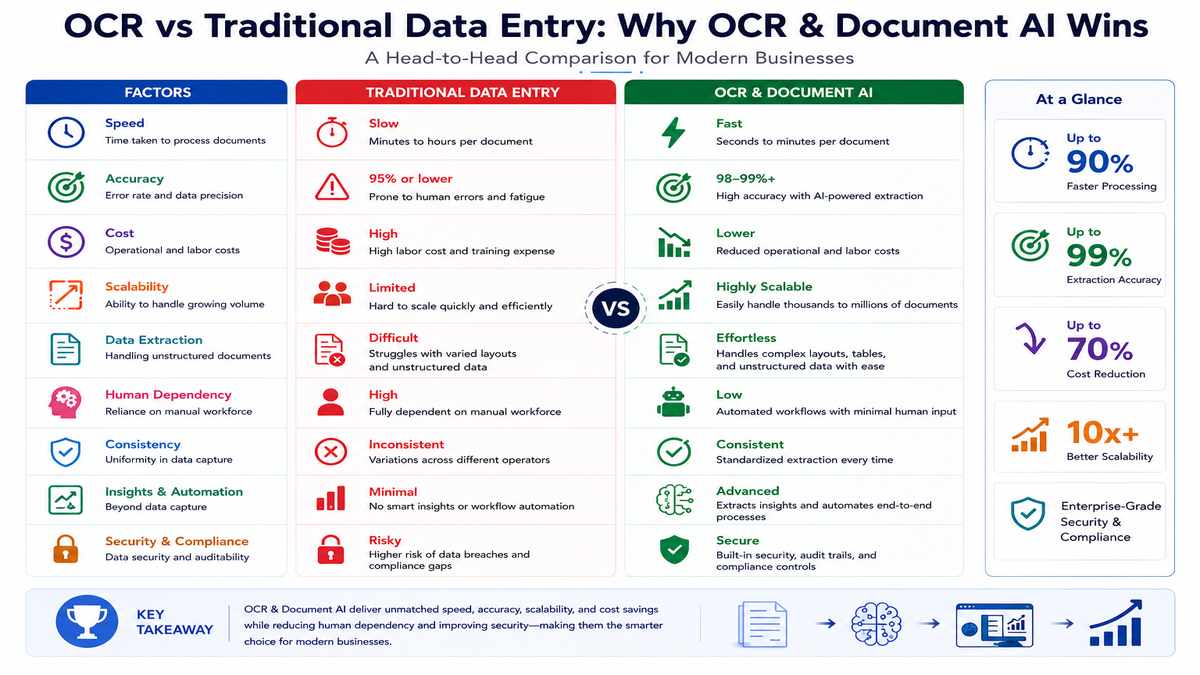
Each document has to be opened, ‘sensed’ for its valuable data, checked and typed into other system processing hundreds of times every day. This is costly, slow and surprisingly prone to errors.
Back in the old days, Optical Character Recognition (OCR) was supposed to provide a solution to this issue by translating printed text into computer-friendly text. And for not too complicated documents, it was fairly successful.
But businesses quickly discovered something frustrating.
A document is more than words on a page.
It‘s tables, signatures, logos, check boxes, handwritten notes, stamps, graphs, columns, headings, footnotes, connections between different pieces of information. Just pulling out the words by itself isn‘t enough if it can‘t discern what those words are really saying.
And this is precisely why Document AI has grown faster than any other field of AI.
Today’s AI systems are capable of comprehending texts rather than just reading them.
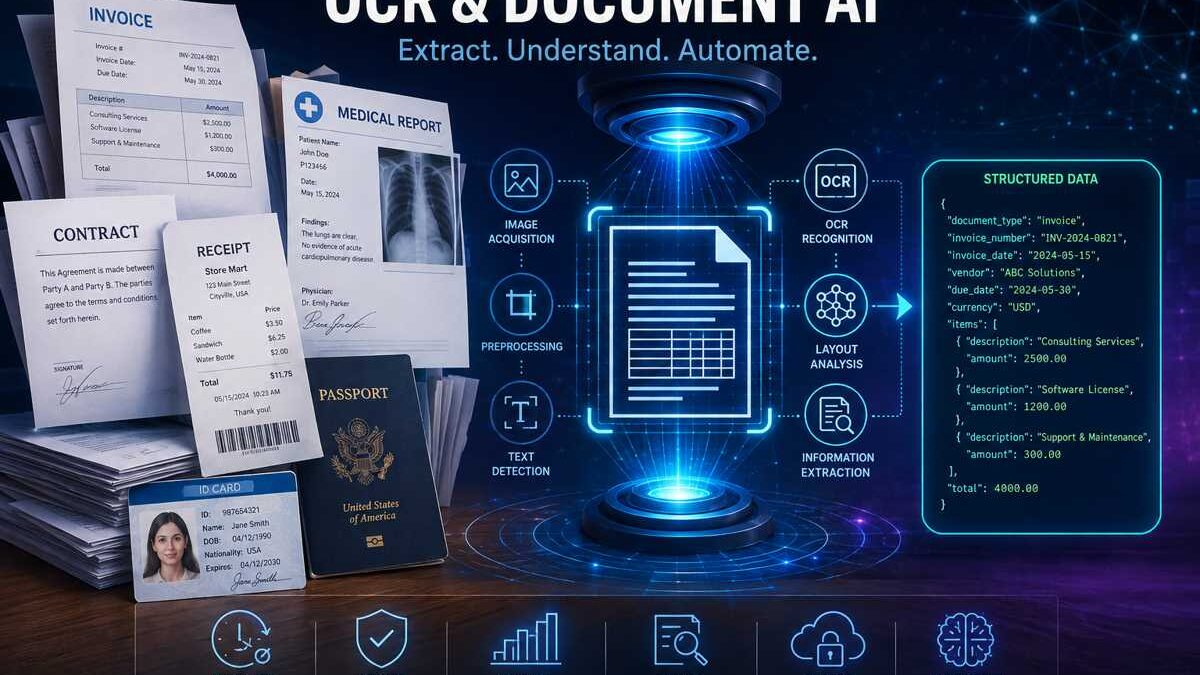
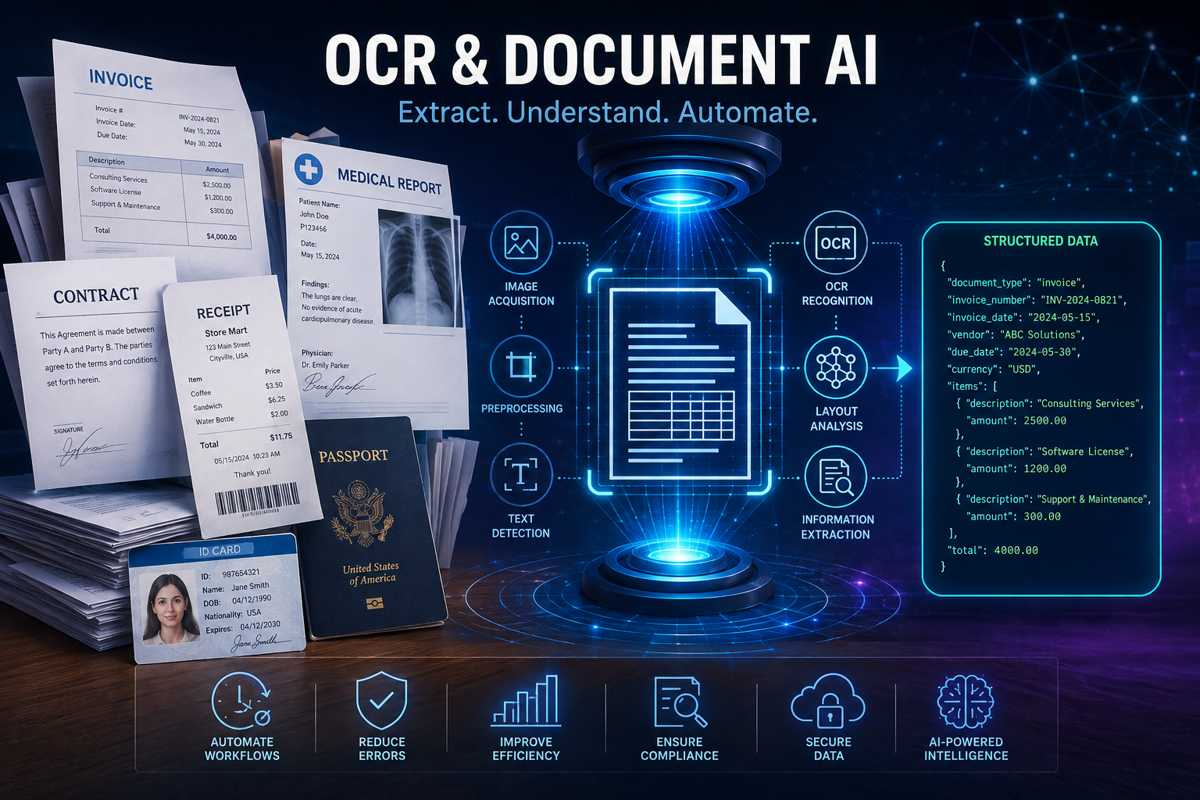
They can recognize invoice numbers, cross reference purchase orders, find signatures, read tables, verify totals, categorize document types and invoke automated workflows all without a human ever opening a file.
If you‘re building enterprise applications, debating cloud OCR solutions, designing RAG pipelines, or trying to get rid of manual data entry, understanding the difference between today‘s Document AI and the traditional OCR is starting to become a must.
In this guide, you‘ll learn:
- What OCR and Document AI actually are
- Why OCR is fundamentally a Computer Vision problem
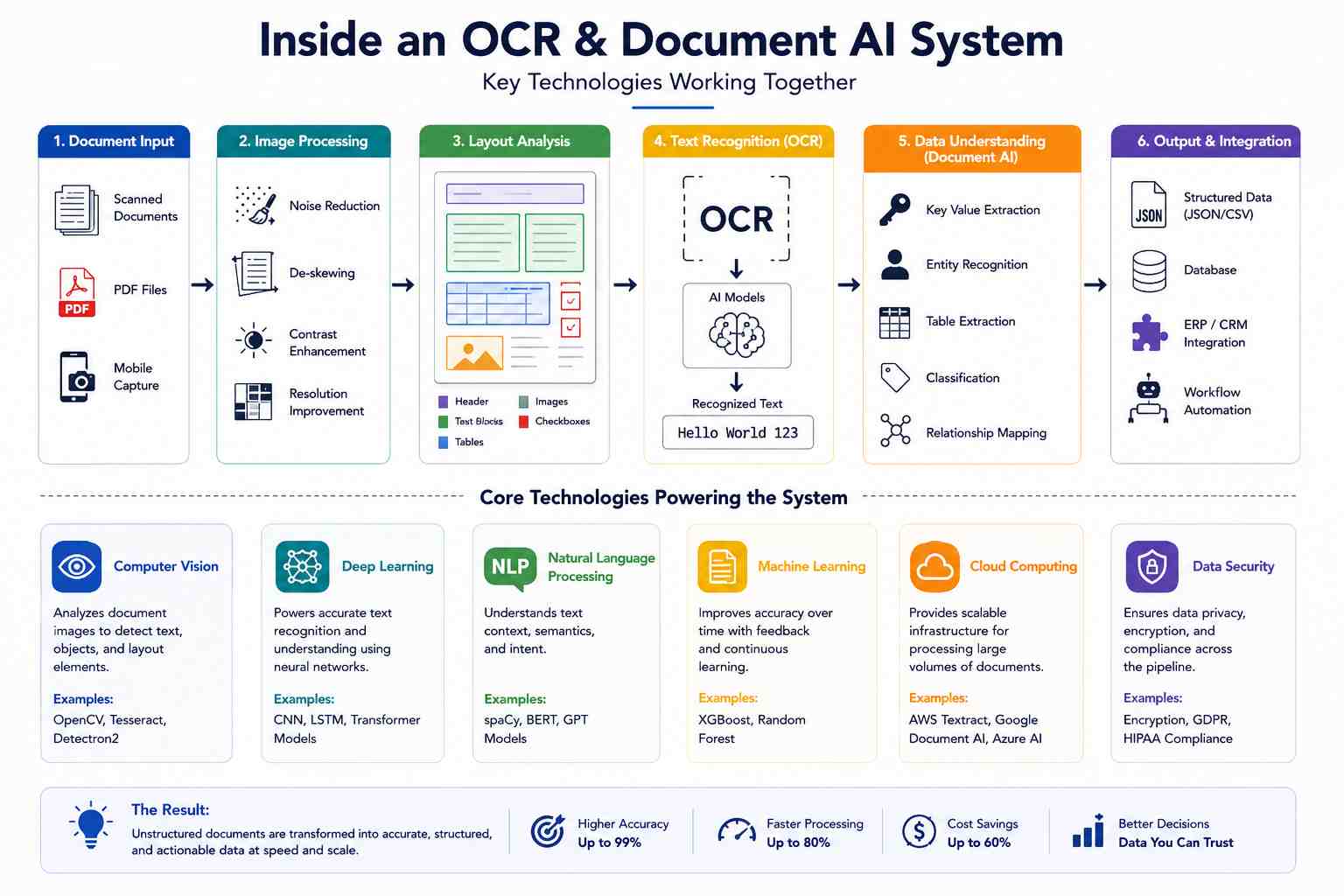
- How modern document understanding systems work
- The biggest limitations of traditional OCR
- The leading OCR and Document AI platforms available in 2026
- Production-ready architectures used by enterprises
- How multimodal AI is changing document processing
- Best practices for choosing the right solution
If you’re exploring the wider realm of visual AI for the first time, begin by reading our Guide to Computer Vision, that elaborates on how computers can understand images, then continue on with the more niche applications OCR and Document AI.
What Is OCR?
Optical Character Recognition (OCR) is the technology that that converts the image of printed or handwritten text into machine-encoded text.
It can be thought of as converting pixels into characters.
This is similar to the scenario where when you print out an invoice and scan it into your computer, the scanned document itself is no more than a digitized version of an image. The human eye can interpret the words, but the computer will only recognize an array of colored point.
OCR fills the response gap.
It recognizes all the characters such as alphabets, numbers, punctuation and symbols when converted into flexible digital text.
Without OCR, you couldn’t:
- Search inside scanned PDF files
- Copy text from scanned books
- Digitize historical archives
- Automatically process invoices
- Read text from photographed documents
- Convert paper forms into searchable records
Despite the fact that OCR has been around for quite some time, modern OCR engines are arguably much more accurate with a little state of the art computer vision and deep learning.
What Is Document AI?
Document AI goes several steps beyond OCR.
Instead of asking,
“What words appear on this page?”
Document AI asks,
“What does this document actually mean?”
That difference completely changes what computers can accomplish.
A modern Document AI system doesn’t simply recognize text.
It understands context.
For example, imagine an invoice containing the following information:
Invoice Number: INV-10592
Vendor:
ABC Manufacturing Ltd.
Total:
$8,420.75
Traditional OCR produces something similar to:
Invoice Number INV-10592 Vendor ABC Manufacturing Ltd Total 8420.75
Technically, the OCR succeeded.
But the computer still doesn’t know:
- which number is the invoice number
- which value represents the payment amount
- who the supplier is
- where the due date appears
- whether the invoice is complete
Document AI identifies all of these automatically and produces structured output instead.
Example:
{
“invoice_number”: “INV-10592”,
“vendor”: “ABC Manufacturing Ltd.”,
“total_amount”: 8420.75,
“currency”: “USD”
}
That’s the difference between reading a document and understanding one.
Why OCR Is Actually a Computer Vision Problem

Many people associate OCR with text processing or Natural Language Processing (NLP), but the first challenge isn’t language at all.
It’s vision.
Before a system can recognize a single letter, it has to answer several visual questions:
- Where does the document begin?
- Is the page rotated?
- Is it upside down?
- Where are the text regions?
- Which areas contain tables?
- Which areas contain images?
- Where are signatures located?
- Which words belong together?
- Which values correspond to which labels?
Every one of these tasks belongs to Computer Vision.
Modern OCR pipelines often include multiple vision models working together before any text recognition begins.
Typical stages include:
- Document detection
- Image enhancement
- Noise removal
- Deskewing
- Text region detection
- Layout analysis
- Table detection
- Text recognition
- Semantic understanding
Without these visual preprocessing steps, OCR accuracy drops significantly.
This is the reason document understanding has developed into one of the most crucial real-life applications of Computer Vision, after Object Detection, Image Recognition, and Facial Recognition.
How OCR Works
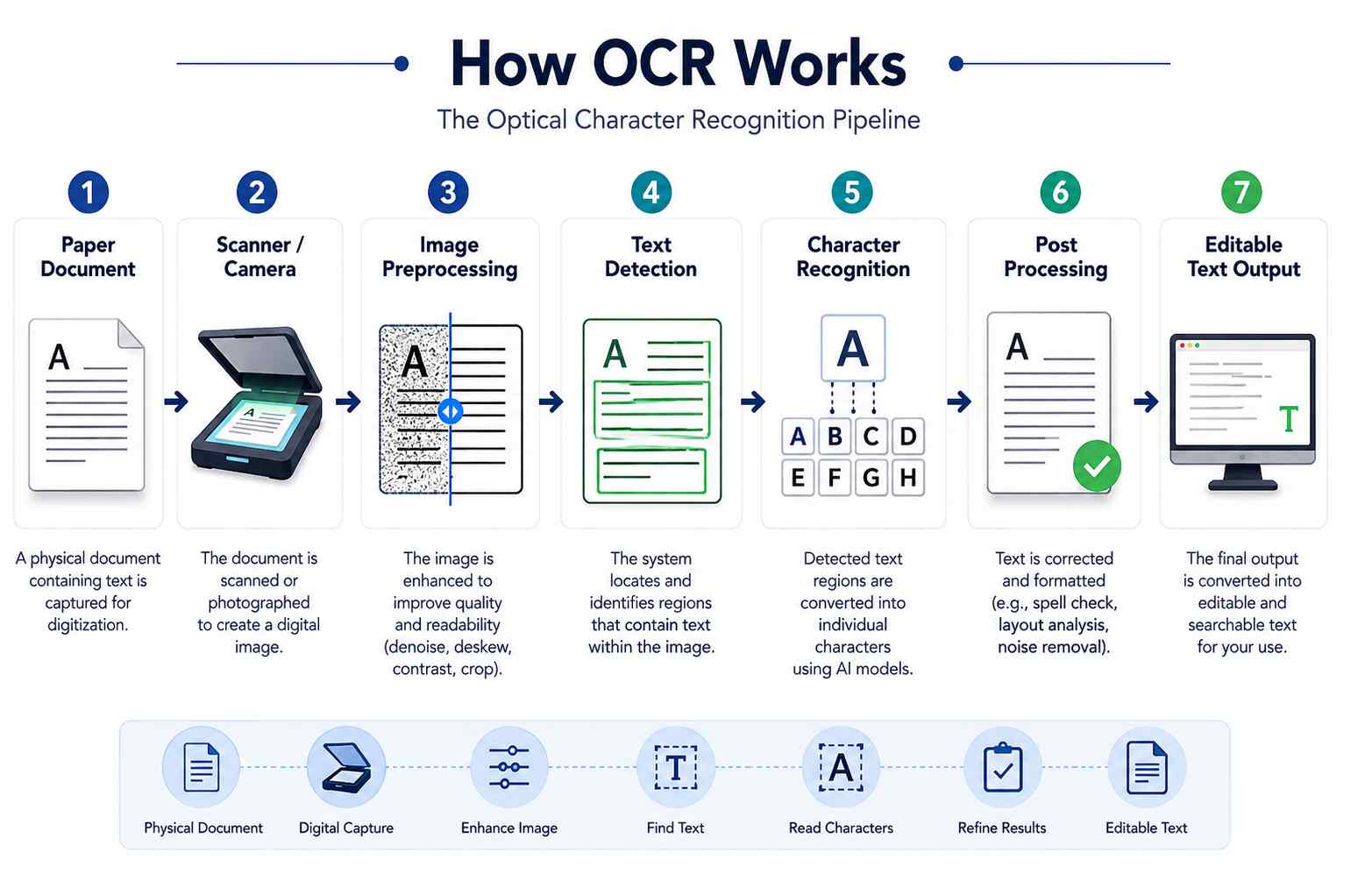
Despite complex AI systems being used, modern systems are still simple.
Step 1: Image Acquisition
Documents may arrive from various sources, including:
- Mobile phone cameras
- Flatbed scanners
- Multi-function printers
- Email attachments
- PDFs
- Fax systems
- Cloud storage
- Enterprise applications
The quality of the image itself has a huge influence on the accuracy of OCR.
Recognition performance is degraded by low-resolution scans, motion blur, inadequate lighting conditions, compression artifacts, and distorted images.
Step 2: Image Preprocessing
Before attempting text recognition, the image is cleaned.
Typical preprocessing operations include:
- Deskewing rotated pages
- Removing background noise
- Improving contrast
- Sharpening blurred text
- Correcting uneven lighting
- Cropping unnecessary borders
- Straightening perspective
- Increasing image resolution
Many enterprise OCR failures originate here rather than in the recognition engine itself.
Step 3: Text Detection
The system detects all of the text areas.
While older OCR tools made the assumption that paragraphs would be horizontal, current deep learning OCR systems are able to identify:
- Vertical text
- Curved text
- Rotated text
- Multilingual documents
- Mixed fonts
- Handwritten notes
The detection of text is now regarded as a task in its own right within the realm of Computer Vision.
Step 4: Character Recognition
Recognition models take the detected text regions and turn the visual characters into computers.
Nowadays, OCR employs deep neural networks whose weights are trained, instead of the previously hand-designed character templates.
This significantly enhances the performance on noisy, poor quality and multilingual documents.
Step 5: Post-Processing
Finally, the obtained text is improved.
This stage may include:
- Spell correction
- Dictionary matching
- Language modeling
- Confidence scoring
- Table reconstruction
- Output formatting
This result can be used by downstream systems such as search engines, enterprise application, databases or artificial intelligence agents.
OCR vs Document AI: What’s the Difference?

Most software vendors interchange these two terms, however they address different problem.
| Feature | Traditional OCR | Document AI |
| Reads text | ✔ | ✔ |
| Detects document type | ✖ | ✔ |
| Understands tables | Limited | ✔ |
| Extracts invoice fields | Limited | ✔ |
| Identifies signatures | ✖ | ✔ |
| Preserves layout | Basic | ✔ |
| Handles complex forms | Limited | ✔ |
| Uses machine learning | Sometimes | ✔ |
| Supports workflow automation | ✖ | ✔ |
| Understands document context | ✖ | ✔ |
In simple terms:
- OCR converts images into text.
- Document AI converts documents into structured business data.
Why Traditional OCR Breaks on Real-World Documents

If you‘ve only tried OCR on pristine and well-formatted PDFs or scanned pages without much error, it can seem almost miraculous.
Upload a document.
Wait a few seconds.
Copy the extracted text.
Done.
For, in the real world, that‘s not what most business face.
Real documents are a mess.
Invoices from hundreds of different suppliers. Handwritting on medical forms. Multi-column ATM bank statements. Stamp, signature, QR code, barcode, logo, and table on the shipping document.
This was not what traditional OCR was meant to do.
It was adapted for character recognition.
And to pile on a bit more, it‘s the reason why so many first generation OCR products don‘t make it past the “simple” document.
The Biggest Limitation: OCR Reads Characters, Not Relationships
Imagine this invoice.
ABC Manufacturing
Invoice Number: INV-10592
Invoice Date: 12 Jan 2026
Total Due: $4,820
Paid: No
To a human, the relationships are obvious.
You instantly understand:
- INV-10592 is the invoice number.
- 12 Jan 2026 is the invoice date.
- $4,820 is the payment amount.
- “No” refers to payment status.
Traditional OCR doesn’t understand those relationships.
It simply extracts text.
Something like:
ABC Manufacturing
Invoice Number INV-10592
Invoice Date
12 Jan 2026
Total Due
4820
Paid No
Every downstream application must then guess which value belongs to which field.
That’s where many automation projects begin to fail.
The Layout Preservation Problem
One of the biggest breakthroughs in modern Document AI came from solving what’s known as the Layout Preservation Problem.
This problem is surprisingly simple.
Traditional OCR treats every document like a book.
It reads:
Left →
Right →
Top →
Bottom.
That works perfectly for novels.
It doesn’t work for invoices.
Or tax forms.
Or receipts.
Or passports.
Or contracts.
Or medical records.
Or engineering drawings.
Those documents aren’t linear.
They’re spatial.
Meaning is determined by where information appears, not just what words appear.
Consider this simplified invoice.
Invoice No INV-1082
Date Jan 20
———————————-
Item Qty Price
SSD 2 $180
RAM 4 $320
———————————-
Total $500
Humans understand instantly:
SSD belongs with Qty 2.
RAM belongs with Qty 4.
Total equals $500.
Traditional OCR often produces something closer to:
Invoice
INV-1082
Date
Jan 20
SSD
RAM
2
4
180
320
Total
500
Everything is technically recognized.
Nothing is correctly connected.
That’s why modern Document AI focuses just as much on layout understanding as text recognition.
Why Layout Matters More Than Text Accuracy
Here’s an interesting reality.
You can have 99.8% OCR accuracy and still completely fail your automation project.
Why?
Because business documents depend on relationships.
Consider a tax form.
Every number might be recognized perfectly.
But if the system matches the wrong number to the wrong field, the document becomes useless.
This is why enterprises increasingly evaluate systems based on:
- Field extraction accuracy
- Table reconstruction
- Key-value pairing
- Spatial reasoning
- Document understanding
—not raw OCR accuracy alone.
From OCR to Intelligent Document Processing (IDP)

As businesses demanded more than plain text extraction, a new category emerged:
Intelligent Document Processing (IDP).
Instead of asking:
“What words are on this page?”
IDP asks:
“What business information should I extract?”
That distinction changed the entire industry.
Modern IDP systems combine several technologies together:
- Computer Vision
- OCR
- Machine Learning
- Natural Language Processing
- Knowledge Graphs
- Large Language Models
- Business Rules
- Workflow Automation
The end result is a program which can comprehend documents instead of merely reading them.
The Three Generations of Document Processing
The document understanding field has changed significantly over the last twenty years.
Put in terms of generations it makes describing the progression much simpler.
Generation 1: Traditional OCR
Goal:
Convert images into text.
Technology:
- Rule-based OCR
- Character recognition
- Dictionaries
Examples:
- Tesseract
- Legacy scanner software
- Basic OCR APIs
Best suited for:
- Books
- Newspapers
- Simple PDFs
- Historical archives
Biggest limitation:
No understanding.
Generation 2: Intelligent Document Processing (IDP)
Goal:
Extract structured business data.
Technology:
- Deep learning
- Layout detection
- Form recognition
- Table extraction
- Key-value extraction
Examples:
- AWS Textract
- Google Document AI
- Azure AI Document Intelligence
- ABBYY Vantage
Best suited for:
- Invoices
- Receipts
- Tax forms
- IDs
- Contracts
- Insurance claims
Biggest limitation:
Many systems still rely on templates or document-specific training, making them less flexible when layouts change significantly.
Generation 3: AI-Native Document Understanding
The newest generation doesn’t depend heavily on predefined templates.
Instead, multimodal AI models reason about documents much like humans do.
These systems understand:
- Layout
- Visual structure
- Language
- Context
- Relationships
Examples include:
- LayoutLM family
- Donut
- Nougat
- LlamaParse
- Unstract
- Modern Vision-Language Models (VLMs)
These models are rapidly changing enterprise document automation because they adapt far better to unseen document formats.
Why Vision Transformers Changed Everything
Historically, OCR systems have used CNNs.
CNNs recognized visual shapes very well.
But documents aren’t ordinary images.
A single invoice contains relationships across an entire page.
It is possible that the Invoice number is displayed in the top-right hand corner.
The supplier address is in the top-left.
The totals at the bottom.
Understanding those relationships requires looking across the whole document simultaneously.
And this was of course only made possible by Vision Transformers (ViTs).
A Vision Transformer learns long-range relationships across the page instead of only looking at small segments of an image.
This dramatically improved:
- Layout understanding
- Table detection
- Form extraction
- Document classification
- Reading order prediction
- Multi-column reasoning
Today’s state-of-the-art Document AI systems are heavily influenced by Transformer architectures.
The same family of models that revolutionized language with GPT also transformed document understanding.
LayoutLM: One of the Biggest Milestones in Document AI
One of the most influential research breakthroughs in this field came from Microsoft’s LayoutLM series.
Unlike traditional OCR pipelines, LayoutLM combines three different types of information simultaneously:
- The text itself
- The position of every word on the page
- The visual appearance of the document
Instead of treating a document as plain text, LayoutLM treats it as a visual object.
That allows it to understand questions like:
- Which value belongs to this label?
- Which cells belong to this table?
- Which paragraph belongs under this heading?
- Where is the signature located?
This significantly improved tasks such as:
- Form understanding
- Invoice extraction
- Contract analysis
- Receipt parsing
- Document classification
Evolution of the LayoutLM Family
Microsoft has steadily improved the architecture:
LayoutLM
- Introduced joint learning from text and layout.
- Strong improvement over text-only approaches.
LayoutLMv2
- Added richer visual features and improved spatial reasoning.
- Better performance on forms and visually complex documents.
LayoutLMv3
- Unified text, image, and layout learning into a single pre-training framework.
- Considered one of the strongest open research models for visually rich document understanding.
Although LayoutLM is primarily a research model rather than a plug-and-play enterprise product, its ideas have influenced many commercial Document AI platforms available today.
OCR-Free Models: A Different Way of Reading Documents
One of the newest directions in Document AI removes OCR entirely.
Instead of:
Image → OCR → Text → AI
the model processes the document image directly.
This avoids many of the errors introduced during traditional OCR.
Two well-known examples are:
Donut
Developed by NAVER, Donut (Document Understanding Transformer) generates structured information directly from document images without requiring a separate OCR engine.
It performs particularly well on forms, receipts, and business documents with varied layouts.
Nougat
Developed by Meta AI, Nougat focuses on scientific literature.
Academic papers often include:
- Equations
- Tables
- Multi-column layouts
- References
- Figures
Traditional OCR struggles with these.
Nougat converts scientific documents directly into structured markup while preserving much more of their original meaning.
Why OCR-Free Models Matter
Skipping the OCR stage offers several advantages:
- Fewer layout errors
- Better handling of complex pages
- Stronger understanding of relationships
- Reduced cascading errors
- More natural structured output
These models are still evolving, but they represent one of the most promising directions for future Document AI systems.
The Best OCR and Document AI Tools in 2026
Choosing an OCR or Document AI platform isn’t just about finding the highest accuracy. The right solution depends on your document types, processing volume, compliance requirements, existing infrastructure, and how much customization you’re willing to maintain.
For example, a small business digitizing contracts has very different needs from a bank processing millions of loan applications every month.
Some organizations simply need searchable PDFs. Others require AI that understands invoices, validates purchase orders, detects fraud, and integrates with ERP systems.
The good news is that today’s ecosystem offers mature solutions for nearly every use case.
Let’s look at the tools that genuinely stand out in 2026.
Tier 1: Open-Source OCR Engines
These tools focus primarily on text recognition. They’re ideal for developers, research projects, self-hosted deployments, and organizations that want maximum control without recurring licensing costs.
Tesseract OCR
Tesseract remains the world’s most widely used open-source OCR engine.
Originally developed by Hewlett-Packard and later open-sourced, it is now maintained by Google and a global developer community.
Despite its age, Tesseract continues to be an excellent option for straightforward OCR tasks.
Best For
- Books
- Scanned PDFs
- Historical archives
- Searchable document creation
- Offline OCR
Advantages
✔ Free and open source
✔ Supports more than 100 languages
✔ Large developer community
✔ Easy to integrate
✔ Completely offline
Limitations
- Limited understanding of document layout
- Weak table extraction
- Poor performance on handwritten text
- Requires preprocessing for noisy scans
- Not designed for Document AI workflows
If your goal is simply converting scanned text into editable documents, Tesseract is still one of the best free options available.
PaddleOCR
Developed by Baidu, PaddleOCR has become one of the strongest open-source OCR frameworks.
Unlike Tesseract, PaddleOCR includes modern deep learning models for:
- Text detection
- Text recognition
- Layout analysis
- Table recognition
- Multilingual OCR
It performs especially well on Asian languages while also offering excellent English support.
Why Developers Like PaddleOCR
- GPU acceleration
- Active development
- Better accuracy than traditional OCR
- Lightweight deployment
- Production-ready APIs
Many startups now choose PaddleOCR instead of Tesseract for new projects.
EasyOCR
EasyOCR is popular because it offers an extremely simple Python interface.
A basic OCR application can often be written in just a few lines of code.
It supports dozens of languages and performs well for prototypes, research, and smaller applications.
However, it lacks many enterprise document understanding capabilities found in more advanced platforms.
DocTR
DocTR (Document Text Recognition) is an open-source deep learning library specifically designed for document understanding.
Rather than focusing solely on OCR, it provides:
- Text detection
- Text recognition
- End-to-end pipelines
- TensorFlow and PyTorch support
Researchers frequently use DocTR when building custom Document AI solutions.
Surya OCR
Surya has gained significant attention for multilingual OCR and layout-aware document parsing.
It performs particularly well on:
- Books
- Historical manuscripts
- Multilingual documents
- Mixed-language pages
For organizations dealing with global document collections, Surya is becoming an increasingly attractive option.
GOT-OCR 2.0
GOT-OCR represents a newer generation of OCR systems designed around multimodal foundation models.
Rather than simply recognizing text, it attempts to understand visual context more effectively.
It handles:
- Tables
- Mathematical formulas
- Complex layouts
- Scientific documents
Although still evolving rapidly, it demonstrates where modern OCR research is heading.
Tier 2: Enterprise Document AI Platforms
Unlike basic OCR engines, these platforms understand business documents.
Most organizations processing invoices, receipts, tax forms, insurance claims, or identity documents will find these solutions far more suitable than traditional OCR.
Amazon Textract
Amazon Textract is one of the most widely adopted enterprise document processing services.
Instead of simply extracting text, Textract automatically identifies:
- Forms
- Tables
- Key-value pairs
- Checkboxes
- Signatures
It integrates seamlessly with other AWS services, making it a natural choice for organizations already running on Amazon Web Services.
Best Use Cases
- Invoice automation
- Expense processing
- Banking documents
- Claims processing
- Government forms
Advantages
✔ No infrastructure to maintain
✔ High scalability
✔ Pay-as-you-go pricing
✔ Strong API ecosystem
Considerations
While Textract performs well on standardized business documents, highly unusual layouts may still require additional validation or custom post-processing.
Google Document AI
Google has invested heavily in intelligent document understanding.
Document AI includes specialized processors designed for:
- Invoices
- Receipts
- Identity documents
- Tax forms
- Procurement documents
- Contracts
Google also provides tools for training custom document extractors using your own data.
Strengths
- Excellent layout understanding
- Strong multilingual support
- Human review workflows
- Integration with Vertex AI
- Powerful developer ecosystem
Organizations already using Google Cloud often find Document AI particularly attractive.
Azure AI Document Intelligence
Previously known as Azure Form Recognizer, Microsoft’s platform has evolved into one of the industry’s leading Document AI services.
It combines OCR, layout analysis, and machine learning into a single cloud platform.
Prebuilt models exist for:
- Invoices
- Receipts
- Business cards
- Identity documents
- Tax forms
- Contracts
Custom models can also be trained for industry-specific document types.
Ideal For
Organizations using:
- Microsoft Azure
- Microsoft 365
- Dynamics 365
- Power Platform
ABBYY FineReader and ABBYY Vantage
ABBYY has spent decades building OCR technology and remains one of the most respected names in enterprise document processing.
FineReader focuses primarily on OCR and document conversion.
Vantage extends this into full Intelligent Document Processing.
ABBYY remains particularly strong in:
- Banking
- Legal
- Healthcare
- Insurance
- Government
where accuracy and compliance are often more important than cost.
Tier 3: AI-Native Document Understanding Platforms
The newest generation moves beyond templates.
Instead of configuring every document manually, these systems use multimodal AI models capable of understanding previously unseen layouts.
Unstract
Unstract is one of the most interesting platforms in this category.
It combines:
- LLM-powered extraction
- Layout-aware parsing
- Prompt Studio
- Workflow automation
- Human review
- API deployment
One of its biggest innovations is LLMWhisperer, a layout-preserving parser that prepares documents for large language models without destroying their structure.
Instead of flattening documents into plain text, LLMWhisperer preserves:
- Tables
- Columns
- Headers
- Lists
- Spatial relationships
This dramatically improves downstream AI accuracy.
LlamaParse
Developed for Retrieval-Augmented Generation (RAG), LlamaParse focuses on converting complex documents into structured content suitable for AI applications.
It performs particularly well with:
- PDFs
- Research papers
- Financial reports
- Technical manuals
- Enterprise knowledge bases
For organizations building AI assistants that search internal documents, LlamaParse has become a popular choice.
Unstructured.io
Unstructured specializes in preparing enterprise documents for machine learning pipelines.
Instead of simply extracting text, it intelligently segments content into meaningful components such as:
- Headings
- Tables
- Lists
- Paragraphs
- Metadata
This makes it particularly valuable for semantic search and RAG systems.
Comparing Popular OCR and Document AI Solutions
| Tool | Primary Focus | Open Source | Best For |
| Tesseract | OCR | ✔ | Simple scanned documents |
| PaddleOCR | OCR + Layout | ✔ | Multilingual OCR |
| EasyOCR | OCR | ✔ | Rapid prototyping |
| DocTR | Deep Learning OCR | ✔ | Custom AI pipelines |
| Surya | Layout-aware OCR | ✔ | Historical & multilingual documents |
| GOT-OCR | Vision-language OCR | ✔ | Complex layouts |
| Amazon Textract | Document AI | ✖ | AWS enterprise workflows |
| Google Document AI | Document AI | ✖ | Cloud document processing |
| Azure AI Document Intelligence | Document AI | ✖ | Microsoft ecosystem |
| ABBYY Vantage | Enterprise IDP | ✖ | Regulated industries |
| Unstract | Agentic Document AI | ✔ | LLM-powered extraction |
| LlamaParse | RAG Document Parsing | Freemium | AI knowledge bases |
| Unstructured.io | Data preparation | Freemium | Enterprise AI pipelines |
Which Solution Should You Choose?
There isn’t a universal winner.
The right choice depends entirely on your use case.
Choose Tesseract if:
- You only need OCR.
- Your documents are clean.
- Budget is your primary concern.
Choose PaddleOCR if:
- You need better multilingual accuracy.
- You’re building your own pipeline.
- You want an actively maintained open-source framework.
Choose Amazon Textract if:
- Your infrastructure already runs on AWS.
- You process invoices or forms at scale.
- You prefer managed cloud services.
Choose Google Document AI if:
- You want prebuilt processors.
- You use Google Cloud.
- Your organization processes diverse business documents.
Choose Azure AI Document Intelligence if:
- Your organization relies on Microsoft technologies.
- You want strong enterprise integration.
- You’re already using Power Automate or Dynamics 365.
Choose ABBYY if:
- Compliance is critical.
- You work in finance, legal, healthcare, or government.
- Accuracy matters more than licensing costs.
Choose LlamaParse or Unstructured if:
You’re building:
- Enterprise AI assistants
- Knowledge retrieval systems
- RAG applications
- Internal search engines
rather than traditional OCR workflows.
Choose Unstract if:
You want to combine:
- Document AI
- Large Language Models
- Workflow automation
- Layout preservation
- Human review
into a single modern platform.
The important takeaway is this:
Don’t evaluate OCR tools solely on text recognition accuracy. Consider how well they preserve layout, extract structured data, integrate with your existing systems, support multilingual documents, and scale to your real-world workloads. For many organizations, these factors will have a far greater impact on long-term success than a small difference in OCR accuracy alone.
Building a Production-Ready OCR and Document AI Pipeline

Getting excellent OCR accuracy in a demo is one thing.
Deploying a system that reliably processes hundreds of thousands—or even millions—of business documents every month is something entirely different.
Production systems must deal with poor image quality, unusual document layouts, missing pages, multiple languages, fraud attempts, compliance requirements, and changing document formats.
That’s why successful Document AI deployments follow a structured pipeline rather than relying on a single OCR engine.
Stage 1: Document Ingestion
Everything begins with document collection.
In real organizations, documents arrive from dozens of different sources:
- Email attachments
- Mobile applications
- Office scanners
- Multi-function printers
- Web upload portals
- ERP systems
- CRM platforms
- Shared network folders
- Cloud storage
- APIs
- Fax gateways
- Third-party vendors
A robust ingestion layer should automatically:
- Accept multiple file formats
- Validate file integrity
- Detect corrupted documents
- Remove duplicate uploads
- Assign unique document IDs
- Capture metadata
- Route files into processing queues
Supported formats typically include:
- TIFF
- JPEG
- PNG
- BMP
- HEIC
- DOCX (converted)
- Images captured by smartphones
This stage often determines how smoothly the rest of the pipeline operates.
Stage 2: Image Preprocessing
Even the best OCR engine cannot recover information from a poor-quality image.
That’s why preprocessing is one of the most important—and frequently overlooked—steps.
Typical preprocessing operations include:
Deskewing
Corrects pages scanned at an angle.
A document tilted by only a few degrees can noticeably reduce OCR accuracy.
Noise Removal
Removes:
- Dust
- Scanner artifacts
- Background speckles
- Compression noise
This improves character recognition significantly.
Contrast Enhancement
Old documents often contain faded text.
Contrast enhancement increases readability before OCR begins.
Perspective Correction
Mobile phone images rarely capture documents perfectly.
Perspective correction flattens the page so that text appears straight.
Resolution Enhancement
Low-resolution images may be upscaled using AI-based super-resolution models.
This can improve recognition on older or poorly scanned documents.
Border Removal
Scanner borders, shadows, and unnecessary margins are cropped to focus only on document content.
Language Detection
Many enterprise systems automatically identify the document language before OCR begins.
This allows the correct recognition model to be selectd.
Proper preprocessing alone can improve extraction accuracy dramatically, especially for noisy or low-quality scans.
Stage 3: Document Classification
Not every uploaded file is an invoice.
Some may be:
- Contracts
- Medical reports
- Purchase orders
- Passports
- Utility bills
- Tax forms
- Insurance claims
- Receipts
- Driver’s licenses
Before extracting information, the system must determine:
“What kind of document is this?”
Modern classification models use computer vision to analyze:
- Layout
- Logos
- Headers
- Visual structure
- Page geometry
- Text patterns
This classification determines which extraction strategy should be used.
Stage 4: Layout Analysis
This is where Computer Vision becomes especially important.
The system identifies:
- Paragraphs
- Tables
- Headers
- Footers
- Images
- Captions
- Checkboxes
- Signatures
- QR codes
- Barcodes
- Stamps
Rather than treating the document as a stream of text, it understands the page as a structured visual object.
This dramatically improves downstream extraction.
Stage 5: Information Extraction
Now the AI extracts business information.
Examples include:
Invoices
- Invoice number
- Vendor
- Tax ID
- Purchase order
- Total amount
- Due date
Contracts
- Parties involved
- Effective date
- Expiration date
- Renewal clauses
Medical Records
- Patient name
- Diagnosis
- Medication
- Physician
- Test results
Shipping Documents
- Tracking number
- Carrier
- Destination
- Delivery date
Identity Documents
- Name
- Date of birth
- Nationality
- Document number
Modern Document AI usually produces structured JSON rather than plain text.
Example:
{
“invoice_number”: “INV-20481”,
“vendor”: “ABC Manufacturing”,
“currency”: “USD”,
“subtotal”: 1420.25,
“tax”: 142.02,
“total”: 1562.27,
“due_date”: “2026-08-20”
}
This structured output can be consumed directly by ERP systems, accounting software, CRMs, or workflow automation platforms.
Stage 6: Validation
Extraction alone isn’t enough.
The extracted information must be validated before it enters business systems.
Typical validation rules include:
- Invoice totals equal line-item totals
- Dates follow expected formats
- Vendor exists in the supplier database
- Currency codes are valid
- Purchase order numbers exist
- Tax IDs match official formats
- Duplicate invoices are detected
This stage prevents expensive downstream errors.
Stage 7: Confidence Scoring
Every extracted field receives a confidence score.
For example:
| Field | Confidence |
| Invoice Number | 99.8% |
| Vendor | 99.2% |
| Invoice Date | 98.6% |
| Total Amount | 95.1% |
| Purchase Order | 72.4% |
Low-confidence fields should never be silently accepted.
Instead, they should be flagged for review.
Confidence thresholds vary by industry:
- Banking often requires extremely high confidence.
- Healthcare prioritizes patient safety.
- Logistics may accept slightly lower confidence for non-critical fields.
Stage 8: Human-in-the-Loop (HITL)
One of the biggest mistakes organizations make is assuming AI should replace humans entirely.
In reality, the best Document AI systems are designed to work with people, not eliminate them.
This approach is known as Human-in-the-Loop (HITL).
When confidence scores fall below predefined thresholds—or business rules detect inconsistencies—the document is routed to a human reviewer.
The reviewer sees:
- The original document
- The extracted data
- Highlighted fields with low confidence
- Suggested corrections
Once the reviewer confirms or edits the values, the corrected information continues through the workflow.
Modern platforms often use these corrections to improve future predictions, a process known as active learning.
This combination of AI automation and human oversight is especially important in regulated industries such as healthcare, finance, insurance, and government.
Measuring OCR and Document AI Performance
“It’s accurate” isn’t enough.
Organizations need objective ways to evaluate whether a Document AI system performs well enough for production.
Several industry-standard benchmarks are commonly used.
Character Error Rate (CER)
CER measures how many individual characters were recognized incorrectly.
It compares the OCR output against the ground truth.
A lower CER indicates better recognition accuracy.
CER is especially useful when evaluating the raw OCR stage before any higher-level document understanding takes place.
Word Error Rate (WER)
WER evaluates recognition accuracy at the word level.
Because business workflows often rely on complete words rather than individual characters, WER provides another useful quality indicator.
Average Normalized Levenshtein Similarity (ANLS)
ANLS is widely used for document question answering and structured extraction tasks.
Instead of requiring exact matches, it measures how closely extracted text resembles the expected answer.
Minor OCR mistakes receive partial credit rather than being counted as complete failures.
Many document understanding benchmarks report ANLS scores.
Mean Average Precision (mAP)
mAP is borrowed from Computer Vision object detection.
In Document AI, it evaluates how accurately a model localizes elements such as:
- Signatures
- Tables
- Logos
- Text blocks
- Checkboxes
Localization becomes increasingly important when reviewers need to verify extracted information directly against the original document.
Major Public Benchmarks
Researchers typically evaluate new Document AI models using well-established datasets.
DocVQA
One of the most widely recognized benchmarks for document visual question answering.
Models must answer questions based on document images rather than plain text.
FUNSD
Focused on form understanding.
Evaluates a model’s ability to identify relationships between fields, labels, and values.
CORD
Designed specifically for receipt understanding.
Widely used for benchmarking invoice and receipt extraction systems.
RVL-CDIP
A large document classification dataset containing hundreds of thousands of scanned documents across multiple categories.
Frequently used for evaluating document classification models.
No single benchmark tells the whole story.
Organizations should evaluate systems using document samples that closely resemble their own production data.
Security and Compliance Considerations
Processing business documents often involves highly sensitive information.
Examples include:
- Personally Identifiable Information (PII)
- Financial records
- Medical data
- Tax documents
- Government IDs
- Legal contracts
Before deploying any OCR or Document AI solution, organizations should evaluate its security and compliance capabilities.
Key considerations include:
- Encryption in transit and at rest
- Role-based access control (RBAC)
- Audit logs
- Data residency requirements
- Automatic PII masking
- Data retention policies
- Secure API authentication
- Human review permissions
Organizations operating in regulated industries should also verify support for relevant compliance frameworks such as GDPR, HIPAA, SOC 2, ISO 27001, or regional regulatory requirements, depending on where they operate.
Security should never be treated as an afterthought. A highly accurate Document AI system that fails to protect sensitive information can introduce risks far greater than manual processing.
The Future of OCR and Document AI
If you compare today’s Document AI platforms with those from just five years ago, the progress is remarkable.
Earlier systems relied heavily on templates. Every new invoice format, purchase order, or tax form often required manual configuration before the software could extract information accurately.
Modern systems are becoming far more adaptable.
Thanks to advances in multimodal AI, large language models (LLMs), and computer vision, Document AI is evolving from a rule-based automation tool into an intelligent reasoning system capable of understanding unfamiliar documents with minimal human intervention.
While traditional OCR will remain an important component for many workflows, the industry’s momentum is clearly moving toward AI-native document understanding.
Let’s explore where the technology is heading.

Agentic Document AI
One of the most significant trends in 2026 is Agentic Document AI.
Unlike conventional OCR pipelines, where every processing step is predefined, agentic systems can make decisions dynamically based on the document they’re analyzing.
Instead of following a rigid workflow, an AI agent can:
- Determine what type of document it has received
- Select the most appropriate extraction strategy
- Decide which AI model should process each section
- Validate extracted information
- Request human review only when necessary
- Trigger downstream business workflows automatically
For example, imagine an accounts payable department receiving invoices from hundreds of suppliers.
A traditional OCR system may require separate templates for many of those layouts.
An agentic Document AI platform can often recognize the document structure on its own, extract relevant fields, compare them with purchase orders, identify inconsistencies, and prepare the invoice for approval with little or no manual configuration.
This significantly reduces maintenance as document formats evolve.
Large Language Models Are Becoming Document Reasoning Engines
Early OCR systems answered one question:
“What text appears on this page?”
Modern LLM-powered systems answer much richer questions, such as:
- What is the purpose of this document?
- Which payment terms apply?
- Does this contract contain an automatic renewal clause?
- Which invoices are overdue?
- Is the purchase order consistent with the invoice?
- Which sections mention regulatory compliance?
Rather than acting as OCR engines, LLMs increasingly function as reasoning layers built on top of structured document data.
This enables organizations to search, summarize, compare, and analyze large document collections using natural language.
Document AI and Retrieval-Augmented Generation (RAG)
Another rapidly growing use case is Retrieval-Augmented Generation (RAG).
Many organizations want AI assistants that can answer questions based on their internal documents rather than relying only on public knowledge.
For example:
“Show me all supplier contracts expiring within the next 90 days.”
Or:
“Summarize the latest safety procedures described in our operations manual.”
Building these systems requires documents to be parsed accurately before they can be indexed.
If OCR destroys tables, columns, or document structure, retrieval quality suffers.
That’s why layout-aware parsers such as LlamaParse and Unstructured have become popular components in enterprise RAG pipelines.
They preserve document hierarchy so that AI models retrieve more relevant context and generate more reliable answers.
Cross-Document Reasoning
Traditional OCR processes one document at a time.
Modern AI increasingly reasons across multiple documents simultaneously.
Consider a procurement workflow.
Instead of extracting information only from an invoice, future systems may automatically compare:
- Purchase orders
- Delivery receipts
- Supplier invoices
- Shipping manifests
- Payment confirmations
If discrepancies appear—for example, an invoice requesting payment for items that were never delivered—the system can flag them automatically for review.
This type of cross-document reasoning is expected to become a major capability of enterprise Document AI platforms over the next few years.
Real-Time Document Processing
Historically, organizations processed documents in overnight batches.
Today, many businesses require immediate decisions.
Examples include:
- Loan applications
- Identity verification
- Insurance claims
- Customs documentation
- Fraud detection
- Customer onboarding
Modern cloud architectures allow documents to be analyzed within seconds of being uploaded.
As event-driven systems continue to mature, real-time document processing is becoming the default expectation rather than the exception.
Build vs. Buy: Which Approach Makes More Sense?
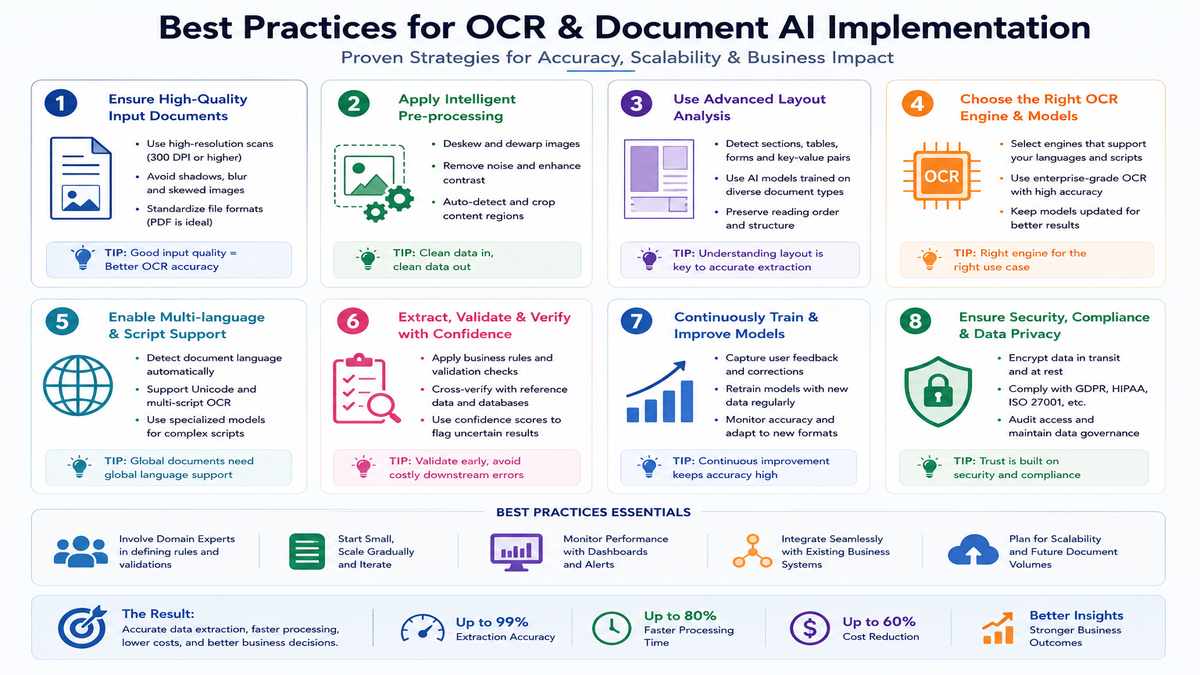
One of the first decisions organizations face is whether to build their own OCR pipeline or adopt an existing platform.
There isn’t a universal answer.
The right approach depends on technical expertise, regulatory requirements, budget, and long-term maintenance capacity.
When Building Makes Sense
Building an in-house solution offers the greatest flexibility.
Organizations can:
- Select individual OCR engines
- Train custom machine learning models
- Deploy entirely on private infrastructure
- Control every processing step
- Avoid recurring per-page licensing costs
This approach is often attractive for organizations with:
- Large engineering teams
- Highly specialized document formats
- Strict data residency requirements
- Long-term AI investment strategies
However, building comes with ongoing responsibilities.
You’ll need to maintain:
- OCR models
- Layout analysis
- Validation logic
- Monitoring systems
- Security updates
- Performance optimization
- Model retraining
For many businesses, those maintenance costs are higher than initially expected.
When Buying Makes Sense
Managed Document AI platforms remove much of that operational burden.
Benefits typically include:
- Faster deployment
- Automatic model improvements
- Built-in scalability
- Security certifications
- Human review workflows
- Vendor support
- Continuous feature updates
The trade-off is reduced control and recurring usage costs.
For most organizations, especially those processing standard business documents, purchasing an established platform often delivers faster time-to-value than developing everything internally.
Common OCR and Document AI Mistakes
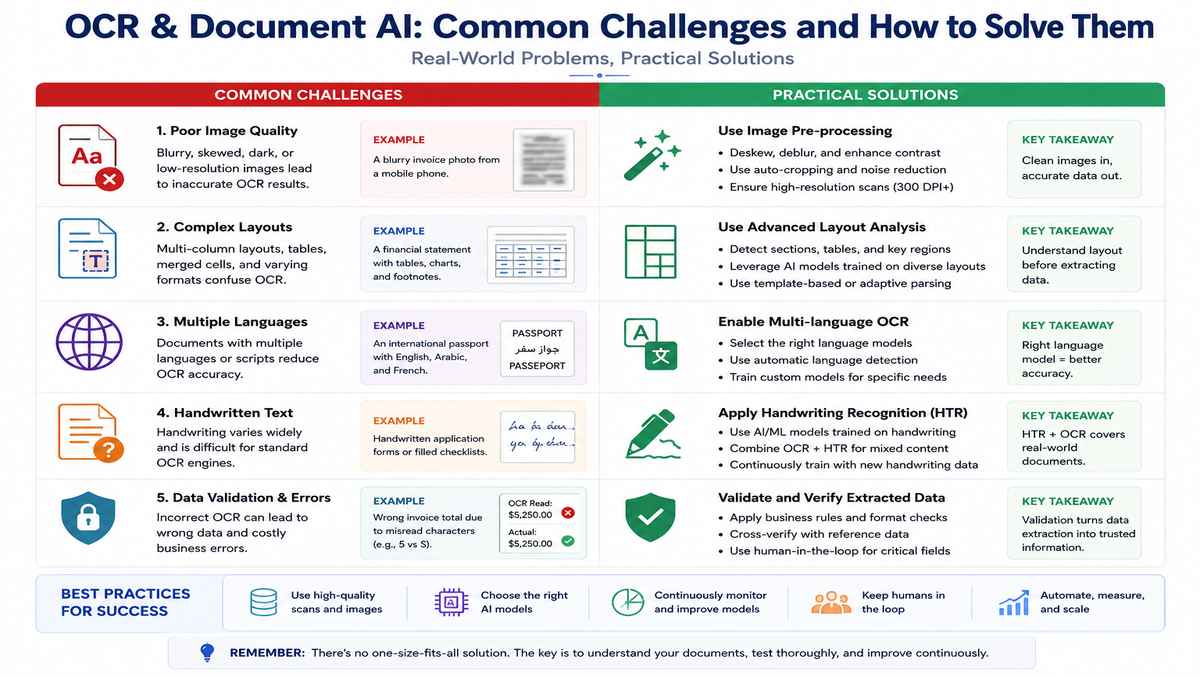
Organizations frequently encounter the same challenges during implementation.
Avoiding these mistakes can save considerable time and cost.
Mistake 1: Evaluating Only OCR Accuracy
High character recognition accuracy doesn’t guarantee successful automation.
Field extraction, layout preservation, and business validation are often far more important.
Mistake 2: Ignoring Image Quality
Poor scans significantly reduce downstream performance.
Investing in preprocessing frequently delivers larger gains than changing OCR engines.
Mistake 3: Skipping Human Review
No AI system achieves perfect accuracy on every document.
Human-in-the-loop workflows remain essential for sensitive business processes.
Mistake 4: Using Templates Everywhere
Templates work well for highly standardized documents but become expensive to maintain when layouts change frequently.
Modern AI-native systems generally adapt more effectively to document variability.
Mistake 5: Neglecting Security
Documents often contain sensitive information.
Organizations should evaluate encryption, access controls, audit logging, and compliance capabilities before deployment—not afterward.
FAQs
Q1: Is OCR the same as Document AI?
A: No.
OCR converts images into machine-readable text.
Document AI combines OCR, Computer Vision, machine learning, and natural language understanding to extract structured business information and automate document-centric workflows.
Q2: Can OCR read handwritten documents?
A: Modern AI-powered OCR engines can recognize many forms of handwriting, although accuracy varies depending on writing style, image quality, and language.
Handwritten cursive text remains more challenging than printed documents.
Q3: Does every Document AI system use OCR?
A: Not necessarily.
Many modern multimodal models use OCR internally, while others—such as OCR-free document understanding models—process document images directly without a separate OCR stage.
Q4: Which industries benefit the most from Document AI?
A: Document AI is widely used across:
- Banking and financial services
- Healthcare
- Insurance
- Retail
- Manufacturing
- Government
- Legal services
- Logistics
- Human resources
- Telecommunications
Any organization handling large volumes of documents can potentially benefit.
Q5: Is open-source OCR good enough for business use?
A: It depends on the use case.
For simple document digitization, open-source solutions like Tesseract or PaddleOCR can be highly effective.
For complex enterprise workflows involving invoices, contracts, compliance, or large-scale automation, managed Document AI platforms often provide stronger document understanding, monitoring, and operational support.
Final Thoughts
OCR has come a long way from its early days of converting scanned pages into editable text.
Today, businesses expect far more than character recognition.
They need systems that understand documents, preserve layout, extract structured information, validate business rules, and integrate seamlessly with modern workflows.
That’s exactly where Document AI delivers value.

Whether you’re digitizing historical archives, automating invoice processing, building enterprise search systems, or powering AI assistants with internal knowledge, success depends on choosing the right combination of Computer Vision, OCR, machine learning, and language understanding.
For organizations beginning their journey, the most practical approach is often to start with a well-defined business problem, evaluate representative document samples, and gradually expand automation as confidence grows.
Document AI is no longer a niche technology. It has become a foundational capability for modern enterprises—and its importance will only continue to grow as multimodal AI matures.
Related Pages
Continue exploring these in-depth guides on ComputerTechReviews to build a stronger understanding of AI, Computer Vision, and modern machine learning technologies.
Computer Vision
Guide to Computer Vision – Learn the core concepts behind image classification, object detection, image segmentation, OCR, and visual AI.
Object Detection – Discover how AI identifies and tracks objects in images and videos.
Image Recognition – Understand how computers classify and recognize visual content.
Facial Recognition – Explore the technologies powering biometric authentication and identity verification.
The Benefits of Computer Vision in Retail Businesses – Learn how retailers use Computer Vision for inventory management, checkout automation, and customer analytics.
AI and Machine Learning
A Perfect Guide About Machine Learning – Build a strong foundation in machine learning algorithms and applications.
How Neural Networks Are Accelerating Research and Innovation – Discover how deep neural networks power modern AI systems.
Automatic Image and Video Caption Generation with Deep Learning – Learn how AI combines Computer Vision and Natural Language Processing to generate descriptive captions automatically.
Ways Edge Computing Is Revolutionising Business – Explore why processing AI workloads closer to the data source improves speed, privacy, and scalability.
Healthcare AI
Computer Vision in Healthcare – See how visual AI improves diagnostics, surgery, and clinical workflows.
Medical Imaging AI Guide for Radiology – Learn how AI assists radiologists with image analysis and clinical decision-making.
AI Diagnostics Guide in Healthcare – Discover how artificial intelligence is transforming disease detection and diagnostic accuracy.
