

This Article is a part of
Computer Vision Resource Center
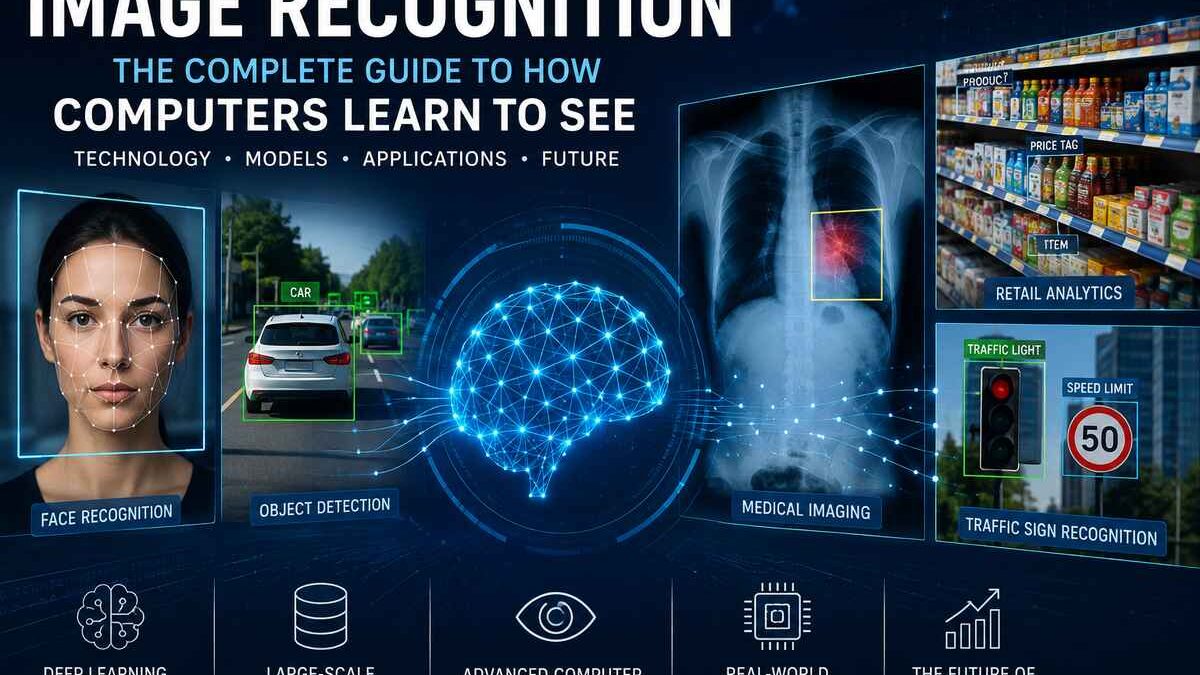
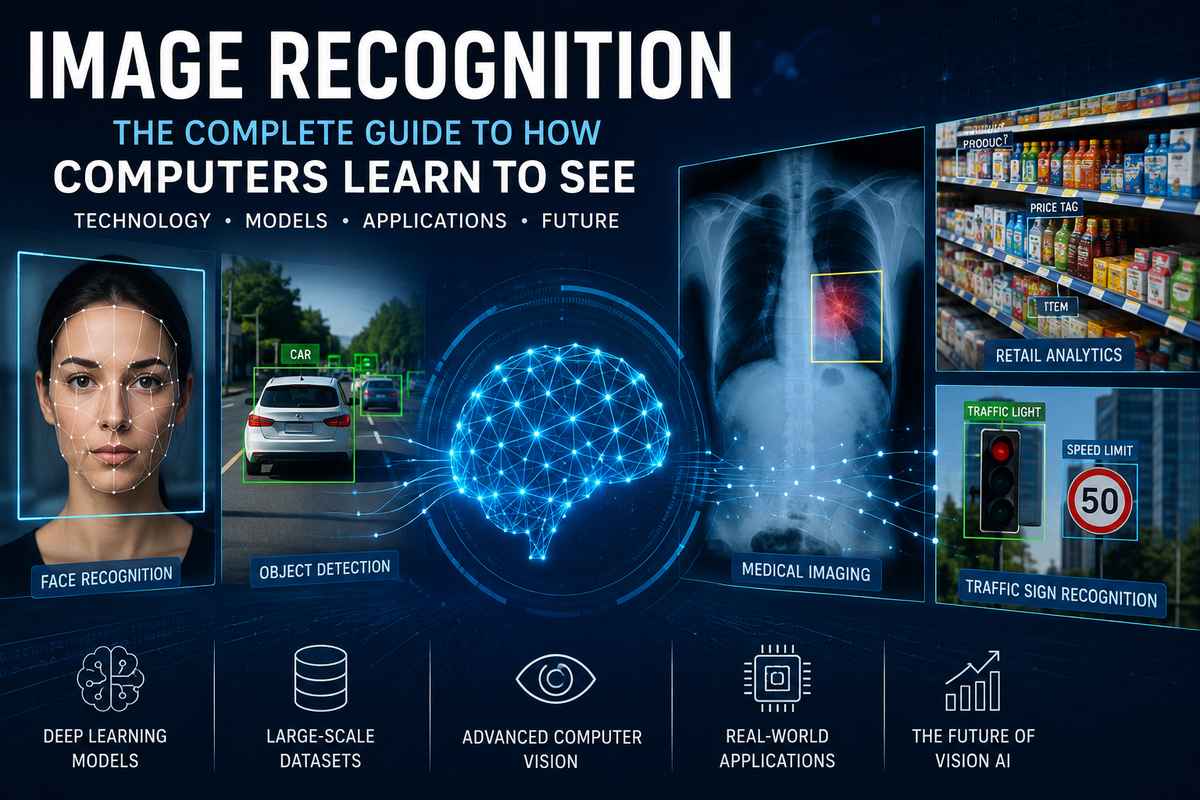
Different real-world objects (face, car, medical scan, retail shelf, traffic sign) being identified using image recognition with AI, with graphics overlaid on top of them.
Image recognition has slowly transformed into one of the most powerful technology of the AI age. You have probably been using it countless times a day without even knowing. Unlock your phone using “Face ID”, search your photo album for “dogs”, submit a picture of a product on a website to find comparable ones or drive a current car with a sophisticated driver assistance system all of those “simple” tasks are actually based on image recognition.
That which was at one time the stuff of science fiction is now the technology driving healthcare, manufacturing, retail, agriculture, logistics, finance, driverless cars, security and consumer electronics.
But even with its broad usage image recognition is often wrongly classified and confused with other solutions. Terms such as machine vision, computer vision, object detection and image recognition, are sometimes used to describe the same thing, although they address separate, unique challenges. Knowing their distinctions is.
In this guide, you‘ll learn:
- What image recognition is and how it works
- How deep learning transformed computer vision
- The differences between image recognition, computer vision, object detection, and image classification
- The neural network architectures behind modern recognition systems
- Popular AI models such as ResNet, EfficientNet, YOLO, Vision Transformers, and CLIP
- Real-world applications across industries
- Challenges, limitations, ethical considerations, and future trends
- How to build your own image recognition system
By the time you reach the end of this guide, you‘ll not only know how machines can identify pictures, but you‘ll also realize why image recognition has become one of the core technology enabling artificial intelligence today.
Table of Contents
What Is Image Recognition?
The process of ‘image recognition’ is concerned with provide a computer system that can automatically locate, recognize and understand the contents of a digital image or series of visual images.
Rather than just think of pixels as colored dots, an image recognition system is taught to learn to identify meaningful pattern recognition. It can decide if an image contains a person, car, animal, building, abnormality in a medical image, handwritten number or one of thousands of other possible recognizable objects and scenes.
At its simplest, image recognition answers questions like:
- What is shown in this image?
- Does this photo contain a cat?
- Is this X-ray normal or abnormal?
- Is this product defective?
- Which plant species is this?
Modern systems push this further. They can locate multiple objects at once, face detection, human pose estimation, emotion recognition, object segmentation, scene understanding, and image captioning in natural language.
This is one of the fundamental pillars of current artificial intelligence.
Related: Discover how image classification is a branch of the wider concept of Computer Vision in our Guide to Computer Vision:
https://www.computertechreviews.com/guide-to-computer-vision/
Why Image Recognition Matters
Visual information is one of the biggest source of digital information in today‘s world.
Millions of photos and videos are upload daily from phones, ebsite, cameras, drone and satellite, and linked-up devices and it‘s based on industry estimation. Manually analyzing this volume of visual information isn’t practical.
This problem is addressed by image recognition, which enables the computer to analyze images automatically, precisely and on huge scale.
Today it powers applications such as:
- Face authentication on smartphones
- Medical diagnosis from CT scans and X-rays
- Automated quality inspection in manufacturing
- Self-driving vehicle perception
- Wildlife monitoring
- Retail inventory management
- Visual search engines
- Optical Character Recognition (OCR)
- Security surveillance
- Social media content moderation
With progress in the AI models, image recognition is evolving to be quicker, precise and able to analyze broader range of scene.
How Image Recognition Works
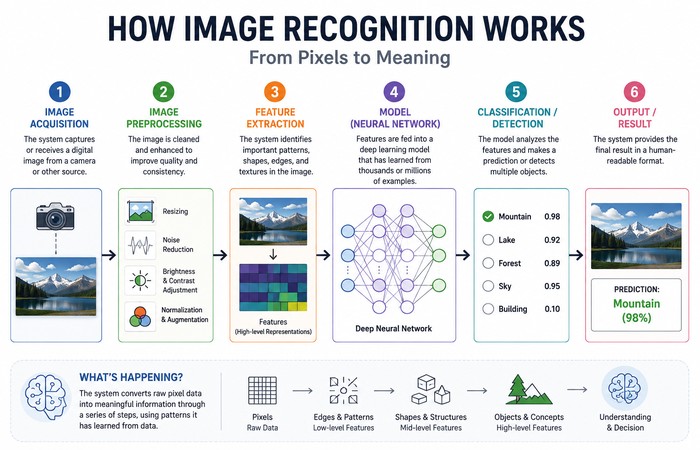
Seems obvious on the surface. At a glance, you seem to easily recognize objects. For look around, a bicycle. You might have not even seen that bicycle before, but you still recognize.
Computers, however do not and “see” the images the way humans do.
According to the machine, each image is just a series of numbers for each pixel.
An image recognition system steadily builds these pixels up to actual information by means of a number of processes,
Step 1: Image Acquisition
In the first step of the acquisition of the digital image by scanning or receiving.
The source could be:
- Smartphone cameras
- Security cameras
- Medical scanners
- Satellite imagery
- Industrial inspection cameras
- Drones
- Web uploads
All pictures are made up of thousands of hundreds of pixels, each pixel will contain information regarding colour and brightness.
Step 2: Image Preprocessing
Raw images usually require preparation before they can be analyzed.
Common preprocessing steps include:
- Image resizing
- Noise reduction
- Brightness correction
- Contrast enhancement
- Color normalization
- Data augmentation (during model training)
“The faces of the face have been enhanced by these methods. The results make the projection more consistent, so once in a different field of view or under different lighting it can still perform accurately.”
Official Documentation: https://opencv.org/
Step 3: Feature Extraction
This stage is where image recognition becomes interesting.
Older computer vision systems relied on manually engineered features.
Developers designed algorithms that searched for:
- Edges
- Corners
- Shapes
- Colors
- Texture
- Geometric patterns
We can see a very different approach to the methods taken by current AI systems.
Deep learning models learn the most discriminative visual features automatically from training data.
Rather than programming a neural network to recognize “what a cat looks like,” programmers instead feed it huge numbers of labeled images until the network learns “what a cat looks like” by itself.
This transition from built rules to learned representations was the reason that led to the frontiers that were pushed with the efficiency of present image recognition.
Step 4: Pattern Recognition
When features have been extracted, the AI compares the features with known trained patterns.
Depending on the application, it may:
- Classify an image
- Detect multiple objects
- Recognize faces
- Segment objects
- Estimate poses
- Identify actions
- Generate captions
The output often provides confidence levels over the classification.
Step 5: Decision Making
Finally, the model outputs results that applications can further process.
For example:
Input Image → AI Processing → Output
- Dog photo → Golden Retriever (98.4%)
- Chest X-ray → Pneumonia Detected (94%)
- Road image → Car, Pedestrian, Traffic Light
- Product image → Nike Running Shoes
- Factory component → Surface Scratch Detected
Most steps are about an order of magnitude faster; on current hardware the entire procedure can take less than one second.
Image Recognition vs Computer Vision vs Object Detection vs Image Classification
They are very similar but they are not one and the same.
Breaking these differences apart is useful so you can select appropriate technology for your project.
| Technology | Primary Goal | Output | Example |
| Computer Vision | Enable machines to understand visual information | Multiple vision tasks | Autonomous driving |
| Image Recognition | Identify what appears in an image | Labels or recognized objects | “This is a Golden Retriever.” |
| Image Classification | Assign one category to an image | Single label | Cat, Dog, Car |
| Object Detection | Detect and locate objects | Labels + Bounding Boxes | Car at (x,y), Person at (x,y) |
| Image Segmentation | Identify every pixel belonging to an object | Pixel-level masks | Road, Sky, Vehicle |
Imagine, for instance, a street scene.
A classification model may simply say:
“Street”
An image recognition model might identify:
- Car
- Bus
- Pedestrian
- Bicycle
An object detection model would additionally indicate where each object is located.
A segmentation model goes even further by outlining the exact boundaries of every object in the scene.
If you’d like to explore localization in greater depth, read our complete guide on Object Detection:
https://www.computertechreviews.com/object-detection/
Why Deep Learning Changed Everything
Prior to 2012, image recognition systems were using human-designed feature extraction processes like:
- SIFT
- SURF
- HOG
- Haar Cascades
Operating these approaches robustly in a controlled environment proved easy, but the variance caused by changes in lighting, rotation, scale, cluttered backgrounds and object shapes caused problems.
And of course the major breakthrough was the advent of deep learning.
Feature extraction is done automatically by convolutional neural networks CNNs rather than by hand. They learn the features from huge amounts of data.
The intense eagerness around deep learning surged [1] when AlexNet handily won the 2012 ImageNet Large Scale Visual Recognition Challenge.
You may refer to this paper by name as. (Available on the said source.) The authors of this paper are Alex Krizhevsky, Ilya Sutskever and Geoffrey E. Hinton.
Since then, image recognition has been greatly advanced by deep learning in various applications, ranging from medical treatment to self-driving car.
Currently, deep neural networks have replaced traditional rule-based algorithms as the heart of most modern image recognition algorithms.
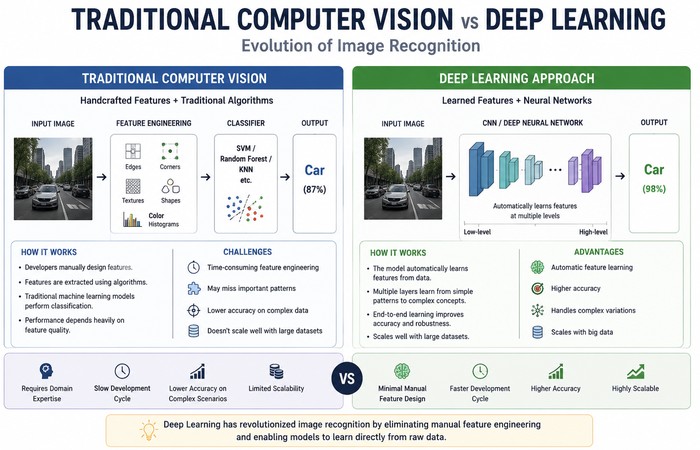
Traditional Computer Vision vs Deep Learning
You don‘t need to use giant neural network to solve every image recognition problem.
Indeed, most production systems continue to use traditional computer vision, because it is much faster, simpler to deploy and needs significantly less computational resources.
The main point is to found the most suitable method for the task.
Traditional Computer Vision
Classical computer vision depends on a set of human crafted algorithms, each capable of recognizing a certain kind of visual pattern. Rather than absorbing information from thousands of photographs, its creators extract rules defining what they want to find.
These algorithms typically analyze:
- Edges
- Lines
- Corners
- Shapes
- Colors
- Textures
- Motion
Popular traditional techniques include:
- Canny Edge Detection
- SIFT (Scale-Invariant Feature Transform)
- SURF (Speeded-Up Robust Features)
- HOG (Histogram of Oriented Gradients)
- Haar Cascade Classifiers
- Template Matching
These methods remain useful in controlled environments where lighting, object position, and background rarely change.
When Traditional Computer Vision Works Best
Traditional methods are still an excellent choice for:
- Barcode and QR code scanning
- Industrial assembly line inspection
- License plate segmentation
- Document scanning
- Shape measurement
- Color-based sorting systems
For example, if all a factory wants to know is whether or not every item on a conveyor is capping, a lightweight computer vision technique will generally get the job done better than an over-complicated deep learning model at a fraction of the computation.
Deep Learning-Based Image Recognition
Deep learning approaches are implemented by an artificial neural network, which expresses the rules instead of the human defined rules. The generated neural network would understand the visual patterns automatically from the given data.
Instead of telling the computer what a cat looks like, you give it thousands of pictures of cats. The model then slowly develops more and more sophisticated representations of visual objects until it is capable of identifying a completely new cat.
This ability to learn by itself is what makes deep learning so powerful.
Modern deep learning models can handle:
- Different lighting conditions
- Multiple viewing angles
- Partial occlusion
- Background clutter
- Scale variations
- Real-world environments
So this is why nearly all current image recognition applications (whether they are Google Photos or self-driving cars) utilize deep learning.
Traditional Computer Vision vs Deep Learning
| Feature | Traditional Computer Vision | Deep Learning |
| Learning Method | Manually programmed rules | Learns automatically from data |
| Training Data | Minimal | Large labeled datasets |
| Accuracy | Good for simple tasks | Excellent for complex tasks |
| Adaptability | Low | Very High |
| Computing Requirements | Low | Medium to High |
| Interpretability | Easier | More difficult |
| Best For | Controlled environments | Real-world applications |
Which Approach Should You Choose?
Choose traditional computer vision when:
- The environment is highly controlled.
- Objects always appear in the same position.
- Computing resources are limited.
- Explainability is important.
- You need extremely fast processing on low-power hardware.
Choose deep learning when:
- Images vary significantly.
- High accuracy is essential.
- Multiple object categories must be recognized.
- Lighting and backgrounds constantly change.
- Large datasets are available.
In practice, many production systems combine both techniques. The usual computer vision method is to first segment a region of interest and then use a deep learning architecture for the final classification.
Understanding Convolutional Neural Networks (CNNs)
In any discussion of image recognition, CNNs are always brought up.
That‘s not by accident.
Convolutional neural networks have ruled image recognition for more than ten years and are still one of the most successful neural network architectures to be built.
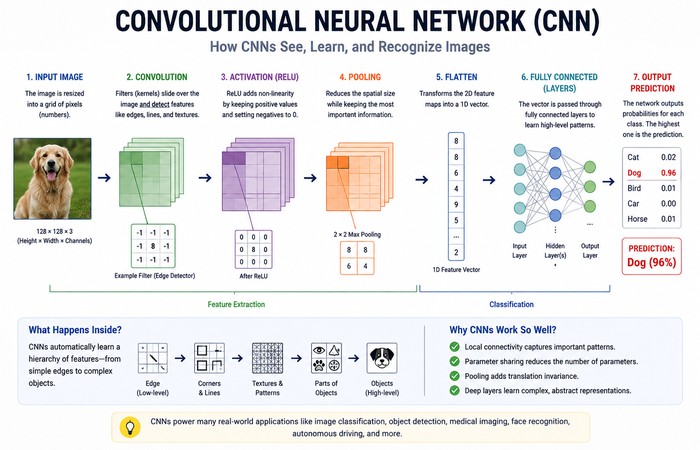
The way I think about CNNs is as a hierarchy of visual comprehension.
Instead of looking at an image all at once, it gradually builds knowledge.
The first layers learn very simple patterns.
The middle layers combine those patterns into recognizable shapes.
The deepest layers identify complete objects.
It‘s actually quite close to the way humans do it.
How CNNs Learn Images
Imagine showing thousands of dog photos to a CNN.
Initially, the network has no idea what a dog looks like.
During training, it begins identifying simple visual elements like:
- Horizontal edges
- Vertical edges
- Curves
- Color gradients
As more layers process the image, those simple features become increasingly meaningful.
Eventually, the model recognizes:
- Eyes
- Ears
- Fur texture
- Legs
- Tail
Finally, the network combines all those features and confidently predicts:
Golden Retriever
This hierarchical learning process is what makes CNNs so effective.
The Main Components of a CNN
Convolution Layer
The convolution layer scans small sections of an image using filters.
Each filter specializes in detecting a particular visual feature.
Examples include:
- Edges
- Corners
- Textures
- Curves
The network is then designed to look for relevant local patterns rather than every pixel separately.
Activation Function
At every layer, each convolution layer is followed by an activation function generally the ReLU (Rectified Linear Unit) function.
This introduces non-linearity, so the model can learn much more complex visual relationships.
Without activation functions, deep neural networks would behave like simple linear models and struggle with real-world recognition tasks.
Pooling Layer
Pooling reduces the size of feature maps while preserving the most important information.
The most common technique is Max Pooling, which keeps only the strongest activation within a small region.
Pooling offers several benefits:
- Faster computation
- Lower memory usage
- Better resistance to small image shifts
- Reduced overfitting
Fully Connected Layer
Near the end of the network, all learned features are combined.
The model compares these features with the categories it learned during training.
For example:
- Dog → 97.8%
- Wolf → 1.3%
- Fox → 0.6%
- Cat → 0.3%
The category with the highest confidence becomes the final prediction.
Why CNNs Became the Standard
CNNs transformed image recognition because they automatically discover useful visual features instead of relying on manually programmed rules.
Some of their biggest advantages include:
- High recognition accuracy
- Excellent scalability
- Robustness to noise
- Translation invariance
- Strong transfer learning capabilities
- Proven performance across countless applications
Today, CNNs are used in:
- Medical imaging
- Face recognition
- Autonomous driving
- Manufacturing inspection
- Satellite imagery
- Retail automation
- Security surveillance
- Wildlife conservation
Transfer Learning: Training Smarter, Not Harder
Building a powerful image recognition model from scratch usually requires millions of labeled images and weeks of GPU training.
Fortunately, most developers don’t need to start from zero.
Instead, they use transfer learning.
Transfer learning takes a model that has already learned general visual features from massive datasets such as ImageNet and adapts it to a new task.
Imagine hiring an experienced mechanic to repair motorcycles instead of training someone who has never seen an engine before.
The mechanic already understands how engines work. They only need to learn the differences specific to motorcycles.
The same principle applies to neural networks.
Instead of learning edges, textures, and shapes all over again, the model simply fine-tunes its existing knowledge.
Transfer learning offers several advantages:
- Faster training
- Smaller datasets
- Lower computational cost
- Higher accuracy
- Reduced overfitting
For many real-world projects, transfer learning is the preferred approach.
Popular CNN Models
Several CNN architectures have shaped the evolution of image recognition.
| Model | Released | Key Strength |
| AlexNet | 2012 | Sparked the deep learning revolution |
| VGG16 | 2014 | Simple, deep architecture with excellent feature extraction |
| GoogLeNet (Inception) | 2014 | More efficient computation using inception modules |
| ResNet | 2015 | Introduced residual learning, enabling much deeper networks |
| DenseNet | 2017 | Improved information flow between layers |
| EfficientNet | 2019 | Outstanding accuracy with fewer parameters |
| ConvNeXt | 2022 | Modernized CNN architecture inspired by Transformers |
Among these, ResNet and EfficientNet remain two of the most widely used models in production systems.
Reference: Tan, M., & Le, Q. (2019). EfficientNet: Rethinking Model Scaling for Convolutional Neural Networks. ICML.
Vision Transformers: The Next Evolution of Image Recognition
For nearly a decade, Convolutional Neural Networks (CNNs) dominated image recognition. Then researchers asked a simple question:
What if computers analyzed images the same way Large Language Models process text?
That question led to the development of Vision Transformers (ViTs), a breakthrough architecture that has significantly advanced computer vision.
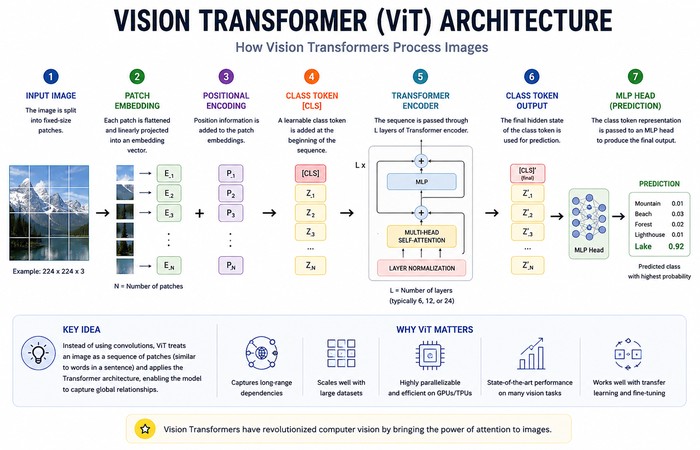
Unlike CNNs, which examine small neighboring regions of an image, Vision Transformers divide an image into small patches and analyze relationships between every patch using a mechanism called self-attention.
This allows the model to understand both local details and the overall context of an image simultaneously.
For example, if a person is holding an umbrella, a Vision Transformer can learn that the umbrella and the person are related, even if they’re located far apart in the image.
This ability to capture long-range relationships makes Vision Transformers especially effective for complex visual understanding tasks.
Reference: Dosovitskiy, A., et al. (2021). An Image is Worth 16×16 Words: Transformers for Image Recognition at Scale. International Conference on Learning Representations (ICLR).
How Vision Transformers Work
Instead of scanning an image with convolution filters, Vision Transformers follow four main steps:
Step 1: Split the Image into Patches
A typical image is divided into small square patches, such as 16 × 16 pixels.
Each patch becomes similar to a “word” in a sentence.
Step 2: Convert Patches into Embeddings
Every patch is transformed into a numerical vector called an embedding.
These embeddings contain visual information that the neural network can process.
Step 3: Self-Attention
The Transformer compares every image patch with every other patch.
Instead of only looking nearby, it determines which regions are most relevant to understanding the image.
For example:
A football player and the football may appear on opposite sides of an image.
A CNN gradually learns this relationship through multiple layers.
A Vision Transformer can learn that relationship immediately using self-attention.
Step 4: Image Classification
After analyzing all relationships between patches, the model predicts the final image category or performs another computer vision task such as detection or segmentation.
CNN vs Vision Transformer
Both architectures are excellent, but they excel in different situations.
| Feature | CNN | Vision Transformer |
| Learns Local Features | ✅ Excellent | ✅ Good |
| Understands Global Context | Limited | Excellent |
| Training Data Requirement | Moderate | Very High |
| Transfer Learning | Excellent | Excellent |
| Training Cost | Lower | Higher |
| Real-Time Performance | Excellent | Good |
| Mobile Deployment | Better | Improving |
| Best For | Most production applications | Large-scale AI systems |
Which One Should You Choose?
If you’re building a typical image recognition system with a few thousand training images, CNNs remain the most practical choice.
If you’re training on millions of images or using foundation models, Vision Transformers often deliver superior performance.
In reality, many state-of-the-art systems now combine both architectures to take advantage of their respective strengths.
Foundation Models Are Changing Image Recognition
Modern image recognition is moving beyond task-specific AI models.
Instead of building separate systems for classification, detection, captioning, and retrieval, researchers now train foundation models capable of solving multiple vision tasks using a single architecture.
These models learn from enormous datasets containing both images and text, enabling them to understand visual concepts in a much broader way.
Rather than memorizing object categories, foundation models learn relationships between images and natural language.
This has dramatically expanded what image recognition systems can do.
Some of the most influential foundation models include:
| Model | Organization | Primary Purpose |
| CLIP | OpenAI | Connects images and text in a shared embedding space |
| DINOv2 | Meta | Self-supervised visual representation learning |
| Florence-2 | Microsoft | Vision-language understanding and generation |
| SAM (Segment Anything Model) | Meta | Universal image segmentation |
| SigLIP | Vision-language representation learning |
These models are increasingly used as building blocks for modern AI applications because they reduce training time while improving performance across multiple tasks.
What Is CLIP?
CLIP (Contrastive Language-Image Pretraining) is one of the most important breakthroughs in modern computer vision.
Unlike traditional image recognition models that learn fixed categories, CLIP learns how images relate to natural language.
For example, instead of training specifically on “Golden Retriever,” CLIP can understand descriptions such as:
- A smiling dog
- A fluffy puppy
- A yellow retriever
- A dog playing in the snow
This capability enables zero-shot learning, allowing the model to recognize objects it was never explicitly trained to classify.
Reference: Radford, A., et al. (2021). Learning Transferable Visual Models From Natural Language Supervision. International Conference on Machine Learning (ICML).
It also powers:
- Image search
- Visual recommendation systems
- AI assistants
- Text-to-image generation
- Image captioning
- Multimodal AI applications
Related Reading: Foundation models such as CLIP also power modern generative AI systems. Learn more in our Guide to Generative AI:
https://www.computertechreviews.com/guide-to-generative-ai/
Types of Image Recognition Tasks
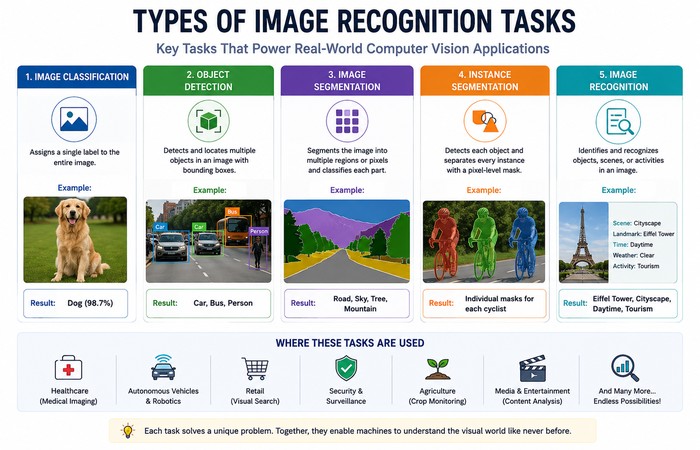
Image recognition isn’t a single task.
Instead, it includes several specialized techniques depending on the problem being solved.
Understanding these differences helps developers choose the right AI model.
Image Classification
Image classification assigns one label to an entire image.
Example:
Input:
A photograph containing a Labrador Retriever.
Output:
Dog
The model doesn’t identify where the dog appears.
It simply determines the primary subject of the image.
Common Use Cases
- Medical diagnosis
- Plant identification
- Product categorization
- Document classification
- Wildlife recognition
Object Detection
Object detection not only recognizes objects but also determines where they are located.
Instead of returning one label, it predicts:
- Object category
- Location
- Confidence score
For example:
- Person
- Bicycle
- Traffic Light
- Car
Each object receives its own bounding box.
This technology powers:
- Self-driving vehicles
- Smart surveillance
- Retail analytics
- Warehouse automation
- Robotics
Today, models like YOLO, Faster R-CNN, and EfficientDet dominate object detection applications.
Related: Want to learn how bounding boxes, YOLO models, and real-time detection work? Read our complete guide on Object Detection:
https://www.computertechreviews.com/object-detection/
Image Segmentation
Sometimes knowing an object’s location isn’t enough.
Applications like autonomous driving and medical imaging require precise object boundaries.
Image segmentation classifies every pixel within an image.
There are two primary types:
Semantic Segmentation
Groups all pixels belonging to the same category.
Example:
Every road pixel receives one label.
Every building receives another.
Instance Segmentation
Separates individual objects belonging to the same category.
Instead of identifying “five people,” the model recognizes Person 1, Person 2, Person 3, and so on.
Popular segmentation models include:
- U-Net
- DeepLabV3+
- Mask R-CNN
- Segment Anything Model (SAM)
Face Recognition
Face recognition is a specialized branch of image recognition.
Rather than simply detecting a face, it identifies whose face appears in the image.
Applications include:
- Smartphone authentication
- Airport security
- Banking verification
- Attendance systems
- Access control
Modern face recognition systems combine image recognition with biometric analysis for greater accuracy.
Optical Character Recognition (OCR)
OCR converts printed or handwritten text inside images into machine-readable text.
You’ll encounter OCR in:
- Invoice processing
- Passport scanning
- Receipt digitization
- Business cards
- Historical document preservation
Many modern OCR systems combine computer vision with Natural Language Processing to improve accuracy.
Popular Image Recognition Models
Different AI models are designed for different computer vision tasks.
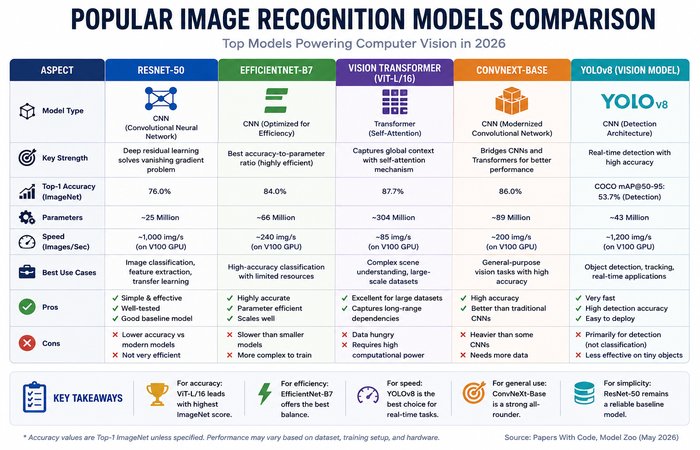
Here’s a comparison of some of the most widely used architectures.
| Model | Best For | Strength |
| ResNet | Classification | Reliable transfer learning |
| EfficientNet | Classification | High accuracy with fewer parameters |
| MobileNet | Mobile AI | Lightweight deployment |
| Vision Transformer (ViT) | Large-scale recognition | Global context understanding |
| YOLOv11 | Object Detection | Real-time performance |
| Faster R-CNN | Object Detection | High precision |
| Segment Anything Model (SAM) | Segmentation | General-purpose segmentation |
| CLIP | Vision-language tasks | Zero-shot recognition |
| Florence-2 | Multimodal AI | Image understanding and generation |
Choosing the right model depends on your dataset, hardware resources, accuracy requirements, and deployment environment.
Reference: Kirillov, A., et al. (2023). Segment Anything. International Conference on Computer Vision (ICCV).
Choosing the Right Image Recognition Model
With so many AI models available, selecting the right one can feel overwhelming. The best choice depends on your application, available computing resources, accuracy requirements, and deployment environment. While no single model is perfect for every task, the table below provides a good starting point.
| Use Case | Recommended Model | Why It’s a Good Choice |
| Mobile Apps | MobileNet | Lightweight architecture optimized for smartphones and edge devices with fast inference. |
| Medical Imaging | ResNet or EfficientNet | High classification accuracy and excellent transfer learning performance for medical datasets. |
| Autonomous Driving | YOLO (You Only Look Once) | Real-time object detection with excellent speed and accuracy for identifying vehicles, pedestrians, traffic signs, and obstacles. |
| Large-Scale AI Systems | Vision Transformer (ViT) | Excels at learning global image relationships and performs well on massive datasets. |
| Low-Power & Edge Devices | EfficientNet Lite | Optimized for embedded devices while maintaining strong accuracy and low computational requirements. |
| Image Search & Multimodal AI | CLIP | Understands relationships between images and natural language, making it ideal for image search, visual recommendation, and AI assistants. |
| Manufacturing & Quality Inspection | EfficientNet or ResNet | Reliable for detecting product defects, surface anomalies, and quality issues with high precision. |
| Image Segmentation | Segment Anything Model (SAM) or Mask R-CNN | Designed to identify precise object boundaries for applications such as medical imaging and autonomous driving. |
| Face Recognition | FaceNet or ArcFace | Purpose-built for accurate facial verification and identification. |
| General Image Classification | ResNet or ConvNeXt | Proven architectures that deliver strong performance across a wide range of classification tasks. |
Quick Tip
If you’re just getting started with image recognition, ResNet is one of the best models to learn because it’s well-documented, widely supported, and works effectively with transfer learning. For mobile or embedded applications, MobileNet is usually the better choice, while developers building large-scale multimodal AI systems should consider Vision Transformers (ViTs) or CLIP depending on the application.
Reference: He, K., et al. (2016). Deep Residual Learning for Image Recognition. CVPR.
Related Reading: If your project requires identifying and locating multiple objects in real time, explore our comprehensive guide on Object Detection to learn how models like YOLO and Faster R-CNN work:
https://www.computertechreviews.com/object-detection/
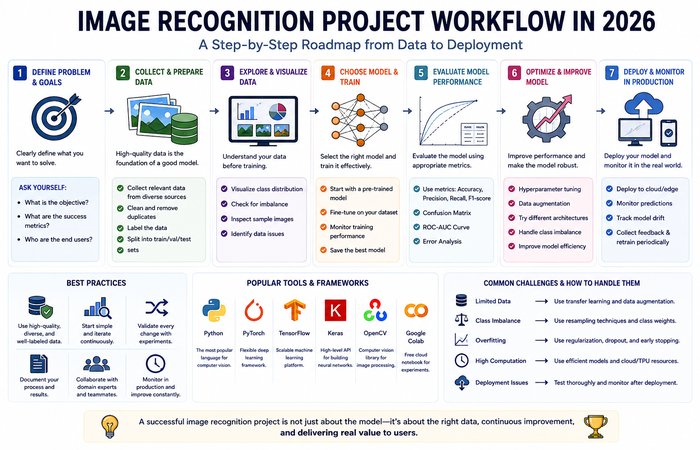
Building an Image Recognition System: Step-by-Step
Understanding how image recognition works is one thing. Building a reliable system that performs well in the real world is another challenge entirely.
Whether you’re developing a medical imaging solution, an industrial inspection system, or an AI-powered mobile app, most successful image recognition projects follow a similar workflow.
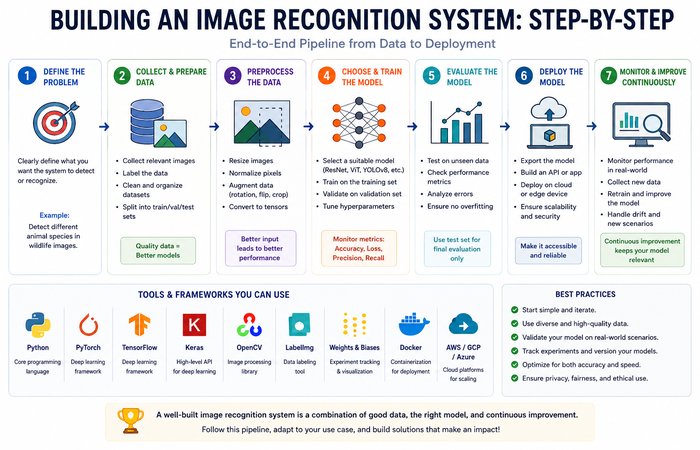
Let’s walk through each stage.
Step 1: Clearly Define the Problem
The biggest mistake beginners make is starting with a model instead of defining the problem.
Ask yourself:
- What exactly should the AI recognize?
- Is it identifying one object or many?
- Does it need to locate objects?
- Does it need pixel-level segmentation?
- Will it run on cloud servers or edge devices?
- How accurate does it need to be?
For example:
| Problem | Recommended Task |
| Identify plant species | Image Classification |
| Detect pedestrians | Object Detection |
| Segment tumors in MRI scans | Image Segmentation |
| Unlock a smartphone | Face Recognition |
| Read invoice text | OCR |
Choosing the correct problem type determines everything that follows.
Step 2: Collect High-Quality Data
An image recognition model is only as good as the data used to train it.
Even the most advanced neural network cannot compensate for poor-quality training images.
A robust dataset should include variations in:
- Lighting conditions
- Camera angles
- Object sizes
- Backgrounds
- Weather
- Image quality
- Occlusions
- Real-world environments
For example, if you’re training a vehicle recognition system, don’t use only bright daytime images.
Include:
- Rain
- Night
- Fog
- Shadows
- Different vehicle colors
- Different camera distances
The more diverse the dataset, the better the model will generalize.
Common Public Image Datasets
Many developers begin with publicly available datasets before creating custom ones.
| Dataset | Best For |
| ImageNet | General image classification |
| COCO | Object detection and segmentation |
| Open Images | Large-scale object recognition |
| CIFAR-10 / CIFAR-100 | Education and experimentation |
| Pascal VOC | Detection benchmarking |
| Cityscapes | Autonomous driving |
| CelebA | Face recognition research |
If you’re building a commercial product, you’ll usually combine public datasets with your own proprietary data.
Reference: Deng, J., et al. (2009). ImageNet: A Large-Scale Hierarchical Image Database. IEEE Conference on Computer Vision and Pattern Recognition (CVPR).
Reference: Lin, T.-Y., et al. (2014). Microsoft COCO: Common Objects in Context. European Conference on Computer Vision (ECCV).
Step 3: Label the Images
Machine learning models need labeled examples.
The type of annotation depends on the task.
Classification
Assign one label to the image.
Example:
dog.jpg
Label:
Golden Retriever
Object Detection
Draw bounding boxes around every object.
Example:
Person
Car
Traffic Light
Dog
Each object receives:
- Class name
- Bounding box coordinates
Segmentation
Instead of drawing rectangles, every pixel belonging to an object is manually outlined.
Although this produces highly accurate models, segmentation datasets are much more time-consuming to create.
Step 4: Preprocess the Images
Raw images rarely produce optimal results.
Before training begins, images are usually standardized.
Typical preprocessing steps include:
- Resize images
- Normalize pixel values
- Remove noise
- Adjust brightness
- Correct contrast
- Crop unnecessary regions
- Convert color spaces when needed
Many projects also use data augmentation to artificially expand the dataset.
Common augmentation techniques include:
- Horizontal flipping
- Rotation
- Random cropping
- Brightness adjustments
- Contrast variation
- Zooming
- Noise injection
Data augmentation improves generalization while reducing overfitting.
Step 5: Train the Model
Once the data is ready, training begins.
During training, the model repeatedly compares its predictions with the correct answers.
Every mistake slightly adjusts millions of internal parameters until the predictions improve.
This process is repeated thousands—or sometimes millions—of times.
Modern image recognition projects commonly use frameworks such as:
- PyTorch
- TensorFlow
- Keras
- JAX
PyTorch has become especially popular among researchers and production AI teams because of its flexibility and extensive ecosystem.
Official Documentation: https://pytorch.org/
Official Documentation: https://www.tensorflow.org/
Why Transfer Learning Is the Industry Standard
Very few companies train image recognition models entirely from scratch.
Instead, they start with a pretrained model that has already learned general visual features from millions of images.
This approach is called transfer learning.
Benefits include:
- Faster training
- Smaller datasets
- Higher accuracy
- Lower computational cost
- Reduced overfitting
For many business applications, transfer learning delivers production-quality results using only a few thousand labeled images.
Step 6: Evaluate Model Performance
A model isn’t ready for deployment simply because training has finished.
It must be evaluated using images it has never seen before.
Several metrics help measure performance.
Accuracy
The percentage of correct predictions.
Useful when datasets are balanced.
Precision
Measures how many positive predictions were actually correct.
High precision reduces false alarms.
Recall
Measures how many real objects the model successfully identified.
High recall is especially important in healthcare and safety applications.
F1 Score
Balances precision and recall.
Often used when datasets contain class imbalance.
Mean Average Precision (mAP)
The industry-standard metric for evaluating object detection models.
Higher mAP generally indicates better localization and recognition performance.
Intersection over Union (IoU)
IoU measures how closely a predicted bounding box matches the ground truth.
Higher IoU values indicate more accurate object localization.
Common Reasons Models Fail
Even sophisticated image recognition systems can perform poorly if fundamental issues are overlooked.
Some of the most common causes include:
Insufficient Training Data
Small datasets limit a model’s ability to generalize.
Poor Image Quality
Blurry or low-resolution images reduce recognition accuracy.
Class Imbalance
If one category dominates the dataset, the model may ignore less common classes.
Overfitting
The model memorizes the training images instead of learning general visual patterns.
Signs include:
- Very high training accuracy
- Poor validation accuracy
Regularization, augmentation, and early stopping help reduce overfitting.
Distribution Shift
Real-world images often differ from training data.
For example:
Training:
- Bright daylight
- Clean backgrounds
Production:
- Night
- Rain
- Motion blur
Even highly accurate models can struggle if deployment conditions differ significantly from training conditions.
Deploying Image Recognition Models
Once the model performs well during testing, it’s deployed for real-world use.
Deployment options generally fall into two categories.
Cloud Deployment
The model runs on remote servers.
Advantages:
- High computing power
- Easy updates
- Scalable infrastructure
Typical use cases:
- Medical imaging platforms
- Retail analytics
- Content moderation
- Large enterprise applications
Edge AI Deployment
Instead of sending images to the cloud, inference happens directly on the device.
Examples include:
- Smartphones
- Drones
- Robots
- Security cameras
- Autonomous vehicles
- Smart factories
Benefits include:
- Lower latency
- Better privacy
- Offline functionality
- Reduced bandwidth usage
Frameworks commonly used for edge deployment include:
- TensorFlow Lite
- ONNX Runtime
- Core ML (Apple)
- Qualcomm AI Engine
- NVIDIA TensorRT
As AI hardware continues improving, edge deployment is becoming increasingly common.
Model Optimization
Large neural networks can be difficult to deploy on resource-constrained devices.
Several optimization techniques improve efficiency.
Quantization
Reduces numerical precision (for example, from 32-bit to 8-bit), making models smaller and faster with minimal impact on accuracy.
Pruning
Removes neurons or connections that contribute little to predictions.
This reduces memory usage and inference time.
Knowledge Distillation
A compact “student” model learns from a larger “teacher” model.
The result is a smaller model that retains much of the original accuracy while running significantly faster.
Monitoring After Deployment
Deployment isn’t the end of the process.
Real-world data changes over time.
New products appear.
Lighting conditions evolve.
Camera hardware changes.
User behavior shifts.
For this reason, production AI systems should continuously monitor:
- Prediction confidence
- Error rates
- False positives
- False negatives
- Data drift
- Model drift
Organizations typically retrain models periodically using newly collected data to maintain high performance.
Common Mistakes When Building Image Recognition Systems
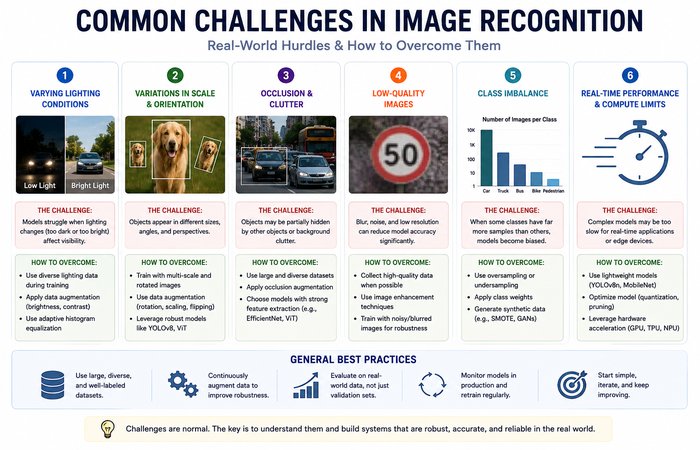
Even with powerful AI models and modern development frameworks, building an accurate image recognition system isn’t always straightforward. Many projects fail not because of the model itself, but because of avoidable mistakes made during data preparation, training, evaluation, or deployment.
Understanding these common pitfalls can save significant time, reduce development costs, and improve your model’s real-world performance.
Using Too Little Training Data
One of the most common mistakes is training a model on a small or limited dataset.
Deep learning models learn by observing examples. If they only see a few hundred images, they may memorize those examples instead of learning patterns that generalize to new data.
Whenever possible:
- Collect diverse images.
- Include different lighting conditions.
- Capture multiple viewing angles.
- Use data augmentation.
- Consider transfer learning if labeled data is limited.
Ignoring Class Imbalance
Many datasets contain far more examples of one category than another.
For example:
- 95,000 normal products
- 5,000 defective products
Without addressing this imbalance, the model may become biased toward predicting the majority class while missing rare but important cases.
Common techniques to reduce class imbalance include:
- Oversampling minority classes
- Under sampling majority classes
- Weighted loss functions
- Focal loss
- Synthetic data generation
Overfitting the Model
A model that performs exceptionally well on training data but poorly on new images is likely overfitting.
Signs of overfitting include:
- Extremely high training accuracy
- Low validation accuracy
- Poor real-world performance
Regularization techniques, early stopping, dropout layers, and data augmentation can help improve generalization.
Choosing the Wrong Evaluation Metric
Accuracy alone doesn’t always reflect model performance.
For example, a medical AI that predicts every patient is healthy might still achieve high accuracy if diseases are rare—but it would fail in practice.
Depending on the application, metrics such as Precision, Recall, F1 Score, IoU, or Mean Average Precision (mAP) often provide a more meaningful evaluation.
Always choose evaluation metrics that match your business or application goals.
Not Monitoring Model Drift
A model that performs well today may become less accurate over time.
Changes in:
- User behavior
- Camera hardware
- Lighting conditions
- Product designs
- Environmental factors
can gradually reduce prediction quality.
Monitoring production performance and periodically retraining models with new data helps maintain long-term accuracy.
Deploying Without Real-World Testing
A model that performs well in a testing environment isn’t automatically ready for production.
Before deployment, validate the model using real-world scenarios that reflect actual operating conditions.
For example, test whether the model still performs reliably when images contain:
- Motion blur
- Poor lighting
- Partial occlusions
- Background clutter
- Weather changes
- Low-resolution inputs
Testing under realistic conditions helps uncover issues that may not appear during laboratory evaluation.
Key Takeaway
Building a successful image recognition system involves much more than selecting the latest neural network architecture. High-quality data, thoughtful evaluation, continuous monitoring, and rigorous real-world testing often have a greater impact on performance than simply choosing a more complex model. Avoiding these common mistakes will help you develop systems that are more accurate, reliable, and ready for production deployment.
Real-World Applications of Image Recognition
Image recognition has come a long way from identifying objects in photos. Currently, it is an integral part of many products and services that millions of people use every day, whether they know it or not.
The power of image recognition has the ability to revolutionize everything from disease diagnosis to automating the way warehouses run.
Let’s explore where this technology is creating the biggest impact.
Healthcare and Medical Imaging
Healthcare is now one of the most rapidly expanding fields employing image recognition techniques.
Medical professionals generate enormous volumes of visual data every day through:
- X-rays
- MRI scans
- CT scans
- Ultrasound
- PET scans
- Retinal imaging
- Histopathology slides
It is not an easy task to analyze each image by hand, as it would take a considerable amount of time and opens the door for human mistakes.
Image recognition by using AI makes abnormalities detection faster by clinicians without replacing medical decision-making.
Common Healthcare Applications
- Detecting pneumonia from chest X-rays
- Identifying diabetic retinopathy in retinal scans
- Breast cancer screening
- Brain tumor segmentation
- Skin lesion classification
- Fracture detection
- Organ segmentation
- Medical image enhancement
A few AI ‘s have regulatory approval for use as a ‘second read’ for particular clinical pathways, where they aid a specialist by flagging regions of concern.
Related Reading: Find out how hospitals and healthcare organizations are utilizing computer vision techniques in our article, Computer Vision in Healthcare:
https://www.computertechreviews.com/computer-vision-in-healthcare/
Manufacturing and Quality Inspection
Taking advantage of automating inspection by machine vision for years, machine is now being able to improve inspection accuracy by applying deep learning.
But we can do better than the rules. Current image recognition techniques can be trained to detect very minor anomalies still untraceable to any existing computer based rule.
Typical inspection tasks include:
- Surface scratches
- Missing components
- Incorrect assembly
- Paint defects
- Product labeling verification
- Packaging inspection
- Dimension measurement
Automation (AI) takes quality control further than the traditional visual inspection as the system can continually inspect for errors, without getting tired which is the case with humans, on a large scale production line.
Retail and E-Commerce
An incredible amount of stress is placed on shoppers and visual information is produced every day by retail.
Image recognition services can offer assistance to retailers in optimizing their services while maintaining the highest customer satisfaction possible.
Popular applications include:
Smart Inventory Management
Cameras automatically detect:
- Empty shelves
- Incorrect product placement
- Low inventory
- Pricing errors
Visual Product Search
Instead of typing keywords, shoppers upload a photo.
The AI finds visually similar by shopping for the same product.
Largely taken for granted on all fashion, furniture and home accessories sites.
Automated Checkout
AI Camera-enabled stores will also have the capability to identify products in shopping carts and therefore allow for rapid checkout experience and bring in operational excellence.
Customer Analytics
Retailers use image recognition to understand:
- Customer traffic
- Shelf engagement
- Shopping behavior
- Queue lengths
- Heat maps
This information helps optimize store layouts and staffing.
Related Reading: Explore more retail use cases in our article on The Benefits of Computer Vision in Retail Businesses:
https://www.computertechreviews.com/the-benefits-of-computer-vision-in-retail-businesses/
Autonomous Vehicles
Self-driving cars fundamentally rely on image recognition.
Multiple cameras continuously capture the surrounding environment while AI models identify:
- Cars
- Trucks
- Pedestrians
- Cyclists
- Traffic signs
- Traffic lights
- Road markings
- Lane boundaries
- Obstacles
They are also integrated with other pre-collision warning systems such as radar, liDAR, GPS and sensor fusion.
Object detection is especially relevant as both the nature of the object, as well as its location, need to be known simultaneously.
Agriculture
Nowadays many farmers make use of image recognition on their farms to increase the yield.
Applications include:
- Crop disease detection
- Weed identification
- Fruit counting
- Yield estimation
- Livestock monitoring
- Irrigation management
- Precision farming
Drone imagery along with AI can and will help farmers monitor thousands of acres very quickly than they could inspecting based on manual inspection.
Security and Surveillance
Security systems have become significantly more intelligent thanks to image recognition.
Modern surveillance platforms can automatically identify:
- Suspicious activities
- Unauthorized access
- Intrusions
- Abandoned objects
- Vehicle license plates
- Faces
- Crowd density
Many organizations also use facial recognition for:
- Employee authentication
- Building access
- Airport security
- Border control
However, we also need to take into account the identity and privacy implications inherent in many of these applications, which we shall discuss in this guide.
Banking and Financial Services
Financial institutions increasingly use image recognition for document verification and fraud prevention.
Examples include:
- Identity verification
- Check processing
- Know Your Customer (KYC)
- Signature verification
- ID document validation
- Mobile banking authentication
Numerous banking apps now authenticate a customer just by matching a selfie with a government issued ID.
Logistics and Warehousing
Warehouses expose people to a multitude of visual events in an hour.
Image recognition automates tasks such as:
- Barcode scanning
- Parcel sorting
- Package dimension measurement
- Inventory counting
- Shelf monitoring
- Damage detection
Images can also be used with robotics to enable autonomous systems to identify items and pick and place products more quickly.
Smart Cities
Artificial intelligence (AI) is to be used for the enhancement of daily city life.
Examples include:
- Traffic monitoring
- Parking management
- Road damage detection
- Waste management
- Crowd monitoring
- Public safety
- Infrastructure inspection
Because of these systems, municipalities can react quicker to events, as well as increasing efficiency.
Social Media and Content Moderation
New images are added to social networking everyday by billions of users.
Can only be viewed of in a graphical way and cannot be checked by hand.
Image recognition helps identify:
- Graphic violence
- Nudity
- Hate symbols
- Copyright violations
- Spam images
- Fake accounts
AI also does the first level of screening. More difficult or uncertain cases are passed on to human moderators.
Wildlife Conservation
Images are being used by scientists to detect at-risk populations of animals in the wild.
Applications include:
- Animal identification
- Population estimation
- Poaching detection
- Species classification
- Migration tracking
Camera traps equipped with AI can automatically recognize thousands of animals across large conservation areas.
Consumer Applications
Many everyday technologies now rely on image recognition.
Examples include:
- Google Photos organizing images
- Apple Photos identifying people and pets
- Snapchat filters
- Instagram visual effects
- Smartphone face unlock
- Visual translation apps
- Home security cameras
- Smart doorbells
These consumer applications demonstrate how image recognition has become part of everyday digital life.
Industries Using Image Recognition
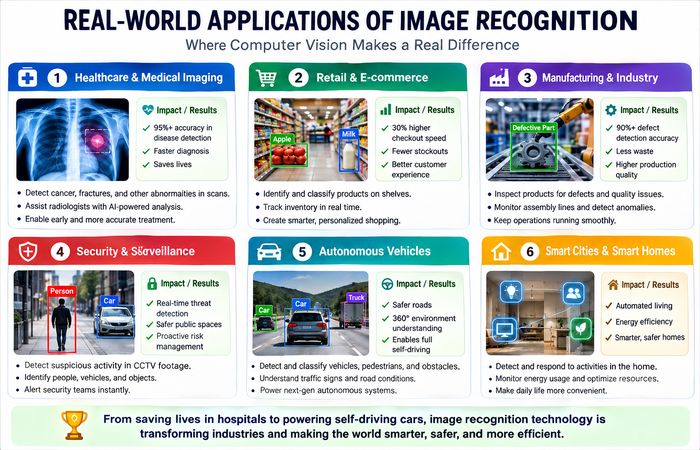
| Industry | Common Applications |
| Healthcare | Disease detection, medical imaging |
| Manufacturing | Quality inspection, defect detection |
| Retail | Inventory management, visual search |
| Agriculture | Crop monitoring, disease detection |
| Automotive | Autonomous driving, driver assistance |
| Finance | Identity verification, fraud detection |
| Security | Surveillance, facial recognition |
| Logistics | Warehouse automation, parcel sorting |
| Smart Cities | Traffic monitoring, public safety |
| Consumer Technology | Face unlock, photo organization |
|
|
Real-World Case Studies
Image recognition becomes more understandable by looking at how top companies are deploying it in production. Here are some of how image recognition is solving production and technical problems for various markets.
Tesla: Helping Vehicles Understand the Road
Tesla employs camera-centered perception system based on deep neural networks. Cameras should be used to detect line, traffic signs, traffic lights, pedestrians, bikes, other vehicles and road users. These information is then processed via computer images acquired from cameras in real time.
Unlike single images, Tesla AI keeps analyzing video streams so that the vehicle can comprehend movements of surrounding environment. This visual information is used to provide assistance in different situations including lane departure, adaptive cruise control, auto emergency braking and parking.
This example illustrates how image recognition is a key component of modern day autonomous driving systems where the decision making is need to be low latency and accurate.
Google Photos: Organizing Billions of Images Automatically
Google Photos is an example of image recognition that is used in a common daily application. It does not let users organize their photo collections; instead, AI automatically sorts the images that are uploaded into clusters based on their visual appearance.
The system can recognize:
- People
- Pets
- Landmarks
- Food
- Vehicles
- Flowers
- Beaches
- Mountains
- Documents
In this way, users are allowed to search among their images for natural wordslike “golden retriever”, “birtday cake” or “sunset” instead of recording the images with labels. Although the specific algorithms are still improving, example shows how image recognition can ease in dealing with large image collections.
Amazon Go: Enabling Cashier-Less Shopping
Amazon Go stores integrate image recognition, object detection, sensor fusion, and machine learning to offer a vending machine-free shopping experience.
When customers take or return items, overhead cameras and AI model detects or recognizes the items and stores it in the virtual shopping cart, then, when customers check out, everything is tallied automatically without going through a conventional checkout stand.
While the whole system is a combination of many technologies, an important part of the image recognition task is to know what products the potential customer might be looking at and monitor their activities inside the store.
Medical Imaging: Supporting Clinical Decision-Making
There is wider adoption by hospitals and diagnostic centers of image recognition powered by AI that helps clinicians interpret radiology images including X-ray, CAT, MRI, mammograms, retinal scans.
Do not propose to replace radiologists but to be used as decision support systems the called attention to abnormal regions which may need for further analysis. This will assist clinicians to find abnormal regions quicker, sort out more urgent cases, increase workflow and help in detecting minute abnormalities.
Human knowledge and expertise is still vital, all final diagnoses are the results of medical professionals. Image recognition acts as an extra step of analysis, instead of the autonomous decision.
Related Reading: Learn more about how AI advances are revolutionizing disease diagnosis and clinical workflows in our document, Computer Vision in Healthcare:
https://www.computertechreviews.com/computer-vision-in-healthcare/
Key Takeaway
Following these examples, it is evident that image recognition is no more limited to research labs. It is already solving real-world problems at scale as a key enabler for autonomous vehicles driving on roads, sorting photo libraries for users, creating checkout-less shopping experiences or assisting healthcare professionals. With emerging improvements in AI models, image recognition has an immense scope to aid as an innovative disruption to digital systems.
Image Recognition Combined with Other AI Technologies
Conventional AI systems are not using Image Recognition in isolation.
Instead, they integrate it with other existing technologies in order to face more sophisticated problems.
Such as:
Image Recognition + Natural Language Processing
It‘s a piece of AI that can detect objects and generate the text based on that image.
This powers automatic image captioning and accessibility tools.
Related Reading: Learn how AI converts visual information into natural language in our guide to Automatic Image & Video Caption Generation with Deep Learning:
Image Recognition + Generative AI
Foundation models can now both recognize and generate images.
Applications include:
- Image editing
- Image generation
- Style transfer
- Visual search
- AI design assistants
Interested in AI image generation? Read our comprehensive guide to Text-to-Image AI:
https://www.computertechreviews.com/text-to-image-ai/
Image Recognition + Robotics
Robots equipped with cameras use image recognition to:
- Pick objects
- Navigate warehouses
- Avoid obstacles
- Inspect products
- Assist surgeons
- Harvest crops
To be sure, were it not for the image recognition, a robot who knew nothing about his environment wouldn‘t know anything about anything.
Challenges and Limitations of Image Recognition
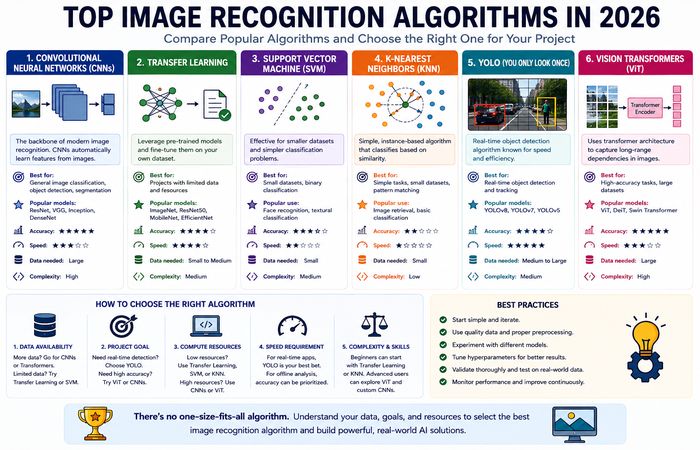
Although the standard of image recognition technology has rapidly developed over the past ten years, it is far from flawless. All currently developed AI technology fails at some points, particularly in unfamiliar situations or when images are of poor quality or are biased with regard to their training.
Awareness of these limitations is of equal importance to an understanding of how the technology operates.
1. Large Data Requirements
Big data is essential for the application of deep learning models.
It can be very costly and time-consuming to gather thousands, or even millions, of high quality, labeled images.
When it comes to ‘niche’ applications like medical image or industrial inspection, expert-assisted labeled data is sometimes the most difficult to get.
Fortunately, many methods can be utilized such as transfer learning, data expansion, self-supervised learning to lower the need for labeled data.
2. Poor Image Quality
Image recognition systems struggle when images are:
- Blurry
- Low resolution
- Overexposed
- Underexposed
- Noisy
- Partially obstructed
Has the effect that a camera monitoring during the hours of darkness may produce fuzzy images, which potentially makes it hard to identify individuals or vehicles.
Enhancing the camera quality and preprocessing the images may seem to reduce these problems, but they can‘t be completely avoided.
3. Changing Environments
Objects rarely appear under perfect conditions.
Real-world environments constantly change due to:
- Lighting
- Weather
- Shadows
- Camera angles
- Background clutter
- Object orientation
If the dataset used to train the model was not well balanced for nighttime or heavy rain, then it can perform extremely poorly during those times.
4. Similar-Looking Objects
Some categories naturally resemble each other.
Examples include:
- Wolves vs. Huskies
- Leopards vs. Jaguars
- Different smartphone models
- Similar car variants
- Nearly identical manufacturing components
Distinguishing between visually similar objects often requires larger datasets and more sophisticated models.
5. Class Imbalance
Many real-world datasets are unbalanced.
Imagine training a defect detection system using:
- 98,000 normal products
- 2,000 defective products
Without proper handling, the model may simply predict “normal” most of the time because that class dominates the training data.
Techniques such as weighted loss functions, oversampling, focal loss, and synthetic data generation help address this issue.
6. High Computational Requirements
Modern image recognition models can contain hundreds of millions of parameters.
Training these models often requires:
- High-end GPUs
- Large memory capacity
- Significant electricity
- Cloud computing resources
Although inference has become much faster, deploying large models on smartphones, drones, or IoT devices still requires optimization.
7. Explainability
Many deep learning models behave like “black boxes.”
While they produce highly accurate predictions, understanding why they reached a particular decision isn’t always straightforward.
This lack of transparency becomes especially important in high-stakes applications such as:
- Healthcare
- Finance
- Law enforcement
- Insurance
- Autonomous vehicles
To improve interpretability, researchers use techniques such as:
- Grad-CAM
- Saliency maps
- Feature visualization
- Explainable AI (XAI)
8. Adversarial Attacks
One surprising limitation of deep learning is its vulnerability to adversarial examples.
Tiny, carefully crafted changes to an image—often invisible to humans—can cause a model to make completely incorrect predictions.
For example, a modified stop sign might still look normal to a driver but could potentially confuse an AI system into misclassifying it.
Although adversarial robustness continues to improve, defending against these attacks remains an active area of research.
Ethical Considerations and Responsible AI
As image recognition becomes more powerful, ethical questions become increasingly important.
Technology itself is neutral. How it’s designed, trained, and deployed determines whether it benefits or harms society.
Privacy
Image recognition systems frequently process personal information, including faces, license plates, documents, and private property.
Organizations deploying these systems should:
- Minimize unnecessary data collection.
- Clearly explain how images are used.
- Protect stored data with appropriate security measures.
- Comply with applicable privacy regulations.
Transparency helps build user trust.
Bias in AI Models
AI systems learn from historical data.
If the training dataset isn’t diverse, the resulting model may perform better for some groups than others.
For example, facial recognition systems trained on unbalanced datasets have historically shown different error rates across demographic groups.
Reducing bias requires:
- Diverse training datasets
- Careful evaluation across multiple populations
- Continuous monitoring
- Human oversight
Human Oversight
Image recognition should support human decision-making—not automatically replace it in critical situations.
Applications involving:
- Medical diagnosis
- Criminal investigations
- Hiring
- Financial decisions
should always include qualified human review before important decisions are made.
Transparency
Organizations should clearly communicate when AI systems are being used.
Users deserve to know:
- When images are analyzed.
- What information is collected.
- Why it’s collected.
- How long it’s stored.
- Whether automated decisions are involved.
Responsible deployment increases both trust and accountability.
Future Trends in Image Recognition
Image recognition continues to evolve rapidly.
Several emerging technologies are expected to shape the next generation of computer vision systems.
Multimodal AI
Modern AI increasingly combines:
- Images
- Text
- Audio
- Video
instead of treating each data type separately.
Large multimodal models can answer questions about images, generate captions, summarize videos, and reason across different types of information.
Better Foundation Models
General-purpose vision models continue to improve.
Instead of training a new model for every task, developers increasingly adapt pretrained foundation models for:
- Classification
- Detection
- Segmentation
- Captioning
- Visual search
This significantly reduces development time while improving performance.
Edge AI
Running image recognition directly on devices is becoming increasingly practical.
Future applications will rely less on cloud servers and more on on-device AI running in:
- Smartphones
- Smart cameras
- Wearables
- Drones
- Robots
- Industrial equipment
This improves privacy while reducing latency.
Synthetic Training Data
Generating realistic synthetic images helps overcome one of the biggest challenges in AI—limited training data.
Synthetic datasets are becoming increasingly valuable for:
- Autonomous vehicles
- Manufacturing
- Robotics
- Healthcare
- Agriculture
especially when collecting real-world images is expensive or impractical.
Explainable AI
Future image recognition systems will become more transparent.
Instead of simply predicting a result, they will increasingly explain:
- Which image regions influenced the decision.
- How confident the model is.
- Which visual features contributed most.
Explainability will be especially important in regulated industries.
FAQs
Q1: What is image recognition?
A: Image recognition is an AI technique that enables computers to identify and classify objects, people, scenes, text, or patterns in digital images.
Q2: Is image recognition the same as computer vision?
A: No. Computer vision is the broader field of enabling machines to interpret visual information, while image recognition is one specific task within computer vision.
Q3: What’s the difference between image recognition and object detection?
A: Image recognition identifies what appears in an image.
Object detection identifies what appears and where it appears by drawing bounding boxes around each object.
Learn more in our Object Detection guide:
https://www.computertechreviews.com/object-detection/
Q4: Which algorithms are used in image recognition?
A: Modern systems commonly use:
- Convolutional Neural Networks (CNNs)
- Vision Transformers (ViTs)
- ResNet
- EfficientNet
- MobileNet
- CLIP
- Foundation Models
Q5: What industries use image recognition?
A: Healthcare, manufacturing, retail, agriculture, automotive, finance, logistics, security, consumer technology, and many others.
Q6: How accurate is image recognition?
A: Accuracy depends on the dataset, model architecture, image quality, and deployment environment.
Well-trained models can achieve very high accuracy for many tasks, but no system is perfect.
Q7: Can image recognition work in real time?
A: Yes.
Modern models such as YOLO can process dozens of frames per second on suitable hardware, making real-time applications like autonomous driving and video analytics possible.
Reference: Redmon, J., et al. (2016). You Only Look Once: Unified, Real-Time Object Detection. CVPR.
Q8: Is image recognition part of artificial intelligence?
A: Yes.
Image recognition is one of the most important applications of Artificial Intelligence and Computer Vision.
Q9: What is transfer learning?
A: Transfer learning uses a pretrained model as the starting point for a new task, reducing training time and improving performance when labeled data is limited.
Q10: Does image recognition require deep learning?
A: Not always.
Traditional computer vision techniques remain effective for simple, controlled tasks, while deep learning is generally preferred for complex, real-world scenarios.
Q11: What programming language is best for image recognition?
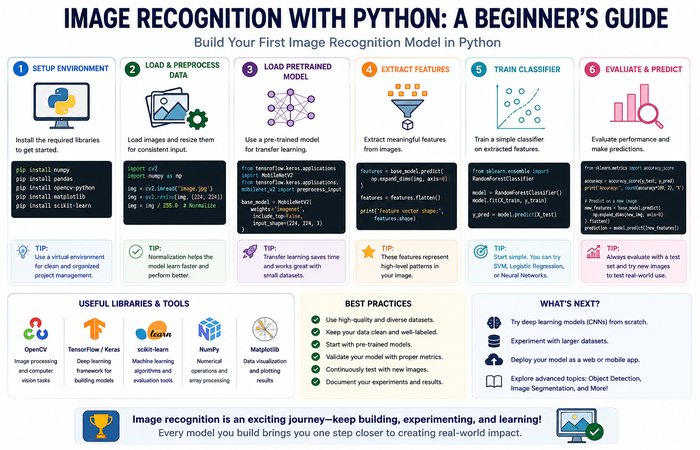
A: Python is the most widely used programming language for image recognition because it has a rich ecosystem of AI and computer vision libraries, including PyTorch, TensorFlow, OpenCV, Keras, and scikit-learn. It’s suitable for both beginners and professionals. Other languages like C++, Java, and Swift are also used in specific scenarios, particularly when performance or mobile deployment is a priority.
Q12: Can image recognition work offline?
A: Yes. Image recognition can run entirely offline using edge AI, where the model processes images directly on a device instead of sending them to the cloud. Smartphones, drones, industrial robots, security cameras, and autonomous vehicles commonly use offline image recognition to reduce latency, improve privacy, and continue operating without an internet connection.
Q13: Is image recognition expensive to implement?
A: It depends on the project’s complexity. Small applications built with pretrained models and open-source frameworks can be developed at a relatively low cost. However, enterprise-grade solutions often require investments in data collection, annotation, GPU infrastructure, cloud services, model training, deployment, and ongoing maintenance. Using transfer learning and cloud AI services can significantly reduce development costs.
Q14: What’s the difference between image recognition and facial recognition?
A: Image recognition is a broad technology that identifies objects, animals, products, scenes, or text within an image. Facial recognition is a specialized application of image recognition that identifies or verifies a person’s identity using unique facial features. In simple terms, every facial recognition system uses image recognition techniques, but not every image recognition system performs facial recognition.
Q15: Which datasets are best for beginners learning image recognition?
A: Beginners should start with publicly available datasets that are well-documented and widely used in the AI community. Some of the most popular options include:
- CIFAR-10 – Ideal for learning image classification fundamentals.
- MNIST – A classic dataset for handwritten digit recognition.
- Fashion-MNIST – Similar to MNIST but focused on clothing items.
- ImageNet – One of the largest datasets for image classification and transfer learning.
- COCO (Common Objects in Context) – Widely used for object detection and image segmentation.
- Pascal VOC – A beginner-friendly dataset for object detection experiments.
These datasets are supported by most deep learning frameworks, making them excellent starting points for building and testing image recognition models.
Related Computer Vision Resources
Continue exploring Computer Vision with these in-depth guides:
- Guide to Computer Vision (Pillar Page)
https://www.computertechreviews.com/guide-to-computer-vision/ - Object Detection
https://www.computertechreviews.com/object-detection/ - Computer Vision in Healthcare
https://www.computertechreviews.com/computer-vision-in-healthcare/ - The Benefits of Computer Vision in Retail Businesses
https://www.computertechreviews.com/the-benefits-of-computer-vision-in-retail-businesses/ - Automatic Image & Video Caption Generation with Deep Learning
https://www.computertechreviews.com/automatic-image-and-video-caption-generation-with-deep-in-learning/ - Text-to-Image AI
https://www.computertechreviews.com/text-to-image-ai/ - Guide to Generative AI
https://www.computertechreviews.com/guide-to-generative-ai/
References
- Deng, J., et al. (2009). ImageNet: A Large-Scale Hierarchical Image Database. CVPR.
- Krizhevsky, A., Sutskever, I., & Hinton, G. E. (2012). ImageNet Classification with Deep Convolutional Neural Networks. NeurIPS.
- Lin, T.-Y., et al. (2014). Microsoft COCO: Common Objects in Context. ECCV.
- He, K., et al. (2016). Deep Residual Learning for Image Recognition. CVPR.
- Redmon, J., et al. (2016). You Only Look Once: Unified, Real-Time Object Detection. CVPR.
- Tan, M., & Le, Q. (2019). EfficientNet: Rethinking Model Scaling for Convolutional Neural Networks. ICML.
- Dosovitskiy, A., et al. (2021). An Image is Worth 16×16 Words: Transformers for Image Recognition at Scale. ICLR.
- Radford, A., et al. (2021). Learning Transferable Visual Models From Natural Language Supervision. ICML.
- Kirillov, A., et al. (2023). Segment Anything. ICCV.
- PyTorch. Official Documentation. https://pytorch.org/
- TensorFlow. Official Documentation. https://www.tensorflow.org/
- OpenCV. Official Documentation. https://opencv.org/
Conclusion
Image recognition has evolved from simple pattern-matching algorithms into one of the most influential technologies in modern artificial intelligence. Today, it enables computers to identify objects, analyze medical images, automate manufacturing, improve retail operations, support autonomous vehicles, and power countless everyday applications.
At the heart of this progress are deep learning models such as CNNs, Vision Transformers, and foundation models that continue to push the boundaries of visual understanding. Combined with advances in edge AI, multimodal systems, and transfer learning, image recognition is becoming faster, more accurate, and more accessible than ever before.
However, building effective image recognition systems requires more than choosing the latest model. Success depends on high-quality data, thoughtful evaluation, responsible deployment, and ongoing monitoring. Organizations must also address challenges such as privacy, bias, explain ability, and security to ensure these systems are used responsibly.
As computer vision continues to evolve, image recognition will remain a foundational technology driving innovation across industries. Whether you’re developing AI-powered applications, researching machine learning, or exploring how intelligent systems interpret visual information, understanding image recognition provides a strong foundation for the future of artificial intelligence.
