![Jihosoft Video Editor – The Best Free Video Editing Software [No Watermark]](https://www.computertechreviews.com/wp-content/uploads/2020/12/Jihosoft-Video-Editor-The-Best-Free-Video-Editing-Software-No-Watermark-1200x675.jpg)

Table of Contents
Overview
Launched by Jihosoft company, Jihosoft Video Editor is one of the best video editing software for beginners . This software works on Windows operating systems and it is able to cut big video/ audio files, as well as join multiple video/ audio clips together. Moreover, it supports various media file formats like MP4, MOV, AVI, AVCHD, MKV, FLV, MPG, MPEG, WMV, MTS, M2V, M2T, AVC, M2TS, ACC, MP3, FLAC, WAV, WMA, etc.; Now, let’s take a deeper look at this free video editing software.
Main functions of Jihosoft Video Editor
1. Cut and trim big video/ audio files
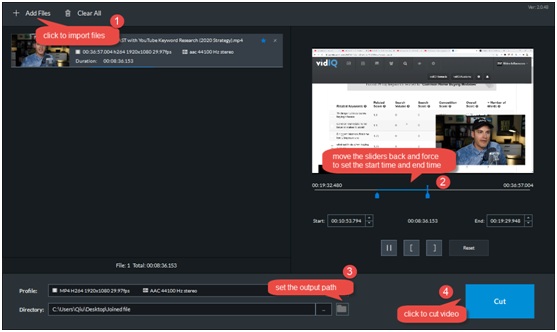
By using Jihosoft Video Editor, you can cut your video/ audio file with a few clicks. Firstly, you need to import video/ audio file to the program. There is a preview window on the software interface, through which you can preview your video or pre-listen your audio, then precisely set the start point and end point by moving the two sliders on the timeline. After that, you can go to set up the output path and finally cut the video/ audio.
2. Combine multiple video/ audio clips into one
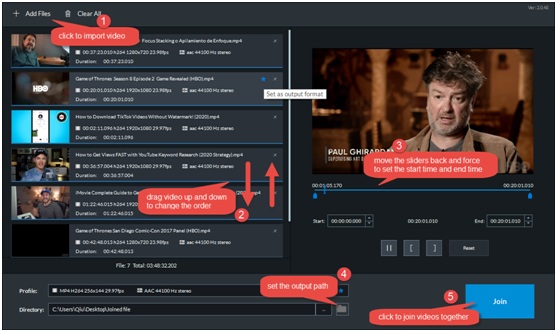
Through Jihosoft Video Editor, you can also combine as many videos as you wish into one. After importing videos (in same format or in different formats) to the program, you can drag videos up and down to change their order. You can also cut and trim each of the videos if necessary. If the video clips you like to join together are in different formats, you are allowed to pick up one of the formats as the output format by lighting the blue star icon. Finally, set up the output path and start joining.
If you like to join multiple audio clips together, Jihosoft Video Editor is also available.
Advantages of Jihosoft Video Editor
- Intuitive user interface makes it easy to use even for newbies;
- Processing speed is very fast and stable even edit big video/ audio files;
- There will be no quality loss after editing videos/ audios;
- There will be no watermark added to the edited video;
- It is free of charge;
- It is a light software that will require less RAM than the average;
Pricing
Jihosoft Video Editor is free video editing software for PC.
In summary
The Mac version of [Jihosoft Video Editor] is not available for the time being. [Jihosoft Video Editor] is targeted to be a multi-functional video editing software, while the cutting and joining features are available now. Other video editing features like cropping, rotating, adding text and more will soon be available. Stay tuned!