

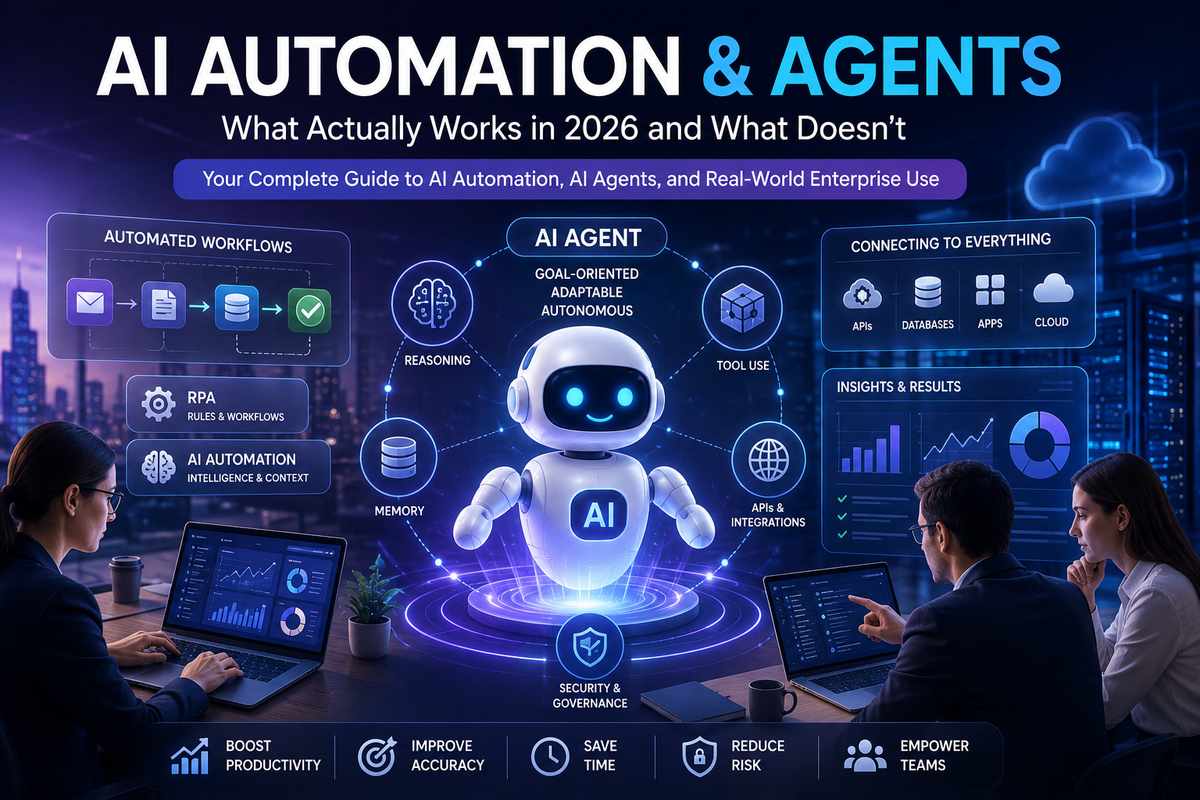
AI Automation & Agents
AI automation has divided itself into two very different camps. At one end is old-school automation rule-based, scripted tools that can route tickets, match invoices, move data between systems using pretty rigid logic. At the other end is the new category of AIs that take an objective, decide which tools to run, in what order, and can stick with it until they meet the objective.
If you don‘t already know how you fit into the larger AI landscape, our Guide to Generative AI has got you covered with an explanation of the technology behind today‘s AI. This guide will instead focus on AI automation and autonomous agents, the technology behind actual business processes.
That shift is not cosmetic. Gartner has said 40% of enterprise applications will feature task-specific AI agents by the end of 2026, up from less than 5% in 2025, which shows how quickly agentic features are moving into mainstream enterprise software. This is for people that want to do this change in the production system, not just play with it for a contest.
Table of Contents
What is AI Automation?
AI automation can be defined as the use of artificial intelligence and automation processes which allows software to analyze data and make decisions and take action without human intervention. Another difference between automation and AI automation is that the later is able to work with unstructured data, for example, email, images, files and conversations.
AI Automation by the Numbers (2026)
They argue that it is these kind of industry specific insights why multinational companies have always adopted AI automation and autonomous agents strategy.
- 40% of enterprise applications are expected to include task-specific AI agents by the end of 2026, up from less than 5% in 2025 (Gartner).
- 87% of business leaders say AI super-users are at least five times more productive than employees who rarely use AI tools (WRITER & Workplace Intelligence).
- 88% of organizations have experienced or suspect an AI agent-related security or data privacy incident, highlighting the growing importance of governance (Gravitee).
- 13.4% of publicly available AI agent skills contained at least one critical security vulnerability, including prompt injection attacks, exposed credentials, or malicious code (Snyk ToxicSkills).
The Bottom Line: AI automation isn‘t that far off in the near future for it to already be a key ingredient in enterprise software. The most successful organizations that combine good governance with high quality of data and workflows that are designed for the automation are significantly more likely to deliver quantified business value.
What changed in AI automation
Traditional automation is predictable, which means that if a trigger occurs you can be sure that you will get the same output. This is not a flaw; on the contrary, on a reliable process this is the best thing as it is simple to record, define and explain.
AI automation introduces an extra layer of nuances. It has the ability to tag underdetermined input, condense language, produce response, and perform action that would be hard to set down in rigid norms. AI agent takes a leap further by working toward an outcome instead of responding to it.
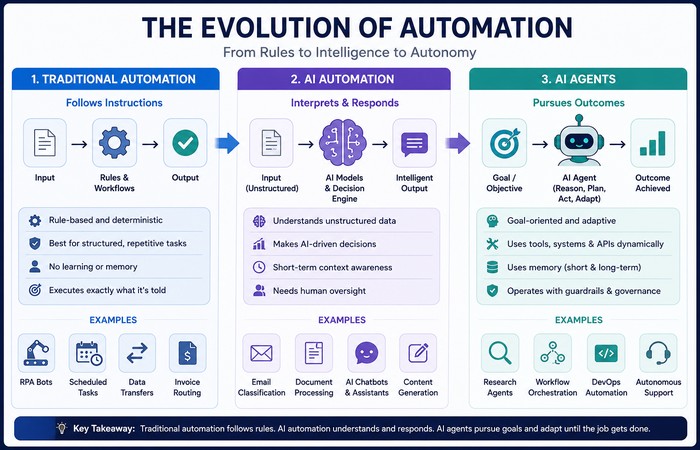
In practice, the difference is simple:
- Traditional automation follows instructions.
- AI automation interprets and responds.
- AI agents pursue outcomes.
| Feature | Traditional Automation | AI Automation | AI Agents |
| Decision Making | Follows predefined rules and workflows | Interprets data and makes limited AI-driven decisions | Pursues goals by planning, reasoning, and adapting actions |
| Memory | No memory between tasks | May retain short-term context depending on the system | Can use short-term, long-term, and external memory to improve performance |
| Goal-Oriented | No — executes specific instructions | Partially — completes assigned tasks with some flexibility | Yes — works toward an objective and adjusts its approach when needed |
| Tool Usage | Limited to predefined integrations | Can interact with AI services and selected business applications | Can dynamically use multiple tools, APIs, databases, and software systems |
| Human Intervention | Required whenever workflows change | Needed for oversight and exception handling | Usually required only for approvals, governance, or high-risk actions |
| Learning Ability | None | Can improve through updated models and training | Can refine decisions using memory, feedback, and iterative execution (depending on implementation) |
| Best Use Cases | Data entry, scheduled tasks, invoice routing, repetitive workflows | Email classification, document processing, content generation, customer support | Research, workflow orchestration, multi-step automation, software operations, enterprise decision support |
| Examples | Rule-based RPA, scheduled scripts, workflow automation tools | AI-powered document processing, intelligent chatbots, email assistants | OpenAI Operator, Microsoft Copilot agents, Salesforce Agentforce, CrewAI, AutoGen workflows |
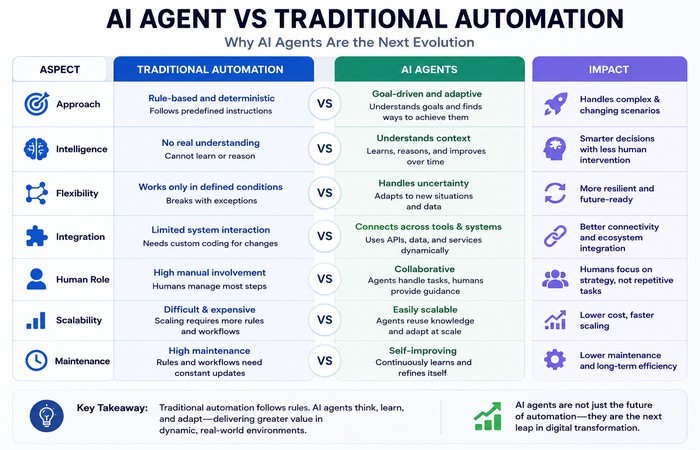
This is important because it is a criterion that really impacts on what can be achieved by the system; it is a criterion that has the potential for things to go wrong; it is a criterion that will bring governance issues!
Most of the AI automation platforms out there are based on machine learning models which keep evolving their capacity to categorize data, discover patterns and make decisions. To get a complete introduction to the particular technology, read our full article about Machine Learning.
What are AI Agents?
An AI agent is a computer program that behaves rather than reacts to instructions. They can think, reason, plan, use external devices, request permissions to command various sources of data and evolve their action based on the results.
Chatbots vs agents
This is where vendor marketing often creates confusion. A chatbot is reactive. You ask a question, it answers and, typically the interaction stops there. The agent that you have is a basic working AI agent. It has been given a goal, it has broken down the goal into sub-goals, it has used tools, checked the output and adapted its output when necessary given the constraints of the environment.
This makes agents more practical for reconciliation, support triage, research and back office tasks. This also makes agents harder to administer as they can be more proactive.
The most useful way to think about it is:
- Chatbots answer.
- Agents act.
- Chatbots sit inside conversations.
- Agents sit inside workflows.
While chatbots are usually seen as a gateway into conversational ai today, modern ai agents build upon those foundations by utilizing external tools, memory, and multi-step thinking. Find out how in our Beginner‘s Guide to Chatbots and explore how Conversational AI is changing inbound and outbound voice communication.
Real-World Examples of AI Agents
In fact maybe you are already doing it yourself and you just hadn‘t noticed it. Microsoft Copilot can do everything from provide summaries of meetings, to help writers draft emails, analyze data in spreadsheets, and complete tasks inside of every Microsoft 365 application. GitHub Copilot can provide code suggestions, fix bugs, and explain complex functions to developers right inside of their IDE. These are not just answering questions, they are helping users to do real work, and that makes them excellent practical use cases of AI agents.
Why 2026 matters
The reason this topic is suddenly everywhere is that AI is moving from isolated assistance to embedded execution. Gartner talks about a multi-phase migration from assistants to task-specific agents, then to collaborative agents and the expanding agent ecosystems over time. Thus the pressure on operations folk, IT and marketing vps to understand agentic AI, even if they never initially set out to be AI strategists.
This matters for content strategy too. The reader seeking out this subject in an academic context will, by and large, demand more than a blanket definition. They will seek to answer questions like: what actually works, what blunders what is it expensive, what it is noxious, and how to throw it without causing carnage.
The architecture that works
The first big mistake teams make is trying to force one large agent to do everything. That “God model” approach looks efficient on paper, but it usually collapses under context overload, latency, and error accumulation.
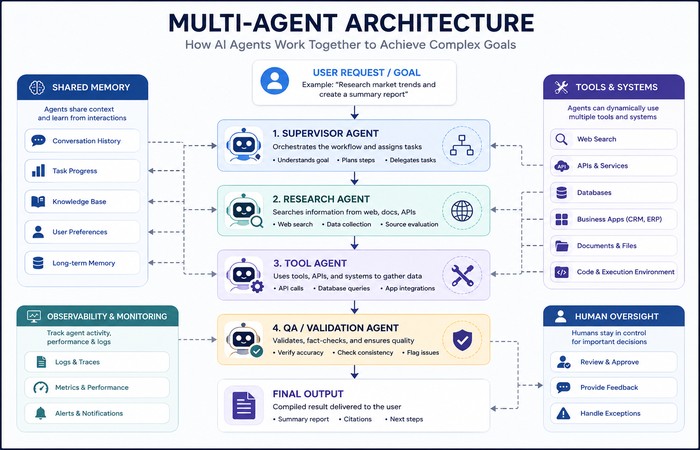
The stronger pattern is a multi-agent system. In this setup, work is split across specialized agents with narrow responsibilities. A retrieval agent gathers context, a tool-execution agent handles API calls, and a deterministic QA agent validates the output before anything moves forward.
Common coordination patterns include:
- Supervisor, where one central agent routes tasks.
- Hierarchical, where layers of supervisors manage sub-teams.
- Peer-to-peer, where agents negotiate directly.
- Blackboard, where agents contribute to a shared knowledge space.
- Swarm, where many simple agents follow local rules.
Different workflows need different patterns. Sequential work often fits a supervisor model. Distributed work may be designed such as to involve peer-to-peer or blackboard architectures. There is no single best architecture, just the architecture appropriate for the task.
Frameworks in practice
The most commonly discussed orchestration frameworks are LangGraph, AutoGen, and CrewAI. LangGraph is better suited for controlled, stateful workflows where predictability matters. AutoGen is stronger for conversational problem-solving and iterative refinement. CrewAI is popular for role-based collaboration without requiring teams to build everything from scratch.
That said, the framework matters less than the workflow design. A bad process remains bad even with a good orchestration layer. For many deployments, the real win has been re-designing the work up front even before you add the agent to it.
A large number of recent AI agents are powered by large language models (LLMs), which perform well at reasoning, planning and natural language understanding. You can reference our ecosystem guide for working with LLMs and Voice Cloning to understand how these models can be used with modern voice techniques.
Enterprise AI Agent Platforms
Many organizations choose managed AI agent platforms instead of building everything from scratch. Salesforce Agentforce enables businesses to deploy customer service and sales agents that work directly with CRM data. Google Agentspace integrates AI agents with enterprise knowledge sources. It allows the discovery of information and increased productivity at workplace. These platform also help in save time of development but at the same time it provides governance, security and integration.
Why memory is important
In agent design, memory is one of the most undervalued elements. An agent with no memory is essentially a blind agent who can forget just happened before, so the most part is a good solution for the one-time problem. However, the limitation occurs when the problem is in the area of the daily basis and the way of handling or communicate next time.
Modern agent systems usually combine several memory types:
- Short-term conversation memory.
- Long-term task memory.
- User or preference memory.
- External retrieval from documents or knowledge bases.
- Structured workflow state.
Mem0’s published benchmark claims are a good illustration of why this matters. The company says its memory layer achieved a 26% accuracy improvement on the LoCoMo benchmark, along with about a 90% reduction in token usage and a 91% reduction in p95 latency compared with full-context approaches. That makes memory not just a usability feature, but a performance and cost decision as well.
The data problem behind agents
Model quality is not the biggest bottleneck anymore by 2026. Data quality and integration are. If an agent cannot access reliable information or connect cleanly to the systems where work happens, its autonomy quickly becomes unreliable.
This is especially important because errors compound. A small error rate becomes a huge failure in cases when one agent has to do hundreds of steps in a row. Structured environments such as those in coding or analytics are much easier because the data is more high quality and centralized. Unstructured in finance, legal or supply chain are much more difficult because data is disjointed and dirty.
The practical message: putting the right data in the right hands is a lot more important than coming up with the latest and greatest model. Groups that establish data handling practices, assign system ownership and specify access requirements are way more likely to get agents in production.
For example, Amazon Q Business helps employees search internal documents, company policies, and knowledge bases across multiple enterprise systems. Rather than relying on one large language model alone, it combines AI reasoning with secure access to organizational data, demonstrating why high-quality information is often more valuable than simply using a more powerful model.
Many enterprise AI agents also process visual information such as scanned documents, product images, videos, and medical imagery. Our Complete Guide to Computer Vision explains how AI systems analyze and understand visual data.
ROI: where it works
The strongest ROI tends to show up where work is repetitive, text-heavy, or highly manual. In WRITER’s 2026 enterprise AI survey, conducted with Workplace Intelligence, it was found that 87% of leaders said that AI super-users are five or more times productive than the average non-adopter and that there is also a clear division between top users and the rest of the organization. This research does however suggest that personal increases in productivity don’t necessarily impact enterprise ROI.
That gap is important. Many companies have a few excellent AI users, but they have not redesigned workflows around AI. So they get isolated wins instead of institutional change.
Key Takeaway
AI agents don‘t fix non-working workflows, they make them run faster. When a business is accelerating bad workflows that are undocumented or have already been removed from the core, it is just moving them faster. It is here that we can obtain the biggest advantage, by improving workflows, data quality and governance and then deploying AI agents in production.
Good ROI areas include:
Automated content creation which also is one of the most rapidly expanding uses of AI automation is another form of AI automation playing a role in many enterprise workflows. Read more about text-to-image AI.
- Support ticket triage.
- Internal knowledge search.
- Draft generation.
- Meeting summaries.
- Lead qualification.
- Structured document extraction.
- Standard reporting workflows.
Where ROI becomes more fragile is in complex, regulated, or highly interconnected workflows that require careful governance and high data quality.
What the real cost includes
A serious ROI calculation should not stop at the model API. That is only one line item. Real deployment costs also include orchestration, integration, monitoring, evaluation, compliance, security, and human review.
That is why the best question is not “How cheap is the API?” It is “What is the total cost of running this system responsibly for 12 to 18 months?” When teams ignore that question, they often mistake a pilot for a production-ready strategy.
Security is not optional
The security story around agents is now too serious to treat as a side note. Snyk’s ToxicSkills report found that 13.4% of scanned agent skills contained at least one critical-level flaw, including malware payloads, prompt injection code, and exposed credentials. That is a major warning for any organization that treats agent plugins and skills like harmless add-ons.
Gravitee’s 2026 research adds to the concern. Its State of AI Agent Security report found that 88% of organizations experienced or suspected an AI agent-related security or data privacy incident, while many agents still lacked proper oversight. The exact numbers may vary by study, but the direction is clear: governance is lagging behind deployment.
The right security practices are straightforward:
- Treat every agent as its own identity.
- Use scoped permissions.
- Vet third-party skills carefully.
- Log all actions and tool calls.
- Require human approval for irreversible actions.
- Test kill-switch behavior before production.
- Keep high-risk workflows under strict oversight.
Security is also becoming a major differentiator among enterprise platforms. ServiceNow AI Agents, for example, operate within predefined workflows and governance policies to automate IT service management, HR, and customer operations while maintaining audit trails and approval controls. This reflects the growing industry focus on balancing automation with compliance and accountability.
Human oversight matters
Human-in-the-loop design is still essential for high-risk actions. Agents can draft, suggest, classify, and prepare work, but they should not always be allowed to execute sensitive actions on their own.
This is especially important for:
- Financial transactions.
- Contract finalization.
- Production infrastructure changes.
- Customer-facing actions with legal or compliance impact.
The safest and most realistic pattern is not full autonomy everywhere. It is controlled autonomy with clear approval boundaries.
Why organizations struggle
One of the biggest reasons AI projects fail is not model weakness. It is organizational mismatch. WRITER’s survey found that 75% of executives said their AI strategy was more for show than an actual operational guide, while 29% of employees admitted to sabotaging their company’s AI rollout in some form. Among Gen Z workers, that figure rose to 44%.
That creates a genuine transformation problem. Employees may use AI privately to save time, but resist the company’s official deployment because they see it as a threat or a poorly designed rollout. That is why adoption has to be framed as workflow redesign, not just tool installation.
A practical rollout path
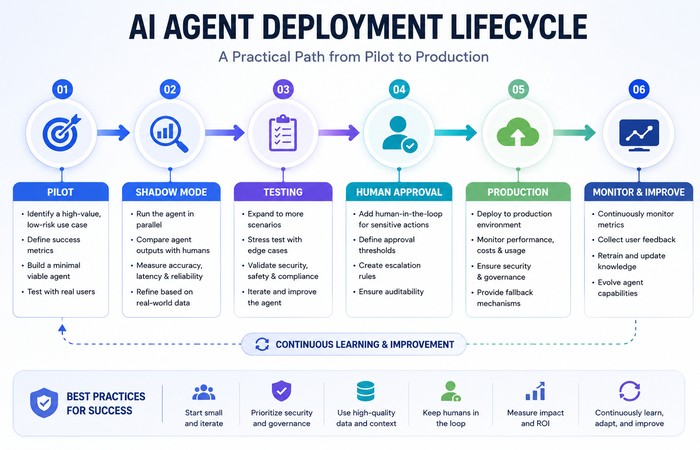
The most sensible way to adopt AI agents is gradually.
- Start with low-risk, high-volume tasks.
- Run in shadow mode first.
- Measure quality, speed, and error rates.
- Add permissions step by step.
- Expand only after performance is stable.
- Train people to supervise, not just use, the system.
This approach is slower than a full autonomy rollout, but it is far more likely to survive contact with real operations.
Many organizations begin their AI journey by automating repetitive workflows before introducing autonomous agents. This phased approach is often referred to as Hyperautomation, where AI, automation, analytics, and business process optimization work together to improve operational efficiency.
AI Agent Deployment Checklist
Before deploying AI agents into production, make sure these fundamentals are in place:
- ✅ Clean, reliable, and accessible business data
- ✅ Clearly defined workflow owner and business objectives
- ✅ Human approval for high-risk or irreversible actions
- ✅ Security controls, permissions, and access management
- ✅ Continuous monitoring, logging, and audit trails
- ✅ Performance metrics such as accuracy, response time, cost, and ROI
- ✅ Rollback and recovery plan in case of failures
- ✅ Ongoing evaluation and improvement based on user feedback
Example: AI Agent Workflow in Customer Support
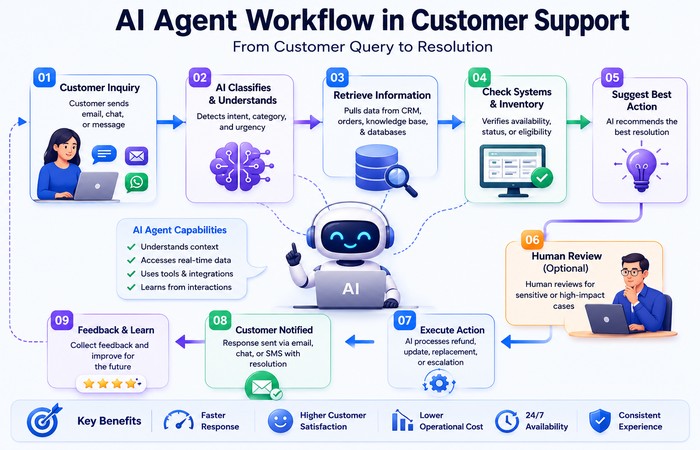
To understand how AI agents work in practice, consider a common customer support scenario. Instead of simply answering a question like a chatbot, an AI agent can coordinate multiple steps across different business systems while keeping a human involved where appropriate.
| Step | What Happens |
| 1 | Customer submits an email requesting a refund for a damaged product. |
| 2 | The AI agent classifies the issue as a refund request and determines its priority. |
| 3 | The agent retrieves the customer’s order details from the company’s CRM or order management system. |
| 4 | It checks inventory records, shipping information, and the company’s refund policy to verify eligibility. |
| 5 | The agent prepares a recommended action, such as issuing a refund or sending a replacement product. |
| 6 | A human support representative reviews and approves the recommendation for quality assurance. |
| 7 | Once approved, the refund is processed automatically, the customer is notified, and the interaction is recorded for future reference. |
This example demonstrates why AI agents are different from traditional automation. Rather than following a single predefined rule, the agent gathers information from multiple systems, reasons through the workflow, recommends the next action, and works alongside a human to complete the task safely and efficiently.
Case Study: How an E-commerce Company Improved Customer Support with AI Agents
Scenario: Imagine a mid-sized e-commerce company receiving thousands of customer support requests every week. Common issues included refund requests, damaged deliveries, order tracking, and product exchanges. Although many of these cases followed similar patterns, every ticket still required manual review, resulting in long response times and increased support costs.
The Solution: The company introduced an AI agent to automate the initial stages of ticket handling. Instead of replying directly to customers, the AI agent classified incoming requests, retrieved order details from the CRM, checked shipping status, verified refund eligibility against company policies, and prepared a recommended resolution for each case.
For routine inquiries such as order tracking or delivery updates, the AI agent responded automatically. However, requests involving refunds, payment disputes, or policy exceptions were routed to a human support representative for approval before any action was taken.
The Result: Within a few months, customer support teams spent significantly less time on repetitive administrative work and more time resolving complex customer issues. First-response times improved, support agents handled a larger number of tickets each day, and customers received faster, more consistent service. Because human approval remained part of the workflow for sensitive decisions, the organization improved operational efficiency without sacrificing governance or customer trust.
Key Lesson: The biggest gains did not come from replacing support staff. They came from allowing AI agents to handle repetitive tasks while employees focused on situations requiring judgment, empathy, and business decision-making.
Where to use agents carefully
Some use cases are naturally better fits than others.
Good early candidates:
- Customer support triage.
- Internal knowledge search.
- Research and summarization.
- Draft generation.
- Meeting notes.
- Document extraction.
Higher-risk candidates:
- Financial workflows.
- Incident response.
- Code deployment support.
- Compliance-related review.
Proceed carefully:
- Legal analysis.
- Healthcare-related workflows.
- Any irreversible action.
- Any system touching regulated or sensitive data.
Customer service is one of the most mature applications for AI agents today. If you’re exploring conversational interfaces for websites, our guide on using chatbots to improve website navigation demonstrates how AI can enhance customer engagement while reducing support workloads.
How Different Industries Use AI Agents
Although the underlying technology is similar, AI agents are designed differently depending on the industry and the level of risk involved. Some organizations use agents to improve productivity and customer experience, while others focus on reducing manual work, improving decision-making, or accelerating routine business operations.
AI Agents in Healthcare
Healthcare organizations use AI agents to assist with appointment scheduling, medical documentation, patient triage, insurance verification, and clinical knowledge retrieval. Because healthcare involves sensitive patient information and strict regulations, most deployments keep clinicians involved in reviewing recommendations before important decisions are made.
AI Agents in Finance
Financial institutions use AI agents to detect fraud, automate compliance checks, process loan applications, analyze financial documents, and generate reports. Since financial decisions often carry legal and regulatory implications, AI agents typically operate within tightly controlled workflows that require human approval for high-value transactions.
AI Agents in Retail
Retail businesses deploy AI agents to recommend products, answer customer questions, manage inventory, forecast demand, and personalize shopping experiences. By combining customer behavior with real-time inventory data, AI agents can help improve operational efficiency while enhancing customer satisfaction.
AI Agents in Manufacturing
Manufacturers increasingly use AI agents for predictive maintenance, production planning, quality inspection, and supply chain optimization. These systems analyze data from machines and sensors to identify potential issues before they cause downtime, helping reduce maintenance costs and improve production efficiency.
AI Agents in IT Operations
IT teams use AI agents to monitor infrastructure, investigate system alerts, summarize incidents, generate troubleshooting recommendations, and automate routine operational tasks. Rather than replacing system administrators, these agents help teams respond faster to incidents while allowing engineers to focus on more complex technical work.
The key question is not whether agents can help. It is whether the cost of failure is low enough to justify the level of autonomy you are giving them.
Examples Across Different Industries
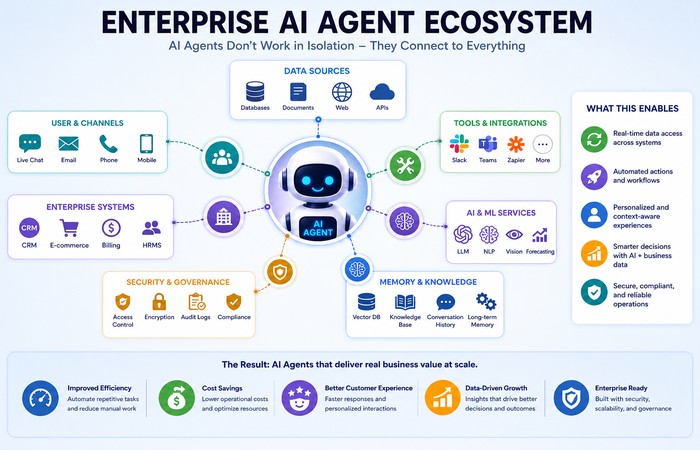
Different AI agents are designed for different business needs. Zendesk AI Agents automatically classify support requests, suggest responses, and resolve routine customer inquiries. GitHub Copilot focuses on software development, while Salesforce Agentforce supports customer relationship management. Meanwhile, Microsoft Copilot enhances productivity across documents, presentations, meetings, and emails, showing how AI agents can be specialized for particular workflows instead of attempting to perform every task.
Common Mistakes to Avoid When Deploying AI Agents
Many AI agent projects fail not because the underlying technology is weak, but because organizations make avoidable implementation mistakes. Understanding these common pitfalls can significantly improve the chances of a successful deployment.
| Common Mistake | Why It Causes Problems | Recommended Approach |
| Building one giant AI agent | Large, all-purpose agents become difficult to manage, consume more resources, and accumulate errors across complex workflows. | Build multiple specialized agents with clearly defined responsibilities. |
| Ignoring permissions and security | Giving agents unrestricted access increases the risk of data breaches, accidental actions, and compliance violations. | Apply least-privilege access, role-based permissions, and human approval for sensitive actions. |
| No evaluation metrics | Without measurable KPIs, organizations cannot determine whether an AI agent is improving productivity or simply increasing costs. | Track metrics such as accuracy, response time, cost per task, user satisfaction, and business ROI. |
| Poor-quality or disconnected data | AI agents can only make good decisions when the information they access is accurate, complete, and up to date. | Invest in data quality, governance, and system integration before expanding automation. |
| Removing humans from critical decisions | Fully autonomous execution can introduce legal, financial, or operational risks in high-impact workflows. | Keep humans involved for approvals, compliance reviews, and irreversible business actions. |
| No rollback or recovery strategy | If an AI agent behaves unexpectedly, organizations without recovery procedures may struggle to restore normal operations quickly. | Test rollback procedures, maintain audit logs, and implement emergency stop mechanisms before production deployment. |
Best Practice: Successful AI agent deployments are built on well-designed workflows, clean data, strong governance, measurable outcomes, and continuous human oversight—not simply on choosing the most advanced AI model.
What actually works in 2026
Emerging agentic systems such as OpenAI Operator illustrate how AI is evolving beyond conversation into task execution. Instead of simply generating responses, Operator is designed to interact with websites and software on a user’s behalf, demonstrating the growing potential for AI agents to complete real-world digital tasks under human supervision.
If you strip away the hype, a few things consistently work:
- Narrow use cases.
- Clean integration.
- Good memory design.
- Strong permissions.
- Human approval where needed.
- Measurable business outcomes.
- Workflow redesign before deployment.
What does not work is forcing agents into messy legacy processes and expecting instant transformation. In most cases, the system amplifies the quality of the underlying workflow. Good workflow in, good results out. Bad workflow in, faster bad results out.
The Future of AI Automation
AI automation is evolving rapidly from simple task execution to intelligent, collaborative systems capable of handling increasingly complex business processes. While today’s deployments focus on improving productivity and reducing repetitive work, the next generation of AI agents will emphasize collaboration, reasoning, and greater autonomy under human supervision.
Multi-Agent Collaboration
Rather than relying on a single large AI agent, organizations are increasingly adopting teams of specialized agents that work together. One agent may retrieve information, another may perform calculations, a third may validate results, and a supervisor agent may coordinate the entire workflow. This modular approach improves reliability, scalability, and fault tolerance.
Smaller, Specialized Agents
Instead of building one general-purpose system, businesses are deploying smaller agents designed for specific tasks such as invoice processing, customer onboarding, document analysis, or software testing. Specialized agents are easier to train, monitor, secure, and optimize for business-specific workflows.
Voice Agents
Advances in speech recognition and large language models are making voice-based AI agents increasingly practical. Modern voice agents can understand natural conversations, access business systems, complete tasks, and provide real-time assistance for customer service, sales, healthcare, and internal support operations.
Computer-Use Agents
A new generation of AI agents is learning to interact directly with software applications in the same way a person would—clicking buttons, filling forms, navigating websites, and completing multi-step digital tasks. These computer-use agents have the potential to automate work that previously required manual interaction with user interfaces.
AI Agent Marketplaces
Just as organizations purchase software applications today, they are expected to adopt specialized AI agents through enterprise marketplaces. Businesses will increasingly select pre-built agents for functions such as HR, finance, customer support, cybersecurity, software development, and legal operations rather than developing every solution internally.
Hybrid Human-Agent Teams
The most successful organizations are unlikely to replace employees with AI agents entirely. Instead, they will build hybrid teams where people focus on judgment, creativity, strategy, and relationship management while AI agents handle repetitive analysis, research, documentation, and operational tasks. Human oversight will remain essential for sensitive or high-impact decisions.
Reasoning Models
Recent advances in reasoning-focused AI models are enabling agents to solve more complex problems by planning, evaluating alternatives, and breaking objectives into logical steps before taking action. These capabilities are expected to improve reliability for enterprise workflows that require multi-step decision-making rather than simple content generation.
On-Device AI Agents
As AI hardware becomes more powerful, more agents will run directly on laptops, smartphones, and edge devices instead of relying entirely on cloud infrastructure. On-device AI offers advantages such as lower latency, improved privacy, offline capabilities, and reduced operational costs for many business applications.
The future of AI automation is not about creating fully autonomous systems that replace people. Instead, it is moving toward intelligent, specialized agents that work alongside humans, integrate securely with enterprise systems, and automate increasingly complex workflows while remaining transparent, governable, and accountable.
Most modern AI agents combine multiple AI disciplines—including generative AI, machine learning, natural language processing, and computer vision—to deliver intelligent automation. Understanding how these technologies work together provides a stronger foundation for designing scalable enterprise AI systems.
Leading AI Agent Platforms in 2026
Today’s AI agent ecosystem includes both enterprise platforms and developer-focused tools. Microsoft Copilot improves productivity across Microsoft 365 applications, GitHub Copilot accelerates software development, Salesforce Agentforce automates CRM workflows, Amazon Q Business provides intelligent enterprise search, Google Agentspace connects AI with organizational knowledge, ServiceNow AI Agents automate business operations, and Zendesk AI Agents streamline customer support. Although these platforms differ in their capabilities, they all demonstrate the industry’s shift from simple AI assistants toward goal-oriented systems that can execute multi-step workflows with appropriate human oversight.
Final take
AI Automation & Agents is no longer a speculative topic. It is becoming part of how enterprise software works, how workflows are redesigned, and how teams deliver work at scale. But the best results do not come from adding more hype, more autonomy, or more agents by default.
AI automation does not exist in isolation. It builds on advances in Generative AI, Natural Language Processing, Machine Learning, and Computer Vision. Together, these technologies are shaping the next generation of intelligent business systems.
They come from careful architecture, strong governance, realistic ROI measurement, and honest limits. That is the version of AI automation that actually holds up in production.
Related Guides
Want to explore the technologies that power AI automation and autonomous agents? These in-depth guides provide a deeper understanding of the core concepts, practical applications, and emerging trends shaping enterprise AI.
- Guide to Generative AI – Learn how generative AI models create text, images, code, audio, and other content, and how they form the foundation of many modern AI automation systems.
- Machine Learning Guide – Discover how machine learning enables AI systems to identify patterns, improve predictions, and automate decision-making across a wide range of business applications.
- Natural Language Processing Guide – Explore how NLP allows AI agents to understand, interpret, summarize, and generate human language for chatbots, virtual assistants, and enterprise workflows.
- Computer Vision Guide – Learn how AI systems analyze images, videos, documents, and visual data to automate inspection, recognition, and intelligent decision-making.
- Beginner’s Guide to Chatbots – Understand how chatbots differ from AI agents and how conversational interfaces improve customer service and business operations.
- Conversational AI Guide – See how conversational AI automates customer interactions through intelligent voice and text communication.
- LLMs & Voice Cloning – Learn how large language models and voice AI are enabling the next generation of intelligent assistants and autonomous AI companions.
- Hyperautomation Guide – Discover how organizations combine AI, robotic process automation (RPA), analytics, and business process optimization to build intelligent, end-to-end automation.
References
- Gartner Research
- WRITER & Workplace Intelligence Research
- Snyk Security Reports
- Gravitee Research Reports
- Mem0 Documentation
- OpenAI
- Microsoft AutoGen
- LangGraph Documentation
- CrewAI Documentation
FAQs
Q1: What is the difference between AI automation and AI agents?
A: AI automation helps software handle tasks with less manual effort, while AI agents can pursue goals, break work into steps, use tools, and adapt as they go.
Q2: Are AI agents the same as chatbots?
A: No. Chatbots respond in conversation. Agents act inside workflows and can take steps toward a goal.
Q3: Why are multi-agent systems preferred?
A: They reduce context overload by splitting work across specialized agents, which makes complex workflows easier to manage.
Q4: Why is memory important?
A: Memory lets an agent maintain context across sessions, improve continuity, and reduce repeated explanation. Mem0’s published benchmark claims show why this can improve both performance and cost.
Q5: What is the biggest risk with agents?
A: Security and governance. Public skills, weak permissions, and poor oversight create real risk, as shown in the ToxicSkills and Gravitee findings.
Q6: Do AI agents replace people?
A: Not in most practical deployments. They are better used as tools that support people, reduce repetitive work, and assist with decision-making.
Q7: Can AI agents work without the internet?
A: Yes, some AI agents can operate without an internet connection if they run on local hardware and have access to the data and tools they need. However, many enterprise AI agents rely on cloud-based large language models, external APIs, or online business systems, so their capabilities may be limited when offline.
Q8: What programming languages are commonly used to build AI agents?
A: Python is the most widely used programming language for developing AI agents because of its extensive ecosystem of machine learning and automation libraries. JavaScript, TypeScript, Java, C#, and Go are also commonly used, particularly when integrating AI agents into web applications, enterprise software, or cloud services.
Q9: Can small businesses use AI agents?
A: Absolutely. Small businesses can use AI agents for customer support, email management, appointment scheduling, document processing, sales assistance, and marketing automation. Many cloud-based platforms offer ready-to-use AI agents that require little or no custom development, making them accessible even for organizations with limited technical resources.
Q10: Are AI agents expensive to deploy?
A: The cost depends on the complexity of the solution. Simple AI agents built with managed cloud services can be relatively affordable, while enterprise deployments often require additional investment in software integration, security, monitoring, governance, and ongoing maintenance. Businesses should evaluate the total cost of ownership rather than focusing only on AI model pricing.
Q11: What is the difference between RPA and AI automation?
A: Robotic Process Automation (RPA) follows predefined rules to automate repetitive, structured tasks such as moving data between applications or processing forms. AI automation extends these capabilities by using machine learning and large language models to understand natural language, analyze unstructured information, make context-aware decisions, and adapt to changing situations. In many organizations, RPA and AI automation work together rather than replacing one another.
