


If you would have asked a CISO in 2023 what kept them awake at night a few years ago, you might have heard something like “misconfigured storage buckets” or “an intern fat-fingering a permissions setting”. Ask that same question today and the response is different. According to the Cloud Security Alliance’s newly released Top Threats to Cloud Computing Survey Report 2026, misconfiguration has actually slipped down the rankings. What’s replaced it at the top? Identity. And right behind identity, for the first time in the report’s history, sits a threat category that didn’t exist two years ago: attackers using AI to do their work for them.
That shift isn’t theoretical. In April 2026, Anthropic disclosed that an internal AI model — Claude Mythos Preview — had autonomously found and written working exploits for thousands of previously unknown vulnerabilities across nearly every major operating system and browser, including a 27-year-old flaw buried in OpenBSD, a codebase famous for its hardened, heavily audited security posture. Whatever you think about the long-term implications of that disclosure, it settled a debate that had been running in security circles for a couple of years: AI-assisted vulnerability discovery isn’t a “someday” problem for cloud teams. It’s a “budget for it this quarter” problem.
This guide is our attempt to give you the full picture — not a listicle of ten tips, but an actual reference you can come back to. We’ll walk through what cloud security means in practice, how responsibility is actually split between you and your provider, the eleven threats the CSA’s 2026 survey says matter most (ranked, with the movement from 2024), how AI is changing both the offense and the defense, the tooling categories you’ll be asked to evaluate, the compliance frameworks that apply depending on your industry, and a step-by-step way to build or mature a cloud security program without boiling the ocean. We’ve also written before about why cloud security solutions are important in more general terms — this guide picks up where that piece leaves off and goes considerably deeper.
One housekeeping note before we start: cloud security is not a single discipline. It’s closer to a dozen adjacent disciplines — identity governance, network engineering, application security, compliance, incident response — that all happen to converge on infrastructure you don’t fully control. That’s part of why it’s hard to get right, and it’s why this page is long. These headings may be useful for you to jump between the sections you‘re currently reading. Though, if you haven‘t already had a presentation on the topic this might be useful to begin reading at.
Table of Contents
What Is Cloud Security, Exactly?
The overarching body of policy, controls, technology and best practice that can be deployed to protect data, applications and infrastructure within a cloud computing environment is known as cloud security. This could take the form of any form of cloud computing (public cloud services from, for instance, Amazon, Microsoft or Google, private cloud infrastructure hosted in house, hybrid approaches). From user access and subsequent authorisation to data at rest encryption, workload tenant isolation and the prevention and timely detection of total failure, it is cloud security.
The thing that takes many people off guard – even a good number of experienced IT personnel moving into cloud roles for the first time – is that “cloud security is not just “security, only delivered somewhere else”. A handful of things are genuinely different:
The perimeter isn’t a fixed thing anymore. In a traditional data center, you could draw a box around your network and defend the edges of the box. In the cloud, your “perimeter” is really a set of identities, APIs, and configuration settings scattered across services that might live in different regions, different accounts, and sometimes different providers entirely. There’s no wall to build a moat around.
Infrastructure is defined by code, not by physical racks. That’s a massive advantage — you can spin up or tear down entire environments in minutes — but it also means a single misconfigured template file can replicate a security gap across hundreds of resources before a human ever notices.
You’re sharing the stack with your provider, which means security is a joint responsibility, not something either side owns outright. We’ll spend an entire section on this below because getting it wrong is one of the most common — and most expensive — mistakes organizations make.
Identity has become the new perimeter. With workloads talking to other workloads, service accounts, API keys, and AI agents all needing some form of access, “who can do what” has become dramatically more complicated than “who has a badge to the building.” This is precisely why the CSA’s 2026 survey found identity-related risk sitting at the very top of the threat list, a point we’ll unpack in detail shortly.
None of this should imply that cloud environments are necessarily less secure than on-site environments- in many ways they are far more secure, since providers dedicate huge amounts of money to physical security and fault tolerance and patching bits of infrastructure that any individual company could never hope to build one-off. It simply means the skills, tools and mental models you need are genuinely different to traditional network security, and assuming cloud security to be an extension of your old security make a lot of sense will tend to leave the sorts of gaps attackers thrive on.
The Shared Responsibility Model (and Why “Shared Fate” Is Replacing It)

Almost every major security incident involving the cloud — from exposed S3 buckets to leaked API keys sitting in public GitHub repos — traces back to the same root misunderstanding: someone assumed the cloud provider was handling something that was actually their job.
The shared responsibility model exists to clear that up. In simple terms, your cloud provider is responsible for the security of the cloud — the physical data centers, the hardware, the core networking, the hypervisor layer, and (for managed services) the underlying software. You’re responsible for security in the cloud — how you configure what you’re given, who has access to it, how your data is protected, and how your applications behave.
Where exactly that line falls depends on the service model you‘re using:
| Layer | IaaS (e.g., EC2, Azure VMs) | PaaS (e.g., managed databases, serverless) | SaaS (e.g., Salesforce, Microsoft 365) |
| Physical infrastructure, hardware, facilities | Provider | Provider | Provider |
| Network controls, hypervisor | Provider | Provider | Provider |
| Operating system, patching | You | Provider | Provider |
| Middleware, runtime | You | Provider (mostly) | Provider |
| Application code | You | You | Provider |
| Identity & access management | You | You | You |
| Data classification & encryption choices | You | You | You |
| Configuration settings | You | You | You |
Notice what stays constant across every row you control: identity, data, and configuration. No matter how much of the stack you hand off to a provider, those three things never stop being your responsibility. That’s not a coincidence — it’s also exactly where the CSA’s 2026 survey found the most serious threats concentrated, which we’ll get into in the next section.
There’s an evolution worth knowing about here, too. A number of major providers — AWS among them — have started talking less about “shared responsibility” and more about “shared fate.” The distinction is subtle but meaningful: shared responsibility draws a clean legal and operational line between what the provider does and what you do. Shared fate acknowledges that the provider has a vested interest in your security outcomes too, because a customer’s breach is bad for the platform’s reputation regardless of whose fault it technically was. In reality, shared fate manifests itself as vendors providing default safer options, greater relative amounts of there are guard rails, and more proactive rather than reactive guidance than a chart than reading you the documentation. It‘s a good thing, but bottom line remains: all the control in your account still falls on you to make correct decisions.
The 2026 Threat Landscape: The CSA’s Top 11, Ranked
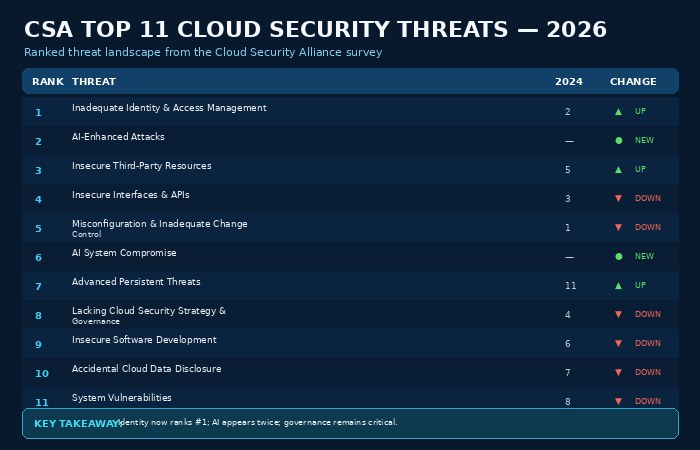
Every year or two, the Cloud Security Alliance’s Top Threats Working Group runs a large-scale survey of security practitioners to figure out what’s actually worrying people on the ground, as opposed to what vendors are marketing. The 2026 edition, published in mid-August, surveyed 507 industry experts in its main phase — after an initial round with working-group members narrowed a long list of candidate issues down to a shortlist of 23 — and the result is the most useful single snapshot of where cloud risk actually sits right now.
The headline finding: the threat landscape reshuffled more dramatically this cycle than in any previous edition. Concerns tied directly to the underlying cloud infrastructure and the providers themselves — the kind of thing that used to anchor these lists — dropped off entirely. But instead of them, AI appeared two times, and identity went all the way up to #1. Below is the complete ranked order, with the 2024 report (for comparison) where you can see which threats were ranked in it:
| 2026 Rank | Threat | 2024 Rank | Movement |
| 1 | Inadequate Identity and Access Management | 2 | ▲ Up |
| 2 | AI-Enhanced Attacks | — | New entry |
| 3 | Insecure Third-Party Resources | 5 | ▲ Up |
| 4 | Insecure Interfaces and APIs | 3 | ▼ Down |
| 5 | Misconfiguration & Inadequate Change Control | 1 | ▼ Down |
| 6 | AI System Compromise | — | New entry |
| 7 | Advanced Persistent Threats | 11 | ▲ Up sharply |
| 8 | Lacking Cloud Security Strategy & Governance | 4 | ▼ Down |
| 9 | Insecure Software Development | 6 | ▼ Down |
| 10 | Accidental Cloud Data Disclosure | 7 | ▼ Down |
| 11 | System Vulnerabilities | 8 | ▼ Down |
Vic Hargrave, a lead author and chair of the Top Threats Working Group, summed up the shift bluntly: AI, in his words, is not an emerging cloud security concern — it’s already reshaping both how attacks happen and what security teams have to defend. His co-chair, Michael Roza, made a related point that’s worth sitting with: the organizations most exposed right now aren’t necessarily the ones with weak perimeter defenses. They’re the ones whose governance, visibility, and change-management processes haven’t kept pace with how fast their environments have grown in complexity — more non-human identities, more machine-to-machine communication, more autonomous decision-making happening without a human in the loop.
Let’s walk through what each of these eleven actually means in practice, because the names alone don’t tell you much.
- Inadequate Identity and Access Management. This is the big one, and it covers a lot of ground: excessive standing permissions, credentials that never get rotated, non-human identities (service accounts, API keys, workload identities) that multiply faster than anyone’s tracking them, and federated trust relationships between systems that nobody fully audited when they were set up. The common thread is that access accumulates over time and rarely gets cleaned up, which means the actual attack surface of “who can touch what” is almost always larger than what’s documented on paper.
- AI-Enhanced Attacks (new for 2026). This category covers the many ways attackers now use AI to improve and automate what they’re already doing — writing more convincing phishing content, generating malware variants faster than signature-based tools can keep up, automating reconnaissance across huge cloud estates, and, as the Claude Mythos disclosure demonstrated, potentially discovering and weaponizing vulnerabilities at a pace no human red team could match.
- Insecure Third-Party Resources. Today’s cloud applications are built on dozens — or hundreds — of dependencies Open-source libraries, SaaS connectors, managed services, API partners. If there‘s a flaw, or a breach in any of those pieces, then it is a threat to you, and most businesses do not have as much insight into their third-party footprint as they think they do.
- Insecure Interfaces and APIs. APIs are how cloud services actually talk to each other, and they’ve become one of the most consistently exploited entry points in cloud breaches — often through broken authentication, excessive data exposure, or missing rate limiting rather than some exotic zero-day.
- Misconfiguration & Inadequate Change Control. Formerly the #1 threat, misconfiguration hasn’t gone away — it’s just been overtaken by identity risk as the sharpest edge of the problem. Publicly exposed storage buckets, overly permissive security groups and left default configurations account for still a large portion of actual incidents.
- AI System Compromise (new for 2026). The other half of attacks facilitated by AI: your AI models, training data, agents, and pipelines are no longer just resources to use but also things that you must safeguard. (e.g. Data poisoning, prompt injections agains AI agents with actual permissions, model theft)
- Advanced Persistent Threats. APTs jumped from #11 to #7 — one of the biggest single moves in the report — reflecting growing concern about well-resourced, patient adversaries (often nation-state-linked) who get into cloud environments and stay quiet for extended periods.
- Lacking Cloud Security Strategy & Governance. Organizations that adopt cloud services faster than they build the policies, ownership structures, and governance processes to manage them securely.
- Insecure Software Development. Security gaps introduced during the build process — insecure defaults in code, secrets accidentally committed to repositories, inadequate security testing in the CI/CD pipeline before code ships.
- Accidental Cloud Data Disclosure. Data has been exposed not by attack but by a simple human failings: a database left with no authentication, a link posted further than it should have been, a backup exported somewhere it shouldn‘t have been.
- System Vulnerabilities. Traditional, known software flaws in the systems running your cloud workloads — still a real risk, just no longer the most pressing one relative to everything above it.
A few patterns are worth calling out explicitly. First, notice how many of the top spots are about people and process rather than technology — identity governance, third-party oversight, change control, and strategy account for most of the top eight. Second, the two brand-new entries are both about AI, and they entered at #2 and #6 simultaneously, which almost never happens for a single technology trend in one survey cycle. Third, and maybe most tellingly, concerns tied purely to the cloud infrastructure or the provider itself dropped out of the top eleven completely. Practitioners increasingly trust the platforms. They don‘t trust their ability to control what they have built on top of them.
How AI Is Reshaping Cloud Security — For Attackers and Defenders

It’s worth slowing down on the AI story specifically, because it’s the single biggest change in this year’s threat landscape and it’s still actively unfolding.
On April 7, 2026, Anthropic published a security research disclosure describing Claude Mythos Preview, an AI model whose exploit-writing ability turned out to be a byproduct of broader improvements in coding and autonomous reasoning — the same capabilities that make a model good at fixing vulnerabilities also make it good at finding and weaponizing them. According to Anthropic’s own account, the model autonomously discovered thousands of previously unknown, high- and critical-severity vulnerabilities across nearly every major operating system and web browser, using nothing more than a containerized environment and a single opening prompt per run. Two of the confirmed findings stood out: a 27-year-old zero-day buried in OpenBSD — an operating system with a reputation for being one of the most rigorously security-audited codebases in existence — and a 16-year-old flaw in FFmpeg, both verified through AddressSanitizer and since patched. In at least one documented case, the model chained together several separate flaws to build a working exploit capable of escaping both a browser’s renderer sandbox and the underlying operating system sandbox — the kind of exploit chain that normally requires a specialized human researcher with deep knowledge of memory internals.
A couple of caveats matter here, and a genuinely balanced guide should say them out loud rather than just repeat the headline. Mythos Preview was never released publicly; access has been restricted to a small group of partners under a program Anthropic calls Project Glasswing, which limits how independently the underlying claims can be verified — the evidence largely rests on Anthropic’s own testing, backed by cryptographic commitments covering vulnerability details that haven’t yet been disclosed. Sunil Gottumukkala, CEO of the security firm Averlon, put the significance in useful context: earlier models had already shown they could help find serious vulnerabilities, but Mythos represented a genuine capability jump, and it signals that zero-day discovery is becoming cheaper, faster, and easier to scale — while most organizations still don’t patch fast enough to keep up even without AI in the picture.
What matters for you as a cloud security practitioner isn’t the specific model or the specific vendor — it’s the trend line. If AI-assisted tools can find decades-old bugs in some of the most heavily reviewed open-source code in existence, the assumption that “our code has been through security review, so we’re probably fine” no longer holds the way it used to. A handful of practical implications follow directly from this:
- Patch velocity now matters more than patch coverage. If vulnerability discovery is getting faster on the attacker side, the gap between disclosure and exploitation shrinks. Programs built around quarterly or even monthly patch cycles for internet-facing systems are increasingly out of step with the threat.
- Non-human identity governance becomes non-negotiable. AI agents with real permissions to touch cloud resources are becoming common inside organizations, not just at labs building frontier models. Any agent with API access is an identity that needs the same lifecycle practices as a human account (provisioning, least privilege, rotation, and deprovisioning).
- “We haven’t been breached yet” stops being reassuring. Traditional vulnerability management assumed attackers were resource-constrained and would go after the easiest targets first. AI-assisted discovery erodes that assumption; obscurity was never a real control, and it’s becoming less of one by the month.
- Defenders get the same leverage attackers do. This isn’t purely a one-sided story. Anthropic’s own response included releasing a security-focused product in beta for enterprise customers and expanding access to vulnerability-scanning tools built on the same underlying capability, and other vendors have moved quickly to build AI-assisted detection and remediation into existing security platforms. The organizations that come out ahead over the next few years will be the ones that adopt AI-assisted defense at least as aggressively as attackers are adopting AI-assisted offense.
The CSA’s decision to add both AI-Enhanced Attacks and AI System Compromise to its top threats list in the same year isn’t a coincidence — it’s the working group reading the same signals we just walked through and concluding that AI has moved from “future consideration” to “current operating condition” for cloud security teams.
The Core Pillars of Cloud Security
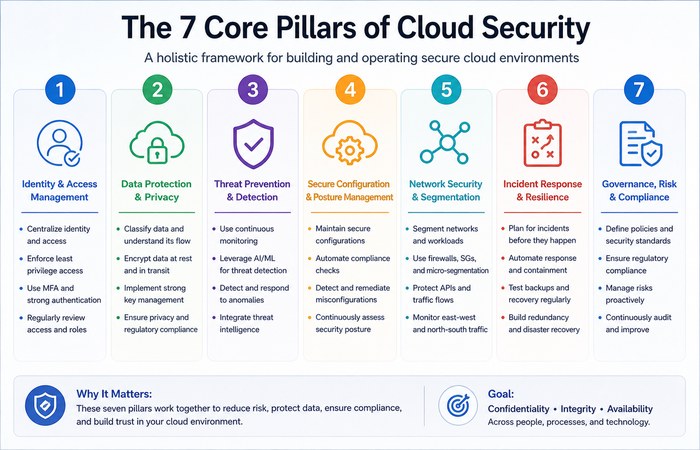
With the threat landscape in view, it’s worth stepping back and organizing cloud security into the functional areas you actually need to build out. Vendors will slice this differently depending on what they sell, but in practice, most mature cloud security programs cover the same seven areas.
1. Identity and Access Management (IAM)
Given that inadequate IAM just took the #1 spot in the CSA’s ranking, this is the right place to start, and it’s the area most worth over-investing in relative to everything else.
The foundational principle is least privilege: every identity — human or machine — should have exactly the access it needs to do its job, and nothing more. That sounds obvious and is genuinely difficult to maintain, because access tends to accumulate. Someone gets temporary elevated permissions for a project and nobody remembers to revoke them. A service account gets broad access because scoping it down felt like it would slow down a deployment. Multiply that pattern across a few hundred employees and a few thousand cloud resources, and you end up with what practitioners sometimes call “permission sprawl” — a gap between the access people theoretically have documented and the access that’s actually been granted.
A few practices matter more than the rest:
- Multi-factor authentication everywhere, especially for privileged accounts and anything with console or API access. This remains one of the highest-leverage, lowest-cost controls available.
- Just-in-time access rather than also standing privileges elevated privileges (like administrator) granted temporarily then give back to normal when not required.
- Regular reviews of permissions, automatically where possible, that highlighting inactivity and identities that have been granted excess access.
- Equate non-human identities to human ones. Provide service accounts, API keys and future AI agents with the same care as human identities: distinct identity (not shared credential), scoped privilege, rotation policy.
- Federated identity done carefully. Single sign-on and federated trust between systems is convenient, but every federation relationship is also a place where a compromise in one system can cascade into another.
2. Data Protection
Data protection in the cloud covers three distinct states, and it’s worth thinking about them separately because the controls differ:
Data at rest — which is data that is stored in storage, databases, backups etc is usually secured through encryption, key management and access control on the storage layer itself. Many cloud providers now encrypt the data at rest by default, though it makes a lot of difference whether you as the cloud user hold the actual data encryption keys, or the cloud provider controls them on your behalf.
Data in transit — Data in transit that is, information moving from one system to another, be it a user‘s browser requesting something from your service, or two internal services passing data between each other are secured via TLS encryption and (by more and more services) mutual authentication between services (mTLS) so you don‘t arbitrarily trust all traffic within your network boundary.
Data in use — information actively being processed in memory — has historically been the hardest state to protect, because encryption typically has to be removed for data to be computed on. We’ll cover the technology solving this problem, confidential computing, in its own section below, because it’s become genuinely important enough to deserve one.
Beyond encryption, data protection also covers classification (knowing what data you have and how sensitive it is), data loss prevention controls, and increasingly, Data Security Posture Management tooling that continuously discovers where sensitive data lives across your cloud estate — something that gets harder every year as data sprawls across more services, more regions, and more shadow-IT projects that security teams weren’t consulted on.
3. Network Security and Zero Trust
Conventional network security was built on the assumption that a trusted environment was contained within the corporate network and that everything outside was untrusted. That paradigm no longer holds when working in the cloud, where workloads communicate with one another across services, regions and sometimes multiple cloud sand where the phrase “inside the network” quickly becomes meaningless.
Zero Trust builds upon this assumption replaced by the less complex policy: least privileged. Known through the guidance from NIST Special Publication 800-207, Every request gets authenticated and authorized based on identity, device posture, and context, regardless of where it originates. In cloud environments, this typically shows up as:
- Microsegmentation — dividing the network into small isolated segments so that if one workload is compromised, it can‘t easily move laterally to other workloads.
- Software-defined perimeters defined perimeters that you can use instead of deploying full network access remove exposed network portions and replace them with narrow, identity-based access to a few specific applications.
- Continuous verification rather than one-time authentication — sessions get re-evaluated based on changing risk signals, not just checked once at login.
The Cloud Security Alliance runs its own Zero Trust Advancement Center and a dedicated certification (the Certificate of Competence in Zero Trust) for practitioners who want to build this expertise formally, which gives you a sense of how central the model has become to how the industry thinks about cloud network security.
4. Workload and Container Security
Most contemporary cloud applications are deployed as containers, managed by container orchestrators such as Kubernetes and increasingly as serverless functions that exist only for the length of a single invocation. Protecting these workloads means extending traditional endpoint protection into a few specific areas:
- Image scanning before deployment, to catch known vulnerabilities and misconfigurations in container images before they ever run in production.
- Runtime protection that monitors container and workload behavior for anomalies — a container suddenly making network connections it’s never made before, for instance.
- Orchestration layer hardening — securing the Kubernetes control plane itself, since a compromised cluster admin credential can affect every workload running on it.
- Immutable infrastructure practices, where running workloads are never patched in place but instead replaced with newly built, updated versions — reducing the window where a workload can drift out of its known-good configuration.
5. Application Security and DevSecOps
The fact that the CSA ranks insecure software development as a top nine threat suggests that that is a realization within the industry that security “bolted on” at the end of a development cycle is both too late and too costly to resolve security concerns. DevSecOps (embedding security into the development lifecycle rather than adding it as a final gate) has become the default paradigm and organizations tend to appear to follow detectable stages of maturity – fairly similar to the stages described in frameworks such as the OWASP DevSecOps Maturity Model. This would start at a stage where security was “hard” (manual code review, discrete penetration testing, runbooks, etc.), then led to a more automated “security in CI/CD” process, and arrive at an autonomous phase where there was significant self-service to supporting security controls, meaning, of course, that the security teams were much more focused on governance, legacy platforms and edge cases than on gatekeeping each new release.
In practice it is something like automated static appsec (SAST) and software composition analysis (checking open-source dependencies for known vulnerabilities) on every commit, secrets scanning to intercept shared or committed credentials, and infrastructure-as-code scanning to find misconfigurations in Terraform or CloudFormation templates before they’re even released into the wild solving the misconfiguration problem we discussed above at the source instead of after.
6. Visibility, Monitoring, and Detection
You cannot secure what you do not see, and cloud environments where resource are constantly being created/destroyed across multiple accounts and often multiple providers are notoriously challenging in this regard. This pillar covers centralized logging (collecting logs from every cloud service into a single locations where they can be used for actual analysis), SIEM platforms optimized for cloud-native log formats, and more and more frequently tools that correlate identity, configuration, and workload data to surface the handful of issues that truly matter out of the thousands of lower-level alerts generated by a typical environment.
7. Incident Response and Resilience
Even a solidly-secured cloud incurs a security event at some point, and how quickly and how cleanly you recover from that is sometimes more important than whether you encountered the event at all. IR tailored to the cloud differs from traditional IR in a handful of key ways: evidentiary artifacts are more ephemeral (by the time you roll out of bed to investigate, ephemeral containers and auto-scaling resources are often kaput), the ramifications of a compromised identity are more broad (a single over-privileged credential can potentially compromise more than an entire subnet of on-prem resources ever could), and recovery may depend upon infrastructure-as-code scripts and off-site backups collected well in advance rather than hastily created on the fly.
This is also where disaster and backup planning no longer is a separate IT function and becomes affected under your security posture now. A ransomware attack that encrypts production data is, functionally, useless against an organization with clean, isolated, tested backups — and devastating against one without them. We’ve covered this in more detail in a piece on how Veeam Cloud Connect can secure your backup strategy, which is worth reading alongside this section if backup and recovery is an area you’re actively evaluating.
Confidential Computing: Closing the Last Gap in Data Protection
We mentioned earlier that data in use has historically been the hardest state to protect. It’s worth explaining why, because the solution — confidential computing — is one of the more genuinely important developments in cloud security over the past few years, and it doesn’t get nearly as much mainstream attention as it deserves.
Here’s the underlying problem. Encryption protects data at rest and in transit effectively because the data doesn’t need to be readable while it’s sitting in storage or moving across a network — it just needs to arrive intact and get decrypted at the destination. But the moment a program needs to actually do something with that data — run a calculation, query a database, train a model — it traditionally has to be decrypted in memory first. That decrypted data in memory has, historically, been visible to anyone with sufficient access to the underlying system: a malicious cloud administrator, a compromised hypervisor, or an attacker who’s managed to gain privileged access to the physical host.
Confidential computing addresses this issue through use of a Trusted Execution Environment (TEE) a hardware-isolated section within a processor where code and data are encrypted and protected against access even from the OS, hypervisor, and cloud provider itself. Technologies such as Intel SGX (Software Guard Extensions) and AMD SEV (Secure Encrypted Virtualization) establish such isolated enclaves at the chip level placing the isolation responsibility within hardware that cannot be compromised or misconfigured by software. Each of the major cloud providers now offers confidential computing services based on this form of hardware-enforced isolation.
Why should you care, practically? A few scenarios where this becomes genuinely important rather than theoretical:
- Regulated industries processing sensitive data in the cloud — healthcare organizations handling patient records, financial institutions processing transaction data — can use confidential computing to demonstrate that even their cloud provider cannot access unencrypted data, which matters both for security and for satisfying regulators who are increasingly asking pointed questions about this exact scenario.
- Multi-party data collaboration, where organizations that don’t fully trust each other need to jointly analyze combined datasets — for fraud detection consortiums, for instance — without any party being able to see the other’s raw data.
- AI model training and inference on sensitive data, where you want the benefits of cloud-scale compute without exposing proprietary training data or user data to the infrastructure provider.
Given how much of this guide has focused on the growing role of AI in both attack and defense, this connection is worth making explicit: as more organizations run AI workloads on sensitive data in the cloud, confidential computing becomes one of the more important tools for doing that without simply trusting your cloud provider not to look. It’s not yet a default setting the way encryption at rest is, and it typically comes with a performance overhead, so it makes the most sense today for genuinely sensitive workloads rather than as a blanket policy — but the direction of travel is clear, and it’s worth having on your roadmap even if it’s not phase one of your security program.
Cloud Security Tools, Decoded: CSPM, CWPP, CNAPP, CIEM, and DSPM
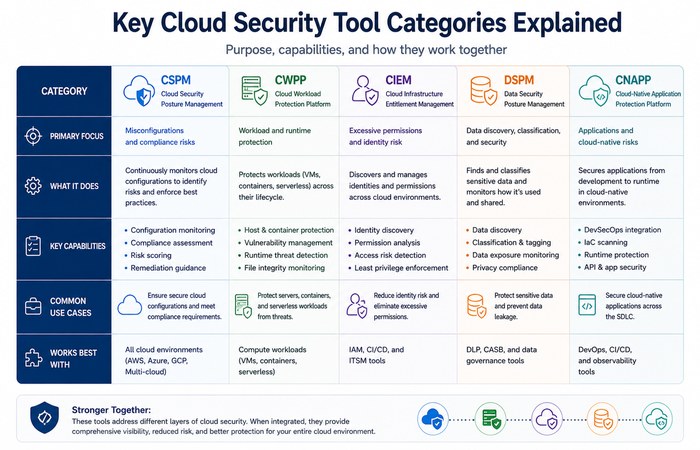
If you have been around the block analyzing CSP security tools, you have likely encountered an alphabet-soup of similar-sounding abbreviations. They are not all the same and clarifying their differences will help you from purchasing duplicating tools or even worse from falsely believing you are protected.
| Category | What It Actually Does | Primary Question It Answers |
| CSPM (Cloud Security Posture Management) | Continuously scans cloud accounts for misconfigurations against best-practice and compliance baselines | “Is anything set up incorrectly right now?” |
| CWPP (Cloud Workload Protection Platform) | Protects running workloads — VMs, containers, serverless functions — through scanning, runtime monitoring, and threat detection | “Is anything actively running that shouldn’t be, or behaving abnormally?” |
| CIEM (Cloud Infrastructure Entitlement Management) | Analyzes who has access to what across cloud accounts, flags excessive or unused permissions | “Who can touch this, and should they be able to?” |
| DSPM (Data Security Posture Management) | Discovers and classifies sensitive data across cloud environments, tracks where it flows and who can access it | “Where is our sensitive data, and is it exposed?” |
| CNAPP (Cloud-Native Application Protection Platform) | A consolidated platform combining CSPM, CWPP, CIEM, and often DSPM and API security into a single tool | “Can I see and manage all of the above from one place?” |
CSPM is really the original entry point into the entire space 1 early cloud breaches were so conclusively and simply rooted in misconfiguration (public storage buckets being the archetype) that “monitor your settings constantly” was simply extremely powerful by itself. CWPP grew up alongside it to cover the workload layer that CSPM doesn’t touch. CIEM emerged specifically because identity and entitlements turned out to be complicated enough — especially with cloud providers each having their own permission models — that it needed dedicated tooling rather than being a feature bolted onto something else. Given that inadequate IAM is now the #1 threat in the CSA’s ranking, if you only have budget to properly implement one of these categories this year, there’s a strong case that CIEM (or at minimum, an entitlement-focused capability within a broader platform) deserves the priority.
CNAPP is the industry’s answer to “why do I need five different consoles for related problems?” — vendors including Wiz, Palo Alto Networks (Prisma Cloud), Microsoft (Defender for Cloud), and Orca Security have built platforms that consolidate most or all of the categories above into a single product, with the pitch being that unified visibility catches combinations of risk that siloed tools miss. That last point is genuinely the more interesting argument for consolidation: a public storage bucket (a CSPM finding) that also happens to contain sensitive customer data (a DSPM finding) and is accessible by an over-privileged service account (a CIEM finding) is a dramatically more urgent problem than any one of those findings in isolation — and a platform that can connect those dots automatically gives you something a spreadsheet full of separate tool outputs never will. This kind of context-aware prioritization, rather than a raw count of vulnerabilities or misconfigurations, is increasingly how mature security teams decide what to fix first — because with typical cloud environments generating far more findings than any team could realistically address, the question isn’t “what’s wrong,” it’s “what’s wrong and actually exploitable and actually exposes something valuable,” and that’s a fundamentally different, harder question that traditional CVSS-only vulnerability scoring was never designed to answer.
Which category — or platform — is right for you depends heavily on your maturity level and existing tool footprint, something we’ll return to in the strategy section below.
Cloud Security by Deployment Model

Security priorities shift depending on which service model and deployment strategy you’re using, and it’s worth being explicit about the differences.
Infrastructure as a Service (IaaS) gives you the most control — and the most responsibility. Since you’re managing the operating system, middleware, and application layer yourself, IaaS environments require the fullest security stack: patch management, network segmentation, workload protection, and everything covered in the pillars section above. Amazon Web Services remains the largest IaaS provider by market share, and its shared responsibility model has become something of a de facto industry standard that other providers’ frameworks are usually compared against. We’ve written a more detailed breakdown of common AWS cloud security challenges and how to address them if you’re specifically working in that environment — it covers issues like IAM policy complexity, security group misconfiguration, and S3 bucket exposure in more hands-on detail than we have room for here.
Platform as a Service (PaaS) shifts more of the operational burden — patching, runtime management — onto the provider, which reduces your workload but doesn’t eliminate your responsibility. You still control application code, data, and access configuration, and PaaS-specific risks tend to center on how you’ve configured the managed service itself (database access controls, API gateway settings) rather than underlying infrastructure.
Software as a Service (SaaS) hands almost all infrastructure and application security to the provider, but this is precisely where identity and configuration become nearly your entire job. SaaS security posture management has become its own specialized discipline because the number of SaaS applications a typical organization uses has exploded — often into the hundreds when you count every department’s individually adopted tools — and most of those applications were never vetted by security teams in the first place. Misconfigured sharing settings, third-party app integrations with excessive permissions, and weak authentication policies account for the overwhelming majority of SaaS-related incidents.
Multi-cloud and hybrid cloud environments — using more than one public cloud provider, or combining public cloud with on-premises infrastructure — add a further layer of complexity that deserves its own mention. Each provider has its own identity model, its own security tooling, its own terminology for equivalent concepts, and its own default configurations. Organizations adopt multi-cloud strategies for good reasons: avoiding vendor lock-in, taking advantage of best-of-breed services from different providers, meeting data residency requirements in different regions, or simply as the accumulated result of different teams and acquisitions making different choices over time. But every one of those reasons comes with a security tax: the third-party and API risks the CSA ranked at #3 and #4 this year are considerably harder to manage when you’re coordinating across providers with genuinely different security models, and a consolidated view across all of them — which is exactly what CNAPP platforms are increasingly built to provide — stops being a nice-to-have and starts being close to essential once you’re operating in more than one environment.
Compliance and Regulatory Frameworks
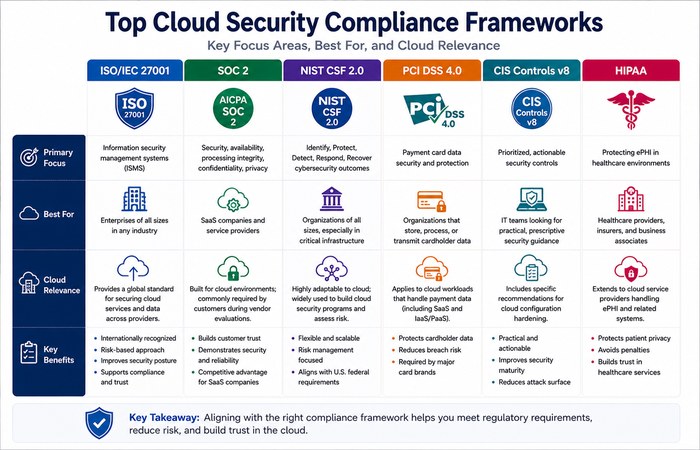
Cloud security and compliance overlap heavily, but they’re not the same thing — you can technically pass a compliance audit while still having meaningful security gaps, and you can run a genuinely secure environment while still failing a specific regulatory requirement on a technicality. Still, the major frameworks give you a well-tested baseline, and in regulated industries, they’re not optional.
| Framework | Scope | Who It Typically Applies To |
| NIST Cybersecurity Framework 2.0 | A voluntary, widely adopted framework organized around six core functions: Govern, Identify, Protect, Detect, Respond, and Recover | U.S. organizations broadly; often used as a baseline even outside the U.S. |
| ISO/IEC 27001 / 27017 | 27001 is the general information security management standard; 27017 adds cloud-specific controls covering shared responsibility, virtualization, and provider relationships | Organizations pursuing formal certification, especially those selling into enterprise or international markets |
| SOC 2 | An auditing standard evaluating controls around security, availability, processing integrity, confidentiality, and privacy | Cloud service providers and SaaS vendors, often required by enterprise customers before they’ll sign a contract |
| GDPR | EU regulation governing personal data protection and privacy, with strict rules on data residency, breach notification, and cross-border transfers | Any organization processing EU residents’ personal data, regardless of where the organization itself is based |
| HIPAA | U.S. regulation governing protected health information | Healthcare organizations and their cloud service providers (business associates) |
| PCI DSS | Security standard for organizations that handle payment card data | Any organization storing, processing, or transmitting cardholder data |
| CSA CCM / STAR | The Cloud Controls Matrix is a cloud-specific controls framework; STAR is CSA’s associated registry and certification program for providers | Cloud providers demonstrating security posture; customers evaluating providers |
A few things worth knowing that don’t fit neatly into the table. First, these frameworks aren’t mutually exclusive — a healthcare SaaS company selling internationally might realistically need to satisfy HIPAA, GDPR, and SOC 2 simultaneously, and the good news is that a well-designed control (strong access logging, for instance) often satisfies requirements across several frameworks at once rather than needing to be built separately for each. Second, data residency and data sovereignty requirements — rules governing where data is physically allowed to be stored and processed — have become an increasingly central compliance concern as cloud providers operate data centers across dozens of regions, and getting this wrong is one of the more common ways organizations discover compliance gaps only after an audit or, worse, after a regulator inquiry. We’ve written a deeper, more practical breakdown of this specific area in our guide to cloud data compliance, which is worth reading in full if regulatory requirements are a significant driver for your organization — it covers data residency, cross-border transfer mechanisms, and vendor due diligence in more depth than we can cover as a subsection here.
Third — and this connects back to the confidential computing section above — regulators are increasingly asking more sophisticated questions than “is the data encrypted.” Some frameworks and regulatory guidance are starting to probe whether the cloud provider itself could theoretically access unencrypted customer data, which is precisely the gap that hardware-based confidential computing closes. That’s a trend worth watching if you operate in a heavily regulated sector, because it suggests today’s “nice to have” security technology may become tomorrow’s compliance requirement.
Building a Cloud Security Strategy: A Practical Roadmap

Everything above describes what good cloud security looks like. This section is about how to actually get there without trying to fix all eleven CSA threat categories simultaneously and burning out your team in the process. In our experience, a phased approach works better than a comprehensive one, both because it delivers value faster and because it’s realistic about how much organizational change security teams can drive at once.
Phase 1: Establish visibility. You cannot secure what you can’t see, and most organizations underestimate how much of their cloud footprint is genuinely unknown to the security team — shadow IT, forgotten test environments, SaaS applications adopted by individual departments without review. Start by deploying discovery tooling (CSPM at minimum) across every cloud account you know about, and budget time for the uncomfortable process of finding accounts and resources you didn’t know existed. This phase alone typically surfaces more risk than anything that follows it.
Phase 2: Fix identity first. Given where identity sits in the current threat ranking, this is the highest-leverage next step for almost every organization. Implement MFA universally, run an access review to identify and remove excessive standing permissions, and inventory your non-human identities — service accounts and API keys are almost always more numerous and more over-privileged than anyone expects going in.
Phase 3: Close the misconfiguration gap. With visibility established, systematically work through the highest-severity misconfigurations your CSPM tooling surfaces — public exposure of storage and databases first, since these represent the most direct path from a configuration error to a data breach.
Phase 4: Build detection and response capability. After addressing the most-exposed, highest-risk deficiencies, reallocate resources to ‘detect and respond’ quickly to anything that gets past your controls. This means centralized logging, a SIEM that‘s optimized for your cloud environment, and importantly a tested (by way of tabletop exercises if necessary)incident response plan, not simply stored away in a binder.
Phase 5: Formalize governance. Once the foundation of operations is established, establish the slack structures necessary to prevent your program from falling apart: ownership for the decisions on your cloud security model, a change management process with security involved, periodic access recertification, and a rhythm of re-evaluation of your threat profile along new axes such as the AI categories recently added by the CSA to its rankings.
Phase 6: Mature toward proactive and predictive security. The most advanced programs move beyond reacting to known threats and toward continuously modeling their exposure — using the kind of context-aware prioritization CNAPP platforms are built for, running purple-team exercises that specifically test AI-assisted attack techniques, and treating confidential computing and other emerging protections as part of the standard toolkit rather than an exotic add-on.
A maturity model like this maps reasonably well onto structured frameworks such as OWASP’s DevSecOps Maturity Model on the application security side, or CSA’s own Certificate of Competence in Zero Trust curriculum on the architecture side, if you want external structure and a way to benchmark your progress against industry norms rather than building your own maturity ladder from scratch.
One last point on strategy that’s easy to overlook: resilience planning — specifically, backup and disaster recovery — needs to be part of this roadmap from an early phase, not bolted on at the end. A ransomware incident or a serious misconfiguration-driven data loss event tests your recovery capability directly, and that capability is either ready or it isn’t; there’s no partial credit during an actual incident. If backup strategy hasn’t been part of your cloud security planning to date, our guide on how Veeam Cloud Connect can secure your backup strategy is a good next read, and it’s worth treating recovery testing as a Phase 4 activity alongside detection and response rather than something you get to eventually.
Cloud Security Best Practices Checklist
If you want something immediate to give a team as a kind of working list of what we are about (and not as a long background narrative), here is compressing down, practical down to:
- Enforce multi-factor authentication on every account with cloud console or API access, no exceptions for “convenience”
- Apply least privilege by default, and review access permissions on a recurring schedule rather than only when something goes wrong
- Inventory every non-human identity — service accounts, API keys, AI agents — and bring them under the same lifecycle management as human accounts
- Enable encryption at rest and in transit by default; evaluate confidential computing for your most sensitive workloads
- Deploy continuous configuration scanning (CSPM) rather than relying on periodic manual audits
- Scan container images and infrastructure-as-code templates before deployment, not after
- Centralize logging across every cloud account and service into a single, searchable location
- Build and test an incident response plan specific to cloud environments, including at least one tabletop exercise per year
- Maintain isolated, tested, immutable backups as a defense against ransomware and catastrophic misconfiguration
- Map your compliance obligations explicitly rather than assuming a general security posture automatically satisfies them
- Reassess your third-party and API exposure at least annually, given how quickly dependency chains change
- Treat AI-assisted attack techniques as a current risk in your threat model, not a future one
How to Evaluate a Cloud Security Solution or Vendor
Eventually, much of this boils down to a purchasing decision which platform, which vendor, which combination of tools could take you from your starting point to the exact specifications outlined in this guide. Some questions for any vendor to consider and ask before you buy, no matter the category (CSPM, CNAPP, CIEM, or whatever):
Does it span your real world not just the hype? If a tool is designed principally for AWS and considers Azure or GCP support an add-on, you‘ll get holes in their coverage if you‘re in multi-cloud, even if a marketing page shows all three.
How does it rank the findings? With so many low-value alerts created by the average cloud environment, a tool that just gives you a longer running list of things to fix isn‘t useful. Better, perhaps, a tool that brings together identity, data sensitivity, and exposure to show you truly urgent bits.
What’s the actual time to value? Some platforms require months of tuning before they produce trustworthy signal. Request reference customers from a comparable size and ask exactly how long it took from deployment to working with authentic results.
How does it fit in with what you already have, or does it require you to rip and replace? A tool that plugs into your existing ticketing system, CI/CD pipeline, and SIEM will get adopted. One that requires your team to check a separate console daily generally won’t, no matter how good its detection is.
How does the vendor handle the AI angle? Given everything covered in this guide about AI-enhanced attacks and AI system compromise, it’s fair to ask any vendor directly what they’re doing to detect AI-assisted attack patterns and to secure AI agents and pipelines specifically, rather than treating AI risk as a bullet point on a roadmap slide.
If you haven’t settled on why investing in dedicated cloud security tooling matters in the first place, our earlier piece on why cloud security solutions are important makes that case in more detail and is a useful starting point before you get into vendor-by-vendor evaluation.
FAQs
Q1: What is the biggest cloud security threat right now? According to the Cloud Security
A: Alliance’s 2026 survey of 507 industry experts, inadequate identity and access management is the top-ranked threat, having moved up from second place in 2024. It covers excessive permissions, poorly managed non-human identities, and unrotated credentials — problems that tend to accumulate quietly over time rather than announce themselves.
Q2: Is cloud computing less secure than on-premises infrastructure?
A: Not inherently. Major cloud providers generally invest far more in physical security, redundancy, and infrastructure patching than most individual organizations could match on their own. The security difference in practice usually comes down to configuration and identity management on the customer’s side of the shared responsibility model, not the underlying platform.
Q3: What’s the difference between cloud security and cybersecurity in general?
A: Cybersecurity is the broader discipline covering all digital threats and defenses, regardless of environment. Cloud security is a specialized subset focused on the specific dynamics of cloud environments — the shared responsibility model, identity-centric perimeters, infrastructure-as-code, and multi-tenant architecture — that don’t map directly onto traditional on-premises security practices.
Q4: What is a CNAPP and do I actually need one?
A: A Cloud-Native Application Protection Platform consolidates several previously separate tool categories — posture management, workload protection, entitlement management, and often data security — into a single platform. Whether you need one depends on your scale and maturity: smaller environments can often get by with point solutions for their highest-priority gaps (identity tooling, most likely, given current threat data), while larger or multi-cloud environments tend to benefit from the unified visibility a CNAPP provides once the number of separate tools and consoles becomes unmanageable on its own.
Q5: How is AI changing cloud security threats?
A: AI now cuts both ways. On the offensive side, the CSAs 2026 report ranked AI-Enhanced Attacks as its second most serious threat, highlighting the role of AI in speeding up reconnaissance, phishing and vulnerability discovery exemplified by Anthropic revealing in April 2026 that its internal AI models were able to autonomously discover and compromise vulnerabilities in all major OSes and browsers. On the defensive side, AI System Compromise achieved entry into the rankings at #6, because today the very AI models, agents and pipelines that organizations operate are assets requiring defense, not just tools.
Q6: What is confidential computing, in plain terms?
A: It’s a way of protecting data even while it’s actively being processed, using hardware-isolated environments (Trusted Execution Environments) that keep data encrypted and inaccessible to the operating system, hypervisor, or cloud provider itself, closing a gap that traditional encryption — which only protects data at rest and in transit — has never fully addressed.
Q7: What compliance frameworks apply to cloud security?
A: This varies considerably depending on your industry and location but the most common are: SOC 2 (often required by enterprise customers of SaaS and cloud vendors), ISO/IEC 27017 (standardized cloud-specific security controls), GDPR (for any organization handling personal data of EU residents), HIPAA (healthcare), PCI DSS (payment card information) and the NIST Cybersecurity Framework 2.0 for all-in-one voluntary baseline. Many organizations will find they need to meet many not just a single one.
Q8: How often should we review cloud access permissions?
A: There’s no universal answer, but quarterly reviews are a reasonable baseline for most organizations, with more frequent, automated reviews for highly privileged accounts and non-human identities. Given that inadequate access management is currently the top-ranked cloud threat, erring toward more frequent review is generally the safer choice.
Related Reading
If you found this guide useful, these related pages go deeper into specific areas we touched on above:
- Why Cloud Security Solutions Are Important — the foundational case for investing in dedicated cloud security tooling, useful background if you’re building a case internally for budget or buy-in.
- 4 Common AWS Cloud Security Challenges and How to Address Them — a hands-on look at the specific misconfiguration and IAM issues that come up most often for teams running on AWS.
- Cloud Data Compliance — a deeper dive into data residency, cross-border transfer rules, and the regulatory side of storing data in the cloud.
- How Veeam Cloud Connect Can Secure Your Backup Strategy — practical guidance on building the backup and recovery capability that makes resilience against ransomware and data loss actually real, not just theoretical.
- Cybersecurity Threats in the Cloud: What SaaS Providers Need to Know — a closer look at the SaaS-specific risks touched on in the deployment models section above, from misconfigured sharing settings to over-permissioned third-party integrations.
- How to Optimize Multi-Cloud Environments for Performance and Security — practical guidance for teams managing more than one provider, expanding on the multi-cloud complexity we cover in the deployment models section.
- Cloud Security Trends — a forward-looking overview of the cloud security trends businesses should watch in 2026, including the evolving threats, technologies, and strategies shaping cloud protection.
Sources and References
This guide draws on the following primary sources, current as of August 2026:
- Cloud Security Alliance, Top Threats to Cloud Computing Survey Report 2026 — cloudsecurityalliance.org/artifacts/top-threats-to-cloud-computing-2026
- Cloud Security Alliance, AI Cloud Controls Matrix v1.1 (AICM) — cloudsecurityalliance.org/artifacts/ai-controls-matrix-v1-1
- Cloud Security Alliance, Security Guidance for Critical Areas of Focus in Cloud Computing v5 — cloudsecurityalliance.org/artifacts/security-guidance-v5
- Security MEA, “AI Emerging as a Top Threat to Cloud Security, says CSA” (August 19, 2026) — securitymea.com
- SecureWorld, “Anthropic’s Claude Mythos Autonomously Discovers, Exploits Zero-Days” (April 2026) — secureworld.io
- Help Net Security, “Anthropic: Claude Mythos identified 10,000+ software flaws” (May 26, 2026) — helpnetsecurity.com
- Anthropic, Project Glasswing overview — anthropic.com/glasswing
- NIST, Cybersecurity Framework 2.0 — nist.gov/cyberframework
- NIST Special Publication 800-207, Zero Trust Architecture
This guide reflects publicly available information as of August 2026. The Cloud Security Alliance’s 2026 Top Threats report and the Claude Mythos disclosure are both recent developments; readers should verify current details directly with the primary sources above before citing specific figures in downstream work.
