

This article is part of our Social Media Marketing resource section
People rushed to Instagram Reels in droves after TikTok was banned in India and the firm faced legal challenges in the United States. Instagram now has over 100 million daily active users, and users are spending an increasing amount of time browsing through Reels. So, if you’re a budding Reels developer, here’s a list of the top Instagram Reels video editors for Android and iPhone.
We’ve included Instagram Reels video editors that are mainly free and don’t leave a watermark. So, with that in mind, let’s look over the list and see who the best video editor for Instagram Reels in 2021-2022 is.
You can get the greatest Reels editing software for both Android and iOS right here. You may scroll the list below to select for yourself the Best Reels Editor. This will help you become MegaFamous in no time!
For businesses, creating engaging Reels can be an important part of the advantages of social media marketing, especially when visual content is used to connect with a target audience.
Table of Contents
1. VN Video Editor
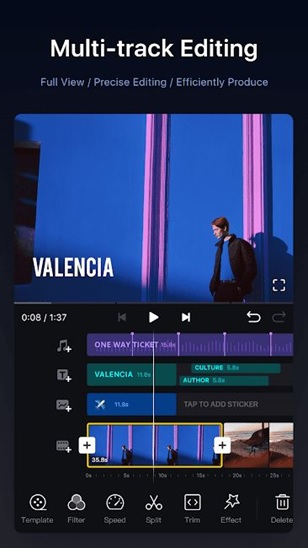
VN Video Editor is unquestionably one of the best Instagram Reels editing software for Android and iOS.It is far more sophisticated than InShot and provides all of its capabilities for free. Yes, you guessed correctly. This Reels video editing programme does not include a watermark. Furthermore, no video or banner advertising appear while editing or exporting the film. It’s like the cherry on top of the cake, with some extra on the edges.
Aside from that, VN Video Editor has Reels-specific capabilities such as portrait video editing, numerous aspect ratios to choose from, backdrop selection, multi-frame video creation, and much more.
Not to mention that you have access to all of the typical video editing tools such as cut, split, speed, and so on. Those looking for a music library with a variety of sound effects may like VN Video Editor’s huge assortment of sounds. Effectively said, VN Video Editor is a fantastic reels editor for Instagram Reels which does not have a watermark, and you must try it out.
Once your Reels are created, you can use them as part of a broader strategy for promoting your business using Instagram.
2. InShot
InShot is a well-known Reels video editor for Android and iPhone. It has a variety of aspect ratios to suit the entire screen in portrait position. It even allows you to use arbitrary aspect ratios and quickly make vertical Reels films dependent on your screen size. Apart from this, you may add text, adjust fonts, a color palette, play music locally or from iTunes, and do a number of other things.
You also have a plethora of video-editing options, such as clipping, dividing, cropping, zooming, flipping films, and producing slow-mo or time-lapses. But that’s not all. You may also use the programme to add animated stickers and emoticons, memes, and custom graphics. Overall, InShot is a fantastic Instagram Reels video editor for Android and iPhone, and you should try it out.
Keep in mind that after a few first videos, InShot begins to add a watermark on them. If you wish to remove the watermark, you must purchase the app’s premium edition. Otherwise, you may choose from the other free applications on our list.
Businesses can also explore Instagram marketing tools to complement their Reels creation and publishing workflow.
3. Clips by Apple
If you’re an iOS user, Clips may be the only tool you’ll need to make distinctive Instagram Reels movies. Apple has made significant improvements to the app, allowing you to add Animojis, Memojis, and a variety of animated characters to your movies. Text, typefaces, stickers, filters, and other elements are also supported. So, yep, it’s an excellent alternative for Instagram’s native Reels editor.
Aside from that, Clips is unique in that it allows you to add subtitles to your videos in real-time. Clips may show the caption in numerous angles and styles while you talk, making your video stand out from the crowd. So, if you want to produce short and enjoyable films on your iPhone, Clips is a good video editing tool to use.
4. FilmoraGo
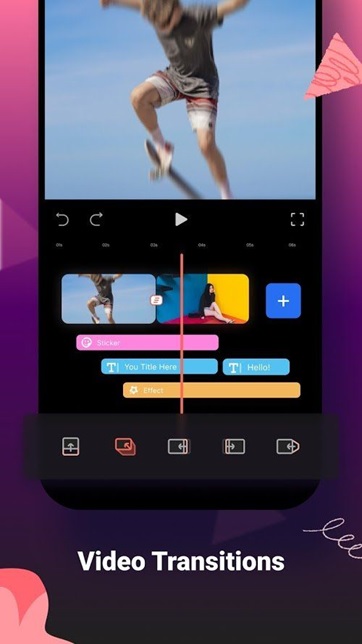
FilmoraGo is yet another amazing video editor for Android and iOS that can be used to create Instagram Reels videos. It supports several aspect ratios in portrait orientation, as do other video editors, and offers some nifty editing capabilities for Reels producers. It has some excellent video effects that I haven’t seen in other applications, a decent text tool, and I enjoy the filters.
In addition, FilmoraGo contains practically every function you might desire in a professional video editor, from video cutting to voice-over and cropping to overlays. It implies you may improve the quality of your Instagram Reels videos. Having said that, keep in mind that FilmoraGo has a fairly high learning curve. Before you can start making Reels films, you must first spend some time using the software.
Once your videos are ready, strategies for easy ways to boost your Instagram reach can help you think about how to distribute them more effectively.
5. Funimate
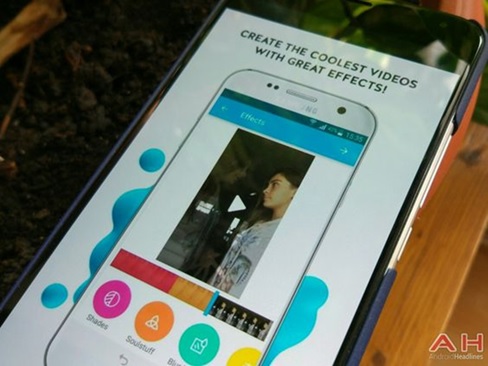
Funimate is primarily intended for the creation of videos for Instagram Reels, Shorts, and other short video apps such as Tiktok. It features a large variety of effects and filters that Instagram Reels does not have. Cropping your films to eliminate undesirable bits, adding still photos and audio tracks, applying clever transitions, and much more are all options.
Remember that, in addition to the video-editing tools, Funimate also operates a social media site where you can post your Funimate films and join a million-plus community. Nonetheless, if you enjoy making short and entertaining films with custom animations and text effects, Funimate may be the right choice for you.
Creators looking to grow their audience can also explore ways to get more Instagram followers and learn how to get followers on Instagram alongside their Reels strategy.
6. YouCut
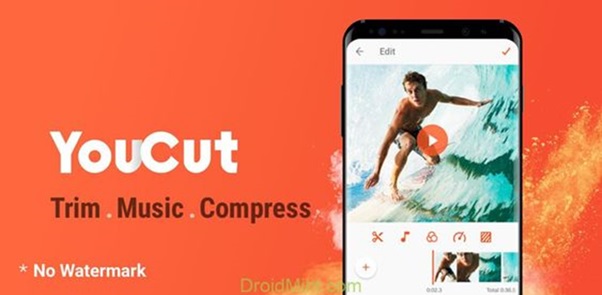
YouCut is the software to use if you want a free Instagram Reels video editor that does not apply a watermark. It is solely available for Android and has a slew of features such as InShot. Furthermore, the app does not display advertisements, which is a plus.
In terms of features and functionality, the software contains all of the basic and complex video editing options you might want. You may modify the backdrop of films, tweak colors, edit clips, crop, and merge numerous videos. The text tool works nicely, and you may use a variety of typefaces and text effects.
Not to forget, the program has a vast selection of royalty-free music, which is fantastic. Overall, YouCut is a fantastic Instagram Reels editor for Android that does not apply a watermark to modified videos.
After creating Reels, understanding how Instagram determines your followers and likes can help you better understand how your audience responds to your content.
Conclusion
So, in 2021-2022, these are some of the top Instagram Reels editors for Android and iOS. We’ve compiled a list of both free and premium applications; some are exclusive to iOS, but the majority are available on both platforms. We’ve also identified a few video editors who don’t add watermarks to videos for free. So, choose one of these applications to get started with Reels video making.
Now that you’re aware of the advantages, test it for yourself to discover what potential it has for your brand!
Businesses can use Reels alongside Instagram Live for business and other content formats to create a broader content strategy. They can also explore how to monetize Instagram once they have established an engaged audience.
For businesses building an Instagram presence, 3 things to learn before starting an Instagram business account can help establish a foundation before investing heavily in content creation.
Audience growth can be approached through the importance of organic Instagram growth and an understanding of the importance of Instagram followers for business expansion. Businesses evaluating paid growth options can also review a best Instagram growth service and compare different Instagram growth services.
At the same time, businesses should carefully consider approaches such as buying Instagram followers and buying real Instagram likes. For engagement-focused campaigns, the ultimate guide to boosting Instagram likes provides another area to explore.
Instagram Reels can also support broader publishing strategies, including creating a blog on Instagram. Brands can use examples such as Instagram and The Rock for inspiration when considering how personalities and visual content can build visibility. Automated audience communication can also be explored through Instagram chatbots and best practices for driving conversions.
Finally, understanding how Instagram has changed marketing can help businesses see where Reels fit within the wider evolution of Instagram marketing.
