


Finding a working VPN discount code for 2026 shouldn’t feel like a game of whack-a-mole. Too many “verified” pages hide the time stamp, checkout screenshot, or renewal price, leaving you guessing at the real cost. So we spun up a fresh Chrome profile, tested every major coupon source in September 2026, and noted which offers actually lowered the cart total. The result is a five-source ranking that shows where to start, how often each option pays off, and when to skip a flashy link—so you can lock in the lowest trustworthy price in minutes, not hours.
Table of Contents
How we verified every discount
We recreated a typical U.S. checkout on September 2, 2026 by opening a fresh Chrome profile, with no VPN, coupon extensions, or logged-in accounts, and we paid in U.S. dollars.
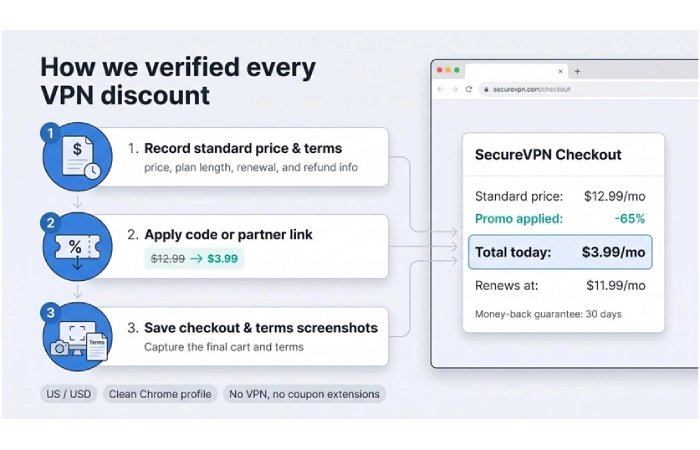
Our three-step test for each offer:
- Record the provider’s standard price, plan length, renewal amount, and refund window.
- Apply the code or partner URL and note any drop in the total or bonus months.
- Save a final checkout screenshot in USD plus the terms page for proof.
If a link pushed us off the provider’s domain, failed to adjust the price, or voided the refund guarantee, we labeled it “invalid” and moved on. Auto-applied deals such as ExpressVPN’s official link were logged separately from typed codes to keep the success rate clear.
Follow this sequence and your cart total should match ours unless the VPN has already swapped in a new sale.
1. Official VPN provider pages, newsletters, and account offers
Why this source ranks first
Every discount we tested on a provider-controlled page in September 2026 worked: 10 passes out of 10. The offer appears inside the brand’s own checkout, so you watch the total drop, see the refund window, and confirm the renewal price before you click “Pay.”
Providers also spell out who qualifies. A banner might read “new customers only,” while a student portal prompts for a .edu email before it adds another 15 percent. Clear guardrails like these save you from surprise charges.
Freshness is another strength. Evergreen promo URLs update the instant a sale shifts from back-to-school to Black Friday, so one bookmark continues to show the current deal.
The fine print on an official page also lists next year’s rate, information most coupon directories omit, so you can decide early whether to turn off auto-renew.
Test snapshot: US / USD, clean Chrome profile, no extensions; screenshots on file.
2. Reputable technology-media deal hubs
Sites such as PCWorld, Tom’s Guide, and TechRadar test VPNs year-round and refresh their deal pages whenever a major sale lands. Likewise, PCWorld’s chart surfaced TorGuard’s one-year “Anonymous VPN” bundle at 50 percent off. TorGuard’s own promo page was running 60 percent off and a free residential IP upgrade during our September 2026 test; you can claim the discount in the same checkout, but the refund window still lasts only seven days and excludes Dedicated IP add-ons, so read the terms before you pay.
Why start here?
- Listings usually include total price, plan length, refund window, and any free months, so cross-brand comparison is quick.
- Editors pull outdated links as soon as a sale ends, so the page you bookmark today should still reflect next week’s pricing.
Quick check before you buy: open the media outlet’s partner link in one tab and the provider’s promo page in another. If the totals match, choose the official page to keep extra trackers out of your cart; if the partner link is cheaper, take the savings and screenshot the renewal line for later.
These media hubs excel during seasonal rushes, especially late October through Cyber Monday, when their deal grids update daily and often highlight bundle extras like password managers or cloud storage. Treat them as a comparison engine, then finish the purchase on whichever source shows the lowest trustworthy number.
3. Student and employee discount portals
If you have a .edu address or an enterprise login, check portals like Student Beans or your company’s perk page before you pay full price. Providers often hide extra savings behind these gates:
- NordVPN lists an “additional discount” for students and apprentices aged 18–26 on its support page.
- Surfshark directs students through Student Beans for a code applied at checkout.
Our September 2026 tests confirmed that these private links led to the provider’s real cart, preserved the standard 30-day money-back guarantee, and in two cases lowered the long-term plan price beyond the public sale. Percentages vary by campaign, so screenshot the cart total and renewal line while the offer is live.
Two quick reminders:
- Portals can pull or replace a code without notice, so keep a dated screenshot.
- Most deals apply only to new subscriptions; if you’re renewing, ask support to match the current student or employee rate before your term ends.
For anyone who qualifies, this route often beats public coupons with minimal effort.
4. Big coupon sites, cashback portals, and browser extensions
Aggregators such as DontPayFull and browser tools like Honey can surface dozens of VPN codes in seconds. In our September 2026 spot-check, DontPayFull displayed 10–30 “verified” coupons per brand, each stamped with a staff- or community-verified label dated within the past week. Honey auto-tested 10 Surfshark codes at checkout and offered 5 percent Gold cashback if none worked.
Why use them last?
- Low success rate. Only a fraction of listed codes still change the cart total when applied.
- Tracker conflicts. Cashback portals usually void rewards if you enter an outside code.
- Privacy cost. Installing an extension shares browsing data and grants permission to read every page you visit.
Quick tip: choose one cashback portal, activate it, and use only the codes it explicitly approves. If a directory coupon beats the portal’s net price, take the instant savings and skip the cashback.
Tried every tool and still paying list price? Return to the provider’s promo page; at least you keep the refund guarantee intact.
5. Moderated Reddit threads and brand communities
Reddit moves faster than any deal blog, but only the right corners are worth your time. The r/VPN moderators funnel provider talk into a recurring “VPN recommendations megathread,” updated every two months. Posts outside that thread are usually removed, making the megathread a reliable first stop for fresh links and renewal-price screenshots.
How to use these communities safely:
- Look for proof. A credible post links directly to the provider’s domain and attaches a dated checkout image in USD.
- Check engagement. Multiple upvotes and confirmations indicate the code worked for more than one person.
- Avoid off-domain stores. If a link ends on anything other than the VPN’s site, particularly a “VPN shop” with gift cards, treat it as unverified.
- Verify before paying. Paste the link in a clean browser, compare the total with the provider’s public promo, and screenshot the cart.
Community advice often spots flash retention offers or cashback stacks before media sites notice, yet a Reddit post is never a guarantee. Use it as a lead, confirm the totals yourself, and keep your refund window in mind.
When VPN discounts hit rock bottom
Black Friday remains the strongest driver of VPN pricing. PCWorld’s running deal tracker shows NordVPN, Surfshark, and CyberGhost dropping 69 to 88 percent on long-term plans during Black Friday 2025 and holding those rates through Cyber Monday. Similar patterns appeared in 2024, with some offers lasting until the first week of January.
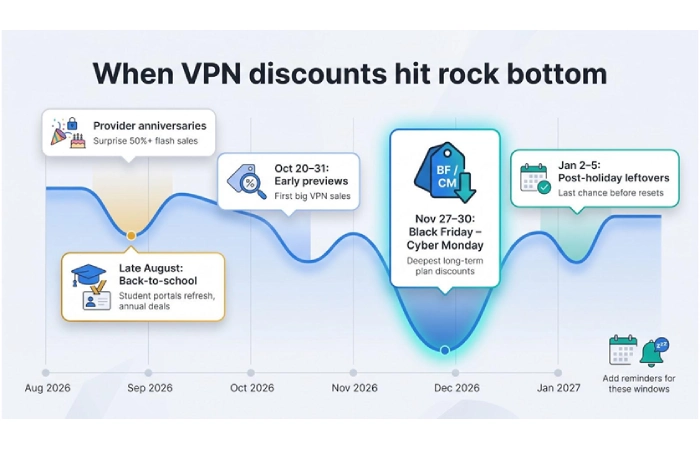
Key dates to watch in the United States:
- October 20–31, 2026: Early “Black Friday preview” pages often surface before Halloween.
- Black Friday, November 27, 2026 – Cyber Monday, November 30, 2026: Expect the deepest cuts; prices rarely fall further after this weekend.
- January 2–5, 2027: A few providers leave holiday pages up after New Year’s, so give them a final look before rates reset.
Smaller yet useful price dips:
- Late August back-to-school window. Student portals refresh and annual-plan coupons circulate in newsletters.
- Provider anniversaries. Launch-month flash sales (often 50 percent or more) appear with little notice; skim official emails if you’re already a customer.
Add calendar reminders for the three windows above, bookmark the provider’s promo page, and compare totals against media-partner links when each alert appears. A five-minute check at the right moment can shave a few more dollars off an already discounted plan.
Tips to maximize VPN savings
Think of every checkout as a quick three-step audit:
- Compare direct vs. promo pages. Open the provider’s standard pricing in one tab and its current sale or partner link in another. If both totals match, choose the official page to avoid extra trackers; if the partner link wins, take the savings.
- Calculate real cost. Divide the upfront price by all paid and free months to spot plans that look cheap only because they add “bonus” time. Jot down the renewal rate in the fine print; that number matters more than the headline percentage.
- Add (approved) cashback last. Activate a single portal, screenshot the confirmation, and use only the codes the portal marks as compatible. Mixing unapproved coupons usually cancels the rebate, as Rakuten’s FAQ notes.
Finish by saving two screenshots: the final cart and the terms page. Those images act as insurance if tracking fails or a renewal posts higher than promised. Spend one extra minute now, and you won’t be searching support chats later.
Fake “lifetime” deals
“Lifetime” in VPN marketing usually means “until the numbers stop adding up.” In May 2025, VPNSecure abruptly canceled thousands of lifetime accounts after new owners deemed the promise unsustainable, leaving customers with no service or refund prospects, according to Ars Technica.
Safer play: pay for a term you’re comfortable repeating—one or two years. Then set a reminder to shop a fresh discount before renewal.
Look-alike domains
Scammers register URLs that mimic trusted brands. For example, expressvnp.com drops one letter, while nordvpn-deals.shop tacks on a generic tail. The page might copy the provider’s logo, yet the SSL certificate and company details will differ from the genuine domain listed in the provider’s privacy policy.
Quick check:
- Hover over the link and read the full address, including every hyphen and extra word.
- After the page loads, click the padlock icon. The certificate should name the provider’s corporation, not “CloudFlare Origin Cert” or an unrelated registrar.
- If the domain looks wrong, close the tab and visit the provider’s site directly to locate the deal.
A sixty-second URL review can protect your payment details from impostor sites.
Inflated percentages
Big banners love to shout “80 percent off,” but that figure usually compares a three-year pre-pay to a rolling monthly plan. According to Top10VPN’s 2026 price study, the average month-to-month cost across 30 providers was $11.15, while the same services averaged $3.87 per month on multi-year terms—a built-in 65 percent gap before any “extra” discount appears.
Do this instead: open the provider’s standard two-year page in one tab and the sale or coupon link in another. Subtract the smaller total from the larger, then divide that difference by the regular price. That result is the real percentage you’re saving. If the sale only trims a few dollars off the usual long-term rate, stay skeptical of an 80-percent headline.
Countdown clock theatrics
A timer that resets each time you refresh is not a real deadline; it is a pressure tactic. Authentic sales display a fixed date and time—such as “Ends Nov 30 at 11:59 pm ET”—and keep counting down even in a new browser session.
Quick check: reload the tab or open it in a private window. If the clock jumps back to 24:00:00, ignore the urgency and compare prices at your own pace.
Refund exclusions in fine print
Most providers advertise a “30-day money-back guarantee,” yet the promise can shrink under closer inspection. TorGuard, for instance, limits refunds to seven days and excludes any plan that includes a dedicated IP address or streaming bundle, according to TorGuard’s terms.
Before you pay:
- Open the provider’s refund policy in a new tab.
- Search for keywords such as add-on, dedicated IP, static, or non-refundable.
- If an add-on you want appears in the exclusion list, remove it or accept that the purchase is final.
A two-minute policy scan now can prevent lengthy support conversations later.
Forced app installs
If a coupon requires an APK download or a browser extension that asks to “read and change all your data,” close the tab. Trustworthy VPN discounts live on a regular web page and apply during checkout, without extra software.
Conclusion
Add calendar reminders for the three discount windows, bookmark the provider’s promo page, and compare totals against media-partner links when each alert appears. A five-minute check at the right moment can shave a few more dollars off an already discounted plan.
