

Photor.ai AI Image Editor
Photor.ai is an innovative AI-powered image editor that allows users to edit simple photographs to sophisticated AI-based images. It is a powerful AI-based image editor suitable for designers, creators, and even ordinary people. Image to image AI is one of the most appealing features of the editor. With it, any user is able to upload an ordinary image and set AI prompts to change the image to a completely different style.
The editing is fast, simple, and the level of creativity is up to the user. It takes only a couple of clicks for a user to furnish a simple image and make a stunning art piece, which can be used for digital marketing and social media purposes and even for personal use.
Table of Contents
What Makes Photor.ai a Smart AI Image Editor?
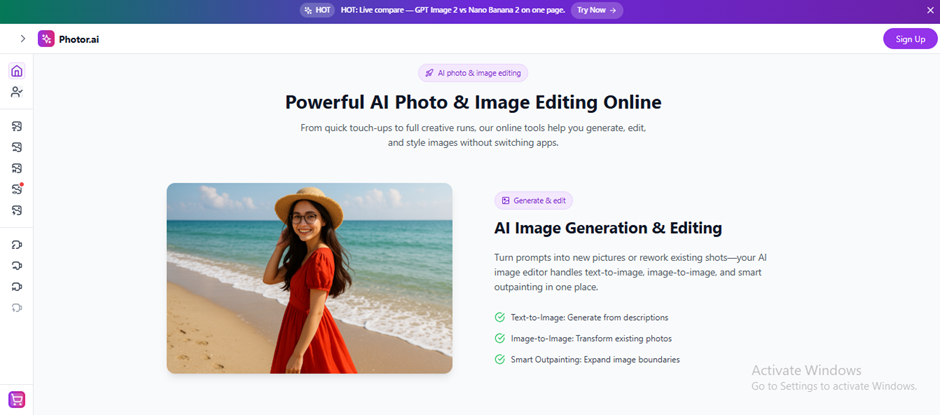
Photor.ai is an innovative image editor that empowers users to edit, regenerate, and creatively alter images by use of artificial intelligence. It is an editor for the everyday user who fancies themselves as being creative but does not have the time or the skills to learn image editing.
The platform has a diversity of AI models that are able to analyse images in terms of structure, style, and their compositional elements. Traditional editing tools are devoid of creativity and heavily reliant on the user making manual adjustments to the image. Photor.ai, however, employs image-to-image AI technology.
This is excellent for social media, marketing presentations, digital imagery and creativity. Photor.ai is an excellent tool for the simple and quick creation of realistic photography or stylised graphics. Photor.ai is like a professional-level editor in your pocket.
Step-by-Step: How Image-to-Image AI Works in Photor.ai
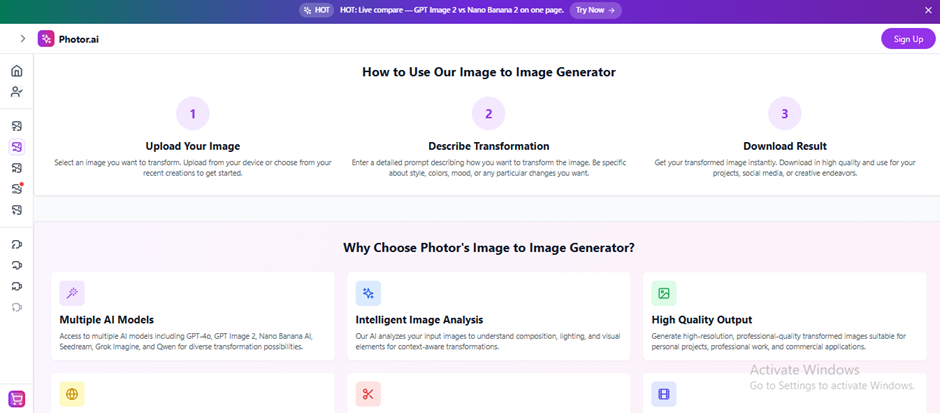
AI Image Editor is one of the most powerful tools Photor.ai has to offer. Because of this tool, the AI uses the given image and applies the user’s details to transform it. The Photor AI tool utilises one of the most powerful diffusion models that focuses on the analysis of shape, colour, and light, and finally, the objects of the image.
Step 1: Upload Your Image
You can upload an image in either JPG, PNG or WEBP formats. The tool scans and interprets the structures, characters and details of the image.
Step 2: Write a Prompt
You can suggest the AI to apply the futuristic, realistic, anime or cinematic style and many more.
Step 3: AI Processing
With the help of a diffusion model, the AI scans the image, interprets characters and structures, and applies the prompt.
Step 4: Choose an AI Model
The tool offers its users the freedom to choose the model to help achieve the specific image or artwork style.
The diffusion model Photor AI uses has the ability to alter the image style while still maintaining all aspects of the subject.
Is Photor.ai Worth It? Here’s What Makes It Stand Out
Operating as both an AI image editor and image generator, Photor.ai differs from other editors by changing the accessibility of digitised creativity. With Photor.ai’s advanced image-to-image AI technology, users can add an interesting and professional touch to any simple picture by converting it into an image of impressive artwork.
Photor.ai combines the advanced AI technology of image editing with elements of traditional creativity to fill the gaps of digitised creativity. It is beneficial to people of all skill levels and abilities, as well as businesses searching for quick and professional image editing, whether for artistic, social, or marketing creativity.
