

Patch Management Explained
Most attackers do not spend their time hunting for mysterious, unknown flaws. They scan for the boring stuff: a server still running last year’s software version, a known bug the vendor already fixed months ago, a fix that simply never got installed anywhere it needed to be. It is unglamorous, and it is exactly why it works so often.
Solid patch management for endpoint security closes that specific gap. It is less about chasing exotic threats and more about making sure the fixes that already exist actually reach every device that needs them.
Vulnerability exploitation was the initial access method in 20% of breaches in 2025, a 34% jump from the year before, according to Verizon’s Data Breach Investigations Report. That increase did not happen because attackers got dramatically smarter. It happened because the gap between a patch being released and it being installed keeps giving them an opening.
Key Takeaways
- Patch management is the discipline of finding, testing, and deploying vendor updates before attackers can exploit the flaws those updates fix.
- Vulnerability exploitation now accounts for 20% of breaches, up 34% year over year, according to Verizon’s 2025 DBIR.
- Roughly 6 in 10 data breach victims point to an unpatched vulnerability as a contributing cause, per Ponemon Institute research.
- A patch existing is not the same thing as a patch being installed; the gap between the two is where most exposure actually lives.
- Speed matters, but so does coverage: a patch rolled out to 95% of devices still leaves a real opening at the other 5%.
Table of Contents
What Patch Management Actually Involves
Patch management covers the full cycle of keeping software current: tracking which updates vendors release, deciding which ones matter most, testing them so they do not break something else, deploying them across every relevant device, and confirming the deployment actually worked. Skipping any single step in that chain quietly reopens the exposure the process was designed to close in the first place.
That last step genuinely trips up more organisations than people expect. A patch marked as deployed in a dashboard is not identical to a patch that successfully installed on every laptop, server, and remote device it was meant to reach.
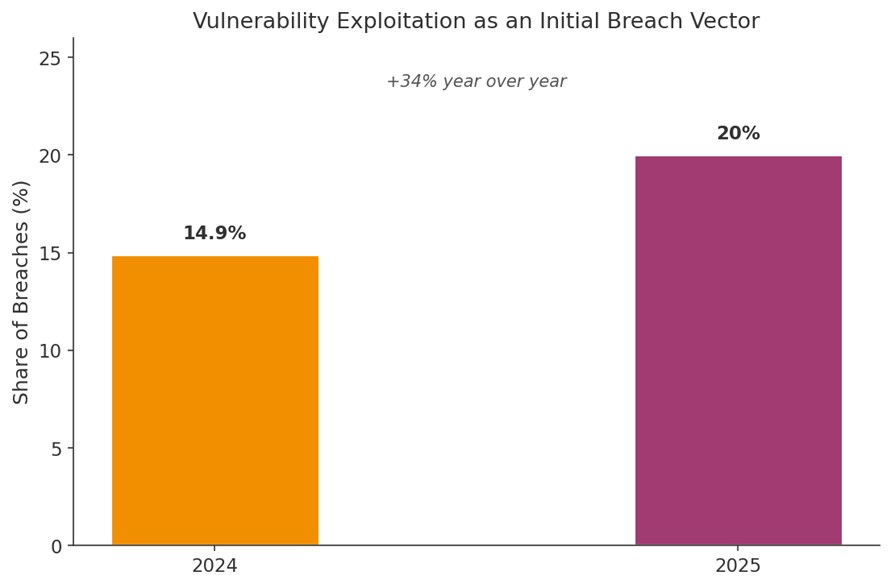
“Exploitation of vulnerabilities has surged by 34%,” with credential abuse (22%) and exploitation of vulnerabilities (20%) continuing to be the leading initial attack vectors. — Verizon 2025 Data Breach Investigations Report
That surge lines up closely with a pattern many security teams already suspected: attackers are not waiting for the next big unknown flaw. They are working through a backlog of known ones that never got closed.
Why the Gap Between Patch and Fix Keeps Widening
Modern IT environments make this harder than it sounds. A deeper look at cyber threats and malware shows that internet-facing enterprise software has become just as attractive a target as endpoints and servers, and each of those categories often runs on a different patch cadence, owned by a different team.
Attackers know this fragmentation exists, and they design around it. Coverage of network security fundamentals makes the point directly: an attacker who compromises one device can often move laterally within minutes if the rest of the network was not patched consistently.
Not Every Vulnerability Needs the Same Urgency
Treating every patch as equally critical burns out IT teams and slows down the fixes that matter most. A flaw with no known exploit and limited exposure can usually wait for a scheduled maintenance window. A flaw already being actively exploited, especially on an internet-facing system, needs to move to the front of the queue immediately, well before any routine update that can safely sit a few more days.
Unpatched Does Not Always Mean Unknown
It is worth separating two different problems. A zero-day threat is a flaw nobody has a fix for yet. An unpatched vulnerability with a known fix is a completely different, more preventable problem, and it is the one responsible for the majority of exploitation activity most organisations actually face.
Documentation Matters More Than It Gets Credit For
A patching process without clear records of what was deployed, when, and to which devices becomes nearly impossible to audit after an incident. That documentation also matters well before anything goes wrong: it is often the difference between a five-minute answer to a compliance question and a multi-day scramble to reconstruct history from memory.
Broader industry cybersecurity statistics reinforce just how common this documentation gap actually is across organisations of every size.
| Pro Tip: Track patch coverage as a percentage of devices, not just whether a patch was pushed. A 92% deployment rate still means roughly 1 in 12 devices remains exposed. |
Manual Patching vs. Managed Patch Deployment
Smaller environments can sometimes get by patching devices one at a time. That approach stops scaling the moment device count, remote work, or compliance requirements grow, and the transition often happens faster than IT teams expect once headcount or device diversity increases.
| Factor | Manual Patching | Managed Patch Deployment |
| Visibility across devices | Limited, often spreadsheet-based | Centralized dashboard |
| Time to full deployment | Days to weeks | Hours to a day |
| Remote and hybrid devices | Easy to miss | Consistently reached |
| Verification of success | Manual spot checks | Automated confirmation |
| Scalability | Breaks down past a few dozen devices | Scales with the organisation |
Where Remote Access Fits Into the Patching Process
Patch management does not happen in isolation. Teams responsible for keeping operations engineer style infrastructure currently need a reliable way to reach every device, including the ones sitting in a home office or a satellite location the IT team rarely visits in person. Remote access tooling is what actually lets a scheduled patch cycle reach a laptop that never comes back to headquarters.
What a Strong Patch Management Setup Includes
Not every patching process actually closes the gap attackers look for. Some organisations track patches diligently but never verify installation; others move fast on routine updates while critical, actively exploited flaws sit untouched for weeks. When evaluating or building a process, prioritise:
- Full device inventory: you cannot patch what you do not know exists on the network.
- Risk-based prioritisation: actively exploited flaws on exposed systems should never wait behind routine updates.
- Automated deployment: manual, device-by-device patching does not scale past a small handful of machines.
- Deployment verification: confirm patches actually installed successfully, not just that they were sent.
- Coverage for remote devices: a device that rarely returns to the office still needs to stay current.
Getting Started: A Simple Rollout Checklist
- Build a complete inventory of devices, operating systems, and applications across the organisation.
- Set a risk-based prioritisation policy so actively exploited flaws move ahead of routine updates.
- Choose tooling that can deploy and verify patches automatically, including on remote and hybrid devices.
- Establish a testing step for critical systems before wide deployment, without letting testing become an excuse for delay.
- Review patch coverage rates monthly, treating anything below the high 90s as an active problem to fix.
Frequently Asked Questions
What is the difference between patch management and vulnerability management?
Vulnerability management is the broader practice of finding and thoroughly assessing security weaknesses. Patch management is the specific process of applying vendor fixes for the vulnerabilities that already have one available.
How quickly should a critical patch be deployed?
As fast as testing genuinely allows, especially for internet-facing systems. Many organisations aim for actively exploited vulnerabilities to be patched within 24 to 72 hours, with routine updates following a slower, scheduled cadence instead.
Why do organisations still fall behind on patching if the fixes already exist?
Usually a mix of scale, fragmented ownership across teams, and fear that a patch will break something else. None of those reasons make the resulting exposure any less real or any less exploitable in practice.
Does patch management cover remote and personal devices too?
It should, wherever those devices touch company systems or company data in any way. A strong process reaches every endpoint consistently, regardless of where that device happens to be sitting.
Is automated patching safe for critical business systems?
With proper testing and staged rollouts, yes. The risk of an untested patch breaking something is usually smaller than the risk of leaving a known, exploitable flaw open indefinitely while a manual review sits in someone’s queue.
How does patch management relate to compliance requirements?
Many regulatory frameworks explicitly require timely patching as part of a documented security programme, making patch management as much a compliance necessity as a technical one for regulated organisations.
Closing the Gap Before an Attacker Finds It
The uncomfortable truth about most breaches tied to unpatched systems is that they were preventable with a fix that already existed. Nobody had to discover anything new. The fix was published, and it simply did not reach every device in time.
That is the entire argument for taking patch management seriously: it turns a known, fixable problem into one that actually gets fixed, before someone else locates the same opening and puts it to far worse use.
