


Twenty-nine minutes. That’s the average time it now takes an attacker to go from a single compromised device to moving freely across the rest of a network, according to CrowdStrike’s 2026 Global Threat Report. Two years ago, that number was closer to an hour. The quickest breakout CrowdStrike observed during the last year was 27 seconds less than the time you’ve spend reading this paragraph. That‘s isn‘t scare tactic, it‘s just where all the cards are at.
It‘s really not a scare tactic, it is where the position of it is. Attackers aren’t spending days quietly poking around anymore. A huge share of them are logging in with stolen credentials rather than “breaking in” at all — CrowdStrike found that 82% of detections in 2025 involved no malware whatsoever, just a valid-looking login doing something it shouldn’t. Once they’re in, the question that decides how bad the day gets isn’t “did they get past the firewall.” It’s “what could they reach once they were inside.”
That question is what network security actually answers. Not in the abstract, marketing-brochure sense, but in the very practical sense of which systems can talk to which other systems, under what conditions, and who’s watching when they do. This guide walks through what network security actually covers, how the tools involved have changed over the last few years, and what’s coming next — including a cryptographic deadline that has nothing to do with quantum computers being invented yet, and everything to do with data being stolen today.
Table of Contents
Network Security in Simple Terms
Network security is in simple terms how you give access, how you secure, and keep an eye out for people and systems of getting on to your network. How it is gained, what is gained access to, and what is done if an authenticated system attempts to gain access to your network.
Consider a small office. All ten employees could log into a single network with their laptops and phones, but, the company would also have a file server, a few printers, some cloud applications and a customer database. Network security controls such that an employee’s laptop can reach just the systems they require.
A firewall can block unwanted traffic. Access controls can restrict who reaches sensitive systems. Network segmentation can separate important resources from ordinary devices, while monitoring tools can flag unusual activity.
That’s the basic idea: let legitimate traffic through, limit unnecessary access, and detect problems before they turn into a bigger incident.
The technology gets much more complicated from here — but the goal stays surprisingly simple.
Network Security Components
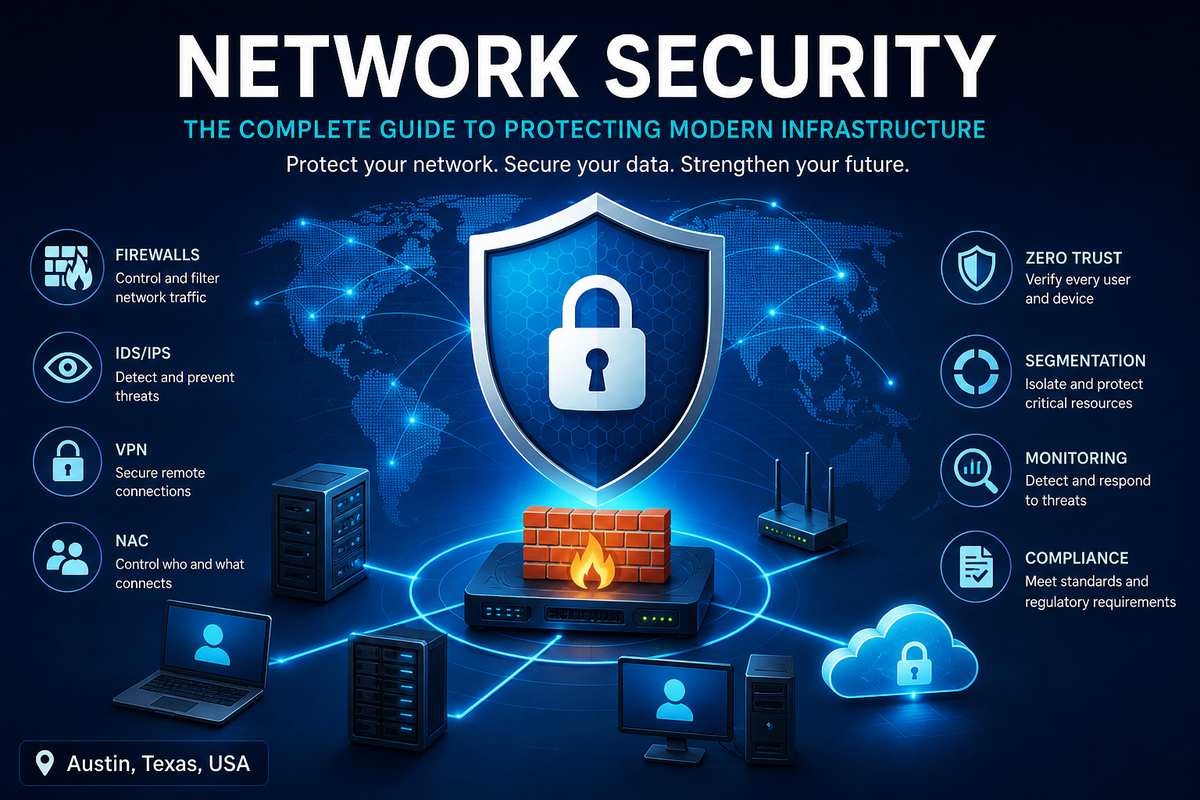
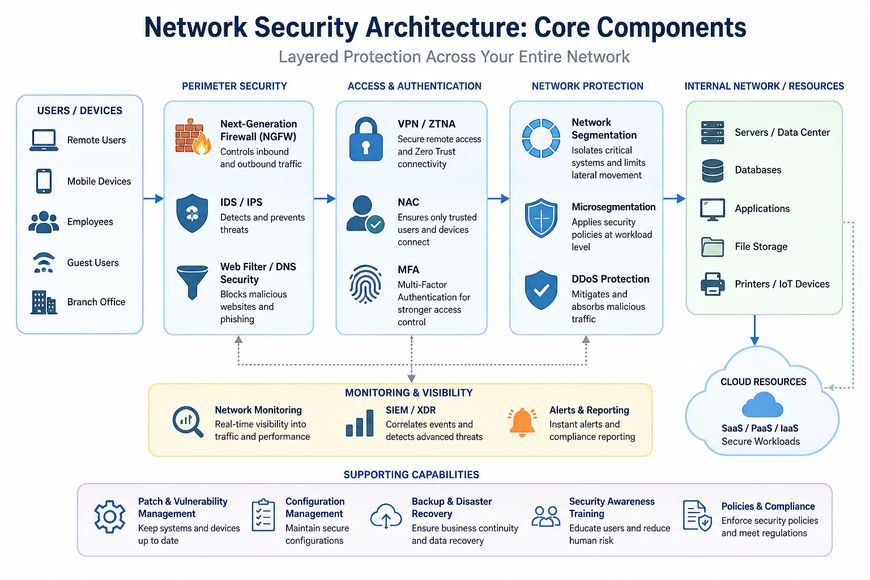
Modern network security isn’t built around one tool. It is a combination of technologies and controls, with each component taking care of a different part of the network.
These are the main building blocks you‘ll come across when constructing or evaluating a network security policy:
Firewalls
A firewall‘s job is to filter the flow of network traffic based on security policies. Today‘s Next-Generation Firewalls can analyze the traffic in much greater depth, even identify applications and other malicious traffic.
IDS/IPS
An intrusion detection system (IDS) watch network traffic for signs of intrusion and send alarms. An intrusion prevention system (IPS) takes it a step further and prevent the malicious traffic altogether.
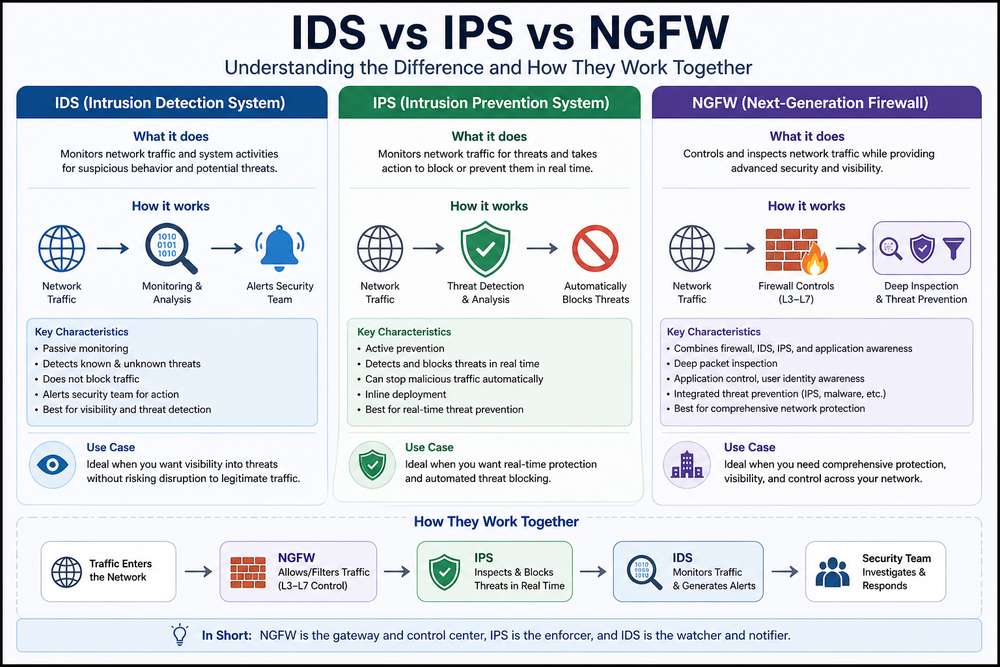
IDS vs. IPS: What’s the Difference?
IDS and IPS are closely related, but they don’t perform exactly the same job.
| Technology | Main job |
| IDS (Intrusion Detection System) | Detects suspicious or potentially malicious activity and alerts the security team. |
| IPS (Intrusion Prevention System) | Detects suspicious activity and can automatically block or stop it. |
| NGFW (Next-Generation Firewall) | Controls and inspects network traffic while combining firewall capabilities with additional security functions. |
Easiest way to remember the difference is simple: IDS watches & alerts. & IPS watches & blocks.
An IDS is useful when it is desirable that visibility is maintained, but detection is paramount. An IPS is used where it is more desirable that we be more proactive, as it will take action if this traffic matches a known attack pattern or policy.
Contemporary NGFW platforms can be bolstered with an Intrusion Prevention System (IPS). This leads to the two terms often being conflated. An IDS or IPS has a specific job to do detect malicious traffic flowing through a network, and take the appropriate action. NGFWs extend beyond this concept they add the ability to control and scrutinize traffic.
VPN
A VPN, or Virtual Private Network, helps to establish an encrypted path between a host or network and a different network or service. One of the most common uses of a VPN is remote access and to protect traffic traveling through untrusted networks.
Network Access Control (NAC)
Network Access Control (NAC): Permitting people and devices to access a network. Identifying the user and the device prior to the policing of the device. May check; the user, the device, its configuration, etc.
Network Segmentation
Network segmentation separates a network into different segments so that systems and devices are not automatically accessed by others. This can occur by subdividing networks into the specific areas.
Network Access Control (NAC)
Network Access Control (NAC) sets the parameters for who and what is granted access to the network in the initial phase. If a device attempts access to the network, it is not automatically considered to be trusted. Instead, as said by (2005), NAC would first consider the user‘s identity, the device type, the security configuration, the compliance.
For instance, an employee managed system may be permitted to connect to the corporate network but an unknown personal device guest network or no network at all.
NAC and ZTNA are related, but they solve different problems:
- NAC → Who or what can connect to the network?
- ZTNA → What can that user or device access after connecting?
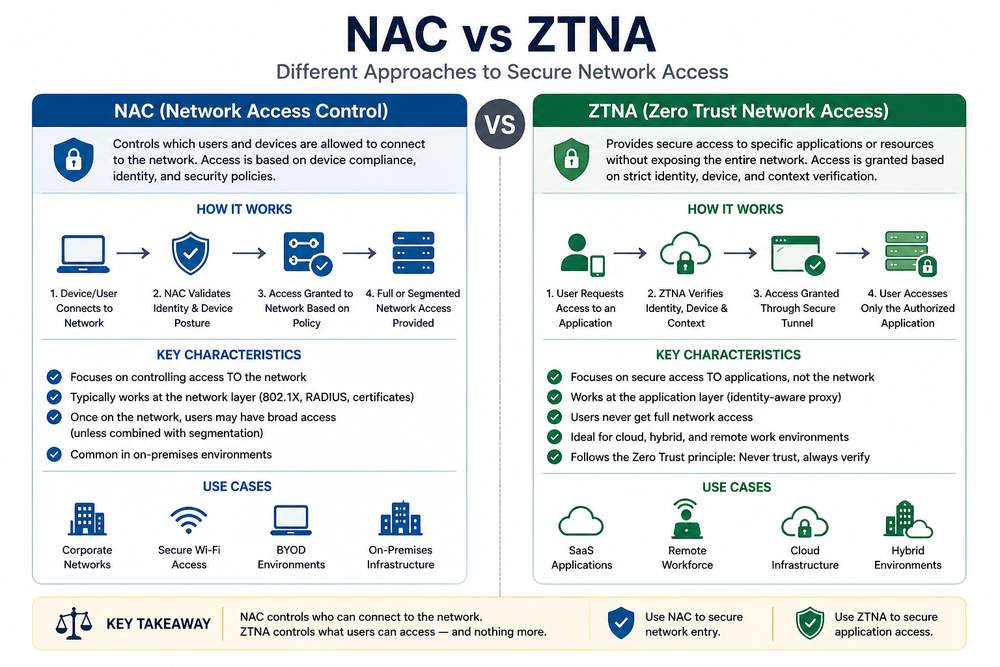
That distinction matters. That something is enabled on a network does not automatically imply that it should be provided unfettered access on that network. NAC draws the line at the network entry point whereas ZTNA can effect application-layer permissions.
In combination with segmentation and least-privilege policies, NAC may also be able to reduce hit rates by decreasing subsequent accesses to sensitive network resources by unnecessary devices.
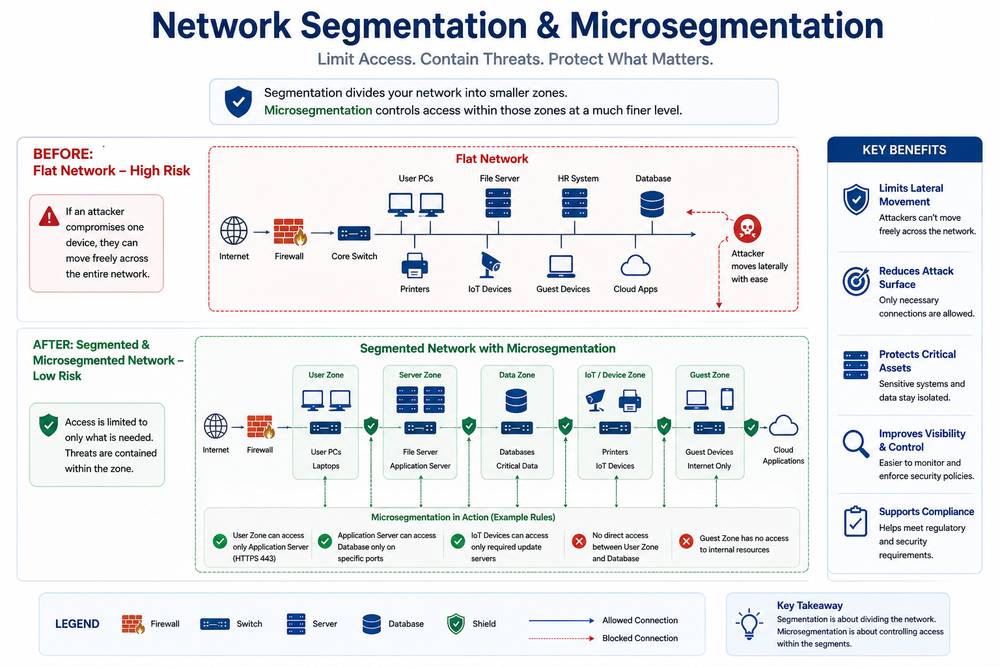
Microsegmentation
Microsegmentation takes segmentation further by using an individual workload, application, device or groups of resources as a security boundary much more granular than defined in segmentation and establishing a policy defining which systems can communicate with each other.
Secure Web Gateway
Swg (Secure Web Gateway) is positioned between user and web to analyze and filter web traffic. To protect against web-based attacks, virus, and facilitate organization policies about browsing, SWGs can protect organizations.
Web Application Firewall
A Web Application Firewall (WAF) prefaces web applications. It examines all HTTP/HTTPS traffic these constitute the web traffic. That‘s-ows any application-layer attack for instance: SQL injection, Cross-site scripting and drops it before it gets to the application.
DNS Security
DNS security. Security controls can also monitor the domain-to-IP resolution system and identify so that malicious domains, phishing sites, command-and-control and other malicious destinations are being blocked.
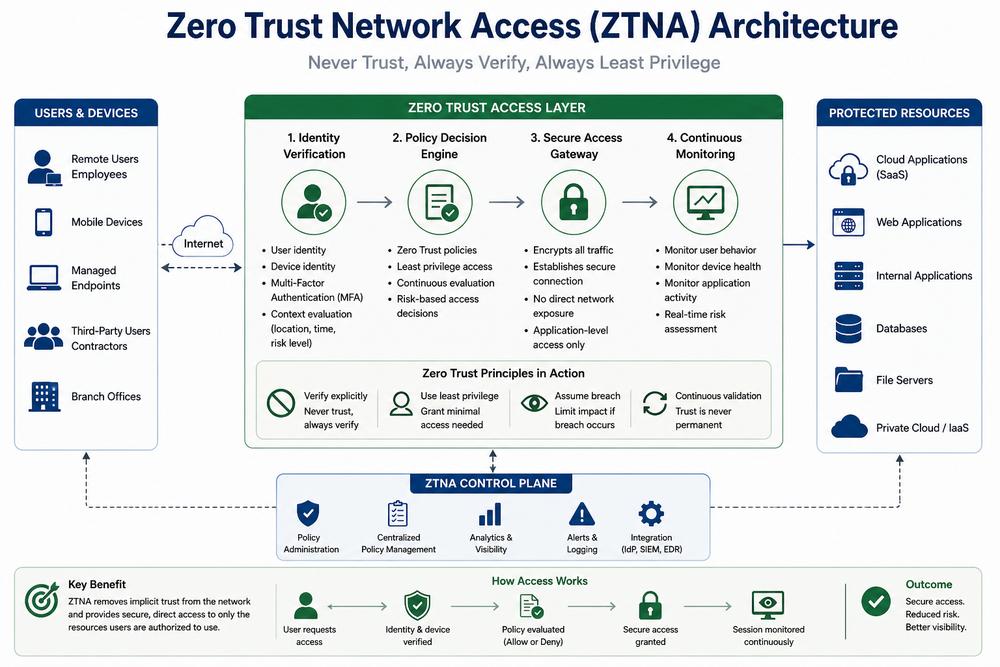
Zero Trust Network Access
ZTNA can provide granular control over which specific applications and resources are accessed, not necessarily the authenticated user and the larger internal network. It provides ongoing access control that can be granted, revokes based on identity, device, context, and other security cues.
SASE and SSE
Secure Access Service Edge (SASE) integrates networking features like SD-WAN, with security functions supplied from the cloud. Security Service Edge (SSE) is mentioned as being less broad, and is usually associated with SWG, CASB, ZTNA etc.
Network Monitoring
Network monitoring can show you anything from a device to a connection to a traffic flow, performance or a strange anomaly. This then allows the IT or security staff to notice failures, unusual patterns or intrusions.
SIEM and XDR
SIEM (Security Information and Event Management) gathers and correlates large quantities of disparate security logs and events from the entire environment. XDR (Extended Detection and Response) correlates detection and response signals across the multiple security layers to provide security analysts with easier analysis and action on detected threats.
How These Components Work Together
These are not alternative competing technologies. They‘re each safeguarding a different environment and they‘re frequently used together.
For instance, a firewall can govern the traffic flow, NAC can identify if the device is granted permanent access to the network, segmentation can limit the reach of that device, ZTNA can regulate the access to certain applications, and monitoring and SIEM/XDR can enable security teams to find out probable malicious activities.
The remaining sections of this guide go into greater depth on the technologies that are most relevant and show where they are positioned within a contemporary network security architecture.
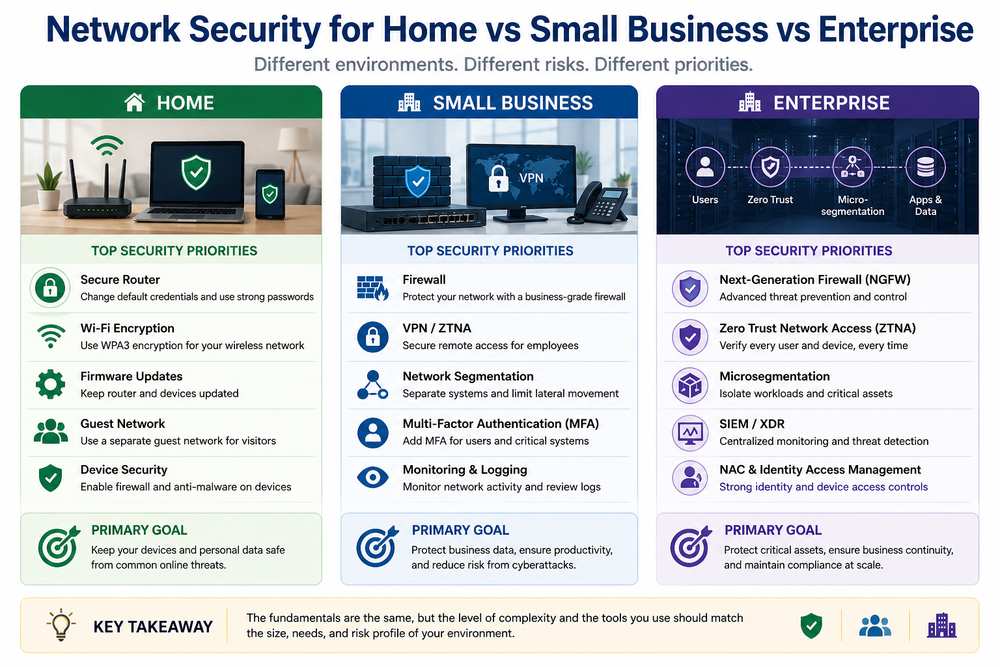
Network Security for Home, Small Business, and Enterprise
Network security doesn’t look the same everywhere. A home network doesn’t need the same architecture as a company with hundreds of employees, multiple offices, cloud workloads, and sensitive business systems.
The underlying principles remain similar — control access, protect traffic, limit exposure, and monitor for suspicious activity — but the technologies and level of complexity change with the environment.
| Environment | Main Network Security Priorities |
| Home | Router security, strong Wi-Fi encryption, firmware updates, secure administrator credentials, and a separate guest network |
| Small Business | Firewall, VPN or ZTNA, network segmentation, MFA, secure Wi-Fi, device controls, and network monitoring |
| Enterprise | NGFW, ZTNA, SASE/SSE, microsegmentation, NAC, SIEM/XDR, centralized monitoring, and detailed access policies |
Home Networks
The router is the most critical of all network-security devices in most households. Maintenance includes changing default administrator login information, updating firmware, implementing good Wi-Fi security practices, turning off unneeded services, and enabling of a guest network.
The point isn‘t to set up an enterprise security stack at home. The point is to ensure your internet-facing router and the devices behind it aren‘t exposed for no reason.
Small-Business Networks
Small businesses encounter different challenges still several employees, multiple devices, various applications, and existing business systems all need to work in harmony without cluttering the network too much.
A business firewall, secure remote access through VPN or ZTNA, MFA, network segmentation, patches/updates and simple monitoring offer a far better starting point than just the ISP router.
Enterprise Networks
Microsoft enterprise environments have many layers because there are a lot more users, devices, applications, locations and routes to defend against.
Companies may pool NGFWs, ZTNA, SASE/SSE, NAC, microsegmentation, SIEM/XDR, centralize monitoring, granular IdAM policies together. The goal is not to have attackers outside of the network. The goal is to significantly decrease the value of the information an attacker could access if and when one account, device and or application is compromised.
The key point here is simple: The security concerns associated with a network should correlate to its size, complexity and risk. There is no need for a home user to have an enterprise style SOC nor does an enterprise need to maintain a single firewall that can safeguard all of it‘s millions of interconnected computers.
What Is Network Security, Really?
Remove the vendor jargon and network security is, in essence, a collection of tools, policies, and procedures that regulate the movement of traffic in and out of your network, and also within it. Cisco describes it as layers of protection for systems and information, against illicit intrusion, impairment, or abuse, and “layered” being the important part, because one measure alone is not relied upon to provide complete security.
Everything in this space still gets measured against the same three properties security people call the CIA triad:
- Confidentiality — only the people and systems that should see your data can see it. Encryption and access controls do most of the heavy lifting here.
- Integrity — data doesn’t get quietly altered in transit or at rest, whether by an attacker or by accident. Hashing and digital signatures are how you catch tampering.
- Availability — the network stays up and usable. This is the one people forget about until a DDoS attack takes their site offline for six hours.
A network security program that nails confidentiality but lets a DDoS attack knock out the customer portal for an afternoon hasn’t actually done its job. All three properties matter together, not in isolation.
It’s also worth being honest about scope. Network security is not the same thing as “keeping the company safe from hackers” in some all-encompassing sense — that’s a bigger job, and it has a name.
Network Security vs. Cybersecurity vs. Information Security
People use these three terms interchangeably, and that’s a mistake that costs money — usually because it leads to security budgets that assume one team is covering ground that nobody’s actually watching.
Here’s the cleaner breakdown:
Information security is the widest circle. It’s the governance layer — the policies and principles (again, that CIA triad) that apply no matter where data lives: on paper, in a database, in someone’s head during a phone call.
Cybersecurity sits inside that circle and covers the digital world specifically — endpoints, identities, SaaS apps, cloud workloads, applications. It’s a huge, sprawling discipline.
Network security is the specialized slice of cybersecurity that focuses on the communication pathways themselves: routers, switches, firewalls, the traffic moving between them, and the perimeter (to whatever extent a “perimeter” still exists in a cloud-first world).
Why does the distinction matter in practice? Because treating network security and endpoint/identity security as separate line items with separate owners and separate budgets creates exactly the kind of gap attackers exploit. A phished employee is an identity and endpoint problem at the point of compromise but everything that happens after, whether the attacker can zip from that one laptop to your finance server is a network security issue. If your company has secured endpoints but left the internal network flat and unsegmented, you have a house with a great front door and no interior walls. One compromised device is an all-access pass.
This is also why home and small-business setups deserve real attention, not an afterthought. The device most people never touch after the day they set it up — the router — is the network security perimeter for millions of households and small offices. If you haven’t looked at your router’s settings since it arrived from your ISP, it’s worth reading through our walkthrough on how to keep your Wi-Fi router and network secure; default admin passwords and outdated firmware on home routers are still one of the most common ways attackers get an initial foothold, and the fix usually takes fifteen minutes.
The Threats Network Security Actually Defends Against
Before getting into the tools, it helps to be concrete about what they’re defending against. A few categories cover most of what shows up in incident reports:
Malware and ransomware. Malicious code that infects a machine and either does harm directly malware or most famously in the case of ransomware encrypts up the user‘s files and holds them for ransom. Ransomware in this respect would have shifted from a blisteringly fast smash and grab to a slow and steady smash. The intruders now sit in a network idling whilst illicitly collecting information for long elapsed periods before then initiating encryption.
Distributed denial-of-service (DDoS) attacks. Large volumes of traffic from multiple sources intended to make a server or network unavailable to users. These hit the “availability” leg of the CIA triad directly.
Man-in-the-middle (on-path) attacks. An attacker positions themselves between two communicating systems — a user and a banking site, say — to intercept or alter the traffic. Encryption is the primary defense, which is part of why so much modern traffic runs over HTTPS.
Phishing and social engineering that leads to network compromise. Most breaches don’t start with a clever technical exploit; they start with someone clicking a link or answering a phone call they shouldn’t have. Once credentials are handed over, the “attack” often looks like a normal login — which is exactly why identity and network controls need to work together.
Insider threats. Not always malicious — sometimes it’s just an employee with more access than their job requires, which turns an ordinary mistake into a much bigger incident than it needed to be. This is one of the strongest arguments for the access-control principles covered later in this guide.
Unpatched and exposed edge devices. VPN gateways, routers and firewalls that front the internet and have known, unpatched software that are apparent sitting on the perimeter is, in a sense, their core audience.
It‘s helpful to be aware of categories, but the tools that will stop them have changed dramatically over the years, especially in the last that are relatively simple. That’s really the story of modern network security: less “build a wall around everything,” more “assume something will get through, and limit how far it can go.”
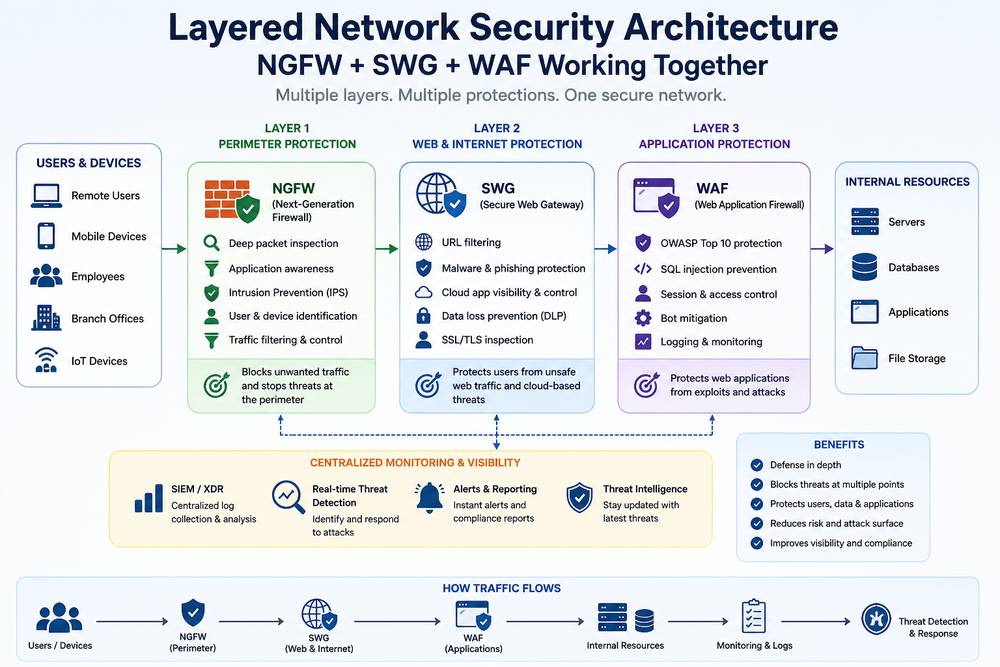
The Building Blocks: NGFW, SWG, and WAF
Firewalls are the oldest tool in the network security toolbox, and they’re still central to it — but “firewall” means something quite different today than it did fifteen years ago. If you want the deeper mechanics of how a modern firewall actually decides what to let through, we’ve broken that down in our guide to the role of firewalls in a security strategy. Here’s the short version, plus how it fits alongside two tools people often confuse it with.
Next-Generation Firewalls (NGFWs) inspect traffic bi-directionally — both what’s coming in and what’s going out — using deep packet inspection rather than just checking ports and protocols the way older firewalls did. Modern NGFWs also bundle in intrusion prevention, so they’re not just deciding whether traffic is allowed, they’re actively looking for attack patterns inside allowed traffic.
Secure Web Gateways (SWGs) are a different animal. They’re outbound-focused, proxying your users’ traffic to the internet and SaaS applications, and — critically — decrypting and inspecting SSL/TLS traffic to see what’s actually inside it. This is more important than in the past. According to Zscaler‘s Threat Labz research team, 87.2% of the threats blocked between late 2023 and late 2024 were delivered over an encrypted session. If your security stack can‘t inspect the contents of the encrypted stream, it effectively has no visibility over the vast majority of what is actually trying to attack it. That’s the whole argument for SWG deployment in one sentence.
Web Application Firewalls (WAFs) flip the direction again — they protect inbound traffic to your own web applications, specifically against things like SQL injection and cross-site scripting that target application logic rather than network protocols.
Put simply: NGFW watches the perimeter in both directions, SWG watches your users going out to the internet (and decrypts to actually see what’s happening), and WAF watches the internet coming in at your applications. Most mature security stacks run some combination of all three, because they’re solving different problems, not competing versions of the same problem.
Retiring the VPN: ZTNA and Software-Defined Perimeters
For nearly two decades the go-to response for “how do remote workers get access to internal resources” was a VPN. This was because traditional VPNs can provide far too much access to the network once authenticated, and that‘s why many organizations are switching to ZTNA, which is something to learn about before dismissing your setup as “it‘s always worked”
If you need a refresher on the mechanics first, our simple guide to VPNs covers how they establish that encrypted tunnel in the first place. The problem isn’t the encryption — it’s what happens after authentication. The classic VPN, when you do get logged in, usually dumps you onto the larger internal subnet. It‘s like a hotel master key you‘ve got access to every room on the floor, not just yours. If an attacker steals one employee’s VPN credentials — through phishing, through a stolen laptop, through a dozen other routes — they don’t just get that employee’s stuff. They get a path to move laterally across whatever else sits on that subnet.
Zero Trust Network Access (ZTNA) and the closely related concept of Software-Defined Perimeters (SDPs) work on a completely different model, built around the principles laid out in NIST’s Special Publication 800-207 on Zero Trust Architecture. Instead of a master key, think of it as a keycard programmed for exactly one room. Access is granted per-application, per-session, based on continuous evaluation of who’s asking, from what device, and under what circumstances — not a one-time login that then grants broad network access.
In practice, a ZTNA trust decision usually weighs several signals together:
- Identity assurance — is this really the person they claim to be, ideally backed by phishing-resistant MFA rather than a one-time SMS code
- Device posture — is the device compliant, patched, and running an active EDR agent, or is it a personal laptop nobody’s ever managed
- Behavioral context — does this login pattern make sense, or does “impossible travel” (a login from New York eight minutes after one from Singapore) suggest something’s wrong
- Resource sensitivity — should this particular application require a higher bar than, say, the internal wiki
None of that trust is permanent. It’s re-evaluated continuously, which is the whole point — a device that was compliant an hour ago but just failed a posture check can lose access mid-session, something a traditional VPN tunnel simply can’t do.
This isn’t a purely enterprise concern, either. The same “grant only what’s needed, verify continuously” mindset scales down to smaller networks too, which is part of why secured network connectivity is essential to any organization’s broader cybersecurity posture — the principle doesn’t really change with company size, only the tooling used to enforce it.
SASE vs. SSE: Making Sense of the Acronym Soup
If ZTNA solves remote access, SASE and SSE solve where all of this security logic actually lives — and the two terms get confused constantly, including by vendors who benefit from the confusion.
The simplest way to remember the relationship: SASE = SSE + SD-WAN.
SSE (Security Service Edge) is the security-only piece — A SaaS delivered bundle usually a mix of SWG, CASB(cloud access security broker), ZTNA, Firewall-as-a Service and so on which managed centrally rather than individually.
SASE (Secure Access Service Edge) takes that same security stack and fuses it with SD-WAN — The networking layer which does the dynamic, on-demand traffic steering across the distributed branch offices, public and private clouds. SASE encompasses the full convergence networking and security under a single architecture, preferably a single vendor, a single console.
So which one does an organization actually need? If the priority is securing remote users and SaaS access without touching branch office routing hardware, SSE gets there faster and with less disruption. If the goal is a genuine, ground-up convergence of networking and security — usually because a company is dealing with real WAN complexity across multiple sites — SASE is the more complete answer, at the cost of a bigger, slower rollout.
We’ve gone deeper into this decision, including where single-vendor consolidation actually pays off versus where it creates lock-in risk, in our dedicated piece on SASE as the future of network security. It‘s truly one of the more important architecture decisions a mid-size-and-up organization will encounter over the next couple of years, so if you are considering a migration, it is well worth the longer read.
Microsegmentation: Shrinking the Blast Radius
Everything so far has been about controlling who gets in. Microsegmentation is about limiting what happens after someone — or something — already has.
The idea is straightforward: instead of one flat internal network where any device can, in principle, talk to any other device, you slice the environment into small, isolated zones with policies enforced between them. A compromised device in the marketing team’s segment simply cannot reach the finance database, because there’s no path between the two segments at all — not “there’s a firewall rule that should stop it,” but an actual absence of connectivity for anything outside the allowed policy.
This is the single biggest structural defense against ransomware’s favorite move: land somewhere low-value, then spread. When a breach happens — and at some point, for most organizations, it will — microsegmentation is the difference between “we contained it to three machines” and “it reached the domain controller.” Anomalous connection attempts between segments get logged automatically, which also gives security teams a much cleaner signal than trying to spot one bad connection in an ocean of normal flat-network traffic.
Seeing What’s Actually Happening: Monitoring and Visibility
None of the above works if nobody’s watching it. A firewall rule that’s never reviewed, a segmentation policy nobody audits, a ZTNA deployment with no logging — these are all security theater without visibility layered on top.
A network-monitoring application shows what bandwidth is being used, how secure a device is, if there is any abnormal traffic, or if there‘s an outage, with virtually instantaneous results and frequently is where the abnormality first occurs long before sending an alarm to a SIEM. In organizations with small IT groups, for example, a monitoring application such as Spiceworks Network Monitor can often be used to accomplish most of this without having to deploy an enterprise security operations-center platform. The particular application used is less important than the practice someone, or something automated, needs to be observing the network when everything is normal, so an abnormal condition will be noticeable.
In larger companies this can be the implementation of porting firewall, SWG and DNS logs to a single source through SIEM or XDR platform so that NetOps and SecOps are literally viewing the same dashboard. That NetOps/SecOps friction is an actual and over looked problem too many breaches go unnoticed not owing to the presence of data but owing to them being in the hands of the unqualified. Joint incident-response tabletop exercises between the two teams fix more of this than any new tool does.
AI Is Reshaping Both Sides of This Fight
Everything described above assumed a human attacker working at human speed. That assumption is aging badly.
CrowdStrike’s 2026 Global Threat Report puts a number on it: AI-enabled adversary activity increased 89% year-over-year, and it’s a big part of why that 29-minute average breakout time dropped so sharply — down 65% in speed from the year before. Attackers are using AI to automate reconnaissance, chain exploits together faster, and target unmanaged edge devices like the VPN gateways and firewalls discussed earlier in this guide, precisely because those devices sit exposed at the network boundary.
The identity side of the threat has gotten stranger, too. Voice and video deepfakes have moved from novelty to genuine operational risk — Pindrop’s 2025 Voice Intelligence and Security Report measured a jump of more than 1,300% in deepfake fraud attempts hitting call centers in a single year, going from roughly one attempt every two days to seven a day. That’s not a hypothetical for finance and HR teams anymore; it’s a reason to put strict, multi-channel verification in place before approving unusual payment or account-access requests, no matter how convincing the voice on the phone sounds.
Organizations aren’t standing still, either. In Netwrix 2025 Cybersecurity Trends Report–which drew from a global survey of 2,150 IT and security professionals across 121 countries– 37% of organizations said they had to shift their security posture in the past year solely due to AI-driven attacks. The adoption of AI in security tooling has seen an equally steep increase–throughout 2023, AI-based security tooling was nowhere on the top five IT priorities 22% of organizations, by 2025, it was eight places higher–six percent, representing a 189% increase in two years.
There’s a real payoff for making that shift, and it’s not just theoretical. IBM’s Cost of a Data Breach Report found that organizations using AI and automation extensively in their security operations identified and contained breaches 80 days faster on average, and saved roughly $1.9 million per incident, compared to organizations with no AI or automation in place. When attackers are moving in minutes, defenders can’t afford to be running purely manual processes measured in weeks.
Identity governance has become the sharper edge of this problem, particularly around what’s sometimes called the “identity blast radius” — the idea that AI workloads, API keys, and service accounts now represent a huge, often ungoverned population of non-human identities with real access to sensitive systems. A few practices matter most here:
- Inventory every AI identity — every AI workload, API key, and service account that can touch sensitive data, cataloged the same way you’d catalog human employee accounts
- Fold AI credentials into existing access reviews — the same entitlement and recertification process that applies to a human employee’s access should apply to a service account, not a separate, looser process
- Separate high-risk AI functions from broad operational permissions, and eliminate standing privileges wherever a task can be handled with temporary, scoped access instead
A single compromised API key with standing, unreviewed access to a sensitive dataset can escalate an incident at machine speed — which is exactly the kind of scenario microsegmentation and Zero Trust access policies, covered earlier, are built to contain.
The Next Frontier: Post-Quantum Cryptography and CNSA 2.0
Post-quantum cryptography can seem like a issue for some distant future. It isn’t entirely.
One of the biggest concerns is Harvest Now, Decrypt Later (HNDL). An attacker can capture encrypted network traffic today and store it, hoping to decrypt that data later when sufficiently powerful quantum computers become available. For information that needs to remain confidential for years or decades, that makes today’s encrypted traffic worth protecting against tomorrow’s capabilities.
Why Network Security Is Part of the Quantum Problem
Network security is directly affected because encrypted traffic moves across VPNs, web connections, application services, and other communication channels. If the underlying cryptographic methods eventually become vulnerable to quantum attacks, simply having encrypted network traffic today won’t guarantee that sensitive information remains confidential indefinitely.
That doesn’t mean organizations need to replace every encryption system overnight. The practical first step is understanding where cryptography is being used, which systems depend on it, and how difficult those systems will be to upgrade.
What Is CNSA 2.0?
The Commercial National Security Algorithm Suite (CNSA) 2.0 is the NSA’s updated cryptographic framework for National Security Systems as they transition toward post-quantum security.
Rather than focusing on one new algorithm, CNSA 2.0 establishes a set of cryptographic requirements and migration expectations for systems that need to meet the standard. Its relevance extends beyond government because organizations supplying or supporting national-security infrastructure may also need to account for these requirements.
The important point for network-security teams isn’t memorizing every algorithm in the suite. It is understandable that cryptographic migration must be scheduled in advance as the legacy systems become more difficult to replace.
Why 2026 and 2027 Matter
This transition is starting to happen right now. Guidance from CNSA 2.0 is moving agencies to systems capable of running post-quantum cryptography, such as networking equipment or secure infrastructure.
For any organization impacted by NSA requirements and within the larger defense supply chain, 2026/27 is a target date to inform planning decisions rather than a benchmark date for planning to think about quantum security.
Organizations are encouraged to follow the current NSA and CNSS guidance for the specific system or program they are implementing, rather than assuming there is one deadline that applies to all networks.
What Organizations Should Do Now
A practical post-quantum strategy starts with visibility:
- Inventory cryptographic dependencies. Know where encryption, certificates, keys, VPN‘s, TLS, digital signatures, and other cryptographic technologies are being used.
- Identify long-lived sensitive data. Determine which data must be kept Secret account for a long period of time.
- Check vendor roadmaps. Determine if any network devices, VPN gateways, firewalls, operating systems or security platforms have a trajectory toward post-quantum support.
- Plan for crypto-agility. Select architectures where cryptography algorithms can be updated without fundamental system change.
- Track current standards. Follow the progress of bodies such as NSA, NIST etc as the post-quantum requirements and post-quantum implementation guidance is still in flux.
The goal isn’t to predict exactly when a cryptographically relevant quantum computer will arrive. It’s to avoid discovering during a future migration that your network depends on hardware, software, or protocols that can’t be upgraded easily.
For the detailed algorithms, FIPS standards, CNSA 2.0 implementation requirements, and post-quantum migration process, see our dedicated post-quantum cryptography guide.
Is any of this relevant if you’re not building National Security Systems? Mostly indirectly, but the indirect effect is significant. CNSA 2.0 has become the de facto reference timeline that a lot of commercial and critical-infrastructure organizations are following for their own post-quantum planning, and defense contractors and their suppliers — a much larger population than “government” — are on the hook regardless of whether they touch classified systems directly. If your organization sells into, or depends on, that supply chain, the 2027 date belongs on your roadmap too.
Compliance Doesn’t Stop at the Checkbox: PCI DSS 4.0 and the Governance Layer
Frameworks such as PCI DSS 4.0, NIST CSF 2.0, ISO/IEC 27001:2022 and the EU‘s NIS2 Directive all intimately intersect network security in places and treating any one of them as a once-a-year ‘audit exercise’ is a known, quantifiable failure, the metrics for which are truly eye-opening.
Verizon‘s Payment Security Report recorded a depressing trend whereby levels of PCI DSS compliance actually declined over three consecutive years, from 55.4% of organizations in 2016, to 36.7% in 2018, before reaching the lowest at 27.9% in 2019. That’s a drop of nearly half in three years — and it wasn’t until organizations shifted from treating compliance as a point-in-time annual assessment to something closer to continuous monitoring that the number rebounded, to 43.4% in 2020. That rebound is the whole argument for PCI DSS 4.0’s approach in a nutshell: it formalizes continuous validation instead of an annual snapshot, because the annual-snapshot model demonstrably didn’t hold up between audits.
In general, there are some few behaviors that are found to reliably distinguish organizations that maintain compliance from those that slip between assessments:
- Treat compliance as a floor, not a ceiling. Meeting the minimum requirements of any framework still leaves plenty of room for sophisticated attacks that the framework wasn’t specifically designed to catch.
- Invest in role-specific training, not generic security-awareness slides. Programs that connect the standard’s requirements to what someone actually does at their desk — like the PCI SSC’s own CPISI workshop — measurably reduce the human error that’s cited as a contributing factor in the large majority of breaches.
- Automate discovery of “shadow data,” the cardholder data or other sensitive information nobody remembers is sitting in an old spreadsheet or dev environment. You can‘t safeguard something you are unaware of, and off-line finding won‘t scale.
- Give compliance an actual owner with budget authority. Without one, compliance programs tend to become reactive fire drills before each audit rather than a sustained business process.
- Maintain a precise, current inventory of assets and third-party access — the kind of documentation that lets a team notice an anomaly quickly instead of discovering it during a breach investigation.
- Break large frameworks into smaller checkpoints after any significant infrastructure change — a cloud migration or a new product launch — rather than waiting for the next annual cycle to find out something drifted out of compliance.
Regulatory timelines are compressing everywhere, not just in payments. Under the EU’s NIS2 Directive, organizations classified as essential or important entities face a strict three-stage incident reporting obligation under Article 23: an early warning within 24 hours of becoming aware of a significant incident, a fuller incident notification within 72 hours, and a final report within one month. Non-compliance carries real teeth — fines up to €10 million or 2% of global annual turnover, whichever is higher. Whatever internal incident-response process you have needs to actually be capable of hitting that 24-hour mark, which is a much tighter clock than most organizations are used to operating on.
The practical answer to all of this overlapping regulatory pressure is what’s sometimes called a “write once, comply many” approach — mapping your actual technical controls (firewall rules, access policies, logging configurations) once against the major frameworks you’re subject to, rather than maintaining separate documentation for each one. A single microsegmentation policy, properly documented, can serve as evidence toward NIST CSF 2.0, ISO 27001, NIS2, and PCI DSS 4.0 requirements simultaneously — it’s the same control, just referenced in four different audit binders.
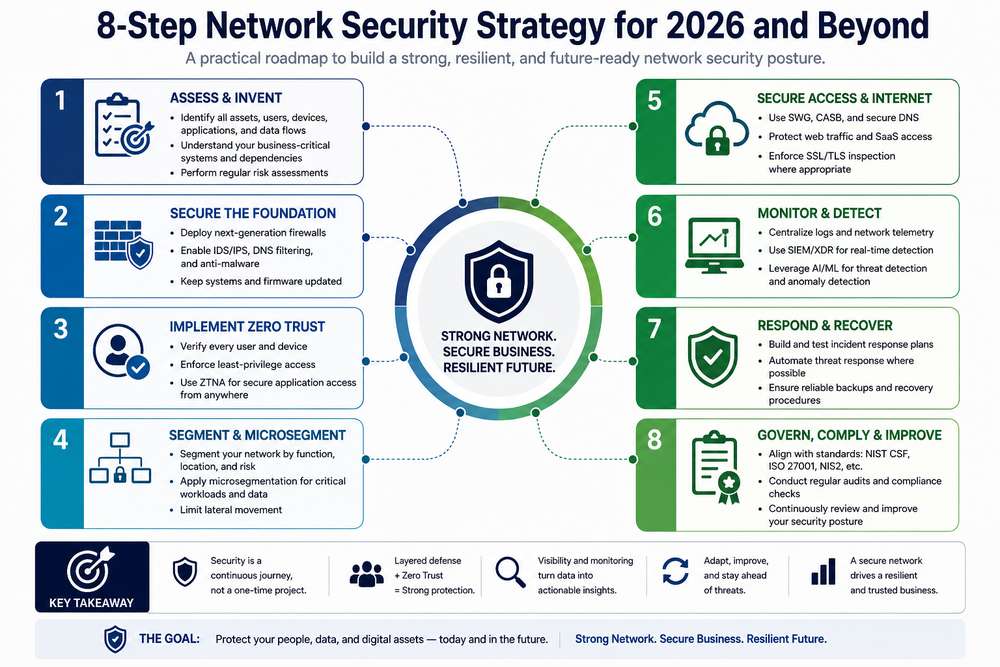
Building Your Network Security Strategy: An 8-Step Roadmap
Understanding network security technologies is one thing. Putting them together into a strategy that actually works is another.
You don‘t have to implement all your security products immediately. An excellent strategy is to start with what provides visibility and then proceed to risk analysis toward excellent controls, segmentation, monitoring, and until-everybody-Is-on-board progress.
1. Inventory Your Assets
To play the game, first find out what is actually on your network.
Catalog servers, endpoints, routers, switches, applications, cloud workloads, network devices, users, service accounts and sensitive data. You can‘t protect an asset that you don‘t know exists.
Make sure you prioritize those systems which are internet-facing or tied-in to sensitive resources.
2. Map Network Traffic and Data Flows
Now that you know what is there, learn how those systems talk to each other.
Record what users, devices, applications and services have to talk to. Can often establish that there are many unneeded links and accreted implicit trust over the time.
Take for instance, internal application may still be accessible from an entire subnet just because long while ago, that‘s how it‘s set up.
3. Identify Vulnerabilities and Exposure
A warning about old firmware, unpatched components, services that should be protected, weak settings, over permissive users and access to your network without any boundaries.
An urgency vote must be provided taking into account the business impact and the exposure.
Infrastructure that is Internet-facing routers, firewalls, VPN gateways and other edge infrastructure need more focus because they are the entrance point into the environment.
4. Secure the Network Perimeter
Use appropriate perimeter controls to reduce unwanted and malicious traffic.
This can be from any security appliance or device, such as but not limited to firewalls, NGFWs, IDS/IPS, secure web gateways, DNS security or WAFs.
The perimeter still matters. It just shouldn’t be treated as the only security boundary.
5. Implement Zero Trust Access
Don‘t eliminate the need to trust a user or device just because it is part of the inside network.
Conditional authenticated access based on identity, device posture, authentication, and contextual information. Provide minimal access by applying zero trust network access (ZTNA) to grant access to select applications rather than revealing an entire internal network.
Simple principle: check explicitly and only provide the authorizations you need to users and devices.
6. Segment the Network
Forthrightly, do not allow every gadget and system to interact easily.
Use network segmentation and where applicable microsegmentation to establish demilitarized zones between users, applications, servers and other sensitive resources.
Segmentation can show some advantage if one device is under compromise. Its function would be so to limit the ability of an attacker to move laterally between other systems not being compromised.
7. Deploy Monitoring and Detection
A much stronger security control is the more open you make the network.
Track traffic, user activity, certification events, firewall events, DNS requests, etc. Report meaningful security events to central logging system (SIEM, XDR) where relevant.
The aim here to set a normal baseline so that anything unusual is easier to detect.
8. Test, Review, and Continuously Improve
Security of networks should not be considered as a one off project.
Review firewall rules, access rights, segmentation policies, device Configurations, vulnerabilities, and alarms from monitoring are often. Test incident-response procedures and re-evaluate the architecture after major changes in infrastructure or business.
Your network-security strategy must grow with the changing landscape of threats, technologies, legislative changes, and attack methodologies.
A mature security program is not characterized by the number of security tools a company owns. It‘s characterized by whether those controls are working in concert to lower the entropy; limit the attacker‘s degree of freedom; detect anomalies in behavior; and defend the most valuable assets.
Network Security Best Practices
In conclusion a strong network security policy isn‘t only about buying the correct technology. It‘s about the daily configuration of the network and the control and level of access given.
These practices provide a practical baseline for keeping a network secure:
1. Use Multi-Factor Authentication
Use multi-factor authentication (MFA) wherever feasible such as but not limited to admin accounts, remote login, VPNs, Cloud-based services and other systems allowing access to critical resources.
2. Patch Network Devices Regularly
Ensure current security patches and supported firmware are used on all internet-connected devices, such as routers, switches, firewalls, VPN gateways, wireless access points, etc.
Internet-facing systems should be a point of focus, since a vulnerability in these systems is an immediate entry for an attacker into the environment.
3. Replace Default Credentials
Never leave the default password or administrator user name on network devices.
Have very strong, unique log-ins that are only used for this site and not elsewhere. Use two or more factors of authentication for high-privilege accounts, and have all relevant security controls and best practices enabled.
4. Segment Sensitive Systems
Separate sensitive servers, databases, administrative systems, and other high-value resources from ordinary user devices.
Network segmentation and microsegmentation can help prevent a compromised endpoint from becoming a path to critical systems.
5. Disable Unnecessary Services
Disable all ports, protocols, and services, including management interfaces, not needed.
Any unnecessary service adds to the attack surface of the network.
6. Encrypt Network Traffic
Use the most up-to-date encryption techniques in order to secure data while it is transmitted over the network.
This is where you want to be interesting, whether for remote connections, web apps, administration, or pass-through communications traveling on an untrusted network.
7. Monitor Network Activity
Monitoring network traffic, authentication, DNS, firewall, devices health, and so forth to notice the abnormality
By comparing to a state of “normal” activity we will see what could be considered a significant abnormality of the network.
8. Maintain Configuration Backups
Maintain secure, current backups of all important firewall, router, switch and other network device configuration files.
It is essential to keep backups securely stored and be able to restore them.
9. Test Incident Response
Have not discovered the efficacy of your response process by waiting for an attack.
“Conduct ongoing exercises of the incident-response procedures for network device access and isolation, tool, device and account disables, traffic blocks, system restoration and security team communications during an incident.”
10. Review Access Regularly
Access should change when people, devices, applications, and business needs change.
Review user accounts, administrator accounts, service accounts, remote-access policies, firewall rules, application accesses, etc. on a weekly basis to identify and disable the unused privileges.
Aims are not to make the network unmanageable or unusable. But to have only limited exposure to external environments, keep damage from feasible accounts or devices to a minimum, and have activities that can be identified as suspicious easier to browse and limit.
FAQs
Q1: How does network security specifically differ from cybersecurity?
A: Cybersecurity is the broader discipline, covering an organization’s entire digital footprint — endpoints, applications, identity systems, cloud workloads. Network security is the specialized subset focused specifically on the communication pathways: routing, perimeters, traffic in motion, and infrastructure like routers, switches, and firewalls. Treating them as separate, independently budgeted programs is a common and costly mistake, because threats routinely cross that boundary — a phishing email (an endpoint/identity problem) becomes a network problem the moment the attacker starts moving laterally.
Q2: Why are legacy remote-access VPNs being replaced by ZTNA and SDP?
A: A traditional VPN grants broad access to an entire subnet once a user authenticates — like a hotel master key rather than a single room’s keycard. Should an attacker have taken over one of these sets of credentials, then they can expect that much broader level of access, and be able to move laterally across anything else on the same subnet. ZTNA and software defined perimeters instead provide always on, explicit, per-session access to just the specific application, greatly reducing the effective range of the stolen credential.
Q3: SASE vs. SSE — what’s the real difference, and how should an organization choose?
A: SASE stands for the union of cloud security services and the wide-area network (which must be software-defined WAN, or SD-WAN). SSE, by contrast, offers only the cloud security “layer” SWG, CASB, ZTNA completely separated from the underlying WAN-routing fabric. Opt for SSE if the primary need is a fast, “out of the box” security for remotes or SaaS users, without having to change the branch routing hardware. Opt for SASE if the primary need really is a true “convergence” of network and security, and you‘re willing to take the slower rollout program.
Q4: What is CNSA 2.0, and why is it an immediate priority rather than a 2030s problem?
A: CNSA 2.0 is the NSA’s updated suite of cryptographic algorithms for protecting National Security Systems against future quantum computing threats, which are expected to eventually break current public-key cryptography like RSA and ECC. It mandates that networking hardware begin supporting post-quantum algorithms starting in 2026, with a hard procurement gate on January 1, 2027. The urgency isn’t about when a quantum computer arrives — it’s “Harvest Now, Decrypt Later”: adversaries are intercepting and storing encrypted traffic today, banking on decrypting it once the technology catches up.
Q5: How does network microsegmentation actually limit damage during a breach?
A: Microsegmentation divides a network into isolated zones with policy enforced between them, rather than one flat network where any device can reach any other. If one segment — say, a branch office or a single compromised laptop — is breached, the attacker has no path to unrelated systems like HR or finance databases, because that connectivity simply doesn’t exist. When segments try to connect abnormally, attempts get captured on the fly and are stopped. This provides security teams with a far clearer signal of what to investigate.
Bringing It All Together
None of the pieces in this guide work well in isolation. A firewall without segmentation behind it just delays an attacker instead of stopping them. Zero Trust access policies without decent monitoring mean nobody notices when something slips through. Post-quantum planning without a current cryptographic inventory is a deadline with no starting point. The organizations that hold up under real attacks aren’t the ones with the single best tool — they’re the ones where the perimeter, the internal architecture, the identity layer, and the compliance mapping all reinforce each other.
That’s really the shift this guide has been describing. Network security used to be mostly about the edge: build a strong enough wall, and the inside took care of itself. That assumption doesn’t survive contact with 29-minute breakout times, AI-assisted attackers, and a workforce that connects from everywhere. The wall still matters NGFWs, SWGs, and WAFs aren‘t going anywhere but it‘s no longer the whole game. The real game now is what happens after something gets through that wall, where the bulk of the current security budget and focus should now be: least-privilege access, break-in containment segmentation instead of documentation, and anomaly detection in time to prevent an incident report.
The compliance and cryptography sections aren’t separate from that story, even though they can feel like a different conversation. NIS2’s 24-hour reporting clock, PCI DSS 4.0’s push toward continuous validation, and CNSA 2.0’s 2027 procurement gate are all, underneath the paperwork, asking the same question the rest of this guide asks: do you actually know what’s happening on your network right now, or only what you assumed was happening until something went wrong. Getting ahead of that question — rather than answering it for the first time during an incident — is the whole point of treating network security as an ongoing architecture decision instead of a checklist to clear once a year.
Related Reading
- The Role of Firewalls in a Security Strategy — a closer look at how modern firewalls decide what traffic to allow and block.
- A Simple Guide to VPNs — the fundamentals of how VPNs work, for anyone who wants the basics before diving into ZTNA.
- How to Keep Your Wi-Fi Router and Network Secure — practical steps for home and small-office networks, starting with the device most people never reconfigure.
- Why Secured Network Connectivity Is Essential for Cybersecurity — The broader argument as to why network level controls are at the core of all others in a security program.
- SASE: The Future of Network Security — Specifics of SASE architecture and its applicability.
- Spiceworks Network Monitor — A glance at part of the more friendly tool sets for teams requiring network visibility in absence of traditional SOC platform.
Sources & References
- CrowdStrike — 2026 Global Threat Report
Used to verify the 29-minute average breakout time, 27-second fastest breakout, 65% increase in breakout speed, 89% increase in AI-enabled adversary activity, and 82% malware-free detections.
CrowdStrike 2026 Global Threat Report - Zscaler ThreatLabz — 2024 Encrypted Attacks Report
Used to verify the 87.2% of blocked attacks delivered through encrypted channels statistic, based on 32.1 billion encrypted attacks analyzed between October 2023 and September 2024.
Zscaler ThreatLabz Report - Pindrop — 2025 Voice Intelligence & Security Report
Used to verify the 1,300%+ increase in deepfake fraud attempts and the increase from approximately one attempt per month to seven per day.
Pindrop 2025 Voice Intelligence & Security Report - Netwrix — 2025 Cybersecurity Trends Report
Used to verify the 37% of organizations changing their security approach because of AI-driven attacks, plus the 9% → 26% increase in AI-based tools being a top-five IT priority and the resulting 189% increase.
Netwrix 2025 Cybersecurity Trends Report - IBM — Cost of a Data Breach Report 2025
Used to verify the $1.9 million average savings associated with extensive use of AI in security.
IBM Cost of a Data Breach Report 2025 - Verizon — 2020 Payment Security Report
Employed to confirm the historical PCI DSS full-compliance figures: 55.4% (2016), 36.7% (2018), 27.9% (2019).
Verizon 2020 Payment Security Report - Verizon — 2024 Payment Security Report
Utilized for validating the extended PCI DSS compliance pattern, with 43.4% in 2020 and on.
Verizon 2024 Payment Security Report - European Union — NIS2 Directive (Directive 2022/2555), Article 23
In order to check the 24-hour early warning, the 72-hour incident notification and the 1month final report.
EUR-Lex — NIS2 Directive 2022/2555 - European Union — NIS2 Directive, Article 34
Threshol dorx6. Verification of the carve-outs on the administrative-fine rules: EUR10m/2% of the worldwide annual turnover for certain infringements by essential entities.
EUR-Lex — NIS2 Directive 2022/2555 - NSA — Post-Quantum Cybersecurity Resources / CNSS Policy 15
Used for the CNSA 2.0 and post-quantum cryptography section, including the current CNSA 2.0 framework and CNSS Policy 15 released in March 2025.
NSA — Post-Quantum Cybersecurity Resources - NSA — CSfC Post-Quantum Cryptography Guidance
Used to verify the CNSA 2.0 algorithm requirements and CSfC implementation timeline. The NSA document currently describes a 2026–2030 CSfC timeline, so I recommend using this source rather than the original CNSA timeline wording in your draft.
NSA — CSfC Post-Quantum Cryptography Guidance - NSA — CNSA 2.0 Key Management Requirements
Used to verify the specific CNSA 2.0 algorithms, including AES-256, ML-KEM-1024, ML-DSA-87, SHA-384 and SHA-512, and their relevant FIPS standards.
NSA — CNSA 2.0 Key Management Requirements
