

This Article is a part of
AI Infrastructure & Data Resource Center
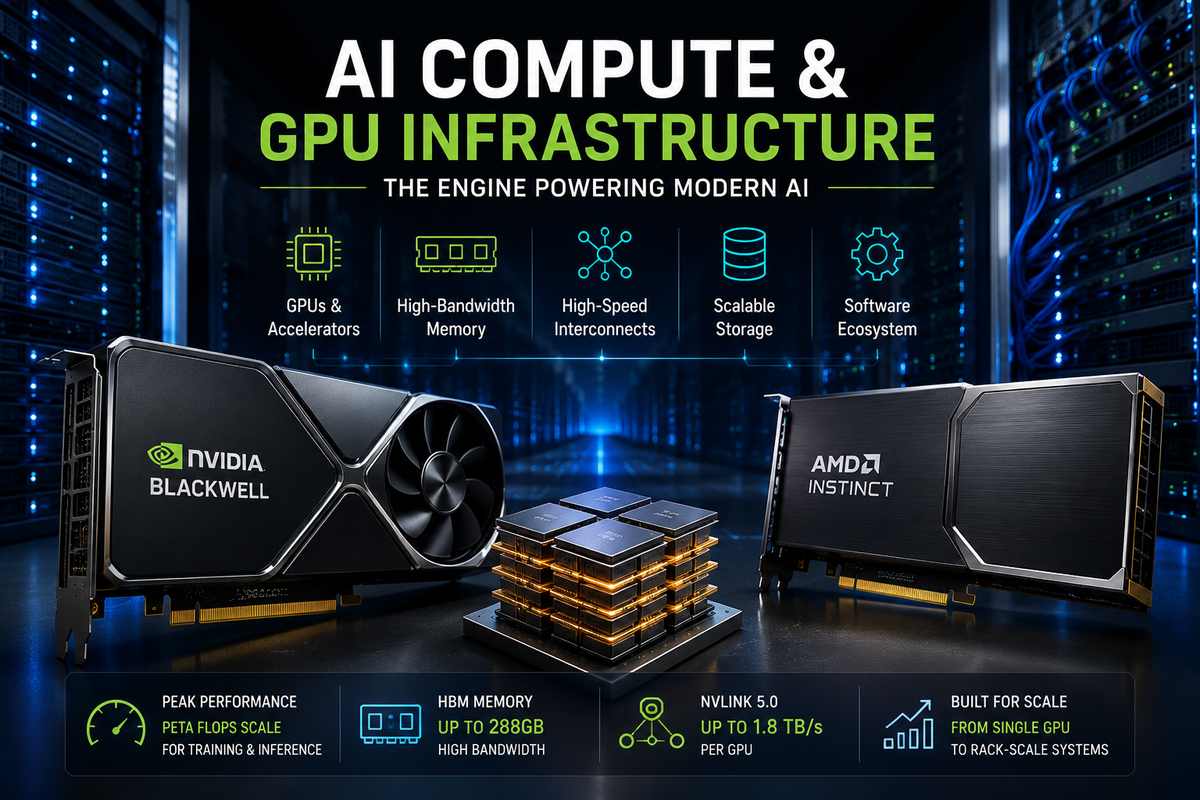
AI Compute & GPU Infrastructure
AI infrastructure gets talked about as if buying a faster GPU automatically makes an AI system faster. It doesn’t.
A GPU can have enormous theoretical compute, yet spend part of its time waiting for data, communicating with other GPUs, or simply sitting idle because the software isn’t keeping it busy.
That’s the part that matters.
Modern AI compute is really a combination of accelerators, memory, interconnects, software and workload design. A proper infrastructure choice has less to do with which chip has the longest spec sheet than it has to do with getting all of those bits to play well together.
This guide looks at that foundation without going too far into the specialist topics that deserve their own articles.
AI compute is only one part of the infrastructure stack. GPUs also depend on high-speed storage, networking, data pipelines, and efficient data movement. For a broader look at how these components fit together, see our AI Infrastructure and Data guide.
Table of Contents
What Is AI Compute Infrastructure?
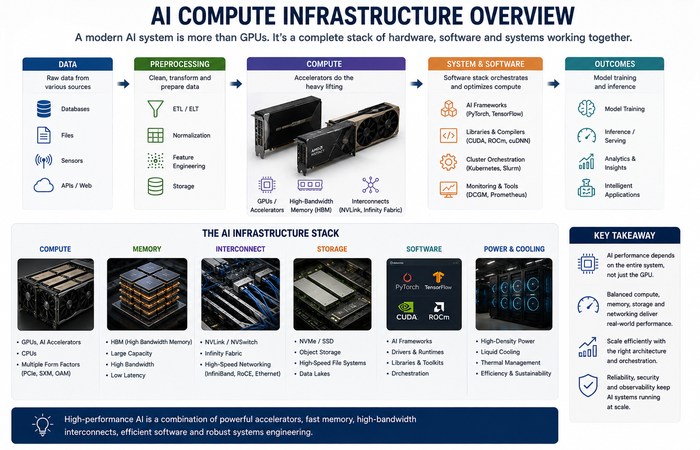
AI compute infrastructure is the hardware and software stack used to train, fine-tune and run AI models.
At the hardware level, that can include:
- CPUs
- GPUs
- AI accelerators
- High-bandwidth memory
- GPU interconnects
- Network adapters
- Servers and racks
- Cooling and power systems
The software layer is equally important. Most systems using NVIDIA will be using CUDA and the libraries and tools built on top of it, whereas AMD Instinct accelerators will be using the ROCm software platform. AMD ROCm presently supports its MI350X and MI355X data-center GPUs, as shown in its latest documentation.
So when someone says an organization is “buying GPUs for AI,” they’re really buying a complete compute platform.
Why GPUs Became So Important for AI
AI workloads involve enormous numbers of mathematical operations that can be performed in parallel.
That’s where GPUs shine.
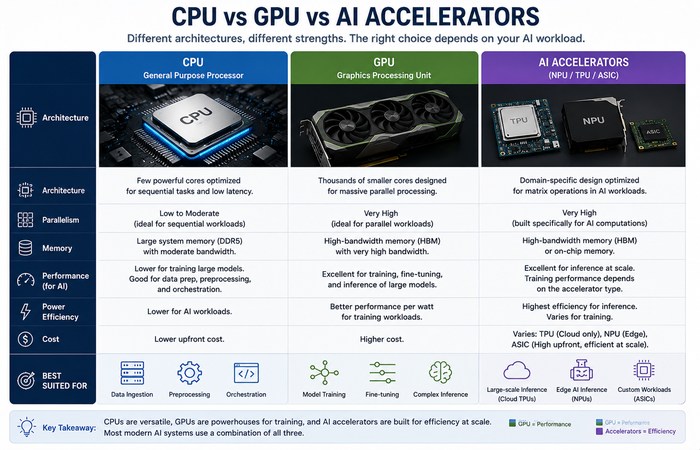
A CPU is designed as a relatively small number of powerful, general-purpose cores. A GPU contains a much larger collection of parallel processing resources designed to work on many operations simultaneously.
Deep-learning frameworks can therefore distribute matrix and tensor operations across thousands of GPU execution units.
But raw compute isn’t everything.
A model constantly moves data between compute units and memory. If the GPU has to wait for that data, theoretical TFLOPS or PFLOPS don’t tell you much about the actual application.
Memory bandwidth, memory capacity, software optimization and communication between accelerators can become the real bottleneck.
NVIDIA Blackwell vs AMD Instinct
The current AI accelerator market isn’t simply a contest between two chips. It’s a contest between entire ecosystems.
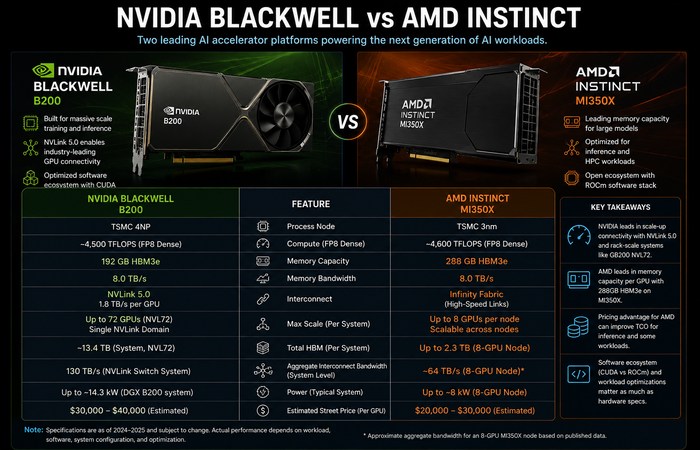
NVIDIA’s Blackwell generation includes the B200 and rack-scale systems such as GB200 NVL72. AMD’s Instinct MI350 family uses its CDNA 4 architecture and includes the MI350X.
The MI350X, for example, provides 288GB of HBM3E memory and up to 8TB/s of memory bandwidth, with a 1,000W typical board power specification.
NVIDIA’s GB200 NVL72 takes a different approach to scale. It combines 72 Blackwell GPUs and 36 Grace CPUs in a liquid-cooled rack-scale system, with a 72-GPU NVLink domain. NVIDIA specifies 13.4TB of HBM3E for the GPUs and 130TB/s of total NV Link communication bandwidth for the NVL72 system.
That‘s quite a good point.
GPU specifications tell you about an accelerator. Infrastructure specifications tell you about a system.
And large AI workloads increasingly depend on the latter.
HBM: The Memory AI GPUs Actually Care About
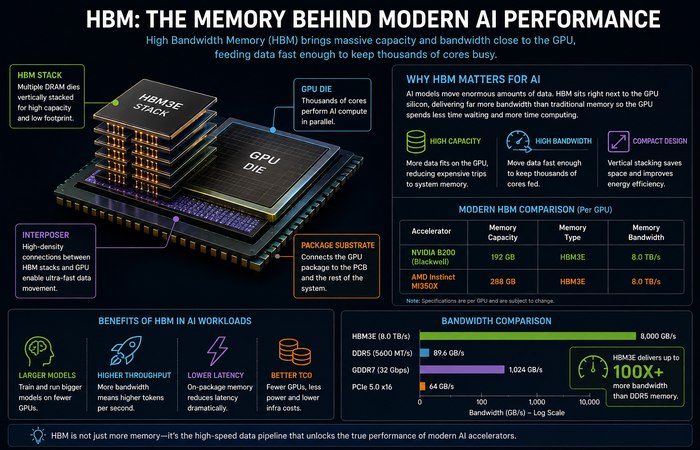
AI models transfer enormous quantities of data each time they are trained or used.
Which is why high-bandwidth memory, or HBM, is an integral to modern accelerators.
Two numbers matter:
Memory capacity
Will determine the size of model data layout that can be stored locally on the accelerator.
A little more capability could have meant a little less GPU, but it really is all depending of the architecture, the precision, the batch size, the parallelism
Memory bandwidth
This determines how quickly data can move between the accelerator and its high-bandwidth memory.
The MI350X’s 288GB HBM3E and 8TB/s bandwidth illustrate how manufacturers are attacking both sides of the problem.
That’s why comparing GPUs purely on compute throughput can be misleading.
A slightly slower accelerator with substantially more memory may be the better choice for a memory-heavy workload.
Multi-GPU Systems Change the Equation
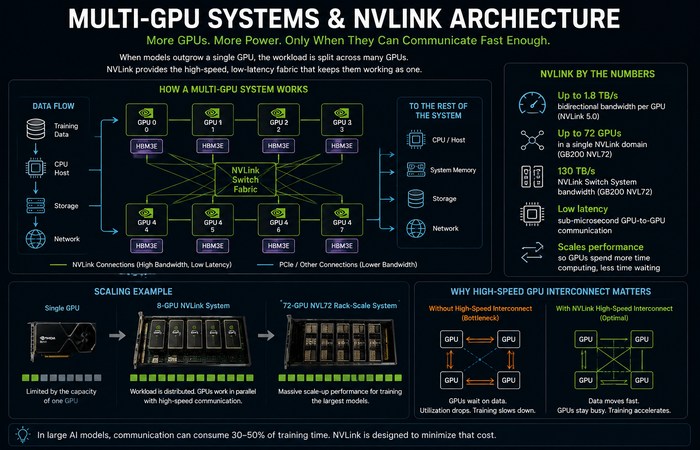
Large models often don’t fit comfortably on one accelerator.
So the workload is distributed across multiple GPUs.
This creates a new problem:
The GPUs have to communicate with each other.
NVIDIA’s fifth-generation NVLink is designed specifically for this scale-up communication. In the GB200 NVL72 architecture, each GPU has up to 1.8TB/s of NVLink bandwidth, while the NVLink Switch System provides a 130TB/s communication domain across the rack.
That communication can be critical for model and tensor parallel workloads.
The important lesson is simple:
The addition of more GPUs is not necessarily to say there would be higher throughput.
If communication becomes the bottleneck, expensive accelerators can spend too much time waiting for one another.
This is one reason GPU clusters, multi-GPU systems and AI networking deserve their own detailed treatment.
Why GPU Utilization Matters
Here’s a number infrastructure teams should watch carefully:
GPU utilization.
A GPU running at 40% utilization isn’t necessarily “bad.” Different workloads behave differently, and a utilization percentage by itself doesn’t tell the entire story.
But consistently low utilization can indicate problems elsewhere in the stack.
Maybe:
- data isn’t arriving quickly enough
- the CPU is holding up preprocessing
- storage is too slow
- network communication is excessive
- kernels aren’t optimized
- batch sizes are inappropriate
- synchronization is causing idle time
This is why real-world performance should be measured using actual workload throughput and latency, not just theoretical peak performance.
NVIDIA’s own current benchmarking material demonstrates how software versions can materially change B200 performance. At GTC 2026, NVIDIA showed significant performance changes across SGLang and vLLM versions on B200 systems.
Hardware and software are tied together.
AI Accelerators Are About More Than GPUs
There are other ways to speed up AI besides using GPUs.
Modern infrastructure can also include:
- NPUs
- TPUs
- custom ASICs
- inference accelerators
- specialized AI processors
The right accelerator depends on the workload.
Training a huge transformer, serving a language model, processing computer-vision workloads and running AI on an edge device can have very different requirements.
That’s why CPU vs GPU vs NPU deserves its own comparison rather than a simplistic “GPU wins” conclusion.
The Software Stack Can Make or Break the Hardware
Here‘s the part that is hard to notice.
A powerful accelerator is virtually useless if the software cannot take advantage of it.
NVIDIA has created a huge ecosystem around the CUDA, CUDA libraries and optimized AI frameworks. AMD is developing the competing ROCm ecosystem for its Instinct products. In addition the the P- and R-series accelerators, The ROCm releases shipped at present already contain MI350X & MI355X support & optimizations.
That doesn‘t mean there isn‘t a right ecosystem for any given workload.
It means infrastructure buyers need to evaluate:
- framework support
- kernel availability
- drivers
- compilers
- communication libraries
- inference engines
- monitoring tools
- developer expertise
A cheaper accelerator can become expensive if significant engineering effort is required to achieve the desired performance.
AI Compute Is Also a Power and Cooling Problem
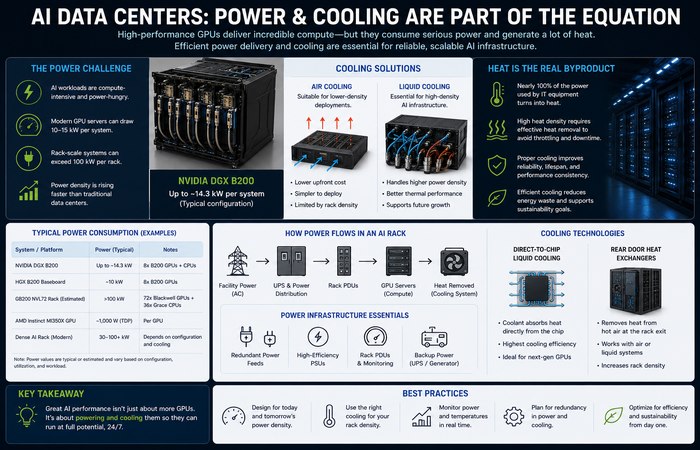
Modern AI accelerators consume substantial power, and dense GPU systems turn much of that electricity into heat.
NVIDIA’s DGX B200, for example, is specified at up to roughly 14.3kW for the system, while rack-scale GB200 NVL72 systems use liquid cooling.
That doesn’t mean liquid cooling is automatically required for every AI server.
It means power density is becoming an infrastructure constraint as organizations deploy increasingly dense accelerator systems.
A serious AI deployment therefore has to consider:
compute → memory → networking → power → cooling → facility capacity
not just the GPU model.
Training vs Inference: Same Hardware, Different Priorities
AI training and inference don’t always want the same thing.
Training
Training large models can prioritize:
- massive parallel compute
- high memory bandwidth
- large GPU clusters
- fast GPU-to-GPU communication
- distributed-training efficiency
Inference
Inference may place more emphasis on:
- memory capacity
- latency
- throughput
- batching
- power efficiency
- cost per token or request
That distinction matters when choosing hardware.
A GPU that’s excellent for large-scale training isn’t automatically the most economical accelerator for every inference workload.
Raw compute isn’t everything. A GPU can have enormous theoretical performance and still spend time waiting for data to arrive. Memory bandwidth, storage performance, data movement, and communication between accelerators can all become bottlenecks. That’s why AI storage infrastructure is such an important part of the overall compute architecture.
What Actually Makes a Good AI Compute Platform?
There isn’t one universal winner.
A practical evaluation should consider at least five things:
- Compute: Can the accelerator deliver the required workload performance?
- Memory: Is there enough capacity and bandwidth?
- Communication: Can GPUs exchange data quickly enough?
- Software: Does the ecosystem support the frameworks and models you actually use?
- Total cost: What do power, cooling, networking, hardware and engineering costs add up to?
That last point is easy to forget.
A GPU is only one line on the infrastructure bill.
The Bigger Picture
Modern AI compute is moving away from the idea of a single powerful GPU toward complete accelerated systems.
- GPUs need fast memory.
- GPUs need fast interconnects.
- Distributed workloads need networking.
- Dense systems need power and cooling.
And all of it needs software capable of keeping the hardware busy.
That’s why AI infrastructure decisions are increasingly made at the system level rather than the chip level.
The next layer gets even more interesting: GPU clusters, distributed training, AI storage, high-speed networking, accelerator memory and specialized inference hardware all have their own engineering trade-offs.
Those deserve deeper guides of their own.
For this page, the key takeaway is simpler:
The best AI compute platform isn’t necessarily the GPU with the biggest number. It’s the platform that turns expensive silicon into useful work.
Sources : NVIDIA Blackwell and GB200 NVL72 AMD Instinct MI350X
