

This Article is a part of
AI Infrastructure & Data Resource Center
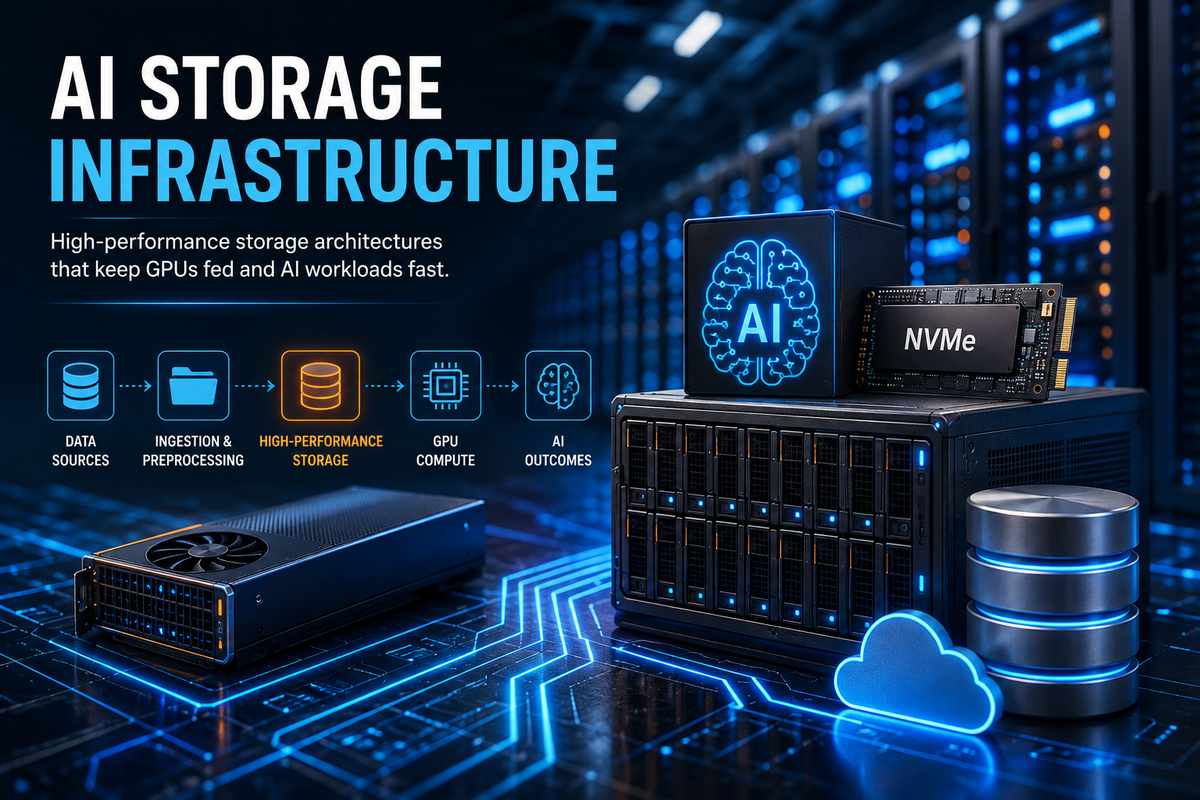
AI Storage Infrastructure
Buying more GPUs sounds like the obvious way to make an AI system faster.
Sometimes it works. Sometimes it doesn’t.
A surprisingly common problem appears when the accelerators become powerful enough to consume data faster than the storage system can deliver it. The GPUs aren’t necessarily doing anything wrong. They’re waiting.
That’s why modern AI infrastructure isn’t just about compute. Storage has to move the right data, at the right speed, with enough concurrency to keep the rest of the system busy.
Our broader AI Infrastructure and Data Guide covers the complete architecture. Here, we’re narrowing the focus to the storage layer.
Table of Contents
Why Storage Matters So Much for AI
AI workloads can generate and consume enormous datasets.
Training data might include text, images, video, audio, documents, sensor information and synthetic data. During training, thousands of workers may request data simultaneously.
That changes the storage problem.
A conventional system designed for a few users opening files isn’t necessarily designed for hundreds or thousands of processes continuously reading training data.
And there’s another wrinkle: storage performance isn’t just about drive speed.
The path between storage, CPU memory, networking and GPU memory matters too.
If that path introduces unnecessary copies or becomes saturated, a fast accelerator can still spend time waiting for data. The original draft correctly identifies this as one of the central problems AI storage architecture needs to solve.
This is also why storage should be designed alongside compute rather than bolted on afterward.
For the compute side of the equation, see our AI Compute & GPU Infrastructure guide.
Object Storage vs. File Storage
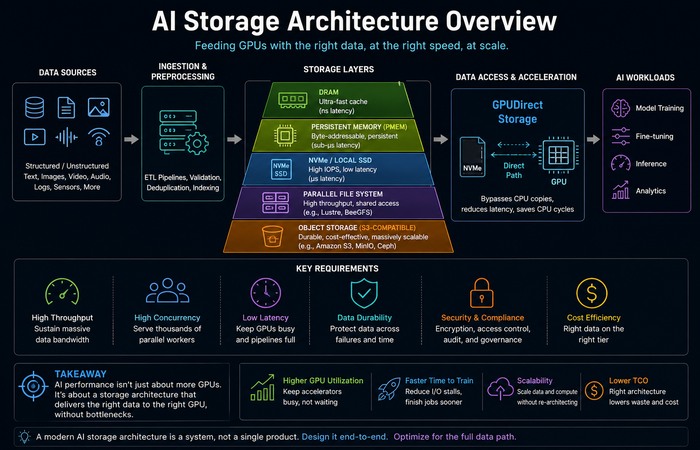
One of the biggest architectural decisions is determining where the organization’s AI datasets should live.
Object storage
Object Storage, which is the storage of data as objects rather than in a hierachical file structure.
Once your data size starts to get larger, it is especially useful due to it‘s horizontally scalable architecture and it‘s ability to serve as a persistent storage layer on raw and processed data.
That makes object storage a natural system of record for many AI environments.
Parallel file systems
Training load may be quite different in it‘s requirements.
Lustre and BeeGFS are types of parallel file systems which allow for high bandwidth and concurrently high access. They can be useful if your training job requires high speed access to currently live data.
Therefore it‘s not an either or scenario.
A mature architecture can use object storage for durable data and faster storage tiers or parallel filesystems for workloads that need higher-performance access. The original draft’s distinction between durable object storage and latency-sensitive training storage is a useful way to think about the architecture.
GPUDirect Storage: Moving Data Without the CPU Detour
Here’s where AI storage gets particularly interesting.
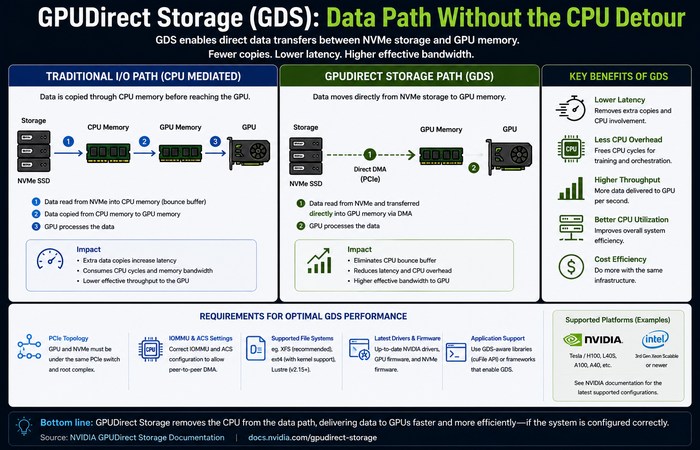
In a traditional storage-to-GPU workflow, data may be read into CPU system memory before being copied into GPU memory. That extra movement consumes CPU resources and adds another step to the data path.
NVIDIA GPUDirect Storage (GDS) aims to eliminate this overhead.
GDS allows direct DMA between storage and graphics memory, bypassing the traditional CPU bounce buffer. NVIDIA claims this improves performance as follows:
The simplified difference looks like this:
Traditional path:
Storage → CPU memory → GPU memory
GDS path:
Storage → GPU memory
That doesn’t mean GDS magically makes every storage workload faster. Performance depends on the complete system configuration, filesystem, hardware topology and workload.
NVIDIA specifically provides benchmarking and configuration guidance because those details matter.
Why PCIe Topology Matters
This is one of those details that quickly become overlooked in a high level infrastructure discussion.
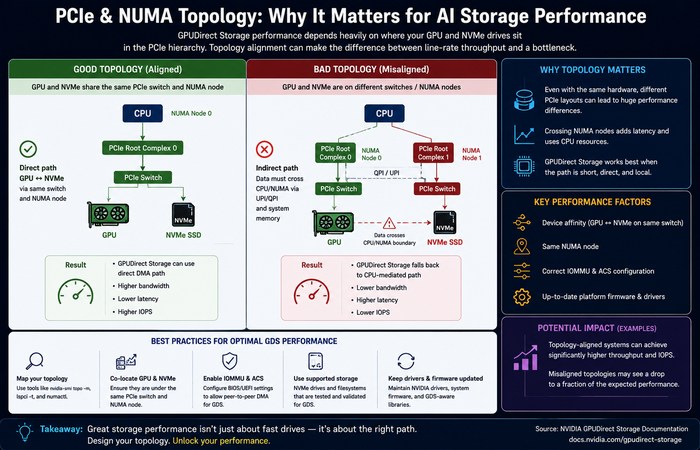
On two servers they can have the same, in fact even identical, GPUs and NVMe devices in them and give different results.
Why?
Because the devices may be connected differently inside the PCIe hierarchy.
For GDS, NVIDIA documents the importance of PCIe device affinity and system topology when determining which GPUs and NVMe devices share upstream PCIe switches.
Other settings can matter too. NVIDIA’s current configuration documentation discusses factors such as PCIe Access Control Services and IOMMU because they can affect peer-to-peer communication and delivered GDS performance.
So “we bought fast NVMe drives” isn’t the end of the storage conversation.
How those drives are connected can matter just as much.
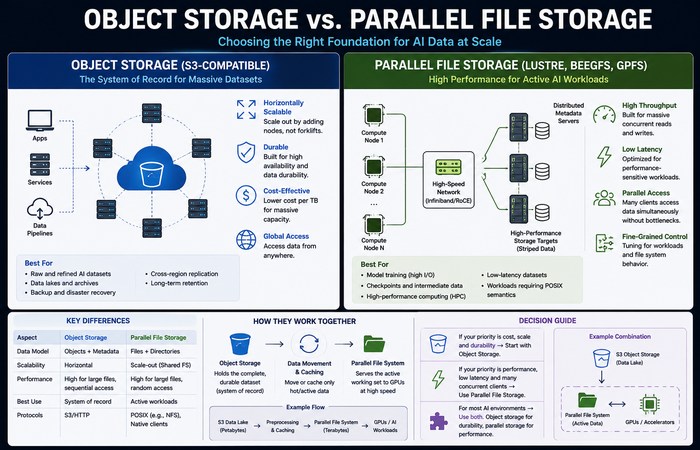
Tiered Storage: Not Every Byte Needs to Be Equally Fast
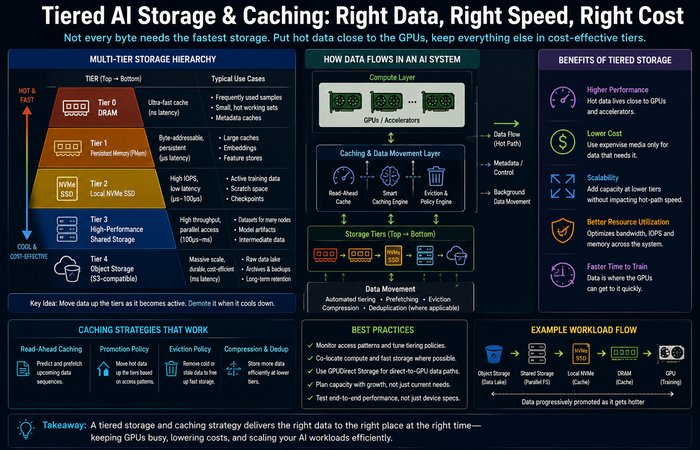
Here’s the thing: keeping everything on the fastest possible storage would be expensive and, in many cases, pointless.
A better approach is to create tiers.
A simplified AI storage hierarchy might look something like:
DRAM → local NVMe → high-performance shared storage → object storage
The most frequently accessed data stays close to the compute resources. Less frequently accessed material can remain on more economical storage.
Caching can sit between these layers and reduce repeated reads from slower storage.
The original draft describes transparent caching approaches that can intercept normal filesystem operations and redirect requests toward faster tiers without requiring every training application to be rewritten.
That can be particularly useful in large organizations where dozens of teams use different models and data-loading pipelines.
Local NVMe vs Shared Storage
Local NVMe drives offer very fast access because they’re physically attached to the server.
That’s useful for:
- temporary training datasets
- cached samples
- preprocessing
- checkpoints
- intermediate results
But local storage has an obvious limitation: it’s attached to a particular machine.
Shared storage solves the accessibility problem, allowing multiple compute nodes to access common datasets.
The trade-off is that shared systems introduce additional networking and storage layers.
That’s why large AI deployments often combine the two rather than choosing one exclusively.
Cloud vs On-Premises AI Storage
There isn’t a universal winner here either.
Cloud storage is attractive when workloads are:
- experimental
- short-lived
- unpredictable
- rapidly changing
You avoid buying and operating the physical infrastructure yourself.
But sustained workloads change the economics.
Once large GPU clusters run continuously, organizations need to account for storage capacity, data transfer, networking, cloud storage charges and potential egress costs alongside compute.
The original draft’s general point is correct, but a fixed “six hours per day” break-even rule shouldn’t be treated as universal. Actual answer is hardware cost, utilization, financing, power, staff, and cloud discounts and use.
What it is saying, therefore, is to measure your workload TCO not simply use some generic threshold.
Storage Security Is Part of the Architecture
AI storage isn’t just a performance problem.
It’s also a security problem.
Training datasets may contain proprietary documents, customer information, source code, research data or other sensitive material. AI agents can make the situation even more complicated when software is given permission to retrieve or modify information automatically.
That means storage systems need appropriate controls around:
- encryption
- identity and access management
- authorization
- backups
- ransomware protection
- audit logging
- data retention
- recovery
The original draft uses the term “cyberstorage” to describe storage systems with security capabilities built into the storage layer. It’s a useful emerging concept, but it shouldn’t be presented as a formal industry standard.
The broader principle is simpler:
Don’t treat storage security as something that gets added after deployment.
What a Modern AI Storage Architecture Looks Like
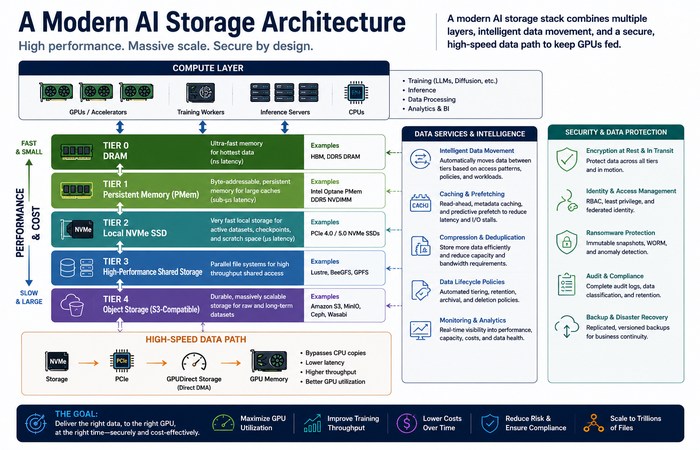
A practical architecture might combine several layers:
Object storage
Long-term system of record for large datasets.
Parallel/shared storage
High-throughput access for active training workloads.
Local NVMe
Fast local cache and temporary working space.
DRAM
Extremely fast access for frequently reused data.
GPUDirect Storage
A direct storage-to-GPU data path where supported and properly configured.
Networking
Connects compute nodes to shared storage and distributed datasets.
The exact design depends on the workload. A small inference deployment doesn’t need the same storage architecture as a multi-node model-training cluster.
The Bigger Picture
AI storage has discreetly now become one of the most critical components of the puzzle pieces.
The objective isn‘t just to purchase the fastest SSD, or the largest array of storage.
It’s to create a data path where the right information reaches the accelerator efficiently.
That means thinking about storage capacity, bandwidth, latency, caching, filesystem design, PCIe topology, networking, security and cost as one system.
And this is only the beginning.
Future deep dives can tackle GPU Direct Storage, NVMe for AI, AI data lakes, distributed storage, storage for RAG and storage for LLM training individually.
For now, the takeaway is straightforward:
A powerful GPU is only as useful as the data pipeline feeding it.
That is the real job of AI storage infrastructure.
