
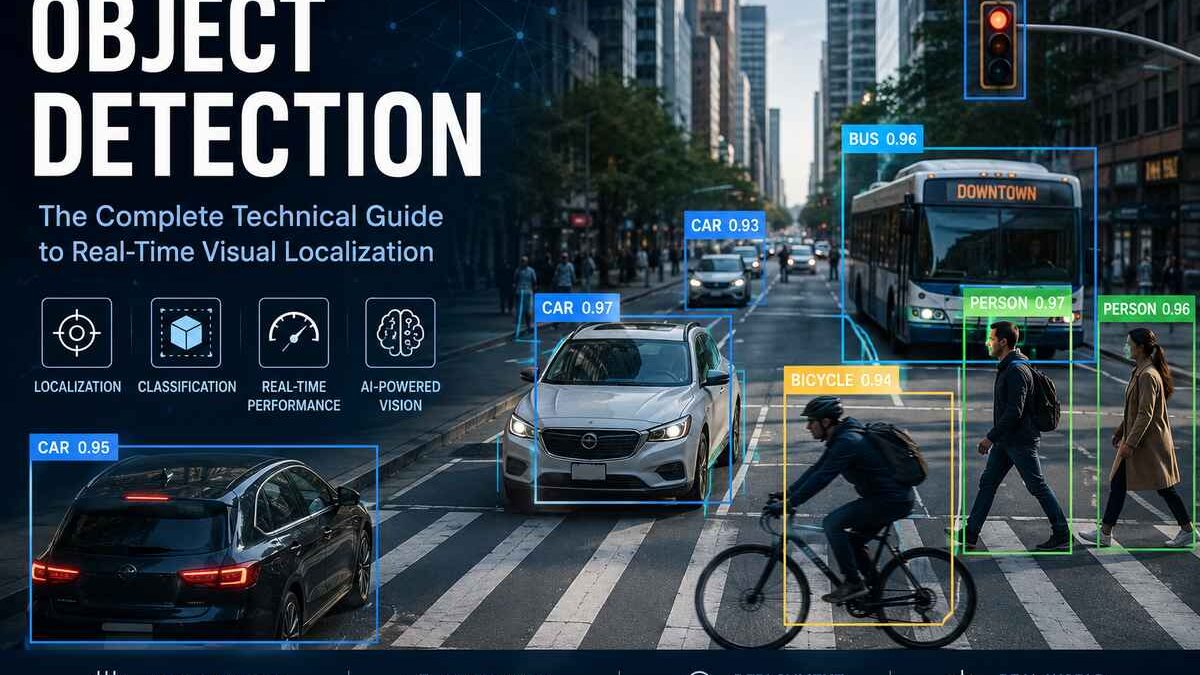

This Article is a part of
Computer Vision Resource Center
A self-checkout camera has about half a second to figure out whether the item you just placed in the bagging area is the $3 avocado you scanned or the $40 bottle of wine you didn’t. A security system watching a train platform has to notice an unattended bag without flagging every backpack a commuter sets down for a second. A drone flying over a cattle ranch needs to count animals that are, from 200 feet up, a handful of pixels each.
None of these are recognition problems in the simple sense. Knowing “there’s a bottle somewhere in this image” isn’t enough — the system needs to know where, and it needs to separate that bottle from the six other objects sitting next to it. That’s object detection: the computer vision task that draws a box around every object it can find and tells you what’s inside each one.
And it‘s one of the hottest subfields in AI right now. In just the past five years, the prevailing architecture has shifted a hands-on three times, and the model that led the field just a few months ago is now routinely used as a lesson. In this article, I‘ll cover what object detection really means, how today‘s best detectors work, and state of the art as of 2026.
Table of Contents
Object Detection Quick Facts
| Aspect | Details |
| Task type | Localization + classification (where is it, and what is it) |
| Core output | Bounding box coordinates + class label + confidence score, per object |
| Founding architectures | R-CNN family (two-stage), YOLO and SSD (one-stage) |
| Current frontier | NMS-free real-time detectors (YOLO26), transformer detectors (RT-DETR, D-FINE), open-vocabulary models (YOLO-World, YOLOE) |
| Standard benchmark | Microsoft COCO (80 object categories, ~330K images) |
| Standard metric | mean Average Precision (mAP) |
| Common uses | Retail analytics, security, manufacturing QC, healthcare imaging, agriculture, autonomous systems |
What Is Object Detection, Exactly?
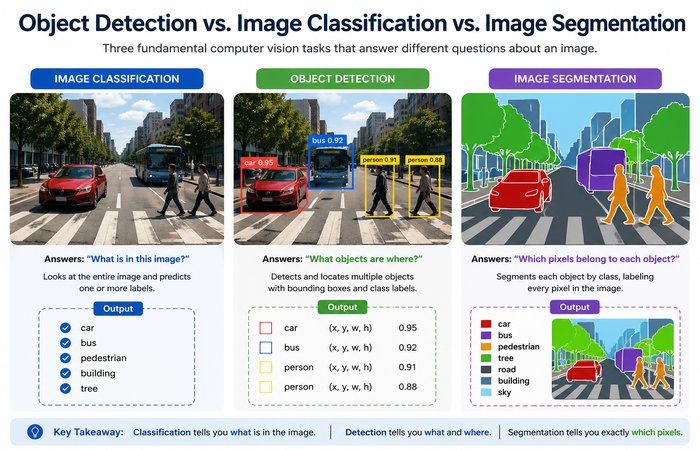
It helps to place object detection between its two closest relatives, because people use these terms loosely and the differences actually matter for choosing the right tool.
Image classification looks at a whole photo and assigns it one label — “this is a picture of a dog.” It says nothing about where the dog is or whether there’s more than one.
Object detection goes further. Given the same photo, it finds every dog, draws a rectangle around each one, and attaches a confidence score to each box. If there are three dogs and a mailman in the frame, you get four separate detections.
Image segmentation goes further still, tracing the exact pixel boundary of each object rather than a rectangular approximation — useful when you need to know precisely which pixels belong to a tumor or a road surface, not just roughly where it sits.
Object Detection vs Image Recognition
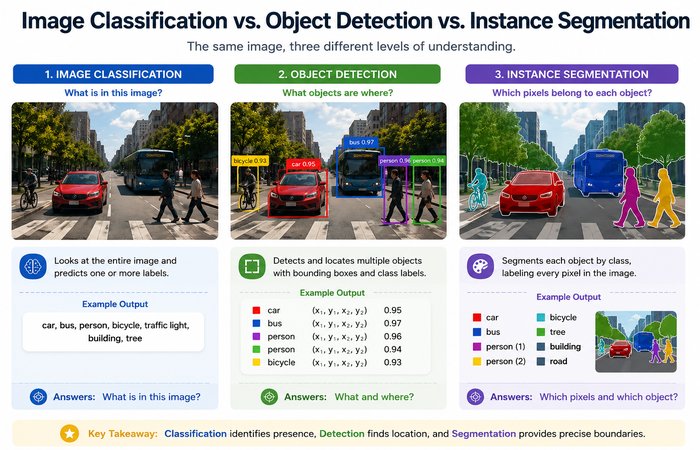
It is becoming more popular for people to use the terms object detection and image recognition interchangeably. There are actually two separate computer vision problems they attempt to resolve, though the same AI is applied to analyze the picture, the output data is very different.
Image recognition (also known as image classification) is the process of predicting what exists in an image. Object detection is more specific by doing the additional task of also recognizing the objects and locating them in the image.
Imagine if you walked in and saw an image of a busy street filled with car moving on by, people getting through, bikes are going places, and road signs everywhere.
- An image recognition model might simply return:
- “This image contains cars, people, bicycles, and traffic signs.”
- An object detection model would instead identify every individual object, draw a bounding box around each one, assign a class label, and provide a confidence score.
The fact that object detection can simultaneously locate multiple objects makes it ideal for many applications that require location as well as recognition.
Object Detection vs Image Recognition Comparison
| Feature | Image Recognition (Image Classification) | Object Detection |
| Primary Goal | Identify the contents of an image | Identify and locate every object in an image |
| Output | One or more class labels | Bounding boxes, class labels, and confidence scores |
| Object Location | Not provided | Provided |
| Multiple Objects | Limited | Detects multiple objects simultaneously |
| Real-Time Applications | Less common | Widely used |
| Typical Use Cases | Image categorization, content moderation, photo tagging | Autonomous driving, surveillance, retail analytics, robotics, healthcare |
Which One Should You Choose?
Select image recognition if your application has a closed set of classes and only aims to recognize the content of the image. Examples include dividing plant species, recognizing handwritten digits, classifying images of pets
Object detection is appropriate if it is important to know where each object is located. If these applications self-driving cars, warehouse automation, smart surveillance, retail monitoring of shelves, or industrial quality inspection are to be successful, they require object detection.
Quick Rule: If your app only wants to know “What is this picture?” then image recognition is the right fit. If it also wants to know “Where is each thing?” it’s an object detection problem.
Real-World Example
Imagine you own a selfdriving car, and it‘s approaching a packed intersection.
- Image Recognition could determine that the scene contains vehicles, pedestrians, bicycles, and traffic lights.
- Object Detection identifies the exact location of each pedestrian, vehicle, traffic light, and road sign, allowing the vehicle to calculate distances, avoid collisions, and make real-time driving decisions.
Thus as the object detection is the basis for many state of art in computer vision system that are applied to transport, robotics, manufacturing, retail and security.
| Computer Vision Task | Output | Best Used For |
| Image Classification | One label per image | Determining the primary subject of an image |
| Object Detection | Bounding boxes + labels | Finding and identifying multiple objects |
| Semantic Segmentation | Pixel-level class masks | Road scenes, medical imaging, satellite imagery |
| Instance Segmentation | Individual object masks | Separating overlapping objects |
| Object Tracking | Bounding boxes across video frames | Surveillance, autonomous driving, sports analytics |
Object detection is in the middle intentionally. A bounding box is cheaper to compute and easier to act on than a pixel mask, and for most real-world decisions — is a forklift too close to a worker, is a shelf empty, is a car in the next lane — knowing the approximate location and extent of an object is exactly the amount of information you need, no more and no less.
Key Concept: Object detection answers two questions simultaneously:
- What is the object? (Classification)
- Where is it located? (Localization)
Object detection can be derived from image classification. Image classification can classify one image into one class; object detection extends this, classifying multiple objects appearing in the same image, and also predicts one set of (x, y, width, height) coordinates within the image for each object to denote the location of the object.
When Should You Use Object Detection?
The application you have in mind will determine the viable computer vision method. Thus if one requires finding and detecting some objects in the image in order to search for them one would make use of object detection; whereas if one wants to search for a face, segmentation of the image or facial recognition has to be used.
| Use Case | Recommended Computer Vision Technique | Reason |
| Count products on retail shelves | Object Detection | Identifies and counts multiple products while locating each one with bounding boxes. |
| Self-checkout item recognition | Object Detection | Detects multiple products simultaneously for automated checkout systems. |
| Outline the exact shape of a medical tumor | Image Segmentation | Pixel-level masks provide much greater precision than bounding boxes. |
| Detect road signs and pedestrians for autonomous driving | Object Detection | Real-time localization is essential for navigation and obstacle avoidance. |
| Verify a person’s identity | Face Recognition | Compares facial features against known identities rather than simply detecting faces. |
| Monitor traffic flow at intersections | Object Detection + Object Tracking | Detection identifies vehicles, while tracking follows their movement across video frames. |
| Analyze complete scenes for autonomous robots | Object Detection + Image Segmentation | Detection identifies objects, while segmentation provides detailed environmental understanding. |
| Detect manufacturing defects | Object Detection (or Segmentation for fine defects) | Detection works well for visible defects, while segmentation is preferred when precise defect boundaries are required. |
Quick Decision Guide
- Choose Object Detection when you need to know what objects are present and where they are located.
- Choose Image Segmentation when pixel-level precision is critical, such as in medical imaging or autonomous driving.
- Choose Image Classification when the goal is simply to identify the main subject of an image.
- Choose Face Recognition when verifying or identifying specific individuals.
- Combine Object Detection with Object Tracking when analyzing moving objects in video streams.
Rule of Thumb: When just creating a bounding box around the object is enough to make a decision, you probably want to use object detection. When you need the actual shape or outline of the object, image segmentation is generally the way to go.
Computer Vision Tasks Compared
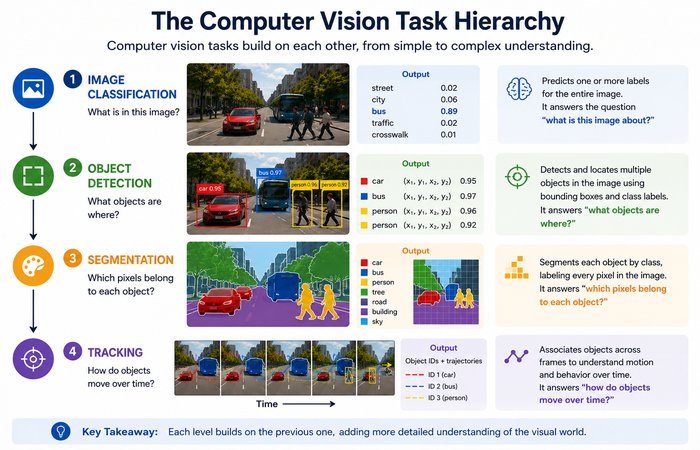
There are many vision problems and image classification, object detection, image segmentation and object tracking are just a few categories among them. They all are related to computer vision but different techniques solve different problems. There is a vast difference in the level of details on which these techniques work.
| Computer Vision Task | Primary Output | Answers This Question | Common Applications |
| Image Classification | Single class label | What is in the image? | Image categorization, content moderation, medical image diagnosis |
| Object Detection | Bounding boxes + class labels | What objects are present and where are they located? | Retail analytics, autonomous vehicles, surveillance, manufacturing inspection |
| Image Segmentation | Pixel-level masks | Which exact pixels belong to each object? | Medical imaging, autonomous driving, satellite imagery |
| Object Tracking | Bounding boxes + object IDs across video frames | Where is each object moving over time? | Video surveillance, sports analytics, robotics, traffic monitoring |
At a Glance
- Image Classification identifies the main object or scene in an image but doesn’t indicate its location.
- Object Detection identifies multiple objects and predicts a bounding box around each one.
- Image Segmentation provides precise pixel-level boundaries instead of rectangular boxes.
- Object Tracking extends object detection to video by assigning persistent IDs and following objects across consecutive frames.
Simple cheat sheet: Download Image classification if you just need to know what is in an image, use object detection if you need to know what and where, use image segmentation if you need to identify exact object boundaries. If your movement data is time series, go with object tracking.
How Object Detection Actually Works
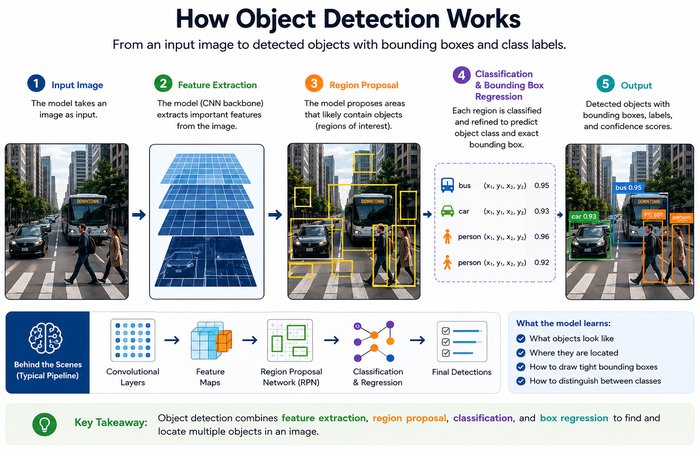
Just extract the architecture-specific parts and all detectors are essentially the same:
- Feature extraction. The image to recognize is fed into a backbone network previously a CNN such as ResNet, but more and more a Vision Transformer that transforms raw pixels into multi-layered feature maps encoding edges, textures, and ultimately object components.
- Candidate generation. The model proposes places where objects might be. Older architectures do this with predefined anchor boxes tiled across the image at multiple scales. Transformer-based detectors instead use a fixed set of learned “object queries” that each attend to different regions of the feature map.
- Classification and box regression. Two parallel heads sit on top of each candidate: one predicts what class of object it is (or “background” if nothing’s there), the other predicts how to adjust the candidate’s coordinates to tightly wrap the actual object.
- Post-processing. Because the model typically produces far more candidate boxes than there are real objects, duplicates need to be filtered down to one box per object. For two decades, this step has been handled by an algorithm called Non-Maximum Suppression — and as you’ll see below, getting rid of it turned out to be one of the more consequential engineering shifts in the field.
Every major innovation in object detection over the past decade has attacked one link in this chain: better backbones, smarter candidate generation, more expressive box regression, or — most recently — removing the post-processing step altogether.
From R-CNN to YOLO: Two Founding Philosophies
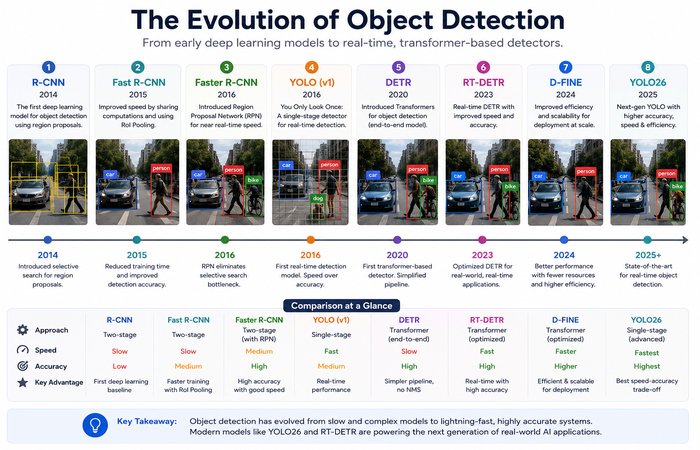
Modern object detection split into two competing philosophies early on, and the tension between them shaped the field for most of a decade.
Two-stage detectors — the R-CNN lineage (R-CNN, Fast R-CNN, Faster R-CNN, and the segmentation-capable Mask R-CNN) — separate the problem into two distinct steps. First, a region proposal network scans the image and suggests a shortlist of areas likely to contain something. Second, a classifier examines each proposed region individually and decides what’s there. This is thorough and historically very accurate, but running a full classification pass over dozens of regions per image is expensive, which kept two-stage detectors out of most real-time applications.
One-stage detectors threw out the two-step process entirely. YOLO — “You Only Look Once,” first introduced by Joseph Redmon and collaborators in 2016 — treats detection as a single regression problem: divide the image into a grid, and have each grid cell predict boxes and classes directly, in one forward pass. SSD (Single Shot Detector) followed a similar philosophy around the same time. The trade-off, at least in the early versions, was accuracy on small and overlapping objects. That gap has narrowed steadily with every subsequent YOLO release, to the point where one-stage detectors are now competitive with — and often faster than — anything two-stage architectures can produce.
The practical upshot: two-stage detectors still show up in research and in applications where accuracy trumps everything else, like certain medical imaging pipelines. Nearly everything you‘d put into production today, whether that be a mobile app or a camera on the factory floor, is a direct descendant of the one-step gene pool.
The Transformer Shift: DETR and RT-DETR
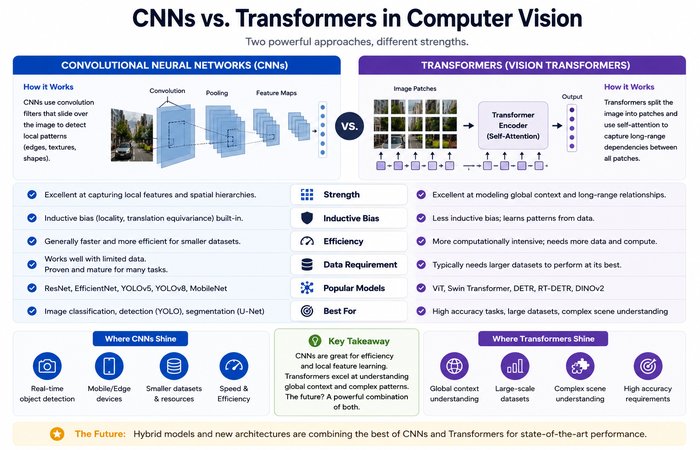
In 2020, Facebook AI Research had a truly innovative idea. They introduced what they called DETR (Detection Transformer). Instead of anchors and hand-tuned post processing, DETR considers detection as a direct set-prediction problem. A CNN backbone extracts features, a Transformer encoder-decoder attends to the whole image at once, and a fixed number of learned queries each predict one object directly — no anchors, no NMS. Training uses a technique called bipartite (Hungarian) matching to pair each prediction with the correct ground-truth object.
It was an elegant idea with a real weakness: DETR was slow to train and too slow at inference for real-time use, which kept it out of production for a few years.
Baidu’s research team closed that gap in 2023 with RT-DETR, introduced in the paper “DETRs Beat YOLOs on Real-Time Object Detection.” RT-DETR redesigned the encoder into two pieces — an intra-scale attention module and a cross-scale feature fusion module — and added IoU-aware query selection to give the decoder a better starting point. The result was the first transformer detector that could genuinely compete with YOLO on speed while keeping the accuracy and NMS-free simplicity that made DETR attractive in the first place. RT-DETR-L reached roughly 53% AP on the COCO benchmark at well over 100 frames per second on an NVIDIA T4 GPU, and the larger RT-DETR-X variant pushed past 54.8% AP. A follow-up release, RT-DETRv2, added more flexibility to the training recipe without giving up that speed.
RT-DETR mattered less for its raw numbers and more for what it proved: transformers weren’t inherently too slow for real-time detection. That opened the door for everything that came after.
The NMS Problem — and How YOLO26 Finally Solved It
To understand why “NMS-free” became such a big deal, it helps to understand what Non-Maximum Suppression actually does and why it’s more fragile than it looks.
A typical detector produces hundreds or thousands of raw candidate boxes for a single image, most of them overlapping slightly around the same real objects. NMS sorts these by confidence score, keeps the highest-scoring box, and deletes every other box whose overlap (measured by Intersection over Union) with it exceeds a threshold — then repeats for the next-highest box, and so on. It works, but it has three real costs: it needs a hand-tuned IoU threshold that doesn’t generalize well across scenes, it runs as a sequential loop whose execution time depends on how cluttered the scene is (a crowded frame takes measurably longer to process than an empty one), and it complicates exporting models to edge runtimes like ONNX or TensorRT because it’s not a clean, differentiable operation.
For years, YOLO models lived with this trade-off. That changed with YOLO26, released by Ultralytics in October 2025 — the first YOLO generation built for native end-to-end inference with no NMS step at all. The architecture bakes in a handful of specific innovations: the MuSGD optimizer, which stabilizes training for the lightweight backbones used in the smaller model variants; Small-Target-Aware Label Assignment (STAL), aimed directly at the class of small-object failures described later in this guide; and ProgLoss, which adjusts supervision dynamically over the course of training. YOLO26 also drops Distribution Focal Loss, a change made specifically to simplify export to ONNX and TensorRT.
The practical payoff is real and measurable: Ultralytics reports CPU inference times cut by up to 43% on the Nano variant compared with earlier, NMS-dependent YOLO releases. For anything running on embedded hardware, drones, or mobile devices — where CPU cycles are the scarce resource, not GPU compute — that’s the difference between a model that’s usable and one that isn’t. YOLO26 ships in six sizes, from Nano through Extra-Large, and handles detection, instance segmentation, pose estimation, and oriented bounding boxes within one unified framework.
Why YOLO26 Matters
Earlier YOLO models relied on Non-Maximum Suppression (NMS) to remove duplicate predictions after inference. YOLO26 performs end-to-end prediction without requiring NMS, resulting in lower latency, simpler deployment, and improved performance on edge devices.
Precision at the Edges: D-FINE’s Distribution Refinement
Speed solves one problem. Localization precision — how tightly a predicted box actually wraps the true object — is a separate one, and it’s the one D-FINE was built to attack.
Most detectors, including standard DETR variants, predict a bounding box as four fixed numbers and stop there. That works fine for easy, unambiguous objects, but it gives the model no way to express uncertainty — a box edge that’s genuinely hard to place (because of blur, occlusion, or a soft object boundary) gets treated with exactly the same confidence as an edge that’s obvious. D-FINE, published by a research team including Yansong Peng and accepted as an ICLR 2025 Spotlight paper, reframes the regression task entirely.
Its first component, Fine-grained Distribution Refinement (FDR), models each box edge as a probability distribution rather than a single committed number, then refines that distribution iteratively as it passes through the decoder’s layers — starting rough and sharpening with each pass, rather than guessing once and moving on. Its second component, Global Optimal Localization Self-Distillation (GO-LSD), distills the precise localization knowledge learned in the deeper layers back into the shallower ones, so the model doesn’t need to run its full depth to benefit from what the later layers figured out.
The published benchmark numbers are strong: D-FINE-L and D-FINE-X reach 54.0% and 55.8% AP respectively on COCO, running at 124 and 78 frames per second on a T4 GPU. Pretrained on the larger Objects365 dataset first, those numbers climb to 57.1% and 59.3% AP — ahead of other real-time detectors available at the time of publication. Because FDR and GO-LSD are add-on techniques rather than a ground-up redesign, the paper also reports that applying them to other existing DETR-style models lifts accuracy by up to 5.3 AP points with almost no added training or inference cost.
Solving the Tiny Object Problem
Small objects are, quietly, one of the hardest unsolved problems in detection — a drone counting cattle, a satellite image spotting vehicles, a retail camera reading a price tag from across an aisle. The root cause is mathematical, not just a matter of image resolution.
Intersection over Union, the standard way of scoring how well a predicted box matches the truth, is punishing at small scales. If a real object is only 10 pixels wide, a prediction that’s off by just 2–3 pixels can drop the IoU score to zero, even though a human would call that detection basically correct. Anchor-based training systems use IoU to decide which candidate boxes count as legitimate positive examples during training — so when IoU collapses to zero on tiny objects, the training process throws away good candidates and treats them as background, and the model never gets a useful signal to learn from.
Normalized Gaussian Wasserstein Distance (NWD), proposed by Jinwang Wang and colleagues, sidesteps the problem by changing what “similarity” means. Instead of comparing two boxes as rigid rectangles, NWD models each one as a 2D Gaussian distribution and measures the distance between those distributions using the Wasserstein metric from optimal transport theory. This produces a similarity score that stays smooth and informative even when boxes barely overlap or don’t overlap at all — exactly the situation where IoU falls apart. Tested against a dedicated tiny-object benchmark called AI-TOD, NWD improved detection performance by 6.7 AP points over a standard fine-tuning baseline and by 6.0 AP points over the strongest prior method. It’s also designed as a drop-in replacement — it can be substituted into the label assignment, NMS, and loss function of most existing anchor-based detectors without a structural rewrite.
Detection Without a Fixed Vocabulary: Open-Vocabulary Models
Every detector discussed so far shares a hidden limitation: it can only find objects from a fixed, predefined list of categories baked in during training. Point a standard COCO-trained model at an object outside its 80 known classes, and it simply won’t see it. Open-vocabulary detection removes that ceiling by connecting vision to language.
OWL-ViT, released by Google researchers at ECCV 2022, builds on CLIP-style image-text pretraining. It strips the final pooling layer out of a Vision Transformer and attaches a lightweight classification and box-prediction head to every remaining token, letting the model detect objects from arbitrary text queries rather than a fixed label set. A later version, OWL-ViT v2, extended this further and remains a strong choice specifically for broad generalization on large-vocabulary benchmarks like LVIS, which spans well over a thousand object categories rather than COCO’s 80.
YOLO-World, from Tencent’s AI lab and presented at CVPR 2024, brought the same open-vocabulary idea into the YOLO family without sacrificing real-time speed — a combination that hadn’t really existed before. It uses a re-parameterizable vision-language path aggregation network (RepVL-PAN) and a region-text contrastive loss to align visual regions with text embeddings, and it introduced a “prompt-then-detect” workflow: encode your text prompts once, then reuse those embeddings across many images without re-encoding text at every frame. At launch, the published numbers put it around 35.4 AP at roughly 52 FPS on a V100 GPU.
YOLOE, and its newer YOLOE26 variant from Ultralytics, push further still by unifying text prompts, image prompts, and an internal open vocabulary within a single model. On the LVIS benchmark specifically, Ultralytics reports YOLOE26-S beating YOLO-World-S by 11.4 AP and YOLOE26-L beating YOLO-World-L by 10.0 AP, while still running at roughly 161 frames per second on a T4 GPU — worth noting these LVIS numbers aren’t directly comparable to the COCO-based figures used elsewhere in this guide, since LVIS is a larger, harder, long-tailed benchmark. Grounding DINO rounds out the field by combining DETR-style detection with grounded language pretraining, and it’s particularly strong at parsing full referring expressions rather than single-word labels — “the person holding the red umbrella” rather than just “person.”
One honest caveat worth flagging: independent robustness testing has found that open-vocabulary detectors — OWL-ViT, YOLO-World, and Grounding DINO among them — see meaningfully larger accuracy drops than closed-set specialists when image quality degrades or the data distribution shifts away from what they were trained on. Flexibility and robustness aren’t the same thing, and it’s worth testing an open-vocabulary model against your actual deployment conditions before trusting it in production.
How Object Detection Gets Evaluated
All the accuracy figures cited above come from a shared measurement framework, and it’s worth understanding the pieces.
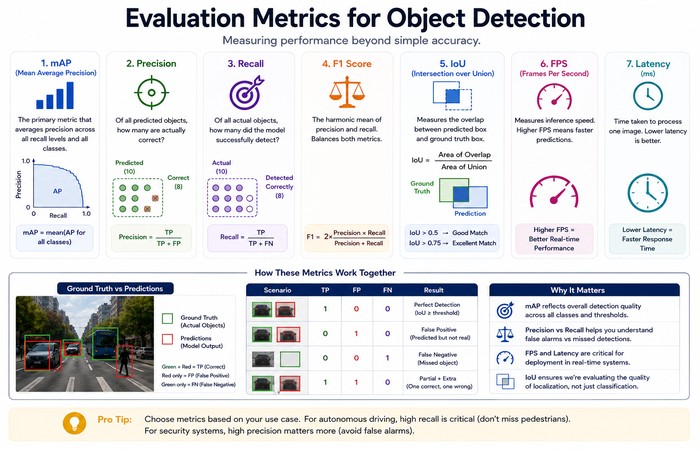
Intersection over Union (IoU) is the foundation: divide the overlapping area between a predicted box and the ground-truth box by the total area the two boxes cover combined. A perfect match scores 1.0; boxes that don’t touch score 0.
Precision and recall come next. Precision asks: of everything the model flagged as an object, how much was correct? Recall asks: of everything that was actually there, how much did the model find? These two numbers trade off against each other — a model can inflate recall by flagging everything as an object, tanking precision in the process.
Average Precision (AP) captures that trade-off in a single number by measuring the area under the precision-recall curve for one object class at a given IoU threshold, typically 0.5. Mean Average Precision (mAP) simply averages AP across every class in the dataset, giving one overall score. The COCO benchmark, which has become the de facto standard for comparing detectors, reports a stricter version called mAP@50:95 — the average precision across ten different IoU thresholds from 0.5 to 0.95, which rewards models for tight, accurate boxes rather than just approximately-correct ones. This is the number you’ll see quoted as “COCO AP” in most of the benchmarks throughout this guide.
Pros & Cons Table
| Model Family | Advantages | Limitations |
| Faster R-CNN | Excellent accuracy | Slower inference |
| YOLO26 | Extremely fast, edge-friendly | Slightly lower accuracy on some complex tasks |
| RT-DETR | High accuracy with end-to-end inference | Requires stronger GPU hardware |
| D-FINE | Outstanding localization precision | Newer ecosystem and fewer tutorials |
| YOLOE | Open-vocabulary detection | More computationally intensive |
A Snapshot: How Today’s Detectors Compare
| Model | Type | Approx. COCO AP | Speed (T4 GPU) | Defining Trait |
| Faster R-CNN (2015) | Two-stage | Solid, not real-time | Not built for real-time use | Region proposals + classifier, high accuracy baseline |
| RT-DETR-X (2023) | Transformer, NMS-free | 54.8% | 74 FPS | First real-time end-to-end DETR |
| D-FINE-X (2025) | Transformer | 55.8% (59.3% with Objects365 pretraining) | 78 FPS | Distribution-refinement box regression |
| YOLO26 (Oct 2025) | One-stage, NMS-free | Competitive, edge-optimized | Up to 43% faster CPU inference (Nano) | Native NMS-free YOLO, MuSGD + STAL + ProgLoss |
| YOLO-World / YOLOE26 | Open-vocabulary | Task-dependent (LVIS-scored) | Real-time (~161 FPS, YOLOE26-L) | Detects arbitrary text-prompted classes |
| RF-DETR (Roboflow) | Transformer | First to break 60% AP on COCO | Real-time | Current high-water mark as of its release |
Benchmark Comparison: Real-Time Object Detection Models (2026)
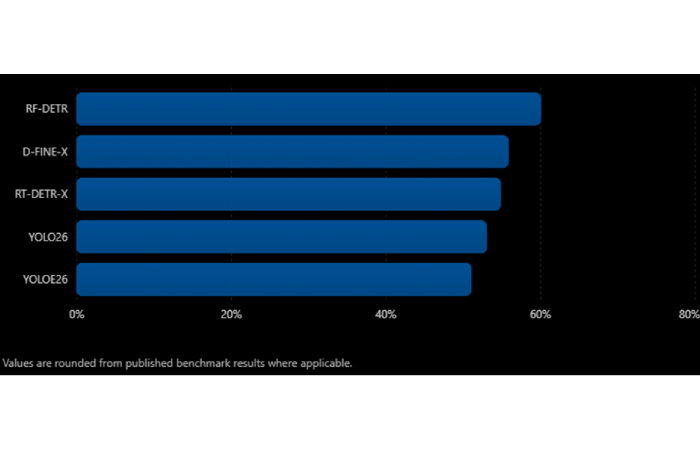
The benchmark results below provide a quick comparison of several leading object detection models based on their reported COCO Average Precision (AP). While benchmark scores are useful for comparing models, remember that deployment speed, hardware requirements, and application-specific performance are equally important when selecting a detector.
COCO Average Precision (AP) Comparison
What the Benchmark Shows
- RF-DETR currently represents one of the highest-performing real-time object detectors on the COCO benchmark.
- D-FINE delivers exceptional localization accuracy, making it an excellent choice for precision-critical applications.
- RT-DETR combines transformer-based detection with real-time performance, offering a strong balance between speed and accuracy.
- YOLO26 prioritizes low-latency inference and edge deployment while maintaining highly competitive accuracy.
- YOLOE introduces open-vocabulary detection, allowing models to recognize objects beyond a fixed set of predefined categories.
Important: Benchmark scores should not be the only factor when selecting a model. For production systems, also consider inference speed (FPS), hardware requirements, deployment environment, memory usage, licensing, and the complexity of your application.
Which Object Detection Architecture Should You Choose?
Today’s object detection models generally fall into three categories: CNN-based detectors, Transformer-based detectors, and Open-Vocabulary detectors. Each architecture has different strengths depending on whether your priority is real-time speed, localization accuracy, or the ability to recognize previously unseen objects.
| Model | Architecture Type | Inference Speed | Detection Accuracy | Best For |
| YOLO26 | CNN (One-Stage) | 5 stars | 4 stars | Real-time inference, edge AI, robotics, drones, mobile devices |
| RT-DETR | Transformer | 4 stars | 5 stars | High-accuracy production systems with GPU acceleration |
| D-FINE | Transformer + Distribution Refinement | 3 stars | 5 stars | Precise localization, industrial inspection, medical imaging |
| YOLOE | Open-Vocabulary | 4 stars | 4 stars | Detecting previously unseen objects using text prompts |
| OWL-ViT | Vision-Language Transformer | 3 stars | 4 stars | Research, zero-shot detection, large-vocabulary recognition |
Which Model Is Right for Your Project?
- Choose YOLO26 if you need the fastest real-time object detection on edge devices or embedded hardware.
- Choose RT-DETR when your priority is maximizing detection accuracy while maintaining real-time performance.
- Choose D-FINE if your application requires extremely accurate bounding boxes, such as medical imaging or industrial quality inspection.
- Choose YOLOE when your application must recognize objects that were not part of the original training dataset.
- Choose OWL-ViT for research projects or applications that rely heavily on natural-language prompts and zero-shot object detection.
Recommendation: For most production applications in 2026, YOLO26 offers the best balance of speed, deployment simplicity, and accuracy. If your workload prioritizes localization precision over inference speed, D-FINE or RT-DETR are stronger choices. When flexibility is more important than fixed-class accuracy, YOLOE is the preferred open-vocabulary detector.
Choosing the Right Object Detection Model
Not every object detection model is designed for the same purpose. Use the decision guide below to quickly identify which architecture best matches your project requirements.
Start Here │ ▼ Do you need the fastest real-time inference? │ ┌───────────┴───────────┐ │ │ YES NO │ │ ▼ ▼ YOLO26 Is maximum detection Accuracy the priority? │ ┌────────────┴────────────┐ │ │ YES NO │ │ ▼ ▼ D-FINE Do you prefer a Transformer-based model? │ ┌─────────────┴─────────────┐ │ │ YES NO │ │ ▼ ▼ RT-DETR Need to detect previously unseen object classes? │ ┌────────────┴────────────┐ │ │ YES NO │ │ ▼ ▼ YOLOE YOLO26
Quick Recommendations
| If Your Goal Is… | Recommended Model |
| Maximum inference speed | YOLO26 |
| Edge AI and embedded devices | YOLO26 Nano |
| Highest localization precision | D-FINE |
| Transformer-based architecture | RT-DETR |
| Open-vocabulary object detection | YOLOE |
| Research and experimentation | OWL-ViT or Grounding DINO |
Bottom Line: If you’re unsure where to start, YOLO26 is the safest choice for most production applications because it offers an excellent balance of speed, accuracy, deployment simplicity, and hardware efficiency. Consider D-FINE when localization precision is critical, RT-DETR for transformer-based workflows, and YOLOE when your application needs to recognize objects beyond a fixed set of predefined classes.
Object Detection in the Real World
The theory only matters because of what it lets you do. There are some areas where object detection is really, quantifiably, doing something:
- Retail — shelf-scanning cameras that flag empty stock positions, self-checkout systems that identify items in the bagging area, and loss-prevention cameras trained to spot suspicious handling patterns rather than store personal images. We cover the broader business case in our guide to computer vision in retail businesses.
- Healthcare — localizing lung nodules on a chest scan, flagging suspicious lesions on a dermatology image, or tracking surgical instruments in real time during minimally invasive procedures. See our dedicated guide to computer vision in healthcare for the clinical side of this.
- Manufacturing — spotting defects on a moving assembly line, verifying that workers are wearing required safety equipment, and catching early signs of equipment wear before it causes a shutdown.
- Security and public safety — perimeter monitoring, unattended-object alerts, and crowd-density estimation in transit hubs and stadiums.
- Agriculture — counting livestock or crop yield from drone footage, and spotting early signs of pest damage or disease across a field too large to walk.
- Autonomous systems and robotics — object detection is the first perception layer in any self-driving or robotic system, identifying pedestrians, vehicles, and signage in a 2D image before that information ever gets fused with LiDAR or radar for full 3D scene understanding. That sensor-fusion side of the problem is a deep enough topic on its own to deserve separate treatment — this guide focuses on the detection task itself.
- Content and media pipelines — object detection frequently runs as a preprocessing step before automatic image and video captioning, since knowing what objects are present and where makes the resulting description far more accurate.
Object Detection Applications Across Industries
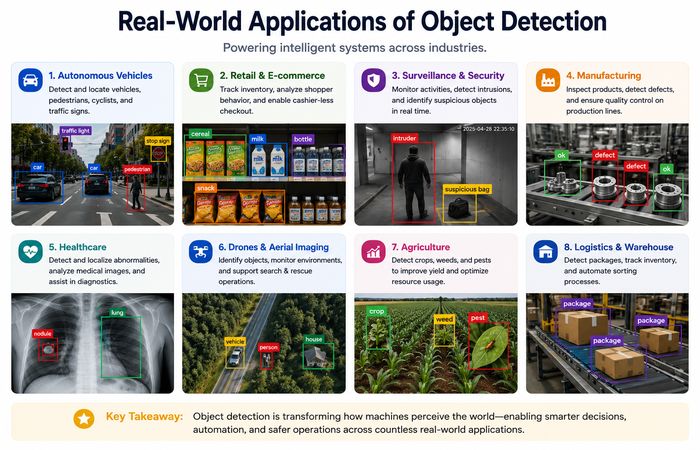
Object detection is one of the most popular computer vision techniques in broad use, because it enables simultaneous recognition and localization of multiple objects in real time. Companies from factory floors and health care institutions to shopping malls and self-driving cars are applying object detection for automated visual inspection, risk prevention, and data analysis.
| Industry | Example Applications | Business Benefits |
| Retail | Shelf monitoring, self-checkout systems, inventory counting, loss prevention, customer behavior analysis | Reduces stockouts, improves inventory accuracy, minimizes theft, and enhances customer experience |
| Healthcare | Tumor detection, lesion localization, surgical instrument tracking, medical image analysis | Assists clinicians in faster diagnosis, improves treatment planning, and reduces human error |
| Manufacturing | Surface defect detection, product quality inspection, assembly verification, worker safety monitoring | Increases production quality, reduces waste, and automates quality control |
| Agriculture | Crop health monitoring, fruit counting, weed detection, livestock monitoring using drones | Improves crop yields, optimizes resource usage, and enables precision farming |
| Transportation | Vehicle detection, traffic monitoring, license plate recognition, pedestrian detection | Enhances traffic management, improves road safety, and supports smart city infrastructure |
| Security & Surveillance | Intrusion detection, unattended object monitoring, crowd analysis, facial masking compliance | Strengthens security operations and enables faster incident response |
| Robotics & Automation | Object picking, obstacle avoidance, warehouse navigation, autonomous mobile robots (AMRs) | Enables robots to perceive their surroundings and operate safely in dynamic environments |
Main Point to remember: The technology is still the same, but custom data is typically used to specialize object detection models for a certain industry. For instance, a model trained to identify manufacturing errors will not typically generalize well to healthcare or self-driving cars without further training. That‘s why using high quality data that represent your problem well is just as important as selecting the correct object detection architecture.
How to Build a Custom Object Detection Model
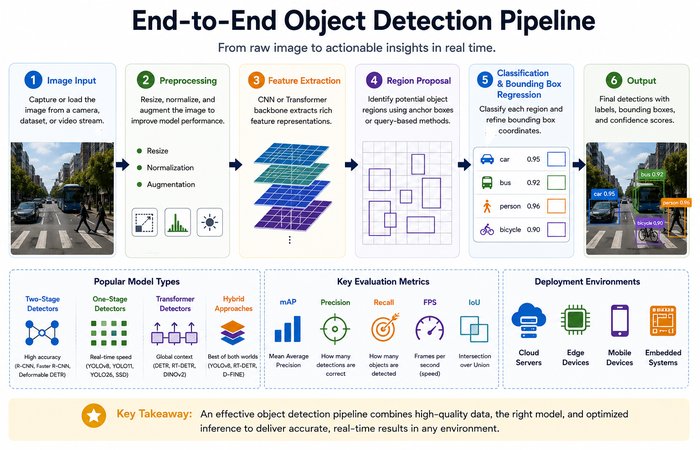
Pretrained object detection models excel at a wide range of generic objects such as people, cars, animals (and even cutout figures), but most applications involve a domain-specific set of objects such as manufacturing fault conditions, anomalies in medical images, retail items, or food crops. For these you will generally need to fine-tune a pre-existing model on your dataset.
Step 1: Collect Images
Gather a representative set of training data. Take images of the environment where the model is to be used, under various lighting, viewpoints, object distances, backgrounds and occlusion ratios to adapt the model to situations different from perfect conditions.
For instance, requirements for a warehouse detection system would be images of each different camera, during different times of day, with partially obscured objects, and heavily loaded shelves rather than simple picture perfect stock levels.
Step 2: Label Every Object
Bounding box must be labeled and tagged for each object present in the collection of images. Each box should be identified by class label. The bounding boxes become the ground truth for the training of the model.
Popular annotation tools include:
- CVAT
- Label Studio
- Roboflow Annotate
- LabelImg
Most of the existing annotation platforms are also capable of exporting the data set directly to any of the supported requirements by YOLO, COCO, Pascal VOC and TensorFlow and you can train using the most common frameworks.
Step 3: Train the Model
After preparing the dataset, select a pre-trained object detection model such as YOLO26 or RT-DETR and fine-tune the images provided within your dataset. When training on your dataset, the pretrained model learns to distinguish the objects you are interested in while still keeping the information from the generic class of images from which it was trained (for example, COCO or Objects365).
Key training parameters typically include:
- Learning rate
- Batch size
- Number of training epochs
- Input image resolution
- Data augmentation techniques
Striking a good balance between these two parameters is the key to obtaining a good detection accuracy while preventing overfitting it.
Step 4: Validate Performance
Achieving accurate results on the training data is not a gauge of how well your network will generalize to unseen data. Always evaluate it using a separate validation dataset that the model has never seen before.
Common evaluation metrics include:
- Mean Average Precision (mAP)
- Precision
- Recall
- F1 Score
- Inference speed (Frames Per Second)
Testing on actual deployment conditions, such as low light, occlusion, motion blur, low resolution camera, etc., is as crucial as testing on benchmark dataset, as it can expose flaws that the latter does not.
| Metric | Measures | Higher Is Better? |
| IoU | Bounding box overlap | Yes |
| Precision | Correct detections | Yes |
| Recall | Missed objects | Yes |
| AP | Accuracy for one class | Yes |
| mAP | Overall detection accuracy | Yes |
| FPS | Processing speed | Yes |
Step 5: Deploy the Model
When the model is tested and approved, the trained model should be exported into a format that is suitable for deployment, such as ONNX, TensorRT, TensorFlow Lite or OpenVINO, according to the targeted environment.
Common deployment targets include:
| Deployment Environment | Common Runtime |
| Cloud servers | PyTorch, TensorRT |
| NVIDIA Jetson devices | TensorRT |
| Mobile applications | TensorFlow Lite |
| Industrial edge computers | ONNX Runtime |
| Embedded AI hardware | OpenVINO, TensorRT |
Monitor the performance of the model on production data once the model is in place. As the environment and appearance of objects begins to change by introducing new variations of objects a retrained model with new labeled images will significantly help detection accuracy over time.
Best Practice
You should always start with a pretrained model such as YOLO26 or RT-DETR instead of training from scratch. When compared with training from scratch, fine-tuning a pretrained model typically needs less labeled data, less training time, and higher accuracy in most practical scenarios.
Object Detection Development Workflow
Collect Images
↓
Annotate Bounding Boxes
↓
Prepare Training Dataset
↓
Train the Model
↓
Validate Performance
↓
Optimize & Export
↓
Deploy to Production
↓
Monitor and Retrain
Best Practice: Many production object detection systems are not trained from scratch. Instead, most companies choose to finetune pretrained models such as YOLO26, RT-DETR, or D-FINE on their proprietary dataset of labels. This takes a fraction of the time as well as computational power to achieve a higher accuracy than using a model trained from scratch.
Deploying Object Detection Models to Production
Training only gets you so far though. Once you‘ve trained the object detector, it needs to be taken out in the field to provide any value. This will most likely mean deploying it somewhere to which it can take images or video.
ONNX: A Universal Deployment Format
Open Neural Network Exchange (ONNX) is arguably the most common standard used for cross-platform acceleration of AI models. It allows models trained in frameworks such as PyTorch to execute on a multitude of inference engines.
Common advantages include:
- Cross-platform compatibility
- Faster inference than standard PyTorch in many environments
- Easy integration into production applications
- Support for CPUs, GPUs, and edge devices
Most of the object detection frameworks like Ultralytics YOLO supports object detection to ONNX export with a single command.
TensorRT: Optimizing Performance on NVIDIA GPUs
In case the application is targeted to run on NVIDIA machine, then the inference engine of choice would be the TensorRT. It is used to optimize the neural networks, by minimizing the memory footprint, fusing layers and optimizing the inference precision (FP16 and INT8 quantization).
TensorRT is commonly used for:
- Autonomous vehicles
- Robotics
- Video analytics
- Smart surveillance
- Industrial inspection systems
In tests conducted by Nvidia, the latency of supported NVIDIA GPU‘s is increased while the throughput is reduced less than in standard inference (compared to standard inference).
TensorFlow Lite for Mobile and Embedded Devices
If the object detector is going to run on a mobile phone, tablet, or other limited embedded device, the TFLite (short for Tensor Flow Lite) runtime is a small, efficient on-device inference.
Typical applications include:
- Mobile AI apps
- Smart home devices
- Wearable technology
- IoT cameras
- Offline image recognition
As well as the obvious acceleration, using the device to run inference directly has the advantage of not requiring images to be transmitted to cloud servers, thus better preserving privacy.
NVIDIA Jetson for Edge AI
Processors produced by the NVIDIA Jetson family are implementations of the ARM architecture with CUDA enabled graphics processing units (GPUs). They enable deep learning models to operate on devices in the field. Model inference occurs at the edge without having to route video to the cloud.
Common use cases include:
- Autonomous robots
- Warehouse automation
- Industrial quality inspection
- Smart traffic monitoring
- Agricultural drones
Jetson devices are popular as they provide offload of GPU but at a significantly lower power compared to a desktop solution.
Google Edge TPU for Ultra-Low-Power AI
The Google Edge TPU is a dedicated AI accelerator designed specifically to run TF Lite models at extremely high speed and low power. optimized for always-on vision applications where fast inference in on device is needed without network access.
Typical deployments include:
- Smart security cameras
- Retail shelf monitoring
- Wildlife and environmental monitoring
- Industrial sensors
- Embedded IoT devices
Because inference happens locally, Edge TPU-based systems can respond almost instantly while reducing bandwidth usage and protecting sensitive visual data.
Choosing the Right Deployment Platform
| Deployment Target | Best Runtime | Typical Use Cases |
| Cloud servers | ONNX Runtime, TensorRT | Large-scale AI services, APIs, batch image processing |
| NVIDIA GPUs | TensorRT | Real-time video analytics, autonomous systems, industrial automation |
| Mobile devices | TensorFlow Lite | Android and iOS applications, offline object detection |
| NVIDIA Jetson | TensorRT | Robotics, drones, smart factories, edge computing |
| Google Edge TPU | TensorFlow Lite + Edge TPU Compiler | Smart cameras, IoT devices, low-power embedded AI |
Best Practices for Production Deployment
To successfully deploy an object detection model you‘ll need more than just exporting it to a new format. Production systems should also:
- Optimize models using techniques such as quantization or pruning to improve inference speed.
- Benchmark latency and throughput on the actual deployment hardware rather than relying solely on laboratory results.
- Monitor prediction accuracy over time, as real-world data may differ from the training dataset.
- Periodically retrain the model with newly collected images to adapt to changing environments and object variations.
- Balance accuracy, inference speed, power consumption, and hardware cost based on the application’s requirements.
Training Dataset
│
▼
Train Model
│
▼
Validate Performance
│
▼
Export Model
(ONNX / TensorRT / TFLite)
│
▼
Deploy
(Cloud / Edge / Mobile)
│
▼
Real-Time Object Detection
Best Practice: All projects do not have one defined deployment solution. Cloud deployments offer near unlimited computing power, whereas using edge platforms like Nvidia Jetson, and the Google Edge TPU aid real-time, low latency object detection with a lower data bandwidth and an increased level of data privacy.
Common Mistakes When Building Object Detection Systems
Developing an object detection model is far more than just selecting a best-in-class architecture. The published research is misleading: the greatest number of failures are due to problems with the data, evaluation or deployment, not the model. Don‘t make the following mistakes and your detector will perform much better in the real world.
| Common Mistake | Why It’s a Problem | Best Practice |
| Training with too few images | The model struggles to generalize and often overfits to the training data. | Collect diverse images covering different lighting conditions, backgrounds, viewpoints, and object sizes. |
| Poor-quality annotations | Incorrect or inconsistent bounding boxes teach the model inaccurate object locations. | Establish clear annotation guidelines and perform regular quality reviews before training. |
| Ignoring class imbalance | Frequently occurring classes dominate training while rare objects are detected poorly. | Balance the dataset or use techniques such as Focal Loss, oversampling, or weighted sampling. |
| Choosing a model based only on benchmark accuracy | The highest COCO AP doesn’t always translate into the best production performance. | Consider inference speed, hardware requirements, latency, memory usage, and deployment constraints alongside accuracy. |
| Evaluating only on benchmark datasets | Models may perform well on COCO but fail when exposed to real-world production data. | Test using images captured from the actual deployment environment whenever possible. |
| Skipping deployment benchmarking | A model that runs smoothly on a high-end GPU may be too slow for edge devices or mobile hardware. | Benchmark latency, throughput, memory consumption, and power usage on the target hardware before deployment. |
| Not retraining with new production data | Camera angles, lighting, products, and environments change over time, causing model performance to degrade. | Continuously collect new labeled data and periodically fine-tune the model to maintain accuracy. |
Best Practices for Reliable Object Detection
Successful object detection systems depend on far more than selecting the latest architecture. High-quality training data, accurate annotations, representative evaluation datasets, and continuous monitoring all play equally important roles in long-term performance.
Before deploying any model, make sure you:
- Collect diverse, representative training images.
- Create consistent, high-quality bounding box annotations.
- Balance object classes whenever possible.
- Evaluate using real-world production data—not just benchmark datasets.
- Measure inference speed and latency on the actual deployment hardware.
- Continuously monitor production performance and retrain the model as new data becomes available.
Key Takeaway: In production environments, data quality and deployment strategy usually have a greater impact on success than choosing between two state-of-the-art object detection models. Even the best architecture cannot compensate for poor annotations, unrepresentative datasets, or inadequate real-world testing.
Common Challenges and Real Limitations
None of the progress above means object detection is a solved problem. A few limitations are worth knowing before you deploy anything:
- Occlusion. Objects that partially block each other — a pedestrian half-hidden behind a parked car, a product obscured by another on a shelf — remain one of the most common failure modes, since the model has to infer a complete object from an incomplete view.
- Small objects. Even with NWD and STAL narrowing the gap, tiny or distant objects are still detected less reliably than large, close ones. This isn’t fully solved so much as substantially improved.
- Class imbalance and long-tail distributions. Real-world datasets are rarely balanced — cars vastly outnumber ambulances in any street-scene dataset, for instance — which biases models toward common classes unless corrected. The standard fix, Focal Loss, down-weights the contribution of easy, already-well-classified examples during training so the model is forced to keep learning from the rare and difficult ones.
- Real-time constraints on constrained hardware. A detector that hits 60 FPS on a data-center GPU can look very different running on a battery-powered edge device, which is exactly why so much recent research — YOLO26’s CPU optimizations included — has focused specifically on edge and mobile deployment rather than raw accuracy. Our guide on edge computing for AI-powered businesses covers the infrastructure side of this trade-off.
- Domain shift and robustness. A model trained on one style of imagery — daytime, urban, a particular camera type — can degrade sharply when deployed somewhere its training data didn’t anticipate. This is a bigger risk for open-vocabulary models than closed-set specialists, as the robustness research cited earlier shows.
- Representativeness of training data. Like most computer vision systems, detectors inherit whatever biases exist in their training data — a model trained mostly on one geographic or cultural context can underperform elsewhere. It’s a general governance concern across computer vision, not one unique to detection, and worth factoring into any deployment plan.
The Toolkit: Frameworks for Building Object Detection Systems
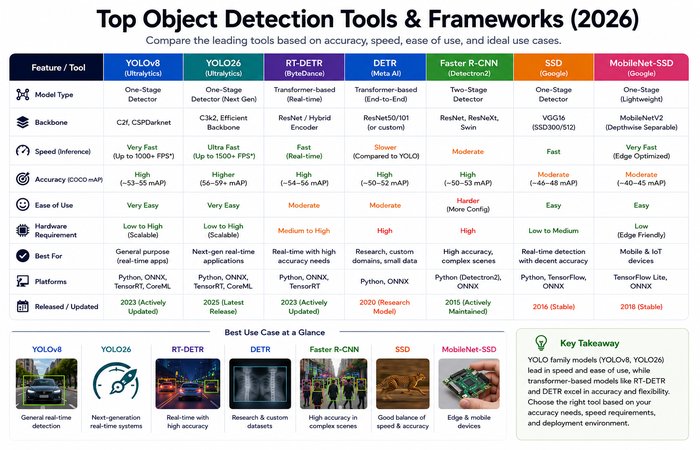
You don’t need to train an architecture from scratch to put object detection to work. A short list of what practitioners actually reach for:
- Ultralytics — the framework behind the YOLO family, including YOLO26. The most direct path from “I need a detector” to a working model, with a Python API simple enough to get a pretrained model running in a few lines of code.
- PyTorch and torchvision — the research standard, and the base most other frameworks and pretrained weights build on.
- Hugging Face Transformers — hosts ready-to-use weights for DETR, RT-DETR, D-FINE, and OWL-ViT under one consistent API, which meaningfully lowers the barrier to experimenting with transformer-based detectors.
- Detectron2 (Meta) — the go-to research framework for two-stage and segmentation-capable architectures like Mask R-CNN.
- MMDetection (OpenMMLab) — an extensive open-source model zoo covering a wide span of both classic and current architectures.
- OpenCV — less a detection framework than the connective tissue around one: camera input, preprocessing, and deployment glue, plus a few lightweight classical methods (Haar cascades, HOG) still useful for constrained scenarios that don’t need deep learning at all.
- Roboflow — dataset labeling, management, and hosted training/inference, useful for teams that want to go from raw images to a deployed model without building infrastructure from scratch.
If you’re newer to the underlying concepts — what a neural network actually learns, or how supervised training works — our guides on machine learning and how neural networks are accelerating research and innovation are a good place to build that foundation first.
Annotation Tools for Preparing Training Data
Before an object detection model can be trained, every object in the training images must be labeled with bounding boxes and class names. This annotation process creates the ground-truth data the model uses to learn. Choosing the right annotation tool can significantly improve labeling speed, collaboration, and dataset quality.
| Tool | Best For | Key Features |
| CVAT | Large-scale annotation projects | Open-source, supports bounding boxes, polygons, segmentation masks, object tracking, team collaboration, and automated annotation. Widely used in research and enterprise environments. |
| Label Studio | Flexible AI data labeling | Supports images, text, audio, and video annotation with customizable interfaces, ML-assisted labeling, and collaborative workflows. |
| Roboflow Annotate | End-to-end computer vision workflows | Browser-based annotation, dataset versioning, automatic data augmentation, quality checks, and one-click export to YOLO, COCO, Pascal VOC, TensorFlow, and other popular formats. |
| LabelImg | Beginners and small projects | Lightweight desktop application for drawing bounding boxes and exporting annotations in Pascal VOC or YOLO formats. Easy to learn and ideal for custom datasets. |
For many production projects, annotation is the most time-consuming stage of the entire pipeline. Even the most advanced object detection models—such as YOLO26, RT-DETR, or D-FINE—depend on accurately labeled training data. High-quality annotations generally have a greater impact on final detection accuracy than simply choosing a different model architecture.
Best Practice: Establish clear annotation guidelines before labeling begins. Ensure every object is consistently labeled, bounding boxes tightly enclose objects, and all annotators follow the same class definitions. Consistent annotations reduce training noise and help object detection models achieve higher precision and better generalization in real-world deployments.
Object Detection in Practice: Running a Pretrained Model
You don’t always need to train an object detection model from scratch. Frameworks like Ultralytics and Hugging Face let you run state-of-the-art models using just a few lines of Python.
Example 1: Detect Objects with YOLO26 (Ultralytics)
The example below loads a pretrained YOLO26 Nano model, runs inference on an image, and displays the detected objects with bounding boxes.
from ultralytics import YOLO
# Load a pretrained YOLO26 Nano model
model = YOLO(“yolo26n.pt”)
# Run inference on an image
results = model(“image.jpg”)
# Display detections
results[0].show()
# Save the output image
results[0].save(“output.jpg”)
What this does:
- Loads a pretrained YOLO26 model
- Detects all recognizable objects in the image
- Draws bounding boxes and confidence scores
- Saves the annotated image for later use
Example 2: RT-DETR Inference with Hugging Face Transformers
Transformer-based detectors such as RT-DETR can also be used with the Hugging Face Transformers library.
from transformers import AutoImageProcessor, RTDetrForObjectDetection
from PIL import Image
import requests
import torch
# Load pretrained RT-DETR model
processor = AutoImageProcessor.from_pretrained(
“PekingU/rtdetr_r50vd”
)
model = RTDetrForObjectDetection.from_pretrained(
“PekingU/rtdetr_r50vd”
)
# Load an image
image = Image.open(“image.jpg”).convert(“RGB”)
# Prepare inputs
inputs = processor(images=image, return_tensors=”pt”)
# Run inference
with torch.no_grad():
outputs = model(**inputs)
# Convert predictions
results = processor.post_process_object_detection(
outputs,
threshold=0.5,
target_sizes=torch.tensor([image.size[::-1]])
)
print(results[0])
What this does:
- Loads a pretrained RT-DETR model
- Processes an input image
- Predicts object classes and bounding boxes
- Returns detections above the chosen confidence threshold
Example 3: Train a Custom Object Detection Model with Ultralytics
If you have your own labeled dataset, training a custom detector requires only a few commands.
from ultralytics import YOLO
# Load a pretrained model
model = YOLO(“yolo26n.pt”)
# Train on a custom dataset
model.train(
data=”dataset.yaml”,
epochs=100,
imgsz=640,
batch=16
)
# Evaluate the trained model
model.val()
# Export for deployment
model.export(format=”onnx”)
What this does:
- Fine-tunes a pretrained YOLO26 model on your own dataset
- Evaluates its performance after training
- Exports the model to ONNX for deployment on edge devices or production systems
Why Use Pretrained Models?
Training an object detector from scratch often requires tens or even hundreds of thousands of labeled images and significant GPU resources. Pretrained models provide an excellent starting point because they’ve already learned rich visual features from large datasets such as COCO and Objects365. In practice, most organizations fine-tune these pretrained models on their own datasets instead of building a detector entirely from scratch.
FAQs
Q1:What’s the difference between object detection and image recognition?
A: Image recognition (also called image classification) assigns a single label to an entire image — “this photo contains a dog.” Object detection finds every instance of every relevant object, draws a box around each, and labels each one individually, so a single image with three dogs and a mail carrier returns four separate results, not one.
Q2: Is YOLO or DETR better for real-time object detection in 2026?
A: It depends on your hardware. YOLO-family models, especially YOLO26, are generally the stronger choice for CPU-bound and edge deployments, since that’s specifically what recent YOLO releases have been optimized for. Transformer detectors like RT-DETR and D-FINE tend to edge ahead on raw accuracy when you have GPU compute available, and both families are now NMS-free, so the old “YOLO for speed, DETR for accuracy” rule of thumb is less clear-cut than it used to be.
Q3: Why do object detectors struggle with small objects, and is that being fixed?
A: The core issue is that the standard accuracy metric, IoU, is extremely sensitive to small positional errors when an object only spans a handful of pixels — a tiny, otherwise-correct detection can score as a total miss. Techniques like Normalized Gaussian Wasserstein Distance and small-target-aware label assignment (used in YOLO26) directly target this weakness, and have measurably narrowed the gap, though small-object detection still lags behind detection of larger, closer objects.
Q4: What does “NMS-free” mean, and why does it matter?
A: Non-Maximum Suppression is the traditional post-processing step that filters a model’s many overlapping raw predictions down to one box per object. It works, but its runtime varies with how crowded a scene is, it depends on a hand-tuned threshold, and it complicates exporting models to edge hardware. NMS-free architectures like YOLO26 and RT-DETR are trained to output clean, non-redundant predictions directly, which gives more consistent latency and a simpler deployment pipeline — particularly valuable for edge and embedded use cases.
Q5: Can object detection models recognize objects they’ve never seen labeled examples of before?
A: Yes, if it’s an open-vocabulary model. Standard detectors are limited to whatever fixed category list they were trained on. Open-vocabulary models like YOLO-World, OWL-ViT, and YOLOE connect vision to language, so they can detect objects described in a text prompt at inference time, even if that exact object class never appeared in training. The trade-off is that these models are currently less robust to image-quality issues and distribution shift than closed-set specialists trained for one specific task.
Q6: What counts as “good” accuracy for an object detector?
A: It’s entirely dependent on the use case, but as a rough anchor: current state-of-the-art real-time detectors on the standard COCO benchmark score in the mid-to-high 50s (AP), with the strongest transformer-based models beginning to cross 60% AP. What matters more in practice is whether the accuracy-speed trade-off fits your specific deployment — a security system that needs to run on an $80 edge device has very different requirements than a cloud-based quality-control pipeline with a full GPU behind it.
Q7: Which Object Detection Model Is Best in 2026?
A: There isn’t a single “best” object detection model because the ideal choice depends on your application’s requirements. For most real-time applications, YOLO26 is an excellent choice due to its speed, efficiency, and strong accuracy. If maximum localization accuracy is the priority, D-FINE is a compelling option. RT-DETR is well suited for organizations adopting transformer-based architectures, while YOLOE enables open-vocabulary detection, allowing models to recognize objects beyond a fixed set of classes.
In practice, developers should evaluate models based on inference speed, accuracy, hardware requirements, and deployment environment rather than relying solely on benchmark scores.
Q8: Can Object Detection Work Offline?
A: Yes. Object detection models can run entirely offline once they have been trained and deployed on a local device. This is common in applications such as industrial inspection, autonomous robots, mobile apps, drones, and smart surveillance systems where internet connectivity may be limited or unavailable.
Frameworks such as TensorFlow Lite, ONNX Runtime, OpenVINO, and NVIDIA TensorRT enable efficient offline inference on mobile devices, edge computers, and embedded systems.
Q9: What Hardware Is Required for Object Detection?
A: The hardware requirements depend on the size of the model and whether you’re training or performing inference.
| Task | Recommended Hardware |
| Learning and experimentation | Modern CPU with at least 16 GB RAM |
| Training small models | NVIDIA RTX 3060 or equivalent GPU (8–12 GB VRAM) |
| Training large datasets | RTX 4090, NVIDIA A100, H100, or cloud GPUs |
| Edge deployment | NVIDIA Jetson Orin, Google Coral TPU, Intel Neural Compute Stick |
| Mobile deployment | Android and iOS devices using TensorFlow Lite or Core ML |
While CPUs can perform inference, GPUs and AI accelerators provide significantly faster processing for real-time applications.
Q10: Is YOLO Free for Commercial Use?
A: It depends on the version and implementation.
The original YOLO research papers are open to the public, but popular implementations may use different licenses. For example, Ultralytics’ YOLO releases are distributed under licensing terms that should be reviewed carefully before commercial deployment. Organizations planning to integrate YOLO into commercial products should verify the license for the specific version they intend to use and ensure compliance with its requirements.
Always review the official documentation before deploying a model in a commercial environment, as licensing terms may change over time.
Q11: How Much Data Do I Need to Train a Custom Object Detection Model?
A: The amount of data required depends on the complexity of the problem, the number of object classes, and whether you’re training from scratch or fine-tuning a pretrained model.
As a general guideline:
| Project Size | Recommended Images per Class |
| Proof of concept | 100–300 |
| Small production project | 500–1,000 |
| Medium-scale deployment | 2,000–5,000 |
| Enterprise-grade application | 10,000+ |
When fine-tuning a pretrained model such as YOLO26 or RT-DETR, high-quality annotations are often more valuable than simply collecting a larger number of images. A smaller, well-labeled dataset typically produces better results than a much larger dataset with inconsistent or inaccurate annotations.
Tip: Focus on collecting diverse training images with different lighting conditions, camera angles, backgrounds, object sizes, and levels of occlusion. Well-balanced, representative data often has a greater impact on model performance than dataset size alone.
Key Takeaways
- Object detection combines classification and localization — it tells you both what an object is and exactly where it sits in an image.
- The field has moved through three major architectural eras: two-stage region-proposal networks, one-stage grid-based detectors like YOLO, and now transformer-based detectors that treat detection as direct set prediction.
- Non-Maximum Suppression, the traditional post-processing step, is being phased out. YOLO26 and RT-DETR both now produce clean predictions natively, cutting latency and simplifying edge deployment.
- D-FINE’s distribution-based box regression and NWD’s Gaussian-distance approach are solving two of the field’s longest-standing weaknesses: coordinate precision and small-object detection.
- Open-vocabulary detectors like YOLO-World, OWL-ViT, and YOLOE remove the fixed-category limitation entirely, at some cost to robustness under difficult conditions.
- Accuracy is measured with mAP, calculated from IoU-based precision and recall — understanding this framework is what makes the benchmark numbers throughout this guide comparable to each other.
Choosing the Right Model
| If You Need… | Recommended Model |
| Maximum speed | YOLO26 |
| Highest localization accuracy | D-FINE |
| Transformer architecture | RT-DETR |
| Detect unseen object categories | YOLOE or OWL-ViT |
| Edge deployment | YOLO26 Nano |
| Research and experimentation | Detectron2 or MMDetection |
Related Computer Vision Guides
- Computer Vision: The Complete Technical Guide to Modern Visual Intelligence
- The Benefits of Computer Vision in Retail Businesses
- Computer Vision in Healthcare
- Automatic Image and Video Caption Generation with Deep Learning
- A Perfect Guide About Machine Learning
- How Neural Networks Are Accelerating Research and Innovation
- Ways Edge Computing Is Revolutionising Business
