



SPF Kitterman Query Tool – Email deliverability is central to effective communication and a robust security posture for organizations and individuals alike. Poorly configured or invalid SPF records expose a domain name to spoofing, phishing, and significant deliverability issues. One of the industry’s most trusted solutions for managing Sender Policy Framework (SPF) configuration is the SPF Kitterman Query Tool.
Provided by Kitterman Technical Services and available at www.kitterman.com, this SPF Query Tool helps ensure email authentication, boosts domain security, and underpins best practices demanded by mailbox providers such as Google and Yahoo. Below, we’ll delve into how the tool works, its features, and how to use it for effective SPF validation to enhance your inbox placement.
Table of Contents
What SPF Is and Why It Matters for Email Deliverability
The Sender Policy Framework (SPF) is an email authentication protocol defined in RFC 7208. It allows domain owners to specify in a DNS TXT record which mail servers and IP addresses are permitted to send emails on behalf of their domain name. The presence of a valid SPF record prevents unauthorized parties from using the domain to send spoofed or fraudulent messages, supporting email security and improving the reputation of outbound email.
A properly configured SPF record is vital for several reasons:
- Protects Against Email Spoofing: By stating which servers are authorized IP addresses to send email, SPF provides strong email spoofing protection.
- Improves Inbox Placement: Many major receiving mail servers (including those operated by Google, Yahoo, and other major providers) use SPF validation as an input for evaluating email deliverability. Emails from domains with failed SPF checks are often sent to spam or rejected outright.
- Supports Domain Security: As part of a layered approach alongside protocols like DKIM, DMARC, MTA-STS, TLSRPT, and DNSSEC, SPF enhances overall domain management and compliance.
Keeping your SPF record valid, accurate, and up-to-date is thus essential for achieving reliable delivery while safeguarding your organization’s reputation.
Overview of the SPF Kitterman Query Tool and Its Key Features
The SPF Kitterman Query Tool is a longstanding, widely trusted SPF Analyzer designed specifically for real-time SPF lookup, SPF validation, and syntax check of published records. The tool, managed by Kitterman Technical Services, serves system administrators, security teams, and email professionals globally. Notably, it benefits from input and cross-references with entities like the Federal Office for Information Security (BSI), the Alliance for Cyber Security, and often appears in security advisories from providers.

Key features of the SPF Kitterman Query Tool include:
- SPF Lookup & Record Discovery: Accurately discovers the SPF record published in DNS for a provided domain name, including records found on subdomains and those using CNAME records.
- SPF Validation and Syntax Check: Performs comprehensive syntax check against RFC 7208, including parsing for supported SPF mechanisms (v=spf1, ip4, ip6, include, mx, a, ptr, exists, and all). It also detects deprecated or risky mechanisms such as PTR.
- Record Validity & Evaluation: Verifies compliance with SPF lookup limit (DNS mechanism and modifier limit of 10), evaluates SPF errors, checks TTL settings, and flags issues like SPF check failed or SPF fail scenarios.
- Detailed SPF Record Analysis: Presents a breakdown of all authorized IPv4 addresses, IPv6 addresses, MX records, and A records referenced in the SPF record.
- Handling Complex DNS Configurations: Resolves nested includes, macros, and CNAME chains to expose the true set of authorized IP addresses used for sending mail.
- Additional Testing Tools: Integrates with external SPF testing tools, DNSBL Check, pyspf for engine testing, and can highlight misalignments with HELO/EHLO address and mail from address SPF evaluation.
- Minimalistic Design and Reporting: The interface, noted for its minimalistic design, provides results succinctly—making it ideal for professionals conducting routine SPF compliance checks or in-depth record analysis.
Other tools such as SPF Generator, SPF-Consulting, and SPF-Record.com, as well as broader DNS and domain management suites like NIC Manager and Anycast DNS, may complement the
Kitterman SPF Query Tool for holistic email security.
How to Check and Validate an SPF Record Using SPF Kitterman
Step 1: Navigating to the SPF Kitterman Query Tool
Go to kitterman.com/spf/validate.html. You’ll find a clean form requiring just the domain name whose SPF record you intend to analyze. The form supports both primary domains and subdomains, taking into consideration CNAME resolutions.
Step 2: Entering a Domain Name for SPF Lookup
Input the target domain name (e.g., example.com, *virginplus.ca*, or one of the domains supported by organizations like infotray.com, eseca.de, or dailywork.biz). The SPF Query Tool will initiate a DNS TXT record lookup, attempting to retrieve the SPF record published in DNS tied to your entry.
Step 3: Running the SPF Query and Syntax Check
Upon submitting your query, the tool performs a comprehensive SPF lookup, retrieving records, following includes, resolving MX records, and capturing all authorized IP addresses (both IPv4 and IPv6). It also cross-checks the record against the required SPF syntax (v=spf1 …), ensuring compliance with RFC 7208.
If issues are detected in the SPF record syntax or if multiple records are found (a common configuration error), the tool will flag these clearly. The syntax check module is particularly robust, leveraging libraries such as pyspf and referencing standards set by OpenSPF.
Step 4: Reviewing SPF Validation Results
You’ll receive an in-depth report including:
- The precise SPF record found for the domain name
- Validation status (valid SPF record, record validity, or SPF errors)
- All resolved authorized IP addresses and mechanisms (e.g., mx, a, include, ptr, etc.)
- TTL and DNS resolution trace (showing how the DNS resolver traversed relevant TXT records, CNAME records, and inherited records)
- SPF record analysis highlighting errors like SPF check failed, SPF fail, or excessive SPF lookup limit
- Macro expansion outcomes where macros are used in the SPF mechanisms
Interpreting SPF Kitterman Results and Fixing Common SPF Errors
Decoding the SPF Record Evaluation Output
The SPF Kitterman Query Tool presents results in a straightforward format. Here’s how to interpret the most critical outcomes:
- Valid SPF Record: No syntax or logic errors detected; authorized IP addresses are correctly enumerated.
- SPF Record Syntax Issues: Errors in formatting—such as missing v=spf1, unsupported mechanisms, or malformed includes—require immediate correction.
- SPF Lookup Limit Exceeded: More than ten DNS mechanisms or modifiers result in an invalid record, as per RFC 7208.
- Multiple Records Detected: Only one SPF record is allowed per DNS TXT entry; having more will lead to SPF check failed conditions.
- SPF Errors: Highlighted issues such as record not found, SPF fail, unresolvable macros, or flaw in A or MX record references.
- Problems with IP Address Ranges: Unauthorized or incorrectly specified IP addresses may prevent intended mail servers from passing SPF validation.
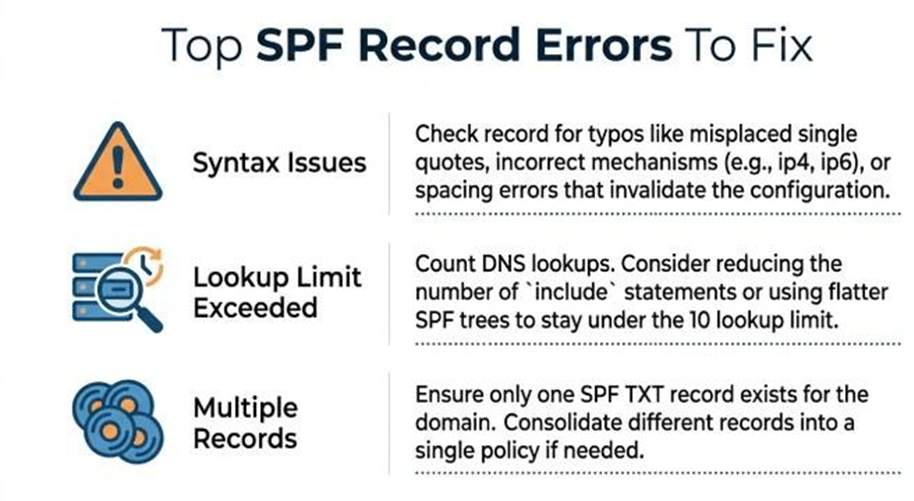
Fixing SPF Errors Using Tool Guidance
- Edit DNS TXT Records: Use insights from the tool’s DNS trace and SPF record analysis to edit your domain’s TXT record via your DNS or NIC Manager.
- Consolidate Multiple Records: Ensure only a single SPF record is published.
- Resolve Syntax Issues: The report identifies where syntax diverges from RFC 7208, helping remediate quickly.
- Optimize Record Size: Remove unnecessary mechanisms or includes to avoid exceeding the SPF lookup limit.
- Update Authorized IPv4 or IPv6 Addresses: Regularly verify that only current mail servers’ IP addresses are listed as authorized.
Entities such as purple-ch.com, infotray.com, rehkitzrettung.ch, and kirchenburgmuseum.de have used these diagnostics to optimize their own SPF compliance workflows.
Best Practices for Maintaining SPF Records to Improve Inbox Placement
Regular SPF Record Validation and Monitoring
Consistent monitoring using tools like the SPF Kitterman Query Tool, as well as complementary SPF Analyzer and SPF Generator solutions, helps maintain record validity. Schedule tests for all primary and secondary domains, especially after mail server IP addresses or MX records change.
Secure and Manage DNS Updates Carefully
Ensure any SPF record changes are swiftly and accurately published in DNS, using reliable platforms—for example, Anycast DNS services or systems like NIC Manager. Pay attention to TTL values to control record propagation.
Apply Conservative SPF Mechanisms
- Limit use of macros and PTR mechanisms (the latter discouraged by both BSI and OpenSPF).
- Avoid common pitfalls like duplicate include: statements, unrestricted +all mechanisms, or poorly defined authorized IP addresses.
Integrate With Broader Email Security Measures
Coordinate SPF activities with DMARC and DKIM, and where relevant, deploy additional protocols such as DNSSEC, DANE, TLSRPT, and CAA records to bolster email authentication and domain management.
Leverage Expert Resources Responsibly
Consult SPF-Consulting, established guides from entities like the Federal Office for Information Security, and solutions from advanced DNS providers (e.g., pair Networks) for large or complex domain portfolios.
Following these proactive steps, supported by thorough SPF record analysis and syntax check via the SPF Kitterman Query Tool, will greatly enhance email deliverability, provide robust email spoofing protection, and ensure sustained SPF compliance across all systems.
