


Cloud technology is transforming the business industry
Look—cloud architecture isn’t just about spinning up servers and calling it a day.
It’s about designing something that won’t break at 2 AM… and won’t burn ₹10 lakhs/month while doing it.
I’ve seen both extremes.
Overengineered messes.
And “simple” setups that collapsed the moment traffic hit 5,000 users.
So let’s build this properly.
Table of Contents
What Cloud Architecture Actually Means
At its core, cloud architecture is how your system is structured:
- Where your app runs
- How data flows
- How everything scales
- And how much you pay for it
Simple idea. Complex execution.
A typical modern setup includes:
- Compute (servers, containers)
- Storage (databases, object storage)
- Networking (load balancers, CDN)
- Security (IAM, firewalls)
- Monitoring (logs, alerts)
AWS vs Azure vs GCP – Reference Architectures
1. AWS Architecture (Typical 3-Tier Setup)
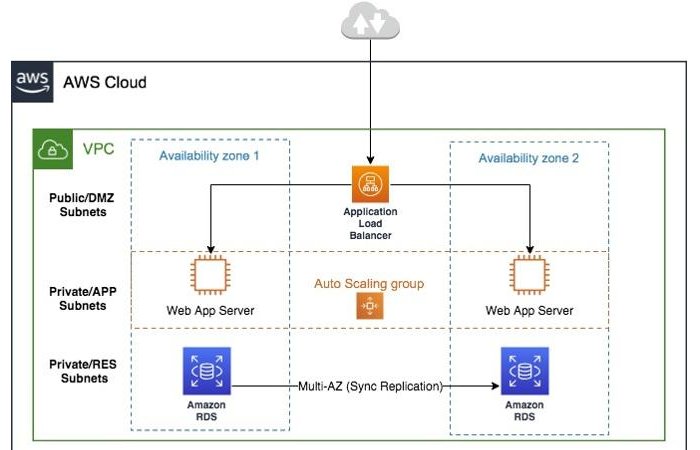
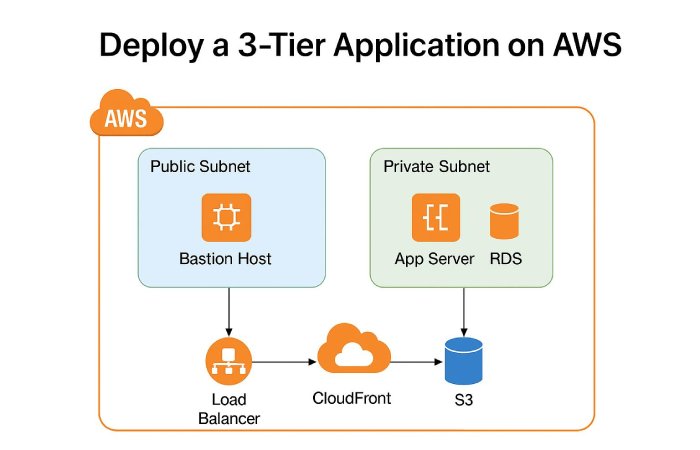
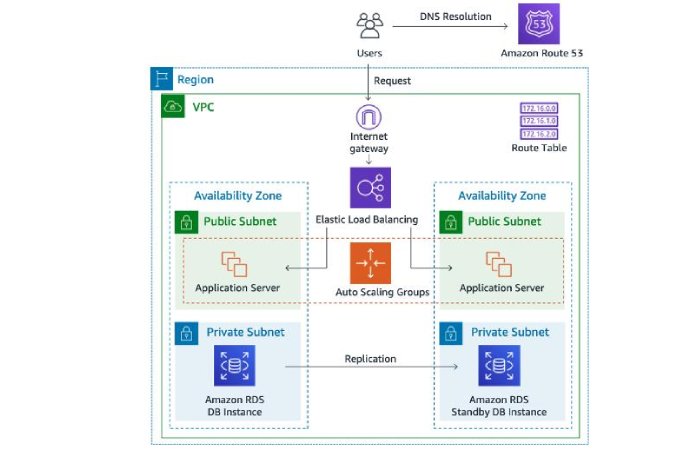
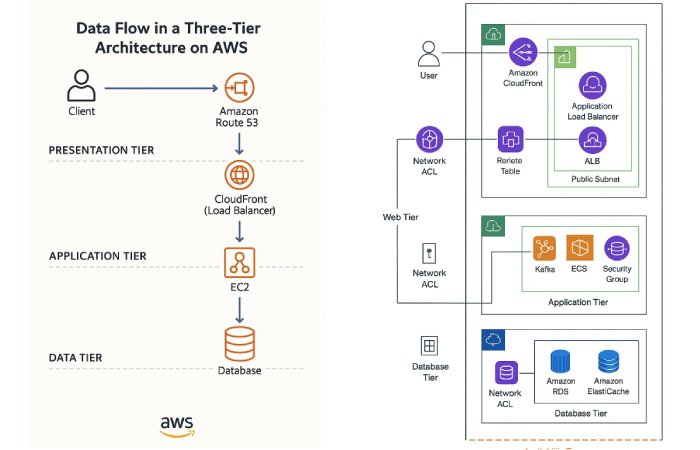
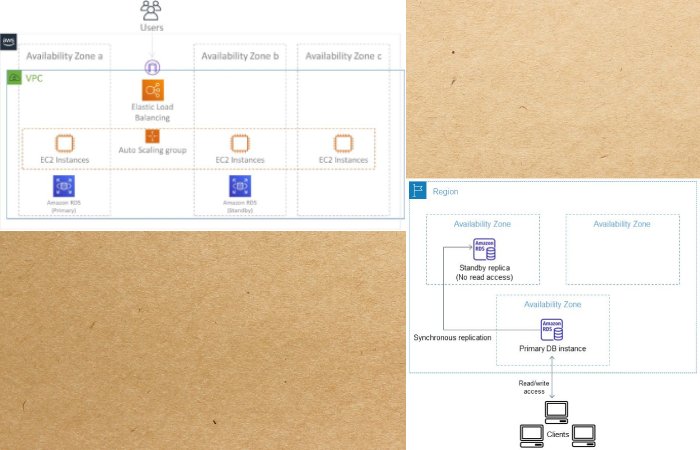
How it works:
- CloudFront (CDN) handles static content
- ALB (Load Balancer) routes traffic
- EC2 or ECS runs your app
- RDS stores structured data
- S3 stores files
Why people choose AWS:
- Mature ecosystem
- Huge service catalog
- Best for startups scaling fast
2. Azure Architecture (Enterprise-Friendly)
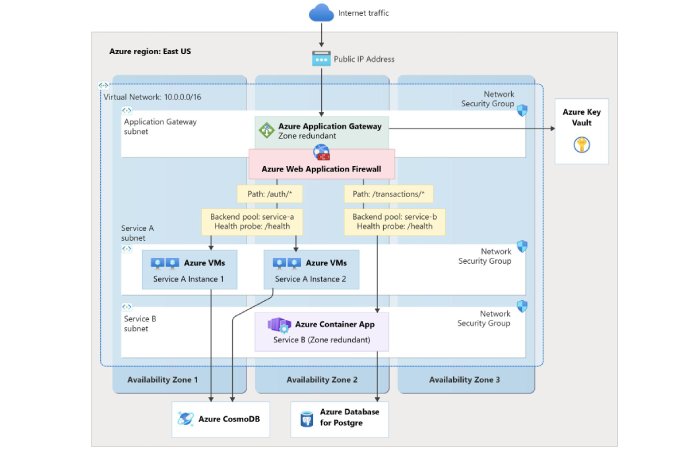
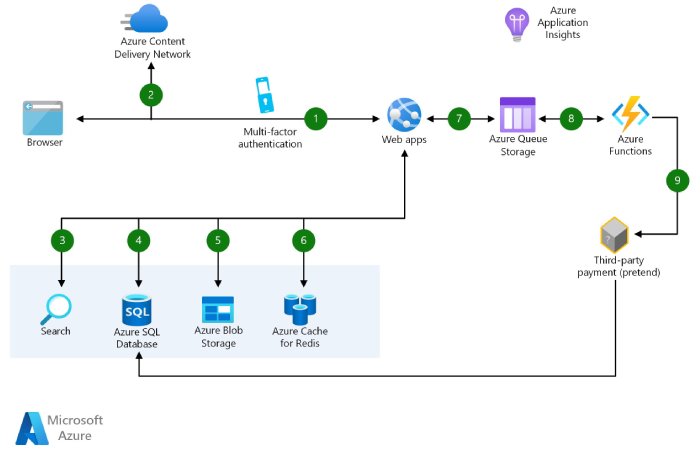
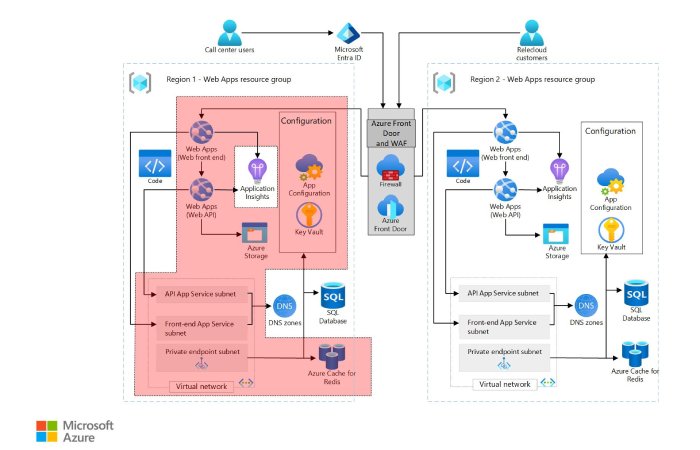
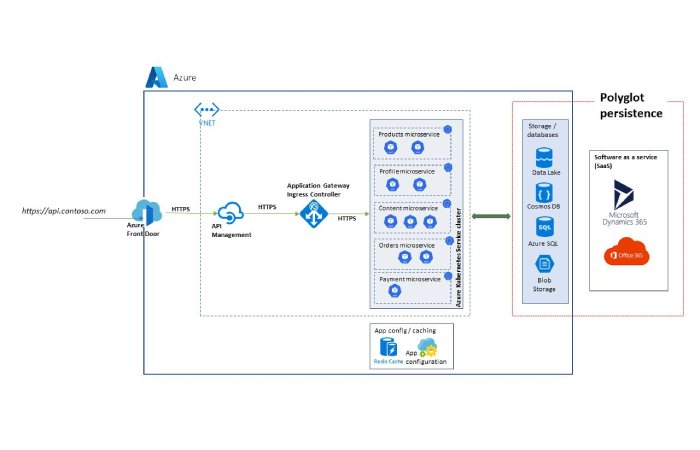
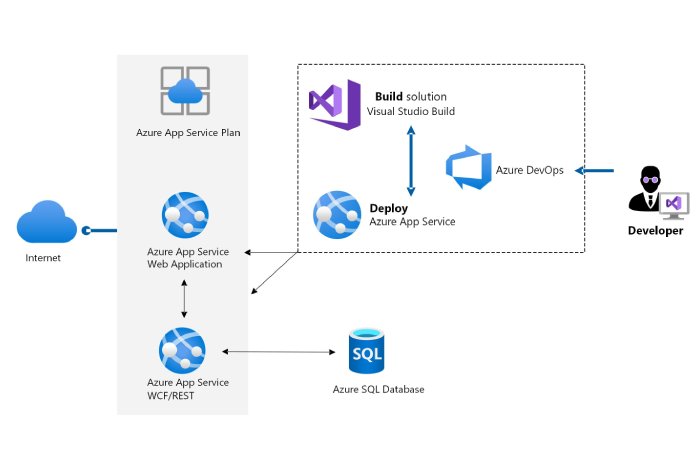
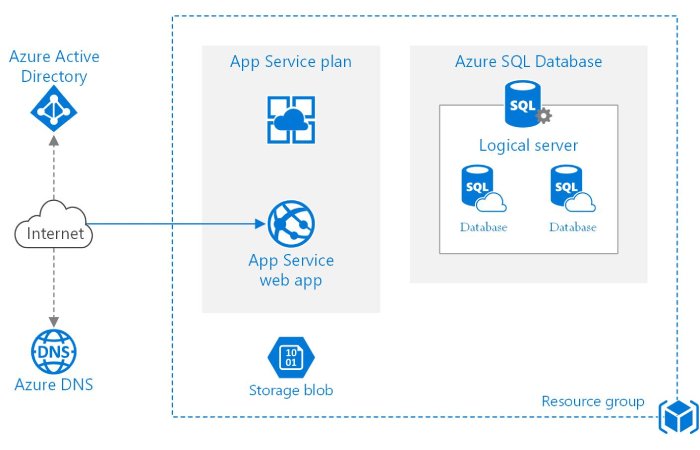
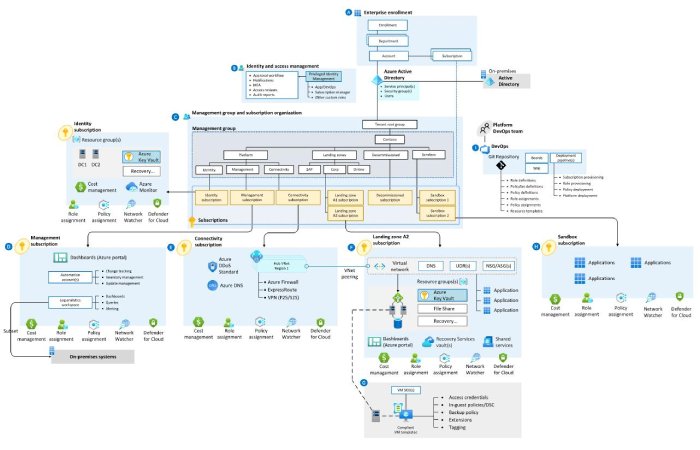
How it works:
- Azure Front Door / Application Gateway handles traffic
- App Services or VMs run backend
- Azure SQL or Cosmos DB stores data
Best for:
- Companies already using Microsoft stack
- Enterprise environments
- Hybrid cloud setups
3. Google Cloud (GCP) Architecture
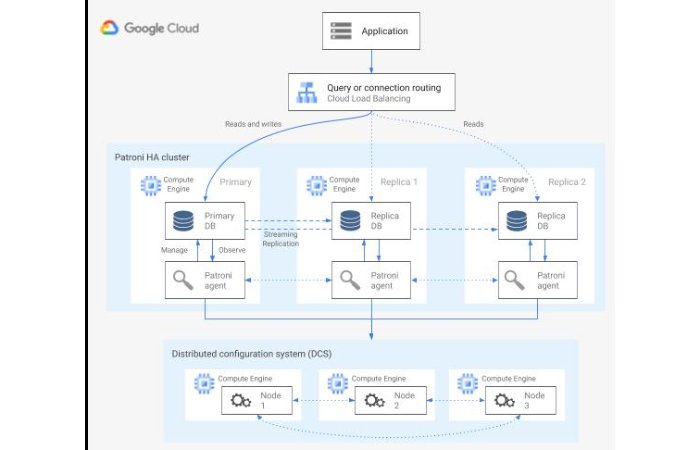
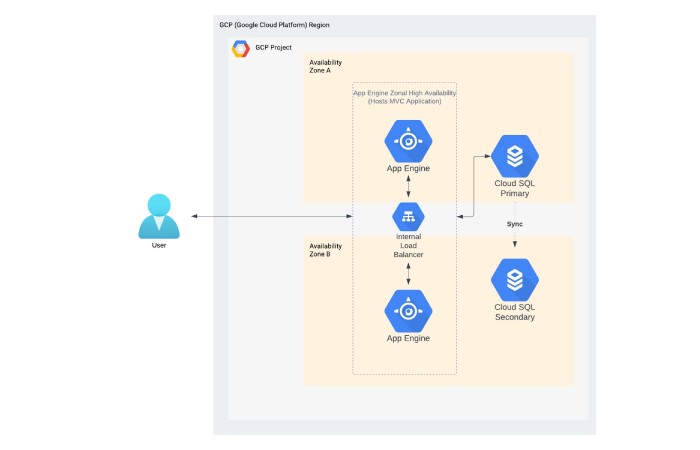
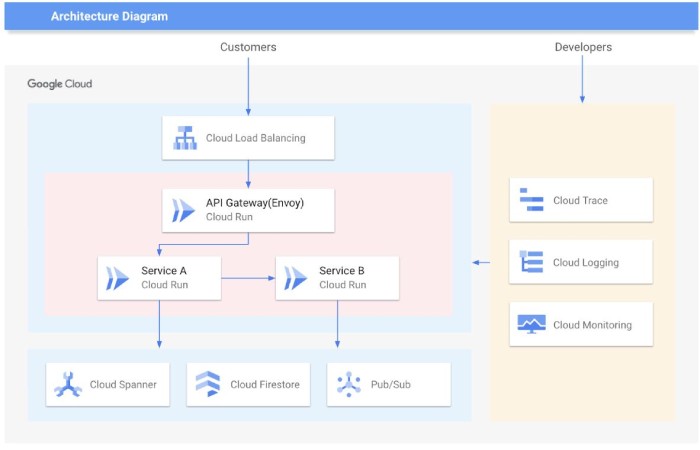
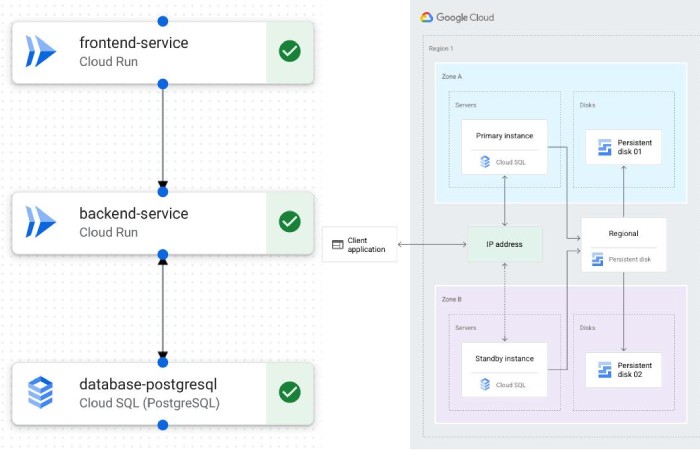
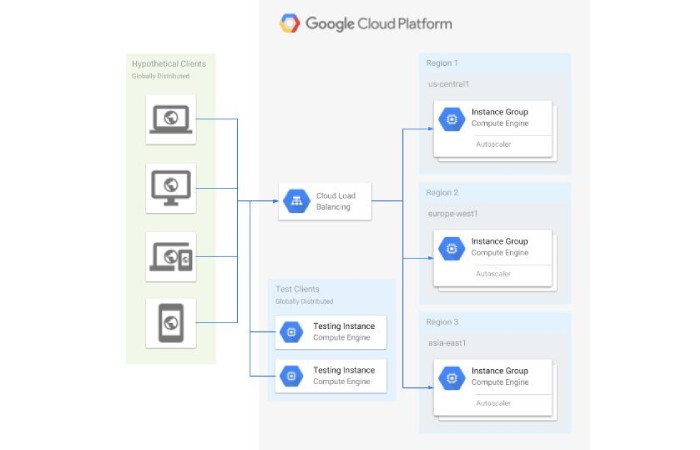
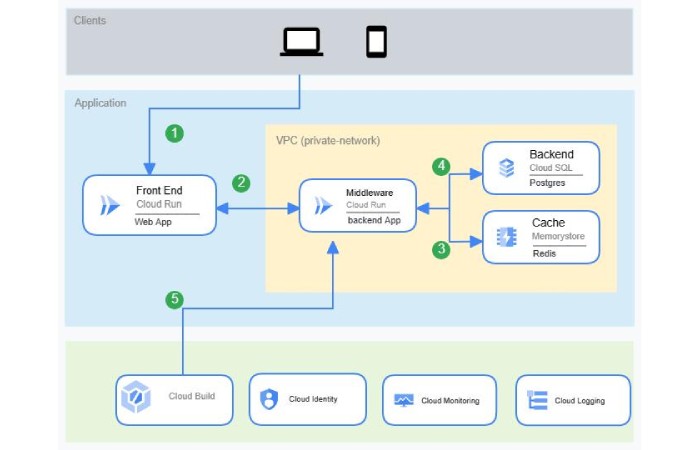
How it works:
- Cloud Load Balancer distributes traffic
- GKE (Kubernetes) runs containers
- Cloud SQL / Firestore handles data
Why devs love it:
- Clean UI
- Strong Kubernetes support
- Great pricing for sustained usage
Real Cost Example (3-Tier Web App)
Let’s not stay theoretical. Here’s a real-world estimate.
Scenario:
- 50,000 monthly users
- Basic SaaS product
- Moderate traffic
AWS Cost (Approx)
| Component | Service | Monthly Cost |
|---|---|---|
| Compute | EC2 (t3.medium x2) | $70 |
| Database | RDS (db.t3.medium) | $90 |
| Storage | S3 | $20 |
| CDN | CloudFront | $15 |
| Load Balancer | ALB | $25 |
Total: ~$220/month (~₹18,000)
Azure Cost (Approx)
| Component | Service | Monthly Cost |
|---|---|---|
| Compute | App Service | $80 |
| Database | Azure SQL | $95 |
| Storage | Blob Storage | $25 |
| CDN | Azure CDN | $20 |
Total: ~$240/month (~₹20,000)
GCP Cost (Approx)
| Component | Service | Monthly Cost |
|---|---|---|
| Compute | Compute Engine | $65 |
| Database | Cloud SQL | $85 |
| Storage | Cloud Storage | $20 |
| Load Balancer | GCP LB | $18 |
Total: ~$190/month (~₹16,000)
Honest takeaway?
- GCP is slightly cheaper
- AWS is most flexible
- Azure fits enterprise workflows
But pricing changes fast. And badly optimized setups?
They can jump from $200 → $2,000 overnight.
Step-by-Step: Building Your Cloud Architecture
Step 1: Start With Your Use Case
Don’t overthink it.
Ask:
- Is this a SaaS app?
- Ecommerce?
- Internal tool?
Example:
A SaaS CRM with 10k users needs:
- App servers
- Database
- Storage
- CDN
That’s it. Not 25 services.
Step 2: Choose Architecture Pattern
Most businesses should use:
3-tier architecture
- Presentation (Frontend)
- Application (Backend)
- Data (Database)
It’s simple. Scalable. Proven.
Step 3: Design for Scaling
Here’s the thing:
If you don’t plan scaling early, you’ll rebuild everything later.
Use:
- Auto Scaling Groups (AWS)
- Kubernetes (GCP)
- App Service scaling (Azure)
Step 4: Secure Everything
And I mean everything.
- IAM roles (no root access)
- Private subnets for DB
- HTTPS everywhere
- WAF for protection
Most breaches happen due to misconfigurations, not hacking.
Step 5: Add Monitoring
You can’t fix what you can’t see.
Use:
- AWS CloudWatch
- Azure Monitor
- GCP Operations Suite
Track:
- CPU usage
- Errors
- Latency
5 Cloud Architecture Mistakes That Cost $10K+/Month
Honestly, I see these all the time.
1. Overprovisioning Resources
You don’t need 8-core servers for 1,000 users.
Start small. Scale later.
2. Ignoring Auto Scaling
Fixed infrastructure = wasted money during low traffic
and downtime during spikes.
3. No Cost Monitoring
Teams forget to check bills.
Result?
A surprise ₹3 lakh invoice.
4. Using Too Many Services
More services ≠ better architecture.
It’s just more complexity. And more cost.
5. Poor Database Design
Bad indexing = slow queries
Slow queries = bigger instances
Bigger instances = 💸
Final Thoughts
Here’s the thing.
Cloud architecture isn’t about picking AWS vs Azure vs GCP.
It’s about designing smart systems that scale without draining your wallet.
Start simple.
Measure everything.
Optimize constantly.
And please—don’t build a Netflix-level system for a 500-user app.
You’ll regret it.
No matter what platform an application will be based on, it needs to be developed using the best practices associated with the environment in which it will be operating.
But since it is less familiar to many development teams, the results aren’t always consistent or up to the standards that the users expect. That is why it is recommended to hire expert cloud-based server backup services.