

This article is part of our Business Technology and Digital Transformation resource section
An SPF record checker is an automated tool designed to analyze and validate the Sender Policy Framework (SPF) record published in your domain’s DNS. The core function of an SPF record checker is to perform an SPF lookup against your domain to ensure that the record is formatted according to standards (such as RFC 7208), free from syntax or configuration errors, and effectively designates the authorized sending sources that can send mail on behalf of your brand. This is crucial because the SPF protocol is a frontline defense mechanism in email authentication, enabling mailbox providers (MBPs) such as Google (gmail.com), Microsoft (Outlook), and Verizon to verify whether inbound emails from your domain originate from authorized IP addresses.
Utilizing a robust SPF diagnostic tool like the EasyDMARC SPF Record Checker or MxToolbox reduces the risk of SPF errors that can disrupt legitimate mail delivery or leave you exposed to email spoofing and phishing attacks. By routinely conducting an SPF record check, organizations can maintain higher email security, protecting outbound communications and reinforcing domain authentication.
Table of Contents
How SPF Records Work in Email Authentication
At the heart of modern email authentication are three principal protocols: SPF, DKIM, and DMARC. The Sender Policy Framework, or SPF, specifically addresses the issue of forged sender addresses in email (a tactic commonly used in phishing attacks). SPF operates through a specially formatted TXT record in your domain’s DNS that lists which mail servers, under specific IP addresses, hosts, or MX records, are permitted to send emails on your behalf.
When a message is sent, recipient servers (like Gmail or Outlook.com) initiate an SPF lookup, consulting the sending domain’s SPF record to verify if the connecting mail server is listed among the authorized sending sources. If the check succeeds (an SPF pass), the message is more likely to be delivered. If it fails (SPF failure), it may be rejected, quarantined, or flagged for further scrutiny by DMARC policy or spam filtering.
Here’s a simplified SPF record example:
v=spf1 ip4:203.0.113.5 include:_spf.*google*.com include:spf.protection.*outlook*.com -all
This SPF record states that emails sent from 203.0.113.5, plus those coming through Google and Microsoft’s mail platforms, are legitimate. The -all qualifier signals a hard fail for all other sources—a recommendation for strong email security.
The combination of SPF and DKIM bolsters dmarc compliance. DMARC policies rely on the underlying results of both SPF and DKIM for domain authentication and enforcement actions, making the correct configuration and validation of an SPF record indispensable to email deliverability and the prevention of domain spoofing.
Common SPF Record Errors an SPF Checker Can Detect
Frequent SPF Record Issues
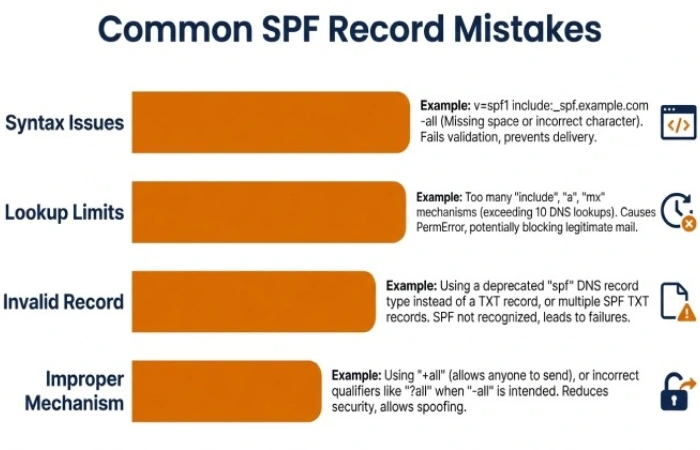
A comprehensive SPF diagnostic tool will not only retrieve your published SPF record via spf record lookup or spf exists check but also analyze it for typical errors and risks. The most common spf errors include:
- Syntax Issues: Mistyped or nonstandard spf tags, incorrect use of ip4, ip6, a record, or mx record mechanisms, or misplaced spf qualifiers.
- Exceeded DNS Lookup Limits: RFC 7208 enforces a 10 DNS lookup maximum per SPF record; overage generates spf warning and disrupts validation.
- Invalid or Missing SPF Record: Not publishing a valid SPF record yields spf invalid or missing status, exposing you to both deliverability issues and domain spoofing.
- Improper Use of all Mechanism or include tag: Overly permissive ~all or incorrect include chains in the spf tree or spf lookup tree can allow unauthorized senders or cause spf redirect/loop problems.
- Obsolete or Redundant DNS Records: Outdated references to mail systems or TXT records that no longer exist, common when organizations migrate platforms or change providers.
In-Depth Checks and Risk Assessment
Advanced tools such as the EasyDMARC SPF Record Checker or MxToolbox enable detailed parsing and reporting, including:
Nested and Recursive includes
SPF checkers can detect excessive layering in the spf include mechanism (e.g., chaining _spf.*google*.com → _spf.easydmarc_us._d.*easydmarc*.pro) that may inadvertently push lookup counts beyond specification, increasing failure risk.
Unauthorized IP Addresses or Hosts
The SPF record check ensures only intended authorized sending sources are present and flags attempts by outside entities to inject rogue IPs or hosts.
Reporting Features
Many SPF tools provide actionable spf reporting, showing real-world spf results (pass/fail), configuration gaps, and specific spf vulnerabilities impacting your email security.
How to Use an SPF Checker to Validate Your Domain
Step-by-Step SPF Record Validation
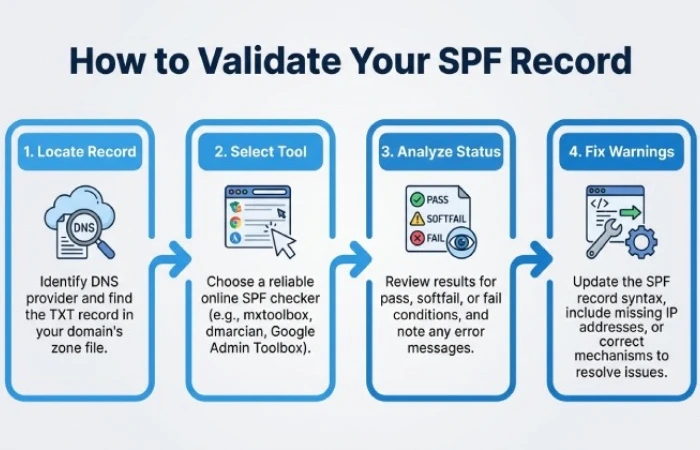
- Locate Your Domain’s SPF Record
Begin by searching for your SPF TXT record in your DNS Control Panel or domain registrar, or use lookup utilities such as *NSLOOKUP*, *DIG*, or the command-line spf check command. - Select a Reputable SPF Checker Tool
Choose robust solutions like EasyDMARC’s SPF Record Checker, MxToolbox, or equivalent. These platforms allow you to input your domain (e.g., *easydmarc*.us, *gmail.com*) for instant diagnostics. - Analyze the SPF Status and Results
Initiate an spf record lookup to see your published record and immediate issues flagged by the SPF diagnostic tool. Pay close attention to:- Whether the spf record exists
- The overall spf status: valid, warning, invalid, or fail
- Highlighted spf limitations, misconfigurations, or syntax errors
- Interpret and Address SPF Warnings or Failures
Investigate each flagged item—whether spf invalid syntax, excessive DNS lookups, or incorrect mechanisms (such as unintended ip4/ ip6/ mx record entries). Most tools link to Knowledge Base articles or provide contextual help. - Test After Updates
After making corrections in the DNS, re-run the spf test to verify that all errors are resolved. Reiterate the process when you add new outbound email services or third-party senders.
Understanding SPF Checker Results: Pass, Fail, Softfail, Neutral, and PermError
Interpreting the outcomes from an SPF checker is crucial to maintaining robust email authentication and email security. When running an SPF lookup or conducting an SPF record check, you’ll typically see results such as “Pass,” “Fail,” “Softfail,” “Neutral,” or “PermError.” Each status provides insight into how the sender policy framework is functioning and whether your domain authentication is effective against email spoofing and phishing attacks.
SPF Pass
An “SPF Pass” indicates that the sending mail server is an authorized sending source according to your published SPF record. The SPF checker validates that the sender’s IP address is permitted under your sender policy framework, significantly improving email deliverability and domain reputation. This status contributes to successful dmarc compliance, dmarc policy enforcement, and consistent email authentication.
SPF Fail
An “SPF Fail” suggests the sending server is not listed as an authorized IP address within your SPF record. This result, often signaled by a “-all” mechanism, triggers mailbox providers (MBPs) and mail servers to reject, quarantine, or flag outbound mail as suspicious. Consistent SPF failures can harm your domain reputation and are a common sign of configuration errors or attempts at domain spoofing.
SPF Softfail
A “Softfail” (often denoted by a “~all”) means that the sending server is not in the SPF record, but the domain’s dmarc policy may allow the message to be accepted while applying extra scrutiny. A softfail is a warning signal, often used during SPF implementation or transitional periods, letting you monitor unlisted senders without outright blocking them immediately. However, persistent softfails must be investigated with an spf diagnostic tool for accurate spf risk assessment.
SPF Neutral
The “Neutral” result (indicated by a “?all” qualifier) signals that the SPF record neither permits nor denies the mail server. This weak result offers little protection against email spoofing and is discouraged for production domains aiming for high email security levels.
SPF PermError
A “PermError” (permanent error) occurs when there’s a technical problem with the SPF record, such as invalid SPF syntax, excessive DNS lookups above the SPF protocol limit (RFC 7208), or other spf misconfiguration. Common causes include incorrect use of include tags, too many mx record or a record lookups, or circular references in the spf tree. SPF PermError results in MBPs treating the domain as if no SPF record exists, opening the door to spf vulnerabilities and impacting dmarc compliance.