

M4A vs MP3 for Transcription
Comparing M4A vs MP3 for transcription is close to a non-question, and the reason is not that the two formats are similar. It is that speech recognition systems throw away most of what separates them before the audio ever reaches the model. Whichever file you send, it gets resampled down to 16 kHz first.
This is written for anyone with a folder of voice memos and a decision to make about what to send to a transcription tool. Everything below comes from published specifications and vendor documentation rather than a listening test. No comparison recordings were run for this article, and the argument does not need any: the interesting part happens in the signal chain, where it can be read off the spec. Checked on 4 September 2026.
The short version
- Speech models resample audio to 16 kHz, which caps the usable bandwidth at 8 kHz. Everything above that is discarded before recognition starts.
- .m4a is a container name, not a codec name. The same extension holds lossy AAC or lossless ALAC, and the file extension does not tell you which.
- Converting an M4A voice memo to MP3 before uploading is a second lossy pass. Small cost, zero benefit.
- Microphone distance, room reverberation and overlapping speakers change the transcript far more than the container ever will.
Table of Contents
Does M4A vs MP3 for transcription change the result?
Almost never, and the mechanism is worth knowing because it also tells you which decisions do matter.
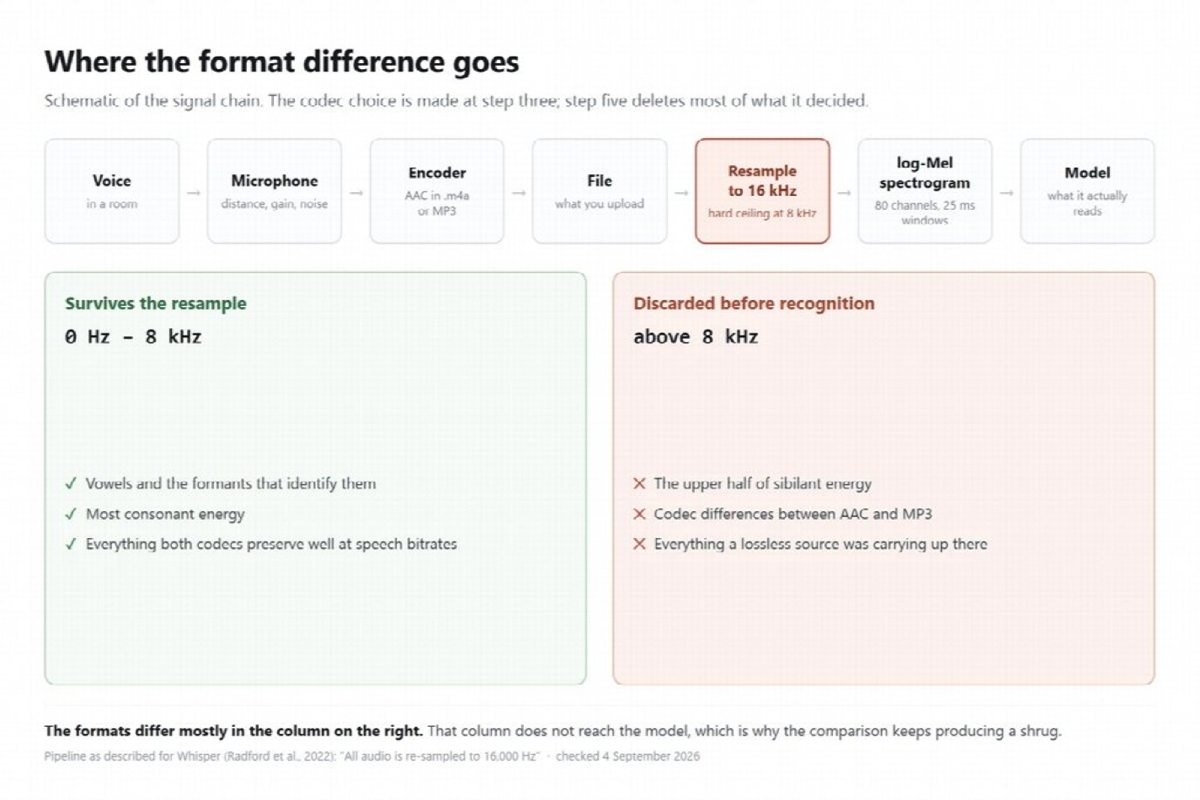
Modern speech recognition does not consume your audio file. It consumes a spectrogram derived from a downsampled version of it. OpenAI’s description of Whisper is explicit about the first step: “All audio is re-sampled to 16,000 Hz”, after which the system computes an 80-channel log-Mel spectrogram over 25 millisecond windows with a 10 millisecond stride. Whisper is one widely documented example rather than a description of every service, but resampling to 16 kHz is the standard shape of the pipeline.
Sixteen kilohertz sampling puts a hard ceiling on representable frequency at 8 kHz. That is the Nyquist limit, and it is not a setting anyone can turn off. Whatever your source file was, the model never sees anything above 8 kHz.
Now consider what that leaves. Both AAC in an M4A and MP3 at ordinary speech bitrates preserve the band below 8 kHz well. The differences people cite between the two codecs, and they are real, live mostly in the treatment of high frequencies and of complex musical material. Neither of those survives the resample.
This is why the format comparison keeps producing a shrug. It is not that the formats are equivalent in general. It is that the part where they differ is deleted before the transcription begins.
The 8 kHz ceiling is not free, though, and it is worth knowing where it costs you. Sibilants and other fricatives carry a lot of their identifying energy high in the spectrum, which is why they are the sounds a narrow channel confuses first. Telephony has demonstrated this for a century: the classic voice band runs from roughly 300 Hz to 3.4 kHz, and the reason spelling alphabets exist at all is that S, F and X stop being distinguishable once the top of the spectrum is gone. At 16 kHz the situation is far better than a phone line, but the same failure mode is what you see when a transcript confuses “fifty” with “sixty” or drops a plural. That failure is built into the sample rate. No choice of container fixes it, and no higher-bitrate source file reaches it.
The container is not the codec
.mp3 names a codec. .m4a names a container, and that distinction is the reason the question has two different answers.
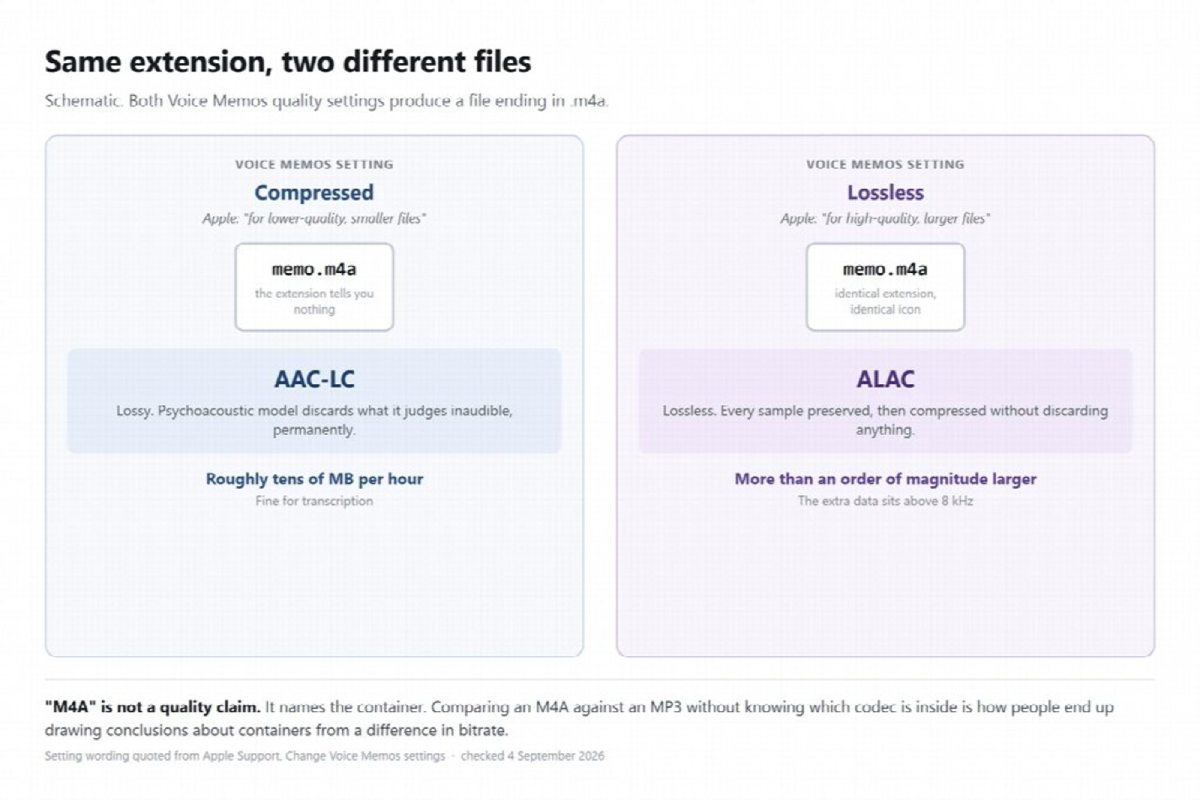
M4A is the audio-only convention for the MPEG-4 container. What sits inside it is usually AAC-LC, which is lossy. It can also be Apple Lossless, which is not. Same extension, same icon in Finder, two very different files.
Apple’s own settings make this concrete. In Voice Memos, Audio Quality offers two choices. Apple describes Compressed as “for lower-quality, smaller files” and Lossless as “for high-quality, larger files”. Both settings produce a file ending in .m4a. One of them is lossy AAC at a modest bitrate; the other is Apple Lossless carrying every sample. The extension is identical and the storage difference is more than an order of magnitude.
So when somebody asks whether M4A is good enough for transcription, the honest answer is that it depends on a property the filename does not expose. In practice, a voice memo recorded on a phone with default settings is compressed AAC, and it is fine, for the reason set out in the previous section. But “M4A” on its own is not a quality claim, and treating it as one is how people end up comparing a lossless file against a 96 kbps MP3 and concluding something about containers.
The conversion that costs you something and buys you nothing
Converting an M4A voice memo to MP3 before uploading it runs a lossy encoder over audio that a lossy encoder has already been through.
The first encode made irreversible decisions about which parts of the signal to discard. The second encode cannot recover any of them. It looks at the damaged signal, applies its own psychoacoustic model to that, and discards a little more. This is generation loss, and it is a property of lossy encoding rather than a flaw in any particular tool.
Being fair about the size of the effect: on speech, at a sensible target bitrate, the practical impact on a transcript is usually small. This is not a step that will wreck your results. The problem with it is narrower and harder to argue with, which is that it has a real cost and no upside at all. You spent time, you added a lossy generation, and the file that comes out is not better in any respect that the recogniser cares about.
There is one situation where converting is reasonable, and it is worth naming so the rule does not sound absolute. If the recording is a three hour lossless file and the upload limit is smaller than the file, compressing it is the thing that makes the job possible at all, and a moderate loss on a file you could not otherwise submit is obviously the right trade. That is a size problem, not a quality decision, and it is the only version of this that survives scrutiny.
The reason people do it anyway is compatibility, not quality. Search results are full of guides for converting iPhone voice memos to MP3, and they exist because some piece of software somewhere refused an .m4a. That is a legitimate problem when you have it. It is worth checking whether you actually have it, because most transcription tools take the file directly. A tool built for M4A audio transcription accepts the voice memo as it came off the phone, alongside MP3, WAV, FLAC, AAC and OGG, which means the conversion step was solving a problem that was not there.
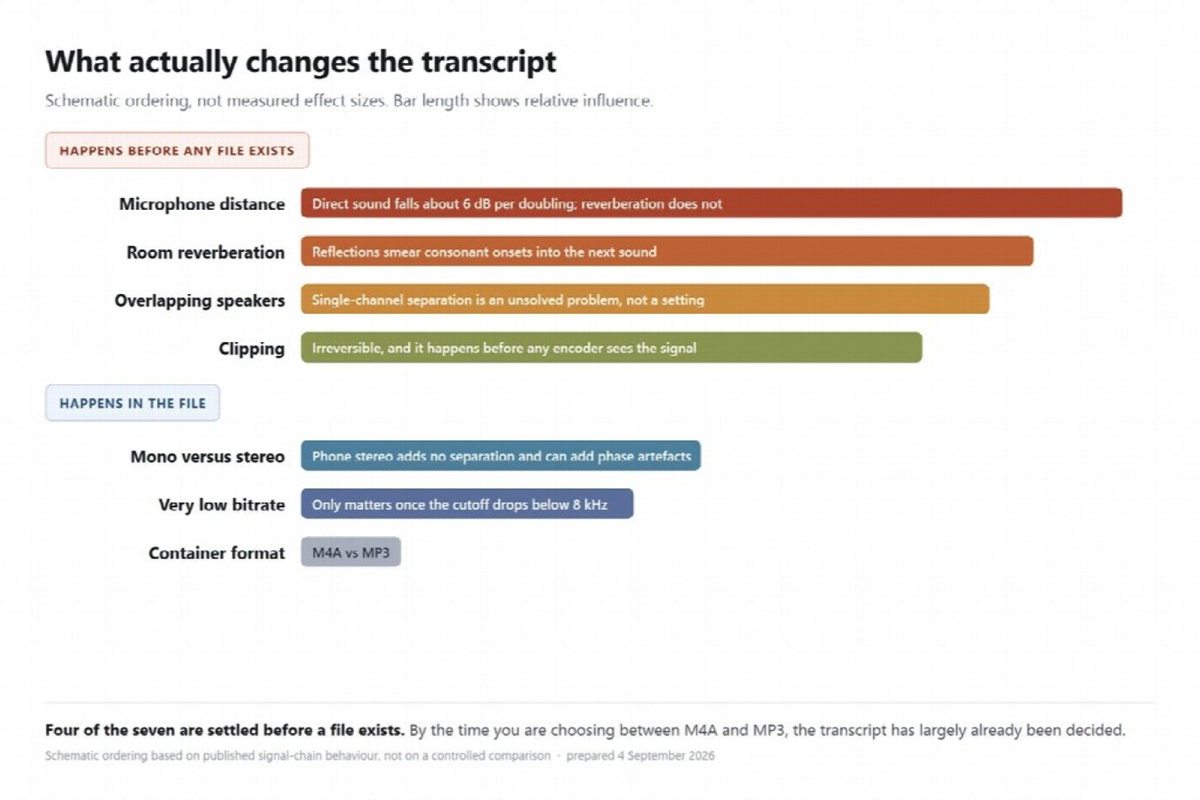
What actually changes the transcript
Seven things, ordered by how much difference they make. The container is last.
The ordering is not arbitrary. Everything above the last row happens either in the room or inside the microphone preamplifier, which is to say before the signal has been digitised at all, let alone encoded. Damage introduced at that stage is present in every copy of the file forever, at any bitrate, in any container. Damage introduced by the codec is comparatively mild and mostly lands in a frequency range the recogniser is going to discard anyway. Anyone optimising the second while ignoring the first is working on the wrong end of the chain.
| Factor | Effect | Why | What to do |
| Microphone distance | Largest | Direct sound falls roughly 6 dB per doubling of distance while the room stays the same, so the ratio of speech to reverberation collapses | Put the phone within arm’s reach of whoever is talking |
| Room reverberation | Very large | Reflections smear each sound into the next, and the first casualties are consonant onsets | Small soft room beats large hard room. Avoid the middle of a boardroom table |
| Overlapping speakers | Very large | Separating simultaneous voices from a single channel is an unsolved problem, not a quality setting | Ask people to take turns. It is the cheapest accuracy gain available |
| Clipping | Very large | Distortion from excessive input gain is irreversible and happens before any encoding | Do not shout into the phone. Check the waveform is not flat-topped |
| Mono versus stereo | Moderate | Phone stereo and spatial modes add no separation benefit for recognition and can introduce phase artefacts | Record mono. Voice Memos has this setting |
| Very low bitrate | Moderate | Extreme compression pulls the low-pass cutoff below 8 kHz, which is the point at which speech information really does start disappearing | Anything from a default phone recorder is already above this threshold |
| Container format | Smallest | See the first section | Send whatever you already have |
The pattern behind the table is that every factor above the last one happens in the room or in the microphone, before any file exists. By the time you are choosing a format, the transcript has largely already been decided.
Frequently asked questions
Should I record voice memos in Lossless?
For transcription, no. The extra data is above the band the recogniser keeps, so you are paying about twenty times the storage for information that gets discarded during resampling. Lossless is worth it if the recording is also going into a music or production workflow. For a memo you intend to turn into text, the default compressed setting is the right one.
Does a higher bitrate MP3 transcribe better?
Up to a point, and that point is low. Moving from a very low bitrate to a normal one helps, because the low-pass cutoff moves back above the speech band. Beyond that the gains stop, since the additional detail sits above 8 kHz and does not survive the resample. A 320 kbps MP3 of a badly miked conversation will still transcribe worse than a 96 kbps MP3 of a clear one.
What format should I ask someone to send me?
Whatever they already have, uncompressed by any extra step. The worst outcome is a colleague converting a clean recording to something else out of politeness. If you want to give one instruction, ask for the original file rather than a specific format, and ask them to record close to the person speaking.
Is WAV better than either of them?
For transcription, no, for the same reason Lossless is not. A WAV file carries every sample, and the resample to 16 kHz throws most of them away. What WAV genuinely buys you is the absence of any encoding decision at all, which matters if the file is going to be re-edited or processed repeatedly. If it is going straight to a recogniser and then to the archive, the extra size is paying for nothing.
