

How File Conversion APIs Simplify Document Workflows
Modern applications deal with more document formats than ever. Users upload PDFs, Word files, spreadsheets, images, old Microsoft Publisher files, and other formats that may not fit directly into an application’s workflow. For developers, supporting all these file types can quickly become a technical headache.
This is where file conversion APIs make a real difference. Instead of installing multiple conversion programs, maintaining complicated libraries, or asking users to manually convert files, developers can connect their applications to an API that handles the conversion automatically.
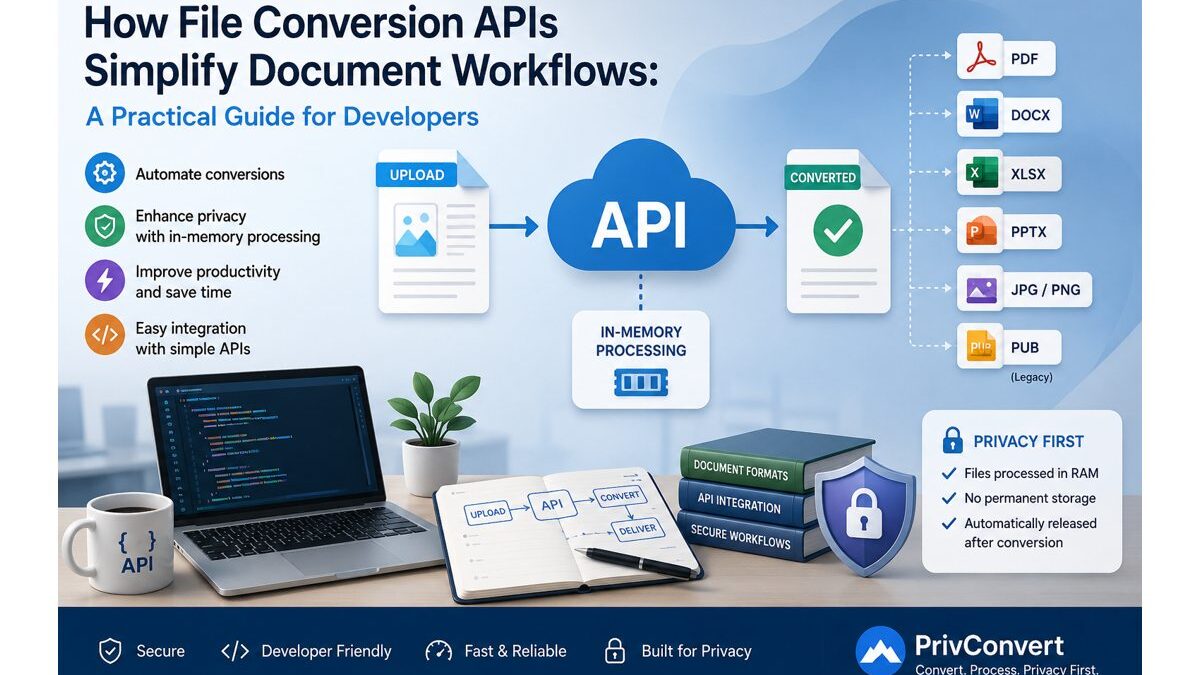
A good file conversion API can make document workflows faster, easier to maintain, and more private. Services such as PrivConvert are also designed around in-memory processing, where files are processed in RAM rather than being permanently stored on the server.
For developers building SaaS platforms, document management systems, internal tools, or automated workflows, this approach can remove a large amount of unnecessary complexity.
Table of Contents
What Is a File Conversion API?
A file conversion API allows one application to send a document to a conversion service and receive it back in another format.
For example, an application may need to convert:
- PDF to Word
- Publisher to DOCX
- Word to PDF
- Spreadsheet files into another compatible format
- Images from one format to another
Without an API, the user might have to download the original file, open desktop software, convert it manually, save the new version, and upload it again.
With an API, the process can happen automatically:
Upload file → send file to API → convert → receive new file → continue workflow
The end user may never even realize that a separate conversion process took place.
For developers, this is valuable because document conversion becomes one small step in the application’s backend rather than an entire system that needs to be built and maintained.
Why File Conversion Becomes Difficult for Developers
Changing .pdf to .docx in a filename obviously does not create a Word document. The actual content has to be interpreted and rebuilt.
Different file formats store information in different ways. Some focus heavily on visual positioning, while others use structured paragraphs, tables, headings, or pages.
Developers may need to deal with:
- Text and font formatting
- Embedded images
- Tables
- Headers and footers
- Multiple columns
- Page dimensions
- Legacy document structures
- Corrupted uploads
- Large files
- Unsupported formats
Trying to handle every format internally means installing and maintaining different libraries or third-party software.
One library may work for PDFs, another for spreadsheets, another for images, and another for older publishing formats. That increases server dependencies and makes future maintenance more difficult.
A file conversion API moves much of that work outside the main application.
How File Conversion APIs Improve Document Workflows
The biggest benefit is automation.
Imagine a recruitment platform where job applicants upload CVs in PDF, DOC, or DOCX format. The company may want every resume converted into one consistent format before storing or analyzing it.
Instead of asking applicants to upload a particular format, the platform can accept multiple formats and standardize them automatically.
The same idea can apply to many products.
An accounting system might standardize financial documents before processing them.
A CRM could convert uploaded attachments before creating previews.
A document management platform could convert old file formats into formats that modern software can open.
A migration tool could process hundreds of legacy files automatically rather than requiring a person to open and export each one.
Developers only need to connect their application to an appropriate conversion endpoint and decide what should happen once the converted file is returned.
Microsoft Publisher Is a Good Example
Legacy documents show exactly why automated conversion is becoming increasingly important.
Microsoft Publisher reaches end of life on 1 October 2026. After that date, Microsoft 365 users will no longer be able to install Publisher or rely on it for opening and editing Publisher documents.
That creates an important migration problem for businesses with years of .pub files.
The publisher itself can save documents into other formats while the software is still available, but doing this one file at a time is not practical for a large archive. Microsoft’s bulk migration approach is mainly focused on producing PDF files.
PDF is useful when someone wants to preserve the appearance of a publication, but it is not always ideal when the content still needs to be edited.
A developer or business might instead want:
PUB → editable DOCX
That is where a dedicated Publisher to Word converter becomes useful.
PrivConvert reads the Publisher file directly and rebuilds its content into a DOCX document that can be edited in applications such as Microsoft Word, LibreOffice, or Google Docs.
Text, headings, images, and the general content order can be preserved during conversion.
However, developers should understand that Publisher and Word work differently. Publisher allows elements to be positioned freely around a page, while Word is built around a flowing document structure. A heavily designed brochure therefore may not become a pixel-perfect Word copy.
For migration projects, that is often acceptable because the real goal is to recover and continue editing the content rather than reproduce every visual element exactly.
Why RAM-Based File Conversion Matters
Privacy is another important part of document conversion.
Many traditional conversion systems work by uploading the original document to a server, writing it to disk, converting it, saving the output, and deleting the files later.
That model can create additional data-retention concerns.
A temporary file is still a stored file.
If cleanup processes fail, temporary documents can remain longer than expected. Files may also be included in backups, logs, storage volumes, or other infrastructure if the system is not configured carefully.
In simple terms, the file is used in working memory while the conversion is taking place rather than being stored as a permanent conversion file on disk.
The workflow is closer to:
Upload → process in RAM → generate output → return file → release processing data
This matters because PrivConvert is designed so that files are not kept as a stored library of user documents after conversion.
For privacy-conscious applications, reducing unnecessary storage is a useful design principle.
If a file only needs to exist long enough to be converted, there is usually little reason for the conversion service to retain it afterward.
RAM Processing vs Temporary File Storage
These two approaches may sound similar, but they are different.
A temporary-storage service might work like this:
Upload → save to disk → convert → store output → delete later
An in-memory workflow is closer to:
Upload → memory → convert → return result → memory released
The first approach depends heavily on storage security and reliable cleanup processes.
The second approach reduces the need to maintain a stored copy as part of the normal conversion process.
This does not mean developers should ignore other security practices. HTTPS, API authentication, access controls, secure API-key management, input validation, and application-level permissions are still important.
However, reducing file retention can remove one unnecessary layer of exposure.
Where Developers Can Use File Conversion APIs
File conversion APIs can fit naturally into many automated workflows.
Consider a customer-support platform:
Customer uploads PDF → convert to DOCX → extract text → attach content to case
Or a legacy-document migration system:
Find Publisher files → convert PUB to DOCX → organize converted files in a new archive
Another example is a content platform:
User uploads PDF → convert to editable Word document → allow editing → export final document
For this type of workflow, a tool such as the PDF to Word converter can also be useful when an application needs editable content rather than a fixed PDF.
The important point is that the user does not have to manually manage every conversion.
The application decides what format it needs and handles the process automatically.
What Developers Should Look for in a File Conversion API
Conversion quality is important, but it should not be the only consideration.
Developers should also evaluate API documentation, supported formats, maximum file sizes, response times, error handling, authentication methods, privacy policies, and file-retention practices.
The application itself should validate uploads before sending them for conversion.
Check the file extension, MIME type, file size, and any application-specific permissions.
Good error handling is equally important. A conversion might fail because the source file is damaged, password-protected, unsupported, or unusually complex.
Instead of allowing that failure to break the entire workflow, the application should return a clear message and provide the user with a sensible next step.
API keys should also remain on the backend. They should not be exposed inside public JavaScript where anyone can inspect and reuse them.
Why an API Can Be Better Than Building Your Own Converter
Developers can build their own conversion infrastructure, but the long-term cost is often underestimated.
Supporting multiple formats may require different libraries, command-line tools, fonts, native packages, temporary directories, security controls, memory management, and operating-system dependencies.
Then those components need to be updated and tested continuously.
For a company whose core product is not file conversion, that engineering time may be better spent elsewhere.
Using a conversion API means the application can focus on its real purpose while document transformation is handled as a specialized service.
Final Thoughts
File conversion APIs are useful because they turn a complicated document problem into a predictable development workflow.
Instead of requiring users to manually open, export, save, and upload files, applications can automatically convert documents in the background.
This becomes especially valuable when dealing with legacy formats such as Microsoft Publisher, where businesses may soon need to migrate large collections of .pub files into modern and editable formats.
Whether an application is converting Publisher files, PDFs, office documents, or other formats, the real advantage of a file conversion API is not simply changing a file extension. It is creating a document workflow that is automated, scalable, easier to maintain, and more privacy-conscious.
