



Estimate Gaming PC Performance
Buying or upgrading a gaming PC often involves comparing long lists of component specifications. Graphics card memory, processor clock speed, core counts and product generations can all be useful information, but they do not directly answer the question most gamers care about:
How many frames per second will this PC deliver in the games I play?
Two computers with similar prices can provide very different gaming experiences. One may be ideal for competitive games at 1080p, while another may perform better in graphically demanding games at 1440p or 4K.
Estimating gaming performance before buying therefore requires more than checking whether a computer meets a game’s minimum system requirements. Buyers need to consider the graphics card, processor, resolution, graphics settings, memory and the specific games they intend to play.
This guide explains how to evaluate those factors and make a more informed purchasing or upgrading decision.
Table of Contents
Why Specifications Alone Do Not Predict Gaming Performance
Hardware specifications are helpful for understanding the general capabilities of a component, but they cannot reliably predict gaming performance on their own.
For example, two graphics cards may have the same amount of video memory but deliver significantly different frame rates. Memory capacity is only one part of a GPU’s design. Architecture, memory bandwidth, clock speeds, power limits and software optimization also affect performance.
The same applies to processors. A CPU with more cores is not automatically faster in every game. Some games benefit from additional cores, while others depend more heavily on single-core performance, cache size or processor architecture.
Instead of evaluating isolated specifications, gamers should examine how the complete system performs in real games.
Start With the Games You Actually Play
There is no single gaming benchmark that represents every player.
A computer that performs extremely well in a competitive game such as Counter-Strike 2 or Valorant may produce very different results in a demanding open-world or simulation game. Game engines place different levels of pressure on the graphics card and processor.
Before comparing hardware, create a short list of the games that matter most to you. It can help to separate them into categories:
- Competitive shooters
- Open-world games
- Racing and simulation games
- Strategy games
- Role-playing games
- Graphically demanding single-player games
This prevents a common buying mistake: choosing a component because it performs well in a general benchmark while ignoring its performance in the games the buyer will actually play.
A benchmark database covering multiple individual games is therefore generally more useful than a single overall performance score.
Understand the Role of the Graphics Card
The graphics processing unit, or GPU, is usually the most important component for gaming performance, particularly at higher resolutions.
The GPU renders the images displayed on the screen. Increasing the resolution from 1080p to 1440p or 4K requires the graphics card to process substantially more pixels for every frame.
The GPU is particularly important when:
- Playing at 1440p or 4K
- Using high or ultra graphics settings
- Enabling ray tracing
- Playing visually demanding games
- Targeting high frame rates with detailed graphics
When comparing graphics cards, avoid relying exclusively on theoretical specifications. Look at real or modeled gaming results across several games and resolutions.
A card that appears only slightly faster at 1080p may develop a larger advantage at 4K. Conversely, an expensive high-end graphics card may offer limited benefits at 1080p when performance is constrained by the processor.
Do Not Ignore the Processor
The processor, or CPU, prepares game logic, physics, artificial intelligence, draw calls and other instructions needed to produce each frame.
CPU performance becomes especially important when targeting very high frame rates. Competitive players using 144 Hz, 240 Hz or faster monitors may encounter processor limitations even when using a powerful graphics card.
CPU limitations are more likely to appear:
- At 1080p
- In competitive games with very high FPS
- In simulation and strategy games
- In crowded multiplayer environments
- When pairing an older processor with a newer graphics card
This is why GPU benchmarks should ideally allow the processor to be considered. A graphics card’s result is not completely independent from the rest of the system.
When estimating performance, compare results using a processor that is reasonably close to the one you own or plan to purchase.
Choose the Correct Resolution
Resolution has one of the largest effects on gaming performance.
1080p
Full HD remains a common choice for budget gaming systems and competitive players. It places a lower rendering load on the graphics card and makes it easier to achieve high frame rates.
At 1080p, processor performance can become more noticeable, especially with powerful GPUs.
1440p
1440p offers a balance between image quality and performance. It is increasingly popular for mid-range and high-end gaming systems.
The graphics card becomes more important at this resolution, although the processor can still affect performance in CPU-heavy games.
4K
4K provides much higher image detail but places a heavy load on the GPU. Even powerful graphics cards may require reduced graphics settings, upscaling technologies or frame generation to achieve consistently high frame rates.
When reviewing benchmarks, always check that the tested resolution matches the monitor you intend to use. A 1080p result should not be used to predict 4K performance.
Match the Frame Rate to Your Monitor
Higher FPS is not always equally valuable.
The appropriate performance target depends partly on the monitor’s refresh rate and the type of games being played.
Common targets include:
- 30 FPS: Playable in some slow-paced games, but not particularly smooth
- 60 FPS: A common target for comfortable general gaming
- 120 FPS: Noticeably smoother and useful with high-refresh-rate displays
- 144 FPS: A popular target for competitive gaming monitors
- 240 FPS or more: Mainly relevant to competitive players with very fast monitors
A gaming PC producing 200 FPS in a game does not provide the full visual benefit if it is connected to a 60 Hz display. Likewise, buying a 240 Hz monitor may not be worthwhile if the computer only produces 70 FPS in the games being played.
The objective should be to match the hardware, resolution and monitor rather than simply purchasing the component with the highest benchmark score.
Average FPS Does Not Tell the Whole Story
Average FPS is the most frequently displayed performance measurement, but it does not fully describe how smooth a game feels.
A system may average 100 FPS while regularly dropping to 45 or 50 FPS during demanding scenes. Those sudden drops can create visible stuttering, even though the average result appears strong.
This is why 1% low performance is important.
The 1% low result represents performance during the slowest portion of rendered frames, excluding the most extreme outliers. It provides an indication of how stable the gaming experience may feel.
Consider two systems:
- System A averages 120 FPS with a 1% low of 55 FPS.
- System B averages 110 FPS with a 1% low of 85 FPS.
System A has the higher average frame rate, but System B may feel smoother because its frame rate remains more consistent.
When available, buyers should compare both average FPS and 1% lows rather than choosing hardware based on average FPS alone.
Account for Graphics Settings and Upscaling
Benchmark results are only meaningful when the graphics settings are understood.
A game running at 100 FPS on medium settings cannot be directly compared with the same game running at 70 FPS on ultra settings. Ray tracing can also have a major effect on performance.
Modern games may provide technologies such as:
- NVIDIA DLSS
- AMD FidelityFX Super Resolution
- Intel XeSS
- Frame generation
- Dynamic resolution scaling
These technologies can improve displayed frame rates, but they can also affect image quality, latency or visual consistency. Frame generation results should not automatically be treated as equivalent to traditionally rendered frames.
When possible, check whether benchmark figures represent native rendering, upscaled rendering or frame generation.
Use Game-Specific Benchmark Data
A practical way to estimate performance is to combine your intended processor, graphics card and resolution with results from individual games.
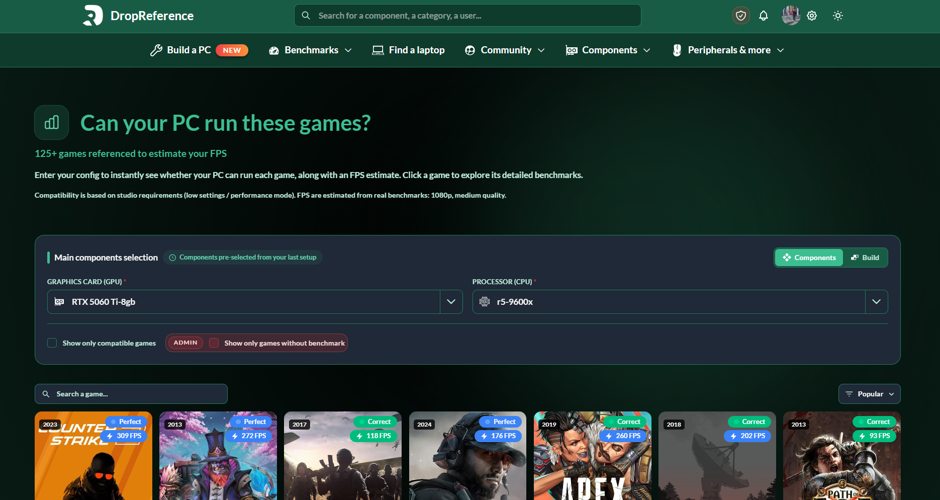
A PC gaming benchmark database can help users compare expected average FPS and 1% low performance across different graphics cards, processors and resolutions.
This type of comparison is useful for several situations:
- Checking whether an existing PC can run a particular game
- Comparing two possible graphics card upgrades
- Determining whether a CPU upgrade is necessary
- Choosing between a 1080p, 1440p or 4K monitor
- Evaluating whether a more expensive component provides a meaningful benefit
- Identifying a balanced CPU and GPU combination
Benchmark tools should still be treated as estimates rather than guarantees. Actual performance can vary depending on the exact hardware model, cooling, memory configuration, drivers, operating system, game updates and background applications.
However, game-specific data is generally more informative than theoretical specifications or minimum system requirements alone.
Check for a CPU or GPU Bottleneck
A bottleneck occurs when one component prevents another component from reaching its full potential.
For example, pairing a high-end graphics card with an old entry-level processor may result in disappointing performance at 1080p. The GPU may be capable of rendering more frames, but the processor may not prepare them quickly enough.
The opposite situation can also occur. A powerful processor paired with a weak graphics card will not compensate for limited GPU performance at 1440p or 4K.
A balanced gaming PC does not necessarily require components from the same price category. The ideal balance depends on the intended games and resolution.
Competitive 1080p gaming may justify greater spending on the CPU, while 4K gaming generally places more importance on the graphics card.
Consider the Rest of the System
The CPU and GPU have the greatest influence on most gaming benchmarks, but other components also matter.
System Memory
Insufficient RAM can create stuttering, slow loading or instability. Memory speed and configuration can also affect processor performance.
Using two memory modules in a dual-channel configuration is generally preferable to using a single module with the same total capacity.
Storage
An SSD does not normally increase average FPS significantly, but it can reduce loading times and improve asset streaming in modern games.
Cooling
Poor cooling can cause the CPU or GPU to reduce its clock speed. A benchmark recorded under ideal thermal conditions may not match a system with restricted airflow or inadequate cooling.
Power Supply
An appropriate power supply does not increase performance directly, but insufficient capacity or poor quality can cause instability and restrict future upgrades.
Avoid Common Benchmarking Mistakes
When estimating a future PC’s performance, avoid the following mistakes:
- Comparing results recorded at different resolutions
- Ignoring differences in graphics settings
- Looking at only one game
- Relying only on average FPS
- Comparing benchmarks using very different processors
- Treating frame-generated FPS as native FPS
- Assuming every graphics card model performs identically
- Ignoring driver and game updates
- Using minimum system requirements as a performance guarantee
- Buying more performance than the monitor can display
Benchmark comparisons work best when the test conditions are as similar as possible.
A Simple Pre-Purchase Performance Checklist
Before purchasing a gaming PC or an upgrade, answer these questions:
- Which games will I play most often?
- What resolution will I use?
- What graphics settings do I expect to use?
- What frame rate do I want to achieve?
- What is my monitor’s refresh rate?
- Are the games mainly CPU-intensive or GPU-intensive?
- What average FPS can the proposed hardware deliver?
- What are the expected 1% lows?
- Are the benchmarks based on a comparable processor?
- Would a cheaper component deliver nearly the same experience?
- Does the system leave room for future upgrades?
Answering these questions makes it easier to distinguish between a meaningful upgrade and an expensive change that may provide little visible benefit.
Final Thoughts
Estimating gaming PC performance is not about finding a single universal benchmark score. It requires evaluating the games being played, the target resolution, graphics settings, processor, graphics card and monitor.
Average FPS provides a useful starting point, but frame-rate consistency and 1% lows are also important. Buyers should use several game-specific comparisons and ensure that test conditions match their intended setup as closely as possible.
Using a benchmark like DropReference website can help you to get an idea of how your PC would perform.
No benchmark can guarantee an exact result for every computer. Nevertheless, using relevant gaming performance data before purchasing can reduce uncertainty, prevent unbalanced component choices and help buyers spend their budget where it will make the greatest difference.
