

The “iPhone Locked to Owner” message usually appears at the worst possible moment, such as right after factory reset or when setting up a second-hand device. Without the original Apple ID credentials, remove iCloud activation lock is completely restricted, leaving many users unsure of how to unlock iPhone locked to owner.
In this guide, you will learn what iPhone locked to owner means, why it appears, and how to bypass Activation Lock without Apple ID using effective solutions and practical iPhone unlock tool.
Table of Contents
What Does iPhone Locked to Owner Mean?
The “iPhone Locked to Owner” message indicates that the device is still associated with an Apple ID through Activation Lock. This security feature is automatically enabled when Find My iPhone is turned on.
When the device is reset, Apple requires the original Apple ID and password to verify ownership. If you forgot iPhone passcode or without these credentials, you cannot access the device, set it up, or use most of its features.
Why Does Activation Lock Appear on iPhone?
Activation Lock is triggered as part of Apple’s anti-theft system. There are several common reasons why it appears:
- The device was factory reset without signing out of iCloud
- You purchased a used iPhone that is still linked to the previous owner
- You forgot your Apple ID credentials
- The device was remotely locked via Find My
This feature is essential for security, but it can create problems for legitimate users who no longer have access to the original account.
How to Bypass iPhone Locked to Owner Without Apple ID
Method 1: Remove iCloud Activation Lock with Screen Passcode
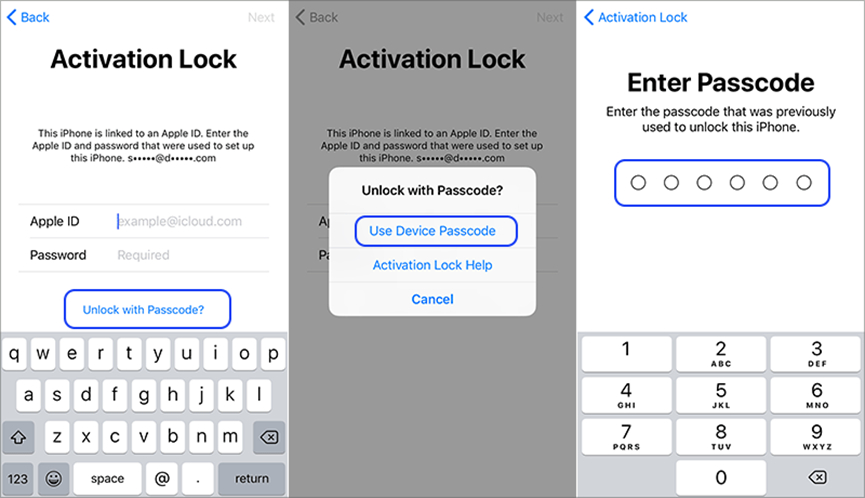
If the iPhone is running iOS 11 and later version and the two-factor authentication is active, you may be able to remove the Activation Lock using the device passcode. This method only works if you know the screen passcode and the device supports this feature. It is one of the simplest solutions but not always available.
Steps:
- Factory reset the locked iPhone. On the “iPhone Locked to Owner” screen, tap “Unlock with Passcode”
- Choose “Use Device Passcode”
- Enter the screen passcode previously used on the device
- Follow the on-screen instructions to complete setup
Method 2: Use iPhone Unlocker Tool to Bypass Activation Lock
If you do not have access to the Apple ID or passcode, using a professional unlocking tool is often the most efficient solution. Tools like TunesKit iPhone Unlocker are designed to help users bypass Activation Lock in a controlled and user-friendly way. TunesKit supports removing various types of locks, including screen locks, Apple ID, and Activation Lock. It is also useful for situations like iPhone unavailable, factory reset iPhone without password, or unlock iPhone with broken screen.
Key advantages include:
- No need for Apple ID or password
- Simple interface suitable for beginners
- High success rate for compatible devices
- Step-by-step guidance throughout the process
Steps to Use TunesKit iPhone Unlocker
Step 1: Launch the Program and Connect Your Device
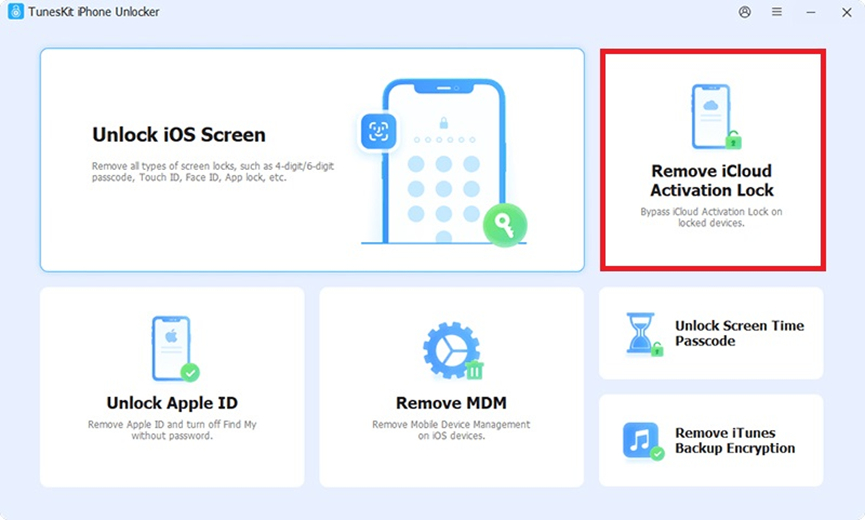
Download and open TunesKit iPhone Unlocker on your computer. Connect your iPhone using a USB cable. Choose the “Remove iCloud Activation Lock” option from the main interface.
Step 2: Start Removal
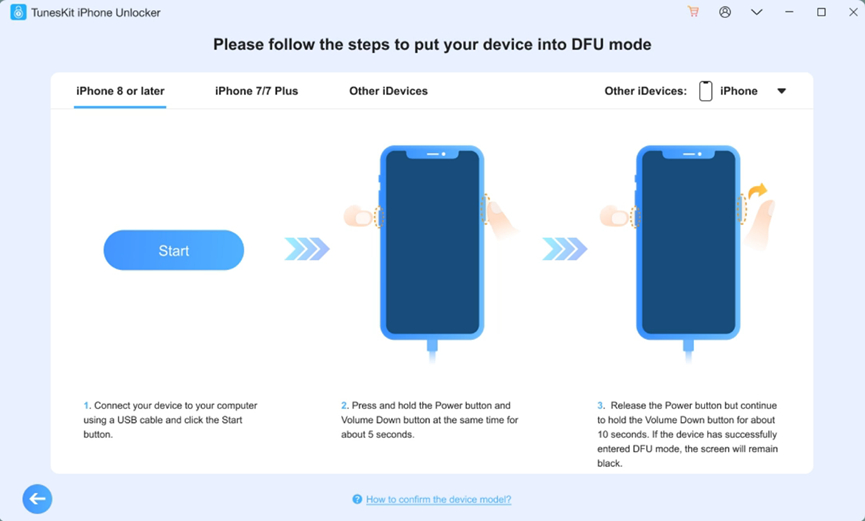
Click the Start button. Follow the on-screen instructions to manually put the device into DFU mode. After entering DFU mode, the Activation Lock removal process will begin automatically.
Step 3: Finish and Set Up Your iPhone
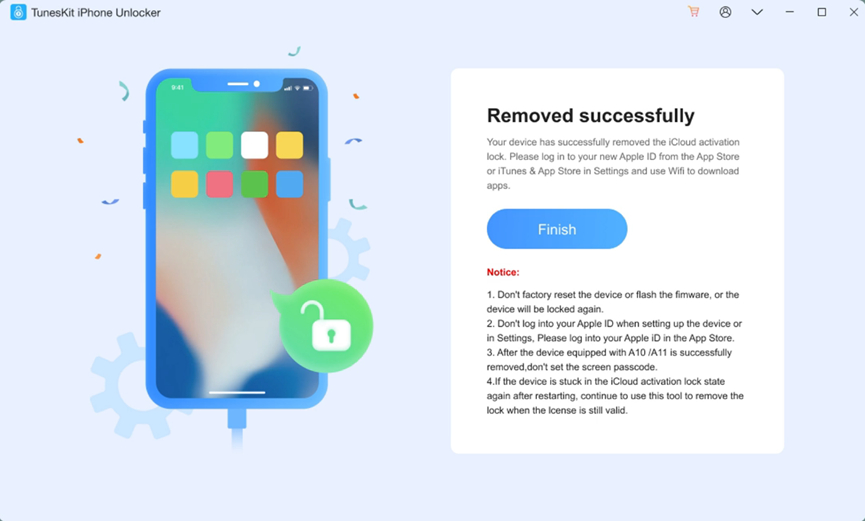
Wait until TunesKit finishes removing iCloud Activation Lock. You can now access the device and set it up as a new iPhone without needing the original Apple ID.
Method 3: Contact the Previous Owner to Remove Activation Lock
If you bought a second-hand iPhone that is locked to owner, reaching out to the previous owner is the simplest way to remove iCloud Activation Lock. This method is completely safe and recommended when the previous owner is available.
Ask the previous owner to remove the device remotely by:
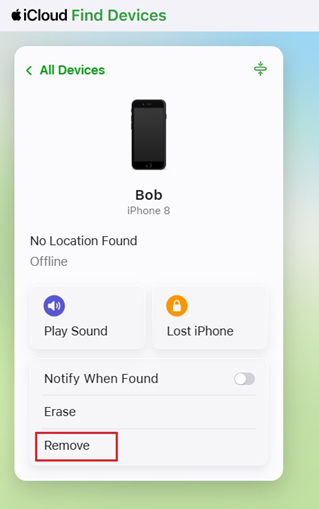
- Go to iCloud.com on any browser. Log into their iCloud account
- Select Find My
- Click the locked device from the list
- Choose Remove. Then the device will be removed from the Apple account
Once removed, you can restart the iPhone and set it up as a new device.
Method 4: Remove iPhone from iCloud via Official Apple Support
In some cases, Apple Support may assist in removing Activation Lock. However, this requires proof of ownership such as a purchase receipt. This method is reliable but not guaranteed. Apple has strict policies and may deny requests without sufficient proof.
Steps:
- Visit Apple Support and submit a request
- Provide necessary documentation, such as:
- Purchase receipt from Apple or an authorized reseller
- The serial number/IMEI of the device
- Your information and purchase details
- Wait for verification and approval
Which Method Is Best to Bypass iPhone Locked to Owner? (Full Comparison)
| Method | Requirements | Difficulty | Success Rate | Best For | |
| Screen Passcode | Device passcode | Easy | Medium | Personal devices | |
| Unlocker Tool | Computer | Easy | High | Most users | |
| Previous Owner | Contact access | Easy | High | Second-hand devices | |
| Apple Support | Proof of purchase | Medium | Medium | Legitimate ownership cases | |
Tips to Avoid iPhone Locked to Owner Issue in the Future
Taking these precautions can save you from dealing with Activation Lock removal later:
- Always sign out of iCloud before resetting your device
- Verify that a used iPhone is not linked to another Apple ID before purchasing
- Ask the seller to remove the device from their account in front of you
- Keep your Apple ID credentials secure and backed up
- Avoid buying devices from unreliable sources
FAQs About Activation Lock Removal
- Does These Methods Work for iPad Locked to Owner?
Yes, all of the methods mentioned above also apply to iPads. Since Activation Lock works the same way across Apple devices, you can use similar solutions to bypass activation lock on an iPad.
- How to Remove Activation Lock Without Previous Owner
If the previous owner is unavailable, your best options are using an unlocking tool like TunesKit iPhone Unlocker or contacting Apple Support with proof of purchase.
- Will Bypassing Activation Lock Remove All Data?
Yes, in most cases, bypassing Activation Lock involves resetting or modifying the device system, which will erase all existing data. It is recommended to back up any accessible data beforehand.
Conclusion
The “iPhone Locked to Owner” issue can be a major obstacle, but it is not impossible to resolve. Whether you use a screen passcode, contact the previous owner, or rely on a professional unlocking tool like TunesKit, there are multiple ways to regain access to your device. Choosing the right method depends on your situation. If you want a quick and hassle-free solution without Apple ID, using a reliable unlocking tool is often the most practical option.
